Table of Contents
There is a (small) family of components whose purpose in life is to display text, and also to accept changes to that text.
The two most commonly used members of the family are:
JTextField
and
JTextArea
both of which extend the abstract class JTextComponent.
There are also some other text input components that we’ll cover, and a number of more complex ones that we won’t cover.
JTextComponent
The abstract class JTextComponent is the superclass for all text components.
It contains a number of useful methods, the most commonly used of which are:
| Method | Description |
|---|---|
public void setText(String t) | Sets the text that is presented by this text component to be the specified text. If t is null, the text is set to the empty string (“”). |
public String getText() | Gets the text that is presented by this text component. |
public void setEditable(boolean b) | Sets the flag that determines whether or not this text component is editable. If the flag is set to true, this text component becomes user editable. If the flag is set to false, the user cannot change the text of this text component. |
public boolean isEditable() | Indicates whether or not this text component is editable. |
These methods are pretty much self-describing.
There are also some other useful methods, but we won’t cover them at this point.
JTextField
A JTextField is a text component that provides a single line of text.
Here are some examples of how text fields can be used:
package swingExamples;

import java.awt.Color;
import java.awt.Container;
import java.awt.Font;

import javax.swing.JPanel;
import javax.swing.JFrame;
import javax.swing.JTextField;

class SimpleTextFieldsPanel extends JPanel
{
  public SimpleTextFieldsPanel()
  {
    JTextField look = new JTextField();
    look.setText("Look at me!  I'm a text field!");
    add(look);
    JTextField whoopee = new JTextField(8);
                           // 8 characters in current font
    whoopee.setText("Whoopee!");
    whoopee.setForeground(Color.RED);
    whoopee.setBackground(Color.BLUE);
    whoopee.setFont(new Font("monospaced", Font.BOLD, 18));
    add(whoopee);
    String text =
        "Please quiet down up there; I'm trying to sleep...";
    JTextField conservative = new JTextField(text);
    conservative.setEditable(false);
    conservative.setFont(new Font("serif", Font.PLAIN, 10));
    add(conservative);
    JTextField bobby =
        new JTextField("'ere, 'ere, Wot's going on 'ere?");
    bobby.setForeground(Color.YELLOW);
    bobby.setBackground(Color.BLACK);
    add(bobby);
  }
}

class SimpleTextFieldsFrame extends JFrame
{
  public SimpleTextFieldsFrame()
  {
    setTitle("SimpleTextFields");
    setSize(300, 200);
    setDefaultCloseOperation(EXIT_ON_CLOSE);
    Container contentPane = getContentPane();
    contentPane.add( new SimpleTextFieldsPanel() );
  }
}

public class SimpleTextFields
{
  public static void main(String[] args)
  {
    SimpleTextFieldsFrame frame =
                    new SimpleTextFieldsFrame();
    frame.setVisible(true);
  }
}
which produces:
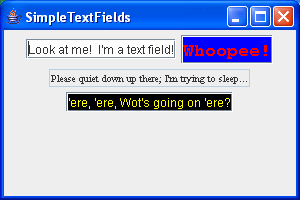
Notice that, when you set a text field as not editable, the default background color changes from white to light gray, and the border changes to make it look more 2-dimensional.
Both foreground and background colors may be set.
JPasswordField
A JPasswordField is a special case of a JTextField. (it’s a subclass of JTextField).
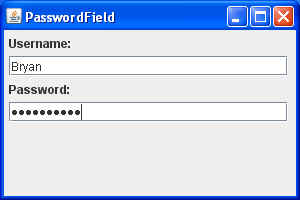
It does not display the text stored in this field; instead, it echoes each character of the text with an “echo” character instead of the real character.
For example:
package swingExamples;

import java.awt.Container;
import java.awt.FlowLayout;

import javax.swing.JFrame;
import javax.swing.JLabel;
import javax.swing.JPanel;
import javax.swing.JPasswordField;
import javax.swing.JTextField;

class PasswordFieldPanel extends JPanel
{
  public PasswordFieldPanel()
  {
    setLayout( new FlowLayout(FlowLayout.LEFT) );
    JLabel userLabel = new JLabel("Username:");
    add(userLabel);
    JTextField user = new JTextField(25);
    add(user);
    JLabel passwordLabel = new JLabel("Password:");
    add(passwordLabel);
    JPasswordField password = new JPasswordField(25);
    add(password);
  }
}

class PasswordFieldFrame extends JFrame
{
  public PasswordFieldFrame()
  {
    setTitle("PasswordField");
    setSize(300, 200);
    setDefaultCloseOperation(EXIT_ON_CLOSE);
    Container contentPane = getContentPane();
    contentPane.add( new PasswordFieldPanel() );
  }
}

public class PasswordField
{
  public static void main(String[] args)
  {
    PasswordFieldFrame frame = new PasswordFieldFrame();
    frame.setVisible(true);
  }
}
which produces:
JTextArea
A JTextArea is a text component that allows more than a single line.
Here’s an example of how to use text areas:
package swingExamples;

import java.awt.Color;
import java.awt.Container;

import javax.swing.JFrame;
import javax.swing.JPanel;
import javax.swing.JTextArea;

class SimpleTextAreasPanel extends JPanel
{
  public SimpleTextAreasPanel()
  {
    setBackground(Color.cyan);
    JTextArea area1 = new JTextArea(4, 10);
                        // 4 lines of 10 characters
    area1.setText("Hello!\nI am an editable\ntext area!");
    add(area1);

    JTextArea area2 =
        new JTextArea("A non-editable text area...");
    area2.setEditable(false);
    area2.setColumns(20);
    area2.setRows(3);
    area2.setForeground(Color.BLUE);
    add(area2);

    JTextArea area3 = new JTextArea(
        "I'm another non-editable text area,\nyellow-on black");
    area3.setEditable(false);
    area3.setBackground(Color.BLACK);
    area3.setForeground(Color.YELLOW);
    add(area3);
  }
}

class SimpleTextAreasFrame extends JFrame
{
  public SimpleTextAreasFrame()
  {
    setTitle("SimpleTextAreas");
    setSize(300, 200);
    setDefaultCloseOperation(EXIT_ON_CLOSE);
    Container contentPane = getContentPane();
    contentPane.add( new SimpleTextAreasPanel() );
  }
}

public class SimpleTextAreas
{
  public static void main(String[] args)
  {
    SimpleTextAreasFrame frame = new SimpleTextAreasFrame();
    frame.setVisible(true);
  }
}
which produces:
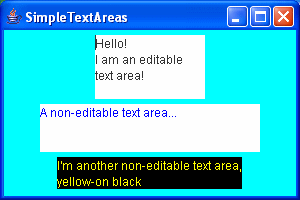
Notice that the non-editable text area does not have a different background color than the editable text area. Also, while the user cannot input anything into the non-editable text area, s/he can select and copy text from it into the paste buffer.
Note also that a JTextArea has no standard built-in border decorations, which makes it rather boring. We’ll see how to improve matters soon.
The Document Model
The model (remember MVC?) for all text components is the Document interface. Of course, that means that, in order to be a text component model, a class must implement the Document interface.
There are several document models which cover both plain text and formatted text, such as HTML.
Tracking Text Changes
Here’s an example of how you can use a document model to track changes in one or more text fields:
package swingExamples;

import java.awt.BasicStroke;
import java.awt.BorderLayout;
import java.awt.Color;
import java.awt.Container;
import java.awt.Dimension;
import java.awt.Graphics;
import java.awt.Graphics2D;

import java.awt.geom.Ellipse2D;
import java.awt.geom.Line2D;
import java.awt.geom.Point2D;

import javax.swing.JFrame;
import javax.swing.JLabel;
import javax.swing.JPanel;
import javax.swing.JTextField;

import javax.swing.event.DocumentEvent;
import javax.swing.event.DocumentListener;

class ClockTextFieldsFrame extends JFrame
{
  public ClockTextFieldsFrame()
  {
    setTitle("ClockTextFields");
    setDefaultCloseOperation(EXIT_ON_CLOSE);

    // Create main panel and add it to the content pane
    JPanel mainPanel = new JPanel(new BorderLayout());
    Container contentPane = getContentPane();
    contentPane.add(mainPanel);

    // Add the clock panel to the center of the main panel
    mainPanel.add(m_clockPanel, BorderLayout.CENTER);

    // Prepare a document listener
    DocumentListener listener = new ClockFieldListener();

    // Create the input panel containing text input fields,
    // and connect the text input fields up with the listener
    JPanel inputPanel = new JPanel();
    inputPanel.add(new JLabel("Hours:"));
    inputPanel.add(m_hourField);
    m_hourField.getDocument().addDocumentListener(listener);

    inputPanel.add(new JLabel("Minutes:"));
    inputPanel.add(m_minuteField);
    m_minuteField.getDocument().addDocumentListener(listener);

    // Add the input panel to the south of the main panel
    mainPanel.add(inputPanel, BorderLayout.SOUTH);

    // Set the clock's initial state
    setClock();

    // Self-size the frame.
    pack();
  }

  private void setClock()
  {
    try
    {
      int hours =
          Integer.parseInt(m_hourField.getText().trim());
      int minutes =
          Integer.parseInt(m_minuteField.getText().trim());
      m_clockPanel.setTime(hours, minutes);
    }
    catch (NumberFormatException nfe)
    {
      // Don't set the clock on formatting errors.
    }
  }

  /// Private data ///
  private ClockPanel m_clockPanel = new ClockPanel();
  private JTextField m_hourField = new JTextField("12", 3);
  private JTextField m_minuteField = new JTextField("00", 3);

  /// Inner class ///
  private class ClockFieldListener
      implements DocumentListener
  {
    public void insertUpdate(DocumentEvent event)
    {
      setClock();
    }

    public void removeUpdate(DocumentEvent event)
    {
      setClock();
    }

    public void changedUpdate(DocumentEvent event)
    {}
  }
}

class ClockPanel extends JPanel
{
  public ClockPanel()
  {
    // Set the preferred size of the panel
    // for layout purposes (pack)
    setPreferredSize(
        new Dimension(2 * RADIUS + 1 + 10, // Insets
                      2 * RADIUS + 1 + 10) // Insets
                    );
  }

  public void paintComponent(Graphics g)
  {
    super.paintComponent(g);

    Graphics2D g2 = (Graphics2D) g;

    // Create a BasicStroke for drawing outlines
    BasicStroke stroke = new BasicStroke(3.0F,
        BasicStroke.CAP_ROUND,
        BasicStroke.JOIN_ROUND);
    g2.setStroke(stroke);

    // Draw the outline of the clock
    Ellipse2D circle =
        new Ellipse2D.Double(INSET, INSET,
                             2 * RADIUS,
                             2 * RADIUS);
    g2.setPaint(Color.GRAY);
    g2.draw(circle);

    stroke = new BasicStroke(
                  8.0F,
                  BasicStroke.CAP_ROUND,
                  BasicStroke.JOIN_ROUND);
    g2.setStroke(stroke);

    // Draw the hour hand
    double hourDegrees =
        90 - 360 * m_minutes / (12 * 60);
    double hourAngle = Math.toRadians(hourDegrees);
    g2.setPaint(Color.BLUE);
    drawHand(g2, hourAngle, HOUR_HAND_LENGTH);

    // Draw the minute hand
    double minuteDegrees = 90 - 360 * m_minutes / 60;
    double minuteAngle = Math.toRadians(minuteDegrees);
    g2.setPaint(Color.BLUE);
    drawHand(g2, minuteAngle, MINUTE_HAND_LENGTH);

    // Draw the axle
    Ellipse2D axle =
        new Ellipse2D.Double(INSET + RADIUS - AXLE_RADIUS,
                             INSET + RADIUS - AXLE_RADIUS,
                             2 * AXLE_RADIUS,
                             2 * AXLE_RADIUS);
    g2.setPaint(Color.RED);
    g2.fill(axle);
  }

  private void drawHand(Graphics2D g2,
                        double angle, double handLength)
  {
    Point2D end =
        new Point2D.Double(INSET + RADIUS +
                              handLength * Math.cos(angle),
                           INSET + RADIUS -
                              handLength * Math.sin(angle));
    Point2D center =
        new Point2D.Double(INSET + RADIUS, INSET + RADIUS);
    g2.draw(new Line2D.Double(center, end));
  }

  public void setTime(int hours, int minutes)
  {
    m_minutes = hours * 60 + minutes;
    repaint();
  }

  ////// Private data //////
  private static final int INSET = 5;
  private static final int RADIUS = 100;
  private static final double HOUR_HAND_LENGTH =
                                   0.6 * RADIUS;
  private static final double MINUTE_HAND_LENGTH =
                                   0.9 * RADIUS;
  private static final double AXLE_RADIUS = 10;

  private double m_minutes = 0;
}


public class ClockTextFields
{
  public static void main(String[] args)
  {
    ClockTextFieldsFrame frame =
                new ClockTextFieldsFrame();
    frame.setVisible(true);
  }
}
which produces:
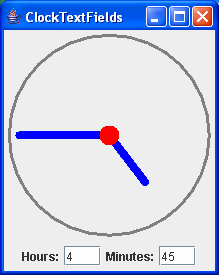
If you change the contents of the text fields (Hours and Minutes), the clock hands move to indicate that time.
Input Validation
Sometimes, we’d like to constrain what’s allowed to be input into a text field. In the above clock example, we’d like to enforce the fact that we expect only integers to be input into the two fields. To do this, we do the following:
- Create a subclass of
JTextField, calledIntTextField, that adds a few useful methods, and usesIntTextDocumentas its model. - Create a subclass of
PlainDocument, calledIntTextDocument. This will enforce the integer requirement. - Use
IntTextFieldin place ofJTextFieldfor the hours and minutes text fields
For example:
package swingExamples;

import java.awt.BasicStroke;
import java.awt.BorderLayout;
import java.awt.Color;
import java.awt.Container;
import java.awt.Dimension;
import java.awt.Graphics;
import java.awt.Graphics2D;
import java.awt.Insets;

import java.awt.event.ActionEvent;
import java.awt.event.ActionListener;

import java.awt.geom.Ellipse2D;
import java.awt.geom.Line2D;
import java.awt.geom.Point2D;

import javax.swing.JButton;
import javax.swing.JFrame;
import javax.swing.JLabel;
import javax.swing.JPanel;
import javax.swing.JTextField;

import javax.swing.event.DocumentEvent;
import javax.swing.event.DocumentListener;

import javax.swing.text.AttributeSet;
import javax.swing.text.BadLocationException;
import javax.swing.text.Document;
import javax.swing.text.PlainDocument;

class ValidatedClockFrame extends JFrame
{
  public ValidatedClockFrame()
  {
    setTitle("ValidatedClock");
    setSize(300, 200);
    setDefaultCloseOperation(EXIT_ON_CLOSE);

    // Create main panel and add it to the content pane
    JPanel mainPanel = new JPanel(new BorderLayout());
    Container contentPane = getContentPane();
    contentPane.add(mainPanel);

    // Add the clock panel to the center of the main panel
    mainPanel.add(m_clockPanel, BorderLayout.CENTER);

    // Prepare a document listener
    DocumentListener listener = new ClockFieldListener();

    // Create the input panel containing text input fields,
    // and connect the text input fields up with the listener
    JPanel inputPanel = new JPanel();
    inputPanel.add(new JLabel("Hours:"));
    inputPanel.add(m_hourField);
    m_hourField.getDocument().addDocumentListener(listener);

    inputPanel.add(new JLabel("Minutes:"));
    inputPanel.add(m_minuteField);
    m_minuteField.getDocument().addDocumentListener(listener);

    // Add the Tick button and hook it up
    JButton tickButton = new JButton("Tick");
    tickButton.addActionListener(new ActionListener()
    {
      public void actionPerformed(ActionEvent ev)
      {
        m_clockPanel.tick();
      }
    }
    );
    inputPanel.add(tickButton);

    // Add the input panel to the south of the main panel
    mainPanel.add(inputPanel, BorderLayout.SOUTH);

    // Set the clock's initial state
    setClock();

    // Self-size the frame.
    pack();
  }

  private void setClock()
  {
    if (m_hourField.isValid() && m_minuteField.isValid())
    {
      int hours = m_hourField.getValue();
      int minutes = m_minuteField.getValue();
      m_clockPanel.setTime(hours, minutes);
    }
  }

  /// Private data ///
  private ClockPanel m_clockPanel = new ClockPanel();
  private IntTextField m_hourField = new IntTextField(12, 3);
  private IntTextField m_minuteField = new IntTextField(00, 3);

  /// Inner class ///
  private class ClockFieldListener implements DocumentListener
  {
    public void insertUpdate(DocumentEvent event)
    {
      setClock();
    }

    public void removeUpdate(DocumentEvent event)
    {
      setClock();
    }

    public void changedUpdate(DocumentEvent event)
    {}
  }
}

class ClockPanel extends JPanel
{
  public ClockPanel()
  {
    // Set the preferred size of the panel
    // for layout purposes (pack)
    setPreferredSize(
        new Dimension(2 * RADIUS + 1 + 10, // Insets
                      2 * RADIUS + 1 + 10) // Insets
        );
  }

  public void paintComponent(Graphics g)
  {
    super.paintComponent(g);

    Graphics2D g2 = (Graphics2D) g;

    // Create a BasicStroke for drawing outlines
    BasicStroke stroke =
        new BasicStroke(3.0F,
                        BasicStroke.CAP_ROUND,
                        BasicStroke.JOIN_ROUND);
    g2.setStroke(stroke);

    // Draw the outline of the clock
    Ellipse2D circle =
        new Ellipse2D.Double(INSET, INSET,
                             2 * RADIUS,
                             2 * RADIUS);
    g2.setPaint(Color.GRAY);
    g2.draw(circle);

    stroke = new BasicStroke(8.0F,
                             BasicStroke.CAP_ROUND,
                             BasicStroke.JOIN_ROUND);
    g2.setStroke(stroke);

    // Draw the hour hand
    double hourDegrees =
        90 - 360 * m_minutes / (12 * 60);
    double hourAngle = Math.toRadians(hourDegrees);
    g2.setPaint(Color.BLUE);
    drawHand(g2, hourAngle, HOUR_HAND_LENGTH);

    // Draw the minute hand
    double minuteDegrees =
        90 - 360 * m_minutes / 60;
    double minuteAngle = Math.toRadians(minuteDegrees);
    g2.setPaint(Color.BLUE);
    drawHand(g2, minuteAngle, MINUTE_HAND_LENGTH);

    // Draw the axle
    Ellipse2D axle =
        new Ellipse2D.Double(INSET + RADIUS - AXLE_RADIUS,
                             INSET + RADIUS - AXLE_RADIUS,
                             2 * AXLE_RADIUS,
                             2 * AXLE_RADIUS);
    g2.setPaint(Color.RED);
    g2.fill(axle);
  }

  private void drawHand(Graphics2D g2,
                        double angle, double handLength)
  {
    Point2D end =
        new Point2D.Double(INSET + RADIUS +
                              handLength * Math.cos(angle),
                           INSET + RADIUS -
                              handLength * Math.sin(angle));
    Point2D center =
        new Point2D.Double(INSET + RADIUS, INSET + RADIUS);
    g2.draw(new Line2D.Double(center, end));
  }

  public void setTime(int hours, int minutes)
  {
    m_minutes = hours * 60 + minutes;
    repaint();
  }

  public void tick()
  {
    m_minutes++;
    repaint();
  }

  ////// Private data //////
  private static final int INSET = 5;
  private static final int RADIUS = 100;
  private static final double HOUR_HAND_LENGTH =
                                0.6 * RADIUS;
  private static final double MINUTE_HAND_LENGTH =
                                0.9 * RADIUS;
  private static final double AXLE_RADIUS = 10;

  private double m_minutes = 0;
}

class IntTextField extends JTextField
{
  public IntTextField(int defaultValue, int columns)
  {
    super("" + defaultValue, columns);
  }

  public boolean isValid()
  {
    boolean ret = false;
    try
    {
      Integer.parseInt(getText());
      ret = true;
    }
    catch (NumberFormatException ex)
    {
      // Do nothing
    }
    return ret;
  }

  public int getValue()
  {
    int value = 0;
    try
    {
      value = Integer.parseInt(getText());
    }
    catch (NumberFormatException ex)
    {
    }
    return value;
  }

  protected Document createDefaultModel()
  {
    return new IntTextDocument();
  }
}

class IntTextDocument extends PlainDocument
{
  public void insertString(int offset, String text,
      AttributeSet attr) throws BadLocationException
  {
    if (text != null)
    {
      String oldString = getText(0, getLength());
      String newString = oldString.substring(0, offset)
      + text + oldString.substring(offset);
      try
      {
        Integer.parseInt(newString + "0");
                    // For the case of "" or "-", etc.
        super.insertString(offset, text, attr);
      }
      catch (NumberFormatException ex)
      {
      }
    }
  }
}

public class ValidatedClock
{
  public static void main(String[] args)
  {
    ValidatedClockFrame frame = new ValidatedClockFrame();
    frame.setVisible(true);
  }
}
which produces:
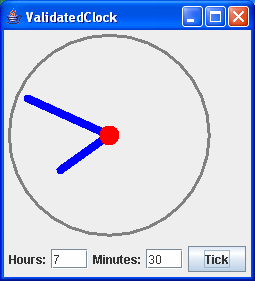
Note that I’ve added a button which, when clicked, causes the clock to “tick” by one minute.
When you attempt to enter something that is not a valid integer value in either text field, that input is ignored.
JFormattedTextField
Until Java 1.4, the previous attempts at producing validated integer input in a text field were pretty much what you had to do. Using Document models, etc., was not for the faint of heart.
In Java 1.4, the Java developers produced a new text input component, called JFormattedTextField, which allows you to do such checking of input — not only for integers, but for dates and more.
This area of Java is still not easy to deal with, but now at least there is a well-defined (if not particularly well documented!) way of doing it.
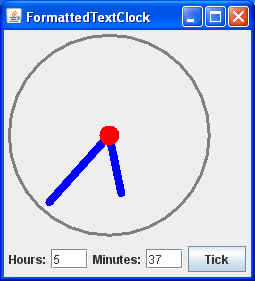
Here’s an example, which re-implements the ValidatedClock example using JFormattedTextFields:
package swingExamples;

import java.awt.BasicStroke;
import java.awt.BorderLayout;
import java.awt.Color;
import java.awt.Container;
import java.awt.Dimension;
import java.awt.Graphics;
import java.awt.Graphics2D;
import java.awt.Insets;

import java.awt.event.ActionEvent;
import java.awt.event.ActionListener;

import java.awt.geom.Ellipse2D;
import java.awt.geom.Line2D;
import java.awt.geom.Point2D;
import java.text.NumberFormat;

import javax.swing.JButton;
import javax.swing.JFormattedTextField;
import javax.swing.JFrame;
import javax.swing.JLabel;
import javax.swing.JPanel;
import javax.swing.event.DocumentEvent;
import javax.swing.event.DocumentListener;

class FormattedTextClockFrame extends JFrame
{
  public FormattedTextClockFrame()
  {
    setTitle("FormattedTextClock");
    setSize(300, 200);
    setDefaultCloseOperation(EXIT_ON_CLOSE);

    // Create main panel and add it to the content pane
    JPanel mainPanel = new JPanel(new BorderLayout());
    Container contentPane = getContentPane();
    contentPane.add(mainPanel);

    // Add the clock panel to the center of the main panel
    mainPanel.add(m_clockPanel, BorderLayout.CENTER);

    // Prepare a document listener
    DocumentListener listener = new ClockFieldListener();

    // Create the input panel containing text input fields,
    // and connect the text input fields up with the listener
    JPanel inputPanel = new JPanel();
    inputPanel.add(new JLabel("Hours:"));
    inputPanel.add(m_hourField);
    m_hourField.setColumns(3);
    m_hourField.setValue( new Long(12) );
    m_hourField.getDocument().addDocumentListener(listener);

    inputPanel.add(new JLabel("Minutes:"));
    inputPanel.add(m_minuteField);
    m_minuteField.setColumns(3);
    m_minuteField.setValue( new Long(0) );
    m_minuteField.getDocument().addDocumentListener(listener);

    // Add the Tick button and hook it up
    JButton tickButton = new JButton("Tick");
    tickButton.addActionListener(new ActionListener()
    {
      public void actionPerformed(ActionEvent ev)
      {
        m_clockPanel.tick();
      }
    }
    );
    inputPanel.add(tickButton);

    // Add the input panel to the south of the main panel
    mainPanel.add(inputPanel, BorderLayout.SOUTH);

    // Set the clock's initial state
    setClock();

    // Self-size the frame.
    pack();
  }

  private void setClock()
  {
    if (m_hourField.isValid() && m_minuteField.isValid())
    {
      long hours = (Long) m_hourField.getValue();
      long minutes = (Long) m_minuteField.getValue();
      m_clockPanel.setTime((int)hours, (int)minutes);
    }
  }

  /// Private data ///
  private ClockPanel m_clockPanel = new ClockPanel();
  private JFormattedTextField m_hourField =
      new JFormattedTextField( NumberFormat.getIntegerInstance() );
  private JFormattedTextField m_minuteField =
      new JFormattedTextField( NumberFormat.getIntegerInstance() );

  /// Inner class ///
  private class ClockFieldListener implements DocumentListener
  {
    public void insertUpdate(DocumentEvent event)
    {
      setClock();
    }

    public void removeUpdate(DocumentEvent event)
    {
      setClock();
    }

    public void changedUpdate(DocumentEvent event)
    {}
  }

  //// Inner class ////
  class ClockPanel extends JPanel
  {
    public ClockPanel()
    {
      // Set the preferred size of the panel
      // for layout purposes (pack)
      setPreferredSize(
          new Dimension(2 * RADIUS + 1 + 10, // Insets
          2 * RADIUS + 1 + 10) // Insets
          );
    }

    public void paintComponent(Graphics g)
    {
      super.paintComponent(g);

      Graphics2D g2 = (Graphics2D) g;

      // Create a BasicStroke for drawing outlines
      BasicStroke stroke =
          new BasicStroke(3.0F,
                          BasicStroke.CAP_ROUND,
                          BasicStroke.JOIN_ROUND);
      g2.setStroke(stroke);

      // Draw the outline of the clock
      Ellipse2D circle =
          new Ellipse2D.Double(INSET, INSET,
                               2 * RADIUS,
                               2 * RADIUS);
      g2.setPaint(Color.GRAY);
      g2.draw(circle);

      stroke = new BasicStroke(8.0F,
                               BasicStroke.CAP_ROUND,
                               BasicStroke.JOIN_ROUND);
      g2.setStroke(stroke);

      // Draw the hour hand
      double hourDegrees =
          90 - 360 * m_minutes / (12 * 60);
      double hourAngle = Math.toRadians(hourDegrees);
      g2.setPaint(Color.BLUE);
      drawHand(g2, hourAngle, HOUR_HAND_LENGTH);

      // Draw the minute hand
      double minuteDegrees =
          90 - 360 * m_minutes / 60;
      double minuteAngle = Math.toRadians(minuteDegrees);
      g2.setPaint(Color.BLUE);
      drawHand(g2, minuteAngle, MINUTE_HAND_LENGTH);

      // Draw the axle
      Ellipse2D axle =
          new Ellipse2D.Double(
                    INSET + RADIUS - AXLE_RADIUS,
                    INSET + RADIUS - AXLE_RADIUS,
                    2 * AXLE_RADIUS,
                    2 * AXLE_RADIUS);
      g2.setPaint(Color.RED);
      g2.fill(axle);
    }

    private void drawHand(Graphics2D g2,
                          double angle, double handLength)
    {
      Point2D end =
          new Point2D.Double(
                    INSET + RADIUS +
                    handLength * Math.cos(angle),
                    INSET + RADIUS -
                    handLength * Math.sin(angle));
      Point2D center =
          new Point2D.Double(INSET + RADIUS, INSET + RADIUS);
      g2.draw(new Line2D.Double(center, end));
    }

    public void setTime(int hours, int minutes)
    {
      m_minutes = hours * 60 + minutes;
      repaint();
    }

    public void tick()
    {
      m_minutes++;
      repaint();
    }

    ////// Private data //////
    private static final int INSET = 5;
    private static final int RADIUS = 100;
    private static final double HOUR_HAND_LENGTH =
        0.6 * RADIUS;
    private static final double MINUTE_HAND_LENGTH =
        0.9 * RADIUS;
    private static final double AXLE_RADIUS = 10;

    private long m_minutes = 0;
  }
}


public class FormattedTextClock
{
  public static void main(String[] args)
  {
    FormattedTextClockFrame frame =
        new FormattedTextClockFrame();
    frame.setVisible(true);
  }
}
which produces:
Scrolling and Wrapping Text in a JTextArea
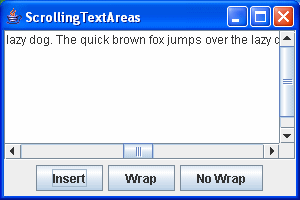
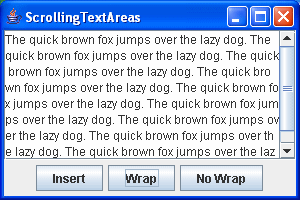
You may have noticed that the text areas shown earlier do not have much of a visible border. In addition, if you add more lines of text to a text area, it increases its vertical size, which is not usually a desirable feature. In most cases, you’d like to have the text area scroll appropriately, without changing size.
To do this, you place the text area in a JScrollPane, and then add the scroll pane to the panel:
package swingExamples;

import java.awt.BorderLayout;
import java.awt.Container;

import java.awt.event.ActionEvent;
import java.awt.event.ActionListener;

import javax.swing.JButton;
import javax.swing.JFrame;
import javax.swing.JPanel;
import javax.swing.JScrollPane;
import javax.swing.JTextArea;

class ScrollingTextAreasPanel extends JPanel
{
  public ScrollingTextAreasPanel()
  {
    setLayout(new BorderLayout());
    add(new TextAreaPanel(), BorderLayout.CENTER);
    add(new InputPanel(), BorderLayout.SOUTH);
  }

  /////// Private data /////
  private JTextArea m_textArea = new JTextArea(8, 40);
  private JButton m_insertButton = new JButton("Insert");
  private JButton m_wrapButton = new JButton("Wrap");
  private JButton m_noWrapButton = new JButton("No Wrap");
  private JButton m_replaceButton = new JButton("Replace");

  /////// Inner classes /////
  class TextAreaPanel extends JPanel
  {
    public TextAreaPanel()
    {
      setLayout(new BorderLayout());
      // Place text area within a scroll pane
      m_textArea = new JTextArea(8, 40);
      JScrollPane scrollPane = new JScrollPane(m_textArea);
      scrollPane.setVerticalScrollBarPolicy(
          JScrollPane.VERTICAL_SCROLLBAR_AS_NEEDED);
      scrollPane.setHorizontalScrollBarPolicy(
          JScrollPane.HORIZONTAL_SCROLLBAR_AS_NEEDED);
      add(scrollPane, BorderLayout.CENTER);
    }
  }

  class InputPanel extends JPanel
  {
    public InputPanel()
    {
      add(m_insertButton);
      m_insertButton.addActionListener(new ActionListener()
      {
        public void actionPerformed(ActionEvent ev)
        {
          m_textArea.append(
              "The quick brown fox jumps over the lazy dog. ");
        }
      }
      );
      add(m_wrapButton);
      m_wrapButton.addActionListener(new ActionListener()
      {
        public void actionPerformed(ActionEvent ev)
        {
          m_textArea.setLineWrap(true);
        }
      }
      );
      add(m_noWrapButton);
      m_noWrapButton.addActionListener(new ActionListener()
      {
        public void actionPerformed(ActionEvent ev)
        {
          m_textArea.setLineWrap(false);
        }
      }
      );
    }
  }
}

class ScrollingTextAreasFrame extends JFrame
{
  public ScrollingTextAreasFrame()
  {
    setTitle("ScrollingTextAreas");
    setSize(300, 200);
    setDefaultCloseOperation(EXIT_ON_CLOSE);
    Container contentPane = getContentPane();
    contentPane.add( new ScrollingTextAreasPanel() );
  }
}

public class ScrollingTextAreas
{
  public static void main(String[] args)
  {
    ScrollingTextAreasFrame frame =
                        new ScrollingTextAreasFrame();
    frame.setVisible(true);
  }
}
which produces:
JTextArea Editing
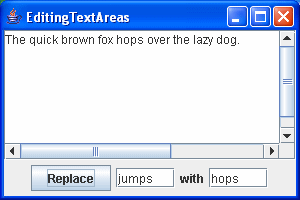
We can also explore editing text in a text area.
Here’s an example, which is slightly modified from the earlier scrolling text area examples:
package swingExamples;

import java.awt.BorderLayout;
import java.awt.Container;

import java.awt.event.ActionEvent;
import java.awt.event.ActionListener;

import javax.swing.JButton;
import javax.swing.JFrame;
import javax.swing.JLabel;
import javax.swing.JPanel;
import javax.swing.JScrollPane;
import javax.swing.JTextField;
import javax.swing.JTextArea;

class EditingTextAreasPanel extends JPanel
{
  public EditingTextAreasPanel()
  {
    setLayout(new BorderLayout());
    add( new TextAreaPanel(), BorderLayout.CENTER);
    add( new InputPanel(), BorderLayout.SOUTH);
  }

  /////// Private data /////
  private JTextArea m_textArea = new JTextArea(8, 40);
  private JButton m_replaceButton = new JButton("Replace");
  private JTextField m_fromField = new JTextField(5);
  private JTextField m_toField = new JTextField(5);

  /////// Inner classes /////
  class TextAreaPanel extends JPanel
  {
    public TextAreaPanel()
    {
      setLayout(new BorderLayout());
      m_textArea = new JTextArea(8, 40);
      m_textArea.setText(
          "The quick brown fox jumps over the lazy dog.");
      JScrollPane scrollPane = new JScrollPane(m_textArea);
      scrollPane.setVerticalScrollBarPolicy(
          JScrollPane.VERTICAL_SCROLLBAR_AS_NEEDED);
      scrollPane.setHorizontalScrollBarPolicy(
          JScrollPane.HORIZONTAL_SCROLLBAR_AS_NEEDED);
      add(scrollPane, BorderLayout.CENTER);
    }
  }

  class InputPanel extends JPanel
  {
    public InputPanel()
    {

      add(m_replaceButton);
      m_replaceButton.addActionListener(
        new ActionListener()
        {
          public void actionPerformed(ActionEvent ev)
          {
            String from = m_fromField.getText();
            int index =
                m_textArea.getText().indexOf(from);
            if (index >= 0 && from.length() > 0)
            {
              m_textArea.replaceRange(
                  m_toField.getText(), index,
                  index + from.length());
            }
          }
        }
      );
      add(m_fromField);
      add(new JLabel("with"));
      add(m_toField);
    }
  }
}

class EditingTextAreasFrame extends JFrame
{
  public EditingTextAreasFrame()
  {
    setTitle("EditingTextAreas");
    setSize(300, 200);
    setDefaultCloseOperation(EXIT_ON_CLOSE);
    Container contentPane = getContentPane();
    contentPane.add( new EditingTextAreasPanel() );
  }
}

public class EditingTextAreas
{
  public static void main(String[] args)
  {
    EditingTextAreasFrame frame =
                new EditingTextAreasFrame();
    frame.setVisible(true);
  }
}
which produces the following: