
Table of Contents
Whenever the information in a GUI component cannot be conveniently stored in the area available, it is conventional to place that component in a scrolling region, with scroll bars to move the data into and out of the visible area.
The Java components that support this are scroll bars and scroll panes.
Scroll Bars
You can use a scroll bar as a slider control, specifying the range it slides between. You can orient the slide horizontally or vertically.
You use adjustment events to detect changes to the position of the scroll bar.
For example:
package swingExamples;

import java.awt.Adjustable;
import java.awt.BorderLayout;
import java.awt.Color;
import java.awt.Container;
import java.awt.GridLayout;

import java.awt.event.AdjustmentEvent;
import java.awt.event.AdjustmentListener;

import javax.swing.BorderFactory;
import javax.swing.JFrame;
import javax.swing.JLabel;
import javax.swing.JPanel;
import javax.swing.JScrollBar;
import javax.swing.SwingConstants;

class ColorSelectPanel extends JPanel
{
  public ColorSelectPanel()
  {
    setLayout(new BorderLayout());
    m_colorPanel = new ColorPanel();
    add(m_colorPanel, BorderLayout.CENTER);
    add(new ScrollPanel(), BorderLayout.SOUTH);
  }

  ////// Private data //////
  private ColorPanel m_colorPanel;

  ////// Inner classes /////
  class ColorPanel extends JPanel
  {
    ColorPanel()
    {
      setBorder(
          BorderFactory.createLineBorder(Color.BLACK));
    }
  }

  class ScrollPanel extends JPanel
      implements AdjustmentListener
  {
    public ScrollPanel()
    {
      setLayout(new GridLayout(3, 2));

      add(m_redLabel);
      m_redScroll.setBackground(Color.RED);
      m_redScroll.setBlockIncrement(BLOCK_INCREMENT);
      m_redScroll.addAdjustmentListener(this);
      add(m_redScroll);

      add(m_greenLabel);
      m_greenScroll.setBackground(Color.GREEN);
      m_greenScroll.setBlockIncrement(BLOCK_INCREMENT);
      m_greenScroll.addAdjustmentListener(this);
      add(m_greenScroll);

      add(m_blueLabel);
      m_blueScroll.setBackground(Color.BLUE);
      m_blueScroll.setBlockIncrement(BLOCK_INCREMENT);
      m_blueScroll.addAdjustmentListener(this);
      add(m_blueScroll);

      changeColor();
    }

    // AdjustmentListener required methods
    public void adjustmentValueChanged(AdjustmentEvent evt)
    {
      changeColor();
    }

    private void changeColor()
    {
      int red = m_redScroll.getValue();
      int green = m_greenScroll.getValue();
      int blue = m_blueScroll.getValue();
      m_redLabel.setText("" + red);
      m_greenLabel.setText("" + green);
      m_blueLabel.setText("" + blue);
      m_colorPanel.setBackground(
          new Color(red, green, blue));
    }

    ////////////// Private Data //////////////////
    private static final int BLOCK_INCREMENT = 16;

    private JLabel m_redLabel =
        new JLabel("0", SwingConstants.CENTER);
    private JLabel m_greenLabel =
        new JLabel("0", SwingConstants.CENTER);
    private JLabel m_blueLabel =
        new JLabel("0", SwingConstants.CENTER);

    private JScrollBar m_redScroll =
        new JScrollBar(Adjustable.HORIZONTAL, 0, 0, 0, 255);
    private JScrollBar m_greenScroll =
        new JScrollBar(Adjustable.HORIZONTAL, 0, 0, 0, 255);
    private JScrollBar m_blueScroll =
        new JScrollBar(Adjustable.HORIZONTAL, 0, 0, 0, 255);
  }
}

class ColorSelectFrame extends JFrame
{
  public ColorSelectFrame()
  {
    setTitle("Scrollbars");
    setSize(300, 200);
    setDefaultCloseOperation(EXIT_ON_CLOSE);
    Container contentPane = getContentPane();
    contentPane.add( new ColorSelectPanel() );
  }
}

public class Scrollbars
{
  public static void main(String[] args)
  {
    ColorSelectFrame frame = new ColorSelectFrame();
    frame.setVisible(true);
  }
}
which produces:
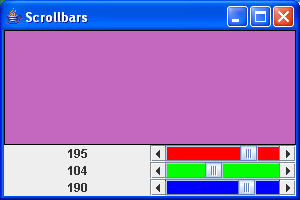
As each scrollbar is dragged to some new value, the background color of the top panel changes to correspond, and the labels to the left show the component value for each color.
Scroll Panes
A more common use for scrolling is to scroll a large area in a small window.
For example:
package swingExamples;

import java.awt.Adjustable;
import java.awt.BorderLayout;
import java.awt.Color;
import java.awt.Container;
import java.awt.Cursor;
import java.awt.Dimension;
import java.awt.Graphics;
import java.awt.Point;

import java.awt.event.AdjustmentEvent;
import java.awt.event.AdjustmentListener;
import java.awt.event.ComponentAdapter;
import java.awt.event.ComponentEvent;
import java.awt.event.MouseAdapter;
import java.awt.event.MouseEvent;
import java.awt.event.MouseListener;
import java.awt.event.MouseMotionListener;
import java.util.ArrayList;

import javax.swing.JFrame;
import javax.swing.JPanel;
import javax.swing.JScrollBar;

class PanelScrollerPanel extends JPanel
{
  public PanelScrollerPanel()
  {
    // Set up the mouse event handling
    MouseHandler handler = new MouseHandler();
    addMouseListener(handler);
    addMouseMotionListener(handler);
  }

  /**
   *   Adds a new square at x, y
   */
  public void add(int x, int y)
  {
    m_squares.add( new Point(x, y) );
    repaint();
  }

  /**
   * Finds the square that corresponds to the
   * coordinates x,y.  If there is no square at
   * these coordinates, returns null;
   */
  public Point find(int x, int y)
  {
    for (Point point : m_squares)
    {
      // Do these coordinates match somewhere
      // within this square?
      int xlo = point.x - SQUARE_LENGTH / 2;
      int xhi = point.x + SQUARE_LENGTH / 2;
      int ylo = point.y - SQUARE_LENGTH / 2;
      int yhi = point.y + SQUARE_LENGTH / 2;
      if ( (xlo <= x) && (x <= xhi)
        && (ylo <= y) && (y <= yhi)
      )
        return point; // Yes
    }
    return null; // No match
  }

  /**
   *   Removes the specified square.
   */
  public void remove(Point point)
  {
    if (point != null)
    {
      m_squares.remove(point);
      repaint();
    }
  }

  /**
   *   Stores scroll offsets, and then repaints.
   */
  public void translate(int x, int y)
  {
    m_dx = x;
    m_dy = y;
    repaint();
  }

  /**
   * Paints the panel, drawing the current
   * set of squares.
   */
  public void paintComponent(Graphics g)
  {
    super.paintComponent(g);
    // Translate to appropriate coordinates
    g.translate(-m_dx, -m_dy);
    // Draw the outer rectangle in red.
    g.setColor(Color.RED);
    g.drawRect(0, 0, MAX_WIDTH - 1, MAX_HEIGHT - 1);
    // Draw each square
    g.setColor(Color.BLACK);
    for (Point square : m_squares)
    {
      draw(g, square);
    }
  }

  /**
   *   Draws the ith square in the Graphics context.
   */
  private void draw(Graphics g, Point square)
  {
    g.drawRect(square.x - SQUARE_LENGTH / 2,
               square.y - SQUARE_LENGTH / 2,
               SQUARE_LENGTH, SQUARE_LENGTH);
  }

  ////// Private data //////

  // The maximum size of the area
  // (mouse clicks outside this area have no effect)
  static final int MAX_WIDTH = 300;
  static final int MAX_HEIGHT = 200;

  private static final int SQUARE_LENGTH = 10;
                            // Size of a square

  // The set of squares
  private ArrayList<Point> m_squares =
                          new ArrayList<Point>();
  // Scroll offsets.
  private int m_dx = 0;
  private int m_dy = 0;

  //////// Inner classes //////

  /**
   * Hamdler for mouse events and mouse motion.
   */
  class MouseHandler extends MouseAdapter
  {
    ///// MouseListener required methods

    /**
     * If the mouse was pressed outside an
     * existing square, adds a new square at
     * these coordinates.
     */
    public void mousePressed(MouseEvent evt)
    {
      int x = evt.getX() + m_dx;
      int y = evt.getY() + m_dy;
      Point point = find(x, y);
      if (point == null)
      {
        // Not inside an existing square,
        // so add a square to the panel
        if ( (x < MAX_WIDTH) && (y < MAX_HEIGHT))
        {
          add(x, y);
        }
      }
    }

    /**
     * If the mouse double-clicks on a aquare,
     * removes the square.
     */
    public void mouseClicked(MouseEvent evt)
    {
      if (evt.getClickCount() >= 2)
      {
        int x = evt.getX();
        int y = evt.getY();
        remove( find(x, y) );
      }
    }

    ///// MouseMotionListener required methods

    /**
     * Causes the mouse cursor to change to a
     * crosshairs when over a square, and to a
     * normal cursor when not.
     */
    public void mouseMoved(MouseEvent evt)
    {
      int x = evt.getX();
      int y = evt.getY();
      Cursor cursor = null;
      if (find(x, y) != null)
      {
        cursor = Cursor.getPredefinedCursor(
                          Cursor.CROSSHAIR_CURSOR);
      }
      else
      {
        cursor = Cursor.getDefaultCursor();
      }
      setCursor(cursor);
    }

    /**
     * When the mouse is over a square,
     * and is dragged, moves the square with it.
     */
    public void mouseDragged(MouseEvent evt)
    {
      int x = evt.getX();
      int y = evt.getY();
      // Find the corresponding square
      Point square = find(x, y);
      if (square != null)
      {
        Graphics g = getGraphics();
        g.setXORMode(getBackground());
        draw(g, square);
        square.x = x;
        square.y = y;
        draw(g, square);
        g.dispose();
      }
    }
  }
}

class PanelScrollerFrame extends JFrame
    implements AdjustmentListener
{
  public PanelScrollerFrame()
  {
    setTitle("PanelScroller");
    setSize(300, 200);
    setDefaultCloseOperation(EXIT_ON_CLOSE);
    Container contentPane = getContentPane();
    contentPane.add(m_panel, BorderLayout.CENTER);

    // Add the vertical scrollbar to the east
    contentPane.add(
        m_verticalScroller, BorderLayout.EAST);
    m_verticalScroller.addAdjustmentListener(this);
    m_verticalScroller.setValues(
        m_verticalScroller.getValue(),
        0, 0, PanelScrollerPanel.MAX_HEIGHT);

    // Add the horizontal scrollbar to the south
    contentPane.add(
        m_horizontalScroller, BorderLayout.SOUTH);
    m_horizontalScroller.addAdjustmentListener(this);
    m_horizontalScroller.setValues(
        m_horizontalScroller.getValue(),
        0, 0, PanelScrollerPanel.MAX_WIDTH);

    // Add a component listener to the frame,
    // to cause the scrollbars to display correctly
    // on show and resize.
    addComponentListener( new ComponentAdapter()
      {
        public void componentShown(ComponentEvent evt)
        {
          setVisibleAmounts();
        }

        public void componentResized(ComponentEvent evt)
        {
          setVisibleAmounts();
        }
      }
    );
  }

  public void adjustmentValueChanged(AdjustmentEvent evt)
  {
    m_panel.translate(
        m_horizontalScroller.getValue(),
        m_verticalScroller.getValue());
  }

  private void setVisibleAmounts()
  {
    Dimension dim = m_panel.getSize();
    m_horizontalScroller.setVisibleAmount(dim.width);
    m_verticalScroller.setVisibleAmount(dim.height);
  }

  ///// Private data /////
  private PanelScrollerPanel m_panel =
      new PanelScrollerPanel();
  private JScrollBar m_horizontalScroller =
      new JScrollBar(Adjustable.HORIZONTAL);
  private JScrollBar m_verticalScroller =
      new JScrollBar(Adjustable.VERTICAL);
}

public class PanelScroller
{
  public static void main(String[] args)
  {
    PanelScrollerFrame frame = new PanelScrollerFrame();
    frame.setVisible(true);
  }
}
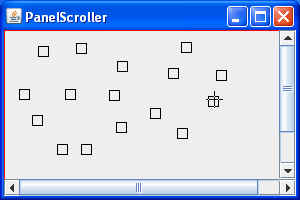
which produces:
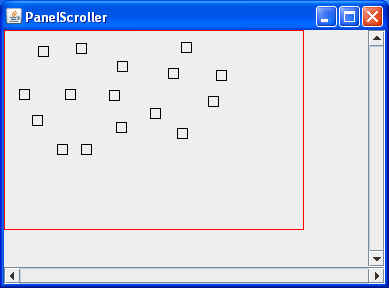
Notice that there are no squares outside the red rectangular area. This is because the scrollbars are defined only on that area. This results in mouse clicks not having any effect outside the red rectangular area.