
A ‘Scribble’ Program
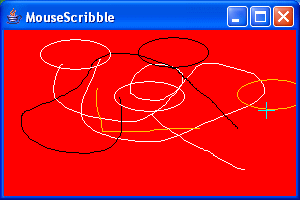
Here’s an example of how to use Mouse Events. It’s a simple ‘Scribble’ program that uses a combination of the mouse and the keyboard to draw lines and ovals in various colors.
Note:
- The cursor is changed to a crosshair when inside the application panel.
- Mouse dragging is used to draw lines.
- Mouse double-clicking is used to draw ovals.
- The SHIFT and CTRL keys in combination with the left and right mouse buttons choose the color of the line or oval being drawn.
package swingExamples;

import java.awt.Color;
import java.awt.Container;
import java.awt.Cursor;
import java.awt.Graphics;
import java.awt.Point;

import java.awt.event.InputEvent;
import java.awt.event.MouseEvent;
import java.awt.event.MouseListener;
import java.awt.event.MouseMotionListener;

import javax.swing.JFrame;
import javax.swing.JPanel;

class MouseScribblePanel extends JPanel
{
  // Constructor
  public MouseScribblePanel()
  {
    addMouseListener( new MouseHandler() );
    addMouseMotionListener( new MouseMotionHandler() );
    setBackground(Color.RED);
  }

  // Utility method to determine the color to use
  private Color getEventColor(MouseEvent e)
  {
    Color color = Color.WHITE; // No modifiers means white

    int modifiers = e.getModifiers();
    if ( (modifiers & InputEvent.SHIFT_MASK) != 0)
    {
      color = Color.BLACK; // SHIFT key means black
    }
    else if ( (modifiers & InputEvent.CTRL_MASK) != 0)
    {
      color = Color.ORANGE; // CTRL key means orange
    }
    else if ( (modifiers & InputEvent.META_MASK) != 0)
    {
      color = Color.BLUE; // Mouse button 2 means blue
    }
    return color;
  }

  ///// Private Data /////
  private Point m_start, m_end;

  ////////// Inner classes ////////

  class MouseHandler implements MouseListener
  {
    // MouseListener method
    public void mousePressed(MouseEvent e)
    {
      int x = e.getX();
      int y = e.getY();
      m_start = new Point(x, y);
      m_end = new Point(x, y);
      int clickCount = e.getClickCount();
      if (clickCount == 2) // double click?
      {
        Graphics g = getGraphics();
        g.setColor(getEventColor(e));
        g.drawOval(m_start.x, m_start.y, 70, 30);
      }
    }

    public void mouseEntered(MouseEvent e)
    {
      setCursor(Cursor.getPredefinedCursor(Cursor.CROSSHAIR_CURSOR));
    }

    public void mouseExited(MouseEvent e)
    {
      setCursor(Cursor.getDefaultCursor());
    }

    // Unused MouseListener methods
    public void mouseClicked(MouseEvent e)
    {}
    public void mouseReleased(MouseEvent e)
    {}
  }

  class MouseMotionHandler implements MouseMotionListener
  {
    public void mouseDragged(MouseEvent e)
    {
      int x = e.getX();
      int y = e.getY();
      m_end = new Point(x, y);
      Graphics g = getGraphics();
      g.setColor(getEventColor(e));
      g.drawLine(m_start.x, m_start.y, m_end.x, m_end.y);
      m_start = new Point(x, y); // Drag from here next
    }

    // Unused MouseMotionListener methods
    public void mouseMoved(MouseEvent e)
    {}
  }
}

class MouseScribbleFrame extends JFrame
{
  public MouseScribbleFrame()
  {
    setTitle("Mouse Scribble");
    setSize(300, 200);
    setDefaultCloseOperation(EXIT_ON_CLOSE);
    Container contentPane = getContentPane();
    contentPane.add(new MouseScribblePanel());
  }
}

public class MouseScribble
{
  public static void main(String[] args)
  {
    MouseScribbleFrame frame = new MouseScribbleFrame();
    frame.setVisible(true);
  }
}
Here’s the result of a scribble session. Note the crosshair cursor at the right center.
Note: An important thing to realize about this program: It does not retain any information about what has been drawn. So, if you draw something on the panel, and then occlude the window, or resize it, or iconify and then restore it, all the drawing will be gone.