
Table of Contents
NOTE: Java applets have been deprecated since Java 9 in 2017, and were removed from Java SE (Standard Edition) 11 (18.9), released in September 2018.
This means that, while you may find learning about Java applets to be interesting, it won’t get you far today in practical web applications using Java.
There are various alternatives, but most of them come down to using JavaScript in some way or another.
GWT is an interesting project that you might find useful. It allows you to write Java code using a predetermined set of classes, and basically translate them into JavaScript code for use on the web. It’s open source, and totally free.
Way back when, in the original release of Java, applets were a big deal. At the time, HTML web pages were regarded as rather static, and any technology that added a dynamic aspect to HTML web pages was considered goodness.
Over the years, however, applets have become less and less important to Java. Much of this was a result of the browser wars between Netscape and Microsoft, and the negative consequences of those wars still linger today. Another reason was that other technologies have evolved to make web pages more dynamic.
Many books on Java use applets heavily in their examples. I have avoided that, because I have found that learning the various quirks and foibles of different web browsers just to get an applet to work tended to get in the way of learning Java itself. So, most of my examples use Java applications, which are simpler to get working because you don’t have to fight the browser as well as the language.
Applet Security Constraints
Applets run within a browser, subject to the constraints of a security manager.
In JDK 1.0.x, applets loaded over the web were completely constrained:
- No reading, or writing, or deleting, or getting information about local files.
- No running another program.
- No loading of a Java library
- No connection to a server other than the one the applet was loaded from.
- etc…
In JDK 1.1.x, and beyond, applets may be trusted as a result of being signed — they may carry a secure certificate that identifies the source of the applet, and verifies that the source may be trusted. Unfortunately, Netscape’s way of signing applets is not compatible with Microsoft’s way, and vice versa. This has been solved with the use of the Sun Java Plug-in.
Customizable security levels are already implemented in some browsers, but signed applet support requires JDK 1.1.x support (or above) in the browser.
With each version of Java has come an increased level of granularity in terms of the ability to control what a particular trusted applet is allowed to do. Initially, with JDK 1.1, applets could be either untrusted, or completely trusted. Later versions of Java allowed more ability to specify exactly what a trusted applet could, or could not, do.
Today, modern browsers use the Java Plug-in, which allows the browser to support completely up to date versions of Java. However, this does mean that someone has to download and install the Java Plug-in for some browsers (notably Microsoft Internet Explorer). Since the Java Plug-in is rather large, this can be a non-trivial task.
Testing Applets
While you’re developing applets, you can try them out in a browser, but debugging is likely to be done within an applet viewer:
- The JDK comes with a standard
appletviewerprogram - Various Java IDEs may provide their own equivalent to appletviewer, and also add the ability to debug applets using their debugger.
The Class Hierarchy
Here’s the class hierarchy for applications and applets:
Object
   Component
      Container
         Window
            Frame  // base for applications
         Panel
            Applet // base for applets
               JApplet
An Applet(and a JApplet) is a kind of Panel, which is a kind of Container, etc.
Not so different from what we’ve seen before, right?
A Simple Applet
Here’s a trivial applet:
package applets;

import java.awt.Container;

import javax.swing.JApplet;
import javax.swing.JLabel;
import javax.swing.SwingConstants;

public class GreetApplet extends JApplet
{
  public void init()
  {
    Container contentPane = getContentPane();
    JLabel label =
        new JLabel("Greetings from a Java applet",
                   SwingConstants.CENTER);
    contentPane.add(label);
  }
}
Unfortunately, I can’t show you how it displays in a browser because applets have been removed from Java and from pretty much all browsers.
Note: Versions are important when writing applets. For example, when I first wrote the above applet, I wrote it and compiled it using JDK 1.5 . However, when I tried it in one of my browsers that had a Java 1.4 plug-in, my browser failed to load the applet successfully. I looked in the Java Plug-in’s Console, and it told me that it had encountered an error:
java.lang.UnsupportedClassVersionError: applets/GreetApplet (Unsupported major.minor version 49.0)
Self-descriptive message, don’t you think? When I investigated further, I discovered that I could not run the code I had written under JDK 1.5 using a Java Plug-in 1.4 (or earlier). So, I changed the source code to ensure I wasn’t using any JDK 1.5 specific features, and then compiled it under JDK 1.4. The resulting version now runs using both the 1.4 and 1.5 versions of the Java Plug-in.
HTML Tags for Applets
To embed an applet within a web page, you must use an appropriate set of HTML tags:
Here’s the HTML for a very simple web page with an embedded applet:
<html>
<head>
<title>I'm a Java-enabled Web Page!</title>
</head>
<body>
 Here's the Java applet:
 <applet code="MyApplet.class"
	 width="300"
	 height="200"
 >
 Sorry, you're out of luck!
 Your browser doesn't support Java.
 </applet>
</body>
</html>
As you can see, there’s a single tag, <applet> ... </applet> which has a number of attributes that can be specified.
Here are the named attributes for the <applet> tag for JDK 1.0.x:
| Attribute name | Required? | Description |
|---|---|---|
CODE="foo.class" | Yes | Specifies the name of the applet’s .class file. |
WIDTH=pixels | Yes | Specifies the width of the applet window |
HEIGHT=pixels | Yes | Specifies the height of the applet window |
CODEBASE="path" | No | Specifies where to find the .class files, relative to the location of the enclosing HTML page. |
NAME="applet-name" | No | Specifies the name of the applet (used to distinguish it from other applets on the same page). |
ALIGN=LEFT | No | Places the applet at the left margin of the page. Text that follows goes in the space to the right of the applet. |
ALIGN=RIGHT | No | Places the applet at the right margin of the page. Text that follows goes in the space to the left of the applet |
ALIGN=BOTTOM | No | Places the bottom of the applet at the bottom of the text in the current line. |
ALIGN=TOP | No | Places the top of the applet with the top of the current line. |
ALIGN=TEXTTOP | No | Places the top of the applet with the top of the text in the current line. |
ALIGN=MIDDLE | No | Places the middle of the applet with the baseline of the current line. |
ALIGN=ABSMIDDLE | No | Places the middle of the applet with the middle of the current line. |
ALIGN=BASELINE | No | Places the bottom of the applet with the baseline of the current line. |
ALIGN=ABSBOTTOM | No | Places the bottom of the applet with the bottom of the current line. |
VSPACE=pixels | No | Creates a vertical margin around the applet . |
HSPACE=pixels | No | Creates a horizontal margin around the applet. |
Here are the <applet> tag attributes added for JDK 1.1.x:
| Attribute name | Required? | Description |
|---|---|---|
ARCHIVE="jar-file" | No | Specifies the name of a Java archive (JAR) file that contain classes and other resources for the applet. |
OBJECT="obj-file" | No | Specifies the name of a file that contains the serialized applet object. |
Adding Package & Directory Specifications
The above HTML example is very basic:
- It specifies an applet whose
.classfile is in the same directory as its enclosing HTML page file. - The class whose
.classfile is being used is in the default package.
Think of the CODEBASE attribute as specifying a kind of CLASSPATH for the applet. The same kind of rules apply to applets as apply to applications, when you start dealing with classes within packages.
To specify an applet whose .class file is in subdirectory classes, and whose class is in the default package:
<html>
<head>
<title>I'm a Java-enabled Web Page!</title>
</head>
<body>
 Here's the Java applet:
 <applet code="MyApplet.class"
	 codebase="classes"
	 width="300"
	 height="200"
 >
 Sorry, you're out of luck!
 Your browser doesn't support Java.
 </applet>
</body>
</html>
To specify an applet whose class is in the package myPackage:
<html>
<head>
<title>I'm a Java-enabled Web Page!</title>
</head>
<body>
 Here's the Java applet:
 <applet code="myPackage.MyApplet.class"
         codebase="classes"
	 width="300"
	 height="200"
 >
 Sorry, you're out of luck!
 Your browser doesn't support Java.
 </applet>
</body>
</html>
and the .class file must be in subdirectory below where the document is:
classes/myPackage
The Applet Life Cycle
Here is a state transition diagram showing the possible states of an applet, during its lifetime:
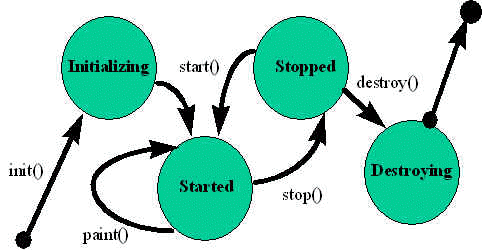
The four applet methods that cause state transitions are:
| Method | Description |
|---|---|
init() | Called when the applet is first loaded into the browser. Performs applet initialization. Called once only. |
start() | Called after the init() method has completed. Also called when the browser opens the page again after having read other pages. Can be called many times. |
stop() | Called when the browser moves off the page. Can be called many times. |
destroy() | Called with the applet is about to be unloaded from the browser. Performs resource cleanup. Called once. |
Multimedia & URLs
Multimedia includes:
- images
- audio
- video
- etc…
A URL (Uniform Resource Locator) is a description of a resource on the Internet. Here is an absolute URL:
protocol://host.domain[:port]/path/filename
where protocol is one of:
| Protocol | Description |
|---|---|
file | a file on your local system |
ftp | a file on an anonymous FTP server |
http | a file on a World Wide Web server |
gopher | a file on a Gopher server |
WAIS | a file on a WAIS server |
news | a Usenet newsgroup |
telnet | a connection to a Telnet-based service |
| etc. | other, often application-specific, protocols |
You can also use a mailto protocol:
mailto:president@whitehouse.gov
The :port is generally omitted, because each protocol has its own default port number. However, it is sometimes required when a server is using an non-standard port number.
Here’s a typical example:
http://www.ncsa.uiuc.edu/General/Internet/WWW/HTMLPrimer.html
Another form of URL is a relative URL. For example:
data/planets.dat
which is relative to some other URL.
For more information about URLs, see:
http://www.ncsa.uiuc.edu/demoweb/url-primer.html
The Java URL Class
Java’s java.net.URL class encapsulates URLs. It has constructors:
URL(String absURL)
URL(URL baseURL, String relURL)
URL(String protocol, String host, String file)
URL(String protocol, String host, int port, String file)
Each of these constructors throws a MalformedURLException if the syntax for the resulting URL is incorrect. You must write code that is prepared for this exception:
try
{
    String url = "http://java.sun.com";
    URL u = new URL(url);
    // ...
}
catch (MalformedURLException e)
{
    // Deal with the exception...
}
getDocumentBase() and getCodeBase()
These methods of the javax.swing.JApplet (and java.applet.Applet) class return the following:
| Method | Description |
|---|---|
getDocumentBase() | returns the URL of the HTML file that contains the applet |
getCodeBase() | returns the URL of the applet |
getImage() and getAudioClip()
These methods of the javax.swing.JApplet (and java.applet.Applet) class return the specified image and audio clip, respectively.
For example:
package applets;

import java.applet.Applet;
import java.applet.AudioClip;

import java.awt.BorderLayout;
import java.awt.Color;

import java.net.MalformedURLException;
import java.net.URL;

import javax.swing.JApplet;
import javax.swing.JLabel;

import multimedia.ImagePanel;

public class MultimediaApplet extends JApplet
{
  public void init()
  {
    // First, create the image part of the GUI
    URL[] imageURLs = gatherImageURLs();
    getContentPane().add(new ImagePanel(imageURLs),
                         BorderLayout.CENTER);

    // Next, a label indicating the state of the audio part
    m_soundLabel = new JLabel("Loading audio clip...");
    m_soundLabel.setOpaque(true);
    m_soundLabel.setBackground(Color.WHITE);
    getContentPane().add(m_soundLabel, BorderLayout.SOUTH);

    // Load the audio clip
    loadAudioClip("audio/yahoo1.au");

    if (m_sound == null)
    {
      m_soundLabel.setText("No audio clip found...");
      m_soundLabel.setForeground(Color.RED);
    }
    else
    {
      m_soundLabel.setText("Playing audio clip...");
    }
  }

  public void start()
  {
    if (m_sound == null)
    {
      System.err.println("No audio clip to play!");
    }
    else
    {
      m_sound.play();
    }
  }

  private URL[] gatherImageURLs()
  {
    URL[] imageURLs = new URL[2];

    // Get the URL of applet
    URL baseURL = getCodeBase();
    System.out.println("CodeBase: " + baseURL);

    // Now get the URL for the first image file, below that directory
    URL imageURL = null;
    try
    {
      imageURL = new URL(baseURL, "images/bleye.gif");

      // Set in the first image URL.
      imageURLs[0] = imageURL;

      // The second image is on the web
      imageURLs[1] = new URL(
          "http://www.rivier.edu/faculty/bhiggs/web/cs585aweb/images/monalisa.jpg");
    }
    catch (MalformedURLException mue)
    {
      // Something wrong with our URL handling
      mue.printStackTrace();
    }

    return imageURLs;
  }

  private void loadAudioClip(String path)
  {
    AudioClip clip = null;
    URL baseURL = getCodeBase();
    System.out.println("Audio clip baseURL: " + baseURL);
    URL audioClipURL = null;
    try
    {
      audioClipURL = new URL(baseURL, path);
      System.out.println("Audio clip URL: " + audioClipURL);
      clip = Applet.newAudioClip(audioClipURL);
    }
    catch (MalformedURLException mue)
    {
      mue.printStackTrace();
    }
    m_sound = clip;
    System.out.println("Audio clip loaded.");
  }

  ///////// Data //////////////
  private JLabel m_soundLabel;
  private AudioClip m_sound = null;
}
package multimedia;

import java.awt.BorderLayout;
import java.awt.Color;
import java.awt.Graphics;

import java.net.URL;

import javax.swing.ImageIcon;
import javax.swing.JLabel;
import javax.swing.JPanel;
import javax.swing.SwingUtilities;

public class ImagePanel extends JPanel
{
  public ImagePanel(final URL[] imageURLs)
  {
    setBackground(Color.WHITE);
    setLayout(new BorderLayout());

    // Indicate that we're loading images,
    // which may take a long time.
    JLabel statusLabel = new JLabel("Loading Images...",
        JLabel.CENTER);
    statusLabel.setForeground(Color.BLACK);
    add(statusLabel, BorderLayout.CENTER);

    // Load the images in a separate thread to avoid
    // hanging up this thread waiting for load completion.
    Thread loader = new Thread()
    {
      public void run()
      {
        loadImages(imageURLs);
        // When done, cause a repaint from the
        // event dispatcher thread
        SwingUtilities.invokeLater( new Runnable()
        {
          public void run()
          {
            // Remove the "Loading images..." label
            ImagePanel.this.removeAll();
            // and cause the images to display
            ImagePanel.this.repaint();
          }
        }
        );
      }
    };
    // Start the loader thread
    loader.start();
  }

  public void paintComponent(Graphics g)
  {
    super.paintComponent(g);

    if (m_imagesLoaded)
    {
      g.setColor(Color.BLACK);
      int x = 5;
      int y = 5;
      for (int i = 0; i < m_image.length; i++)
      {
        if (m_image[i] != null)
        {
          m_image[i].paintIcon(this, g, x, y);
          x += m_image[i].getImage().getWidth(this) + 5;
        }
        else
        {
          g.setColor(Color.RED);
          g.drawString("No image found", x, y);
        }
      }
    }
  }

  private void loadImages(URL[] imageURLs)
  {
    m_image = new ImageIcon[imageURLs.length];
    for (int i = 0; i < imageURLs.length; i++)
    {
      m_image[i] = new ImageIcon(imageURLs[i]);
    }
    m_imagesLoaded = true;
  }

  //// Private data /////
  private ImageIcon[] m_image;
  private boolean m_imagesLoaded;
}
Again, I can’t show you the result because Java applets have been deprecated and removed from Java
Applet Context
An applet runs inside a browser or applet viewer.
An applet running within a browser can ask the browser to do things for it:
- Fetch an audio clip
- Show a short message in the status line
- Show a different web page
The browser can perform these requests or ignore them.
- To communicate with the browser, an applet calls the
java.applet.Applet.getAppletContext()method, which returns an object that implements an interface of typejava.applet.AppletContext. - Think of
AppletContextas a communication path between the applet and the browser. AppletContextprovides the following methods:
| Method | Description |
|---|---|
void showStatus(String message) | Shows the message in the status line of the browser |
Enumeration getApplets() | Returns an enumeration of all the applets in the same context (same web page) |
Applet getApplet(String name) | Returns the applet in the current context with the specified name (null if none exists) |
void showDocument(URL url) | Shows a new web page in the browser, displacing the current page. |
void showDocument(URL url, String target) | Shows a new web page in the browser, specifying the target frame (“_self”, “_parent”, “_top”, “_blank”, or <frame-name>) |
Image getImage(URL url) | Returns an image object that encapsulates the image specified by the URL |
AudioClip getAudioClip(URL url) | Returns an AudioClip object that encapsulates the sound file specified by the URL. |
Converting Applications to Applets
A Java program can be both an applet and an application:
// ...
public class AppletApplication extends JApplet
{
    public void init()
    { ... }

    // ...

    public static void main(String[] args)
    { ... }
}
To make it work, the main method must create a frame for the applet to execute in.
It’s convenient to create a frame to use for this purpose:
// ...
public class AppletFrame extends JFrame
{
    public AppletFrame(JApplet applet, int width, int height)
    {
        setTitle(applet.getClass.getName());
        setSize(width, height);
        setDefaultCloseOperation(EXIT_ON_CLOSE);

        JPanel panel = new JPanel( new BorderLayout() );
        getContentPane().add(panel);

        panel.add(applet, BorderLayout.CENTER); // Add applet to frame

        applet.init();		// Init the applet
        setVisible(true);
        applet.start();		// Start the applet
    }

    // ...
}
So the main method of the AppletApplication should do the following:
// ...
public class AppletApplication extends JApplet
{
    public void init()
    { ... }

    // ...

    public static void main(String[] args)
    {
        new AppletFrame(new AppletApplication(), 620, 400);
    }
}
Unfortunately, this is not sufficient. If the applet tries to execute code like:
getAppletContext()
because there is no applet context in the AppletFrame.The fix is to implement two interfaces in AppletFrame:
AppletStubAppletContext
// ...
public class AppletFrame extends JFrame
	implements AppletStub, AppletContext
{
    // AppletStub methods
    public boolean isActive() { return true; }
    public URL getDocumentBase() { return null; }
    public URL getCodeBase() { return null; }
    public String getParameter(String name) { return ""; }
    public AppletContext getAppletContext() { return this; }
    public void appletResize(int width, int height) {}

    // AppletContext methods
    public AudioClip getAudioClip(URL url) { return null; }
    public Image getImage(URL url) { return null; }
    public Applet getApplet(String name) { return null; }
    public Enumeration getApplets() { return null; }
    public void showDocument(URL url) {}
    public void showDocument(URL url, String target) {}
    public void showStatus(String status) {}

    public AppletFrame(Applet applet, int width, int height)
    {
        setTitle(applet.getClass.getName());
        setSize(width, height);
        setDefaultCloseOperation(EXIT_ON_CLOSE);

        JPanel panel = new JPanel( new BorderLayout() );
        getContentPane().add(panel);

        panel.add(applet, BorderLayout.CENTER); // Add applet to frame

        applet.setStub(this);	// Set up the AppletStub
        applet.init();		// Init the applet
        setVisible(true);
        applet.start();		// Start the applet
    }

    // ...
}
Another possibility is to use inheritance to allow any applet to be executable as an application:
public class CalculatorAppletApplication
		extends AppletApplication
{
    public static void main(String[] args)
    {
        new AppletFrame(new CalculatorApplet(), 150, 100);
    }
}