
An ‘Etch-a-Sketch’ Program
Here’s an example of a program that uses keyboard input to produce a kind of ‘Etch-a-Sketch’ effect:
package swingExamples;

import java.awt.Container;
import java.awt.Graphics;
import java.awt.Graphics2D;
import java.awt.Point;

import java.awt.event.InputEvent;
import java.awt.event.KeyEvent;
import java.awt.event.KeyListener;

import java.awt.geom.Line2D;
import java.awt.geom.Point2D;

import java.util.ArrayList;

import javax.swing.JFrame;
import javax.swing.JPanel;

class SketcherPanel extends JPanel
{
  public SketcherPanel()
  {
    m_last = new Point2D.Double(100, 100);
    m_lines = new ArrayList<Line2D> ();
    // Add a key listener to listen for keystrokes
    addKeyListener( new KeyHandler() );
    // Allow focus to be set for the JPanel,
    // to allow it to receive key events.
    setFocusable(true);
  }

  /**
   * paintComponent controls what is drawn on the panel
   */
  public void paintComponent(Graphics g)
  {
    super.paintComponent(g);
    Graphics2D g2 = (Graphics2D) g;

    // Draw all lines
    for (Line2D line : m_lines)
    {
      g2.draw(line);
    }
  }

  /**
   * Add a new line segment to the Sketcher
   * @param dx the movement in x direction
   * @param dy the movement in y direction
   */
  private void add(int dx, int dy)
  {
    // Compute end point
    Point2D end = new Point2D.Double(m_last.getX() + dx,
                                     m_last.getY() + dy);

    // Add line segment
    Line2D line = new Line2D.Double(m_last, end);
    m_lines.add(line);
    repaint();

    // Remember new end point
    m_last = end;
  }

  //// Private data ////
  private Point2D m_last; // The last point entered
  // Array to hold lines between successive points.
  private ArrayList<Line2D> m_lines;

  // Drawing increments ("slow" and "fast")
  private static final int SMALL_INCREMENT = 1;
  private static final int LARGE_INCREMENT = 5;

  ////// Inner classes //////

  /**
   * This is the class that listens for keystrokes
   * in the SketcherPanel.
   */
  private class KeyHandler implements KeyListener
  {
    public void keyPressed(KeyEvent event)
    {
      int keyCode = event.getKeyCode();

      // Set distance
      int d;
      if (event.isShiftDown())
        d = LARGE_INCREMENT;
      else
        d = SMALL_INCREMENT;

      // Add line segment
      if (keyCode == KeyEvent.VK_LEFT)
        add( -d, 0);
      else if (keyCode == KeyEvent.VK_RIGHT)
        add(d, 0);
      else if (keyCode == KeyEvent.VK_UP)
        add(0, -d);
      else if (keyCode == KeyEvent.VK_DOWN)
        add(0, d);
    }

    public void keyTyped(KeyEvent event)
    {
      char keyChar = event.getKeyChar();

      // Set distance
      int d;
      if (Character.isUpperCase(keyChar))
      {
        d = LARGE_INCREMENT;
        keyChar = Character.toLowerCase(keyChar);
      }
      else
      {
        d = SMALL_INCREMENT;
      }

      // Add line segment
      if (keyChar == 'h')
        add( -d, 0);
      else if (keyChar == 'l')
        add(d, 0);
      else if (keyChar == 'k')
        add(0, -d);
      else if (keyChar == 'j')
        add(0, d);
    }

    // Unused KeyListener method
    public void keyReleased(KeyEvent event)
    {}
  }
}

class SketcherFrame extends JFrame
{
  public SketcherFrame()
  {
    setTitle("Sketch");
    setSize(300, 200);
    setDefaultCloseOperation(EXIT_ON_CLOSE);
    Container contentPane = getContentPane();
    contentPane.add( new SketcherPanel() );
  }
}

public class Sketcher
{
  public static void main(String[] args)
  {
    SketcherFrame frame = new SketcherFrame();
    frame.setVisible(true);
  }
}
and here’s what it produces:
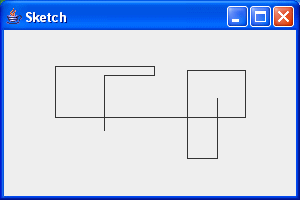
If you type left, right, up, or down arrow, the line draws in the appropriate direction. Similarly, if you type an ‘h’. ‘j’, ‘k’, or ‘l’ (that’s a lowercase ‘L’), the line will move similarly.
Note that the line moves 5 times faster if you use the Shift key in combination with the other key.
This program does retain information about the drawing: each successive point causes a line to be entered into the array, and the set of lines is used to [re]draw the lines on the panel, even when you iconify and restore the window.