Table of Contents
Two of the simplest kinds of GUI components are checkboxes and radio buttons.
Let’s examine them here…
Checkboxes
To give your users the choice of a limited set of options, it’s often a good idea to present them with a set of checkboxes.
A checkbox provides an on or off, true or false, or Boolean type of choice.
Because it is a simple, on/off, kind of item, it is considered pretty much like a regular button, and supports ActionEvents in the same way as regular buttons.
For example:
package swingExamples;

import java.awt.BorderLayout;
import java.awt.Color;
import java.awt.Container;
import java.awt.Font;

import java.awt.event.ActionEvent;
import java.awt.event.ActionListener;

import javax.swing.JCheckBox;
import javax.swing.JFrame;
import javax.swing.JLabel;
import javax.swing.JPanel;

class CheckboxesPanel extends JPanel
{
  public CheckboxesPanel()
  {
    setLayout(new BorderLayout());
    add(new TextPanel(), BorderLayout.CENTER);
    add(new InputPanel(), BorderLayout.SOUTH);
  }

  void setTextFont(int style)
  {
    m_text.setFont(new Font("SansSerif", style, 12));
  }

  /////// Private data /////
  private JLabel m_text =
      new JLabel(
      "The quick brown fox jumps over the lazy dog");

  /////// Inner classes /////
  class TextPanel extends JPanel
  {
    public TextPanel()
    {
      setBackground(Color.white);
      setTextFont(Font.PLAIN);
      add(m_text);
    }
  }

  class InputPanel extends JPanel
      implements ActionListener
  {
    public InputPanel()
    {
      add(m_boldCheckBox);
      m_boldCheckBox.addActionListener(this);
      add(m_italicCheckBox);
      m_italicCheckBox.addActionListener(this);
    }

    public void actionPerformed(ActionEvent ev)
    {
      int style = Font.PLAIN;
      if (m_boldCheckBox.isSelected())
      {
        style |= Font.BOLD;
      }
      if (m_italicCheckBox.isSelected())
      {
        style |= Font.ITALIC;
      }
      setTextFont(style);
    }

    ///// Private data /////
    private JCheckBox m_boldCheckBox =
                        new JCheckBox("Bold");
    private JCheckBox m_italicCheckBox =
                        new JCheckBox("Italic");
  }
}

class CheckboxesFrame extends JFrame
{
  public CheckboxesFrame()
  {
    setTitle("CheckBoxes");
    setSize(300, 200);
    setDefaultCloseOperation(EXIT_ON_CLOSE);
    Container contentPane = getContentPane();
    contentPane.add( new CheckboxesPanel() );
  }
}

public class Checkboxes
{
  public static void main(String[] args)
  {
    CheckboxesFrame frame = new CheckboxesFrame();
    frame.setVisible(true);
  }
}
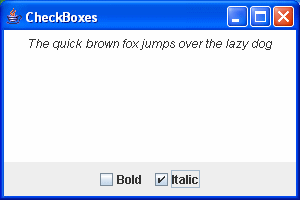
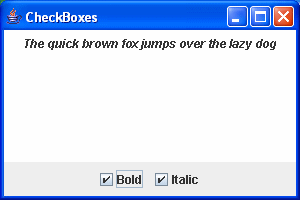
which displays:


Radio Buttons
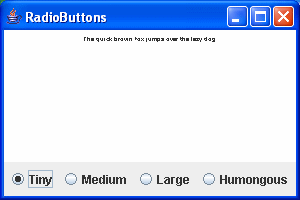
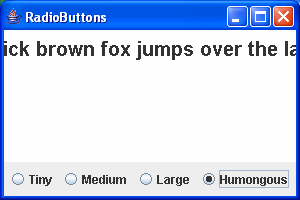
If the choices you wish the user to make are mutually exclusive choices, then you need radio buttons instead of checkboxes.
You group radio buttons into a button group, and the button group ensures that only one of the radio buttons in the group is set at any given time.
Here’s an example:
package swingExamples;

import java.awt.BorderLayout;
import java.awt.Color;
import java.awt.Container;
import java.awt.Font;

import java.awt.event.ActionEvent;
import java.awt.event.ActionListener;

import javax.swing.ButtonGroup;
import javax.swing.JRadioButton;
import javax.swing.JFrame;
import javax.swing.JLabel;
import javax.swing.JPanel;

class RadioButtonsPanel extends JPanel
{
  public RadioButtonsPanel()
  {
    setLayout(new BorderLayout());
    add(new TextPanel(), BorderLayout.CENTER);
    add(new InputPanel(), BorderLayout.SOUTH);
  }

  void setTextSize()
  {
    m_text.setFont(
        new Font("SansSerif", Font.BOLD, m_size) );
  }

  /////// Private data /////

  // Font sizes
  private static final int TINY = 6;
  private static final int MEDIUM = 12;
  private static final int LARGE = 14;
  private static final int HUMONGOUS = 20;

  private int m_size = MEDIUM;
                      // Current font size

  private JLabel m_text =
      new JLabel(
      "The quick brown fox jumps over the lazy dog");

  /////// Inner classes /////
  class TextPanel extends JPanel
  {
    public TextPanel()
    {
      setBackground(Color.WHITE);
      setTextSize();
      add(m_text);
    }
  }

  class InputPanel extends JPanel
      implements ActionListener
  {
    public InputPanel()
    {
      addRadioButton(m_tiny);
      addRadioButton(m_medium);
      addRadioButton(m_large);
      addRadioButton(m_humongous);
    }

    public void actionPerformed(ActionEvent ev)
    {
      Object source = ev.getSource();
      if (source == m_tiny)
      {
        m_size = TINY;
      }
      else if (source == m_medium)
      {
        m_size = MEDIUM;
      }
      else if (source == m_large)
      {
        m_size = LARGE;
      }
      else if (source == m_humongous)
      {
        m_size = HUMONGOUS;
      }
      setTextSize();
    }

    private JRadioButton addRadioButton(JRadioButton button)
    {
      add(button);
      m_group.add(button);
      button.addActionListener(this);
      return button;
    }

    ///// Private data /////
    private ButtonGroup m_group =
			  new ButtonGroup();
    private JRadioButton m_tiny =
			  new JRadioButton("Tiny");
    private JRadioButton m_medium =
			  new JRadioButton("Medium", true);
    private JRadioButton m_large =
			  new JRadioButton("Large");
    private JRadioButton m_humongous =
			  new JRadioButton("Humongous");
  }
}

class RadioButtonsFrame extends JFrame
{
  public RadioButtonsFrame()
  {
    setTitle("RadioButtons");
    setSize(300, 200);
    setDefaultCloseOperation(EXIT_ON_CLOSE);
    Container contentPane = getContentPane();
    contentPane.add( new RadioButtonsPanel() );
  }
}

public class RadioButtons
{
  public static void main(String[] args)
  {
    RadioButtonsFrame frame =
                    new RadioButtonsFrame();
    frame.setVisible(true);
  }
}
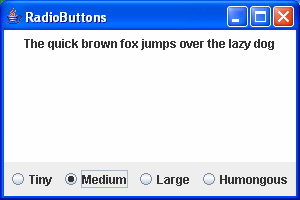
which produces:

Button Group Usage
Determining which Radio Button is Set within a Group
In the original Java AWT, radio buttons were handled differently from the Swing approach.
In the AWT approach:
- There is no separate class for radio buttons; the class
java.awt.Checkboxis used for both checkboxes and radio buttons. - To turn checkboxes into radio buttons, all you have to do is add them to a
java.awt.CheckboxGroup, and their visual representation changes automatically.
In particular, the CheckboxGroup class has a method:
public Checkbox getSelectedCheckbox()
which allows you to find out which of the checkboxes in the CheckboxGroup is selected.
Unfortunately, there is no equivalent mechanism for JRadioButtons and ButtonGroups in Swing. When they moved to a Model-View-Controller separation of state versus presentation approach, they sacrificed some of the simplicity of the original approach.
It is much harder to figure out how to do the same thing in Swing. You have to resort to Actions to do it, and it’s more awkward that it ought to be.
Here’s an example:
package swingExamples;

import java.awt.BorderLayout;
import java.awt.Color;
import java.awt.Container;

import java.awt.event.ActionEvent;
import java.awt.event.ActionListener;

import javax.swing.ButtonGroup;
import javax.swing.JFrame;
import javax.swing.JPanel;
import javax.swing.JRadioButton;

class ColorRadioButtonsPanel extends JPanel
{
  public ColorRadioButtonsPanel()
  {
    setLayout(new BorderLayout());
    add(m_colorPanel, BorderLayout.CENTER);
    add(new InputPanel(), BorderLayout.SOUTH);
  }

  private void setPanelColor()
  {
    Color back = null;
    if (m_colorCommand.equals(YELLOW))
    {
      back = Color.YELLOW;
    }
    else if (m_colorCommand.equals(BLUE))
    {
      back = Color.BLUE;
    }
    else if (m_colorCommand.equals(RED))
    {
      back = Color.RED;
    }
    m_colorPanel.setBackground(back);
  }

  /////// Private data ///////

  // Action commands
  private static final String YELLOW = "Yellow";
  private static final String BLUE = "Blue";
  private static final String RED = "Red";
  private String m_colorCommand = YELLOW;
                                  // Current color "command"

  private ColorPanel m_colorPanel = new ColorPanel();

  /////// Inner classes /////

  class ColorPanel extends JPanel
  {
  }

  class InputPanel extends JPanel
      implements ActionListener
  {
    public InputPanel()
    {
      addRadioButton(m_yellow, YELLOW);
      m_yellow.setSelected(true); // Make yellow the default
      addRadioButton(m_blue, BLUE);
      addRadioButton(m_red, RED);
      setPanelColor();
    }

    // ActionListener required methods
    public void actionPerformed(ActionEvent evt)
    {
      m_colorCommand =
          m_group.getSelection().getActionCommand();
      setPanelColor();
    }

    private JRadioButton addRadioButton(
                            JRadioButton button,
                            String command)
    {
      add(button);
      m_group.add(button);
      button.setActionCommand(command);
      button.addActionListener(this);
      return button;
    }

    ///// Private data /////
    private ButtonGroup m_group = new ButtonGroup();
    private JRadioButton m_yellow = new JRadioButton("Yellow");
    private JRadioButton m_blue = new JRadioButton("Blue");
    private JRadioButton m_red = new JRadioButton("Red");
  }
}

class ColorRadioButtonsFrame extends JFrame
{
  public ColorRadioButtonsFrame()
  {
    setTitle("ColorRadioButtons");
    setSize(300, 200);
    setDefaultCloseOperation(EXIT_ON_CLOSE);
    Container contentPane = getContentPane();
    contentPane.add( new ColorRadioButtonsPanel() );
  }
}

public class ColorRadioButtons
{
  public static void main(String[] args)
  {
    ColorRadioButtonsFrame frame =
                new ColorRadioButtonsFrame();
    frame.setVisible(true);
  }
}
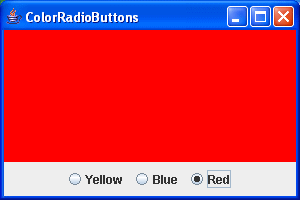
which produces: