
Table of Contents
Threads & Thread Groups
What’s a ThreadGroup?
Every Thread is a member of a ThreadGroup.
A ThreadGroup provides a mechanism for a logical grouping of multiple threads and thread groups. It is possible to manipulate some of the attributes of all the threads in a thread group in a single call.
The Default Thread Group
If you create a thread without specifying a ThreadGroup in the Thread‘s constructor, the thread is placed in the same ThreadGroup as the thread that created it.
When a Java application starts up, the Java runtime system create a ThreadGroup called main.
Creating a Thread Group
You can create a ThreadGroup (assuming that the security manager allows you to) by using a ThreadGroup constructor:
| public ThreadGroup(ThreadGroup parent, String name) | Creates a new thread group. The parent of this new group is the specified thread group. |
| public ThreadGroup(String name) | Constructs a new thread group. The parent of this new group is the thread group of the currently running thread. |
Once the ThreadGroup has been constructed, it is empty — that is, it contains no threads, nor thread groups.
Thread Group Methods
Here’s a synopsis of the ThreadGroup methods. (Entries in bold italics are deprecated in JDK 1.2, and should not be used in any JDK version.)
| public int activeCount() | Returns an estimate of the number of active threads in this thread group. |
| public int activeGroupCount() | Returns an estimate of the number of active groups in this thread group. |
| public boolean allowThreadSuspension(boolean b) | Used by VM to control lowmem implicit suspension. |
| public final void checkAccess() | Determines if the currently running thread has permission to modify this thread group. |
| public final destroy() | Destroys this thread group and all of its subgroups. |
| public int enumerate(Thread[] list) | Copies into the specified array every active thread in this thread group and its subgroups. |
| public int enumerate(ThreadGroup[] list, boolean recurse) | Copies into the specified array references to every active subgroup in this thread group. |
| public int enumerate(ThreadGroup[] list) | Copies into the specified array references to every active subgroup in this thread group. |
| public int enumerate(Thread[] list, boolean recurse) | Copies into the specified array every active thread in this thread group. |
| public final int getMaxPriority() | Returns the maximum priority of this thread group. |
| public final getName() | Returns the name of this thread group. |
| public final ThreadGroup getParent() | Returns the parent of this thread group |
| public final boolean isDaemon() | Tests if this thread group is a daemon thread group. |
| public synchronized boolean isDestroyed() | Tests if this thread group has been destroyed. |
| public void list() | Prints information about this thread group to the standard output. |
| public final boolean parentOf(ThreadGroup g) | Tests if this thread group is either the thread group argument or one of its ancestor thread groups. |
| public final void resume() | Resumes all processes in this thread group. |
| public final void setDaemon(boolean daemon) | Changes the daemon status of this thread group. |
| public final void setMaxPriority(int pri) | Sets the maximum priority of the group. |
| public final void stop() | Stops all processes in this thread group. |
| public final void suspend() | Suspends all processes in this thread group. |
| public String toString() | Returns a string representation of this Thread group. |
| public void uncaughtException(Thread t, Throwable e) | Called by the Java Virtual Machine when a thread in this thread group stops because of an uncaught exception. |
Methods that Apply to the ThreadGroup
The methods that apply to the ThreadGroup itself are:
- getMaxPriority and setMaxPriority
- isDaemon and setDaemon
- getName
- getParent and parentOf
- toString
The first two items in the above list apply to attributes of the ThreadGroup that apply to all threads subsequently created as a member of this ThreadGroup. These attributes do not change the attributes of Threads that already are members of the ThreadGroup.
Methods that Apply to all Threads in a ThreadGroup
The methods that apply to all Threads currently in the ThreadGroup are:
- interrupt
- stop, suspend, resume (deprecated in JDK 1.2, and should not be used in any JDK)
Thread Group Tree Navigation
ThreadGroup contains:
- A set of enumerate() methods which allow you to discover what threads and other thread groups are members of this ThreadGroup.
- A getParent() method to determine the parent thread group of this ThreadGroup
- A parentOf() method to determine whether this thread group is the parent of the specified thread group.
- An activeCount() method to determine the number of threads that are members of this thread group tree (recursively)
- An activeGroupCount() method to return the number of thread groups that are members of this thread group tree (recursively)
Here’s an example of a Java application that reports on all the thread groups and threads it can find within its JVM:
package threads;

public class TestThreadGroup extends Thread
{
    public static void main(String[] args)
    {
        System.out.println(doWork());
    }

    static String doWork()
    {
        String s = dumpThreadGroupTree();
        createThreadGroups();
        s += dumpThreadGroupTree();

        return s;
    }

    static String dumpThreadGroupTree()
    {
        ThreadGroup root = getRoot();
        String s = "------Dump of ThreadGroup tree-----\n";
        s += dump(root);

        return s;
    }

    static void createThreadGroups()
    {
        ThreadGroup parentGroup =
                new ThreadGroup("My New Parent ThreadGroup");
        ThreadGroup childGroup =
                new ThreadGroup(parentGroup,
                                "My New Child ThreadGroup");
        Thread thread1 = new TestThreadGroup(parentGroup,
                                             "My First Thread");
        parentGroup.setMaxPriority(7);
        Thread thread2 = new TestThreadGroup(parentGroup,
                                             "My Second Thread");
        Thread thread3 = new TestThreadGroup(childGroup,
                                             "My Third Thread");
        childGroup.setMaxPriority(5);
        Thread thread4 = new TestThreadGroup(childGroup,
                                             "My Fourth Thread");
    }

    TestThreadGroup(ThreadGroup tg, String name)
    {
        super(tg, name);
    }

    public void run()
    {
        for (int i = 0; i < 10000; i++)
        {
            try
            {
                Thread.sleep(1000);
            }
            catch (InterruptedException e)
            {
                // Ignore
            }
        }
    }

    static ThreadGroup getRoot()
    {
        ThreadGroup tg = Thread.currentThread().getThreadGroup();
        while (true)
        {
            ThreadGroup parent = tg.getParent();
            if (parent == null)
                break;
            tg = parent;
        }

        return tg;
    }

    static String dump(ThreadGroup tg)
    {
        String s = "";
        String indent = "";
        for (int i = 0; i < m_indent; i++)
            indent += ONE_INDENT;

        s += indent + "ThreadGroup \"" + tg.getName() + "\"\n";
        s += indent + " Max priority : " + tg.getMaxPriority() + "\n";
        s += indent + " Daemon : " + tg.isDaemon() + "\n";

        // Dump the threads in this thread group
        m_indent++;
        // overestimate size
        Thread[] threads = new Thread[tg.activeCount()];
        tg.enumerate(threads);
        for (int i = 0; i < threads.length; i++)
        {
            Thread t = threads[i];
            if (t == null)
                break;
            if (t.getThreadGroup() == tg)
                s += dump(t);
        }

        // Dump the thread groups in this thread group
        ThreadGroup[] threadGroups =
                new ThreadGroup[tg.activeGroupCount()];
                                     // overestimate size
        tg.enumerate(threadGroups);
        for (int i = 0; i < threadGroups.length; i++)
        {
            ThreadGroup g = threadGroups[i];
            if (g == null)
                break;
            if (g.getParent() == tg)
                s += dump(g);
        }
        --m_indent;

        return s;
    }

    static String dump(Thread t)
    {
        String s = "";
        String indent = "";
        for (int i = 0; i < m_indent; i++)
            indent += ONE_INDENT;

        s += indent + "Thread \"" + t.getName() + "\"\n";
        s += indent + " Priority : " + t.getPriority() + "\n";
        s += indent + " Daemon : " + t.isDaemon() + "\n";

        return s;
    }

    //// Private data ////////
    private static int m_indent = 0;
    private static final String ONE_INDENT = "  ";
}
and here’s what it outputs on my machine, with the JVM I used:
------Dump of ThreadGroup tree-----
 ThreadGroup "system"
  Max priority : 10
  Daemon : false
   Thread "Reference Handler"
    Priority : 10
    Daemon : true
   Thread "Finalizer"
    Priority : 8
    Daemon : true
   Thread "Signal Dispatcher"
    Priority : 9
    Daemon : true
   Thread "Notification Thread"
    Priority : 9
    Daemon : true
   ThreadGroup "main"
    Max priority : 10
    Daemon : false
     Thread "main"
      Priority : 5
      Daemon : false
   ThreadGroup "InnocuousThreadGroup"
    Max priority : 10
    Daemon : false
     Thread "Common-Cleaner"
      Priority : 8
      Daemon : true
 ------Dump of ThreadGroup tree-----
 ThreadGroup "system"
  Max priority : 10
  Daemon : false
   Thread "Reference Handler"
    Priority : 10
    Daemon : true
   Thread "Finalizer"
    Priority : 8
    Daemon : true
   Thread "Signal Dispatcher"
    Priority : 9
    Daemon : true
   Thread "Notification Thread"
    Priority : 9
    Daemon : true
   ThreadGroup "main"
    Max priority : 10
    Daemon : false
     Thread "main"
      Priority : 5
      Daemon : false
     ThreadGroup "My New Parent ThreadGroup"
      Max priority : 7
      Daemon : false
       ThreadGroup "My New Child ThreadGroup"
        Max priority : 5
        Daemon : false
   ThreadGroup "InnocuousThreadGroup"
    Max priority : 10
    Daemon : false
     Thread "Common-Cleaner"
      Priority : 8
      Daemon : true
An Example
Here’s an example of the use of ThreadGroups.
For good measure, here is a program that shows the JDK version you are running:
package threads;

public class TestJDK
{
  public static void main(String[] args)
  {
    String version = System.getProperty("java.version");
    String vendor = System.getProperty("java.vendor");
    System.out.println("You are using Java " + version +
      " from " + vendor);
  }
}
Which, on the system I’m currently using, outputs:
You are using Java 15.0.2 from Oracle Corporation
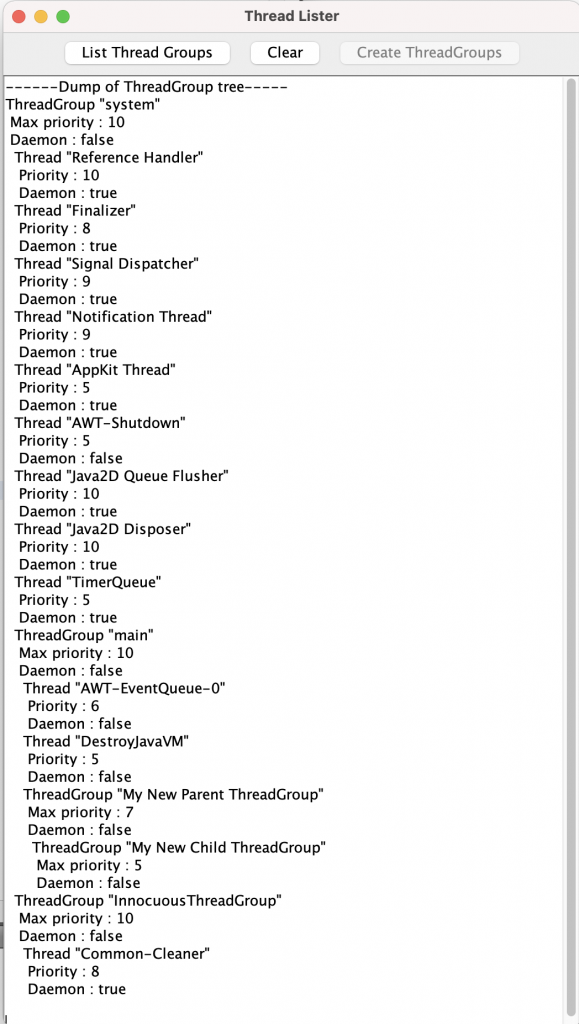
Here is a program that uses the above TestThreadGroup class to list all the ThreadGroups and their Threads:
package threads;

import java.awt.BorderLayout;
import java.awt.FlowLayout;
import java.awt.event.ActionEvent;
import java.awt.event.ActionListener;
import java.io.PrintWriter;
import java.io.StringWriter;
import java.util.Enumeration;
import java.util.EventObject;
import javax.swing.JButton;
import javax.swing.JFrame;
import javax.swing.JPanel;
import javax.swing.JScrollPane;
import javax.swing.JTextArea;

public class ThreadListerFrame extends JFrame
  implements ActionListener
{
  public static void main(String[] args)
  {
    ThreadListerFrame frame = new ThreadListerFrame();
    frame.setDefaultLookAndFeelDecorated(true);
    frame.setDefaultCloseOperation(EXIT_ON_CLOSE);
    frame.setTitle("Thread Lister");
    frame.setSize(300, 200);
    frame.setVisible(true);
  }

  public ThreadListerFrame()
  {
    m_dumpButton = new JButton("List Thread Groups");
    m_clearButton = new JButton("Clear");
    m_createButton = new JButton("Create ThreadGroups");
    setContentPane( createLayout() );
  }

  public void actionPerformed(ActionEvent e)
  {
    JButton source = (JButton)e.getSource();
    if (source == m_dumpButton)
      dumpData(false);
    else
    {
      if (source == m_clearButton)
        m_textarea.setText("");
      else if (source == m_createButton)
      {
        m_textarea.setText("");
        dumpData(true);
        m_createButton.setEnabled(false);
      }
    }
  }

  private void dumpData(boolean createGroups)
  {
    StringWriter sout = new StringWriter();
    PrintWriter out = new PrintWriter(sout);
    String s = "";
    if (createGroups)
      try
      {
        TestThreadGroup.createThreadGroups();
      }
      catch(Exception e)
      {
        out.println("***Caught exception: " + e + "\nUnable to create thread groups.");
      }
    try
    {
      s = TestThreadGroup.dumpThreadGroupTree();
    }
    catch(Exception e)
    {
      s = "***Caught exception: " + e + "\nUnable to dump thread group tree.";
    }
    out.print(s);
    out.println();

    out.flush();
    m_textarea.setText(sout.toString());
  }

  public JPanel createLayout()
  {
    JPanel contentPane = new JPanel();
    contentPane.setLayout( new BorderLayout() );
    m_textarea = new JTextArea();
    contentPane.add(new JScrollPane(m_textarea), BorderLayout.CENTER);

    JPanel buttonPanel = new JPanel();
    buttonPanel.setLayout( new FlowLayout() );
    contentPane.add(buttonPanel, BorderLayout.NORTH);

    m_dumpButton.addActionListener(this);
    buttonPanel.add(m_dumpButton);
    m_clearButton.addActionListener(this);
    buttonPanel.add(m_clearButton);
    m_createButton.addActionListener(this);
    buttonPanel.add(m_createButton);

    return contentPane;
  }

  // Private data members
  private JTextArea m_textarea;
  private JButton m_dumpButton;
  private JButton m_clearButton;
  private JButton m_createButton;
}ied]
which produces, on my machine:
Explicit Locks
Java 1.5 (aka Java 5) introduced additional classes to support more powerful use of locks for synchronization.
Here’s where we learn more about explicit locks…
Lock Objects
To quote from the javadoc pages for interface java.util.concurrent.locks.Lock :
A lock is a tool for controlling access to a shared resource by multiple threads. Commonly, a lock provides exclusive access to a shared resource: only one thread at a time can acquire the lock and all access to the shared resource requires that the lock be acquired first. However, some locks may allow concurrent access to a shared resource, such as the read lock of a
ReadWriteLock.
It goes on to describe how to use such locks:
In most cases, the following idiom should be used:
Lock theLock = ...;
theLock.lock();
try
{
  // access the resource protected by this lock
}
finally
{
  theLock.unlock();
}
This construct guarantees that only one thread at a time can enter the critical section — the section of code between the call to lock() and the call to unlock().
Note: It is critically important that the unlock() operation be placed in a finally block. If the code within the critical section were to throw an exception, the lock should still be unlocked. Without this correct placement of unlock(), other threads might be permanently blocked.
ReentrantLock
Class ReetrantLock (java.util.concurrent.locks.ReentrantLock) is a simple implementation of the Lock interface:
A ReentrantLock is owned by the thread last successfully locking, but not yet unlocking it. A thread invoking lock will return, successfully acquiring the lock, when the lock is not owned by another thread. The method will return immediately if the current thread already owns the lock. This can be checked using methods isHeldByCurrentThread(), and getHoldCount().
The constructor for this class accepts an optional fairness parameter. When set true, under contention, locks favor granting access to the longest-waiting thread. Otherwise this lock does not guarantee any particular access order. Programs using fair locks accessed by many threads may display lower overall throughput (i.e., are slower; often much slower) than those using the default setting, but have smaller variances in times to obtain locks and guarantee lack of starvation. Note however, that fairness of locks does not guarantee fairness of thread scheduling. Thus, one of many threads using a fair lock may obtain it multiple times in succession while other active threads are not progressing and not currently holding the lock. Also note that the untimed tryLock method does not honor the fairness setting. It will succeed if the lock is available even if other threads are waiting.
A ReentrantLock Example
Here’s an example of the use of a ReentrantLock as one solution to the Bank Account transfer deadlock situation:
package threads;

import java.util.concurrent.locks.Lock;
import java.util.concurrent.locks.ReentrantLock;

/**
 *  This class will use an explicit lock to avoid a deadlock situation.
 */
public class ExplicitLockAccountTransfer
{
  public static void main(String[] args)
  {
    Account a1 = new Account("Account 1", 10000);
    Account a2 = new Account("Account 2", 30000);
    System.out.println("Initial Balances:");
    System.out.println(" Account 1: " + a1.getBalance());
    System.out.println(" Account 2: " + a2.getBalance());
    System.out.println("Transferring 5 from Account 1 to Account 2");
    System.out.println("Transferring 20 from Account 2 to Account 1");
    Thread threadA =
        new TransferFundsThread("Thread A", a1, a2, 5);
    Thread threadB =
        new TransferFundsThread("Thread B", a2, a1, 20);
    threadA.start();
    threadB.start();
  }
}

class Account
{
  public Account(String name, int balance)
  {
    m_name = name;
    m_balance = balance;
  }

  public int getBalance()
  {
    return m_balance;
  }

  public void setBalance(int newBalance)
  {
    m_balance = newBalance;
  }

  public String getName()
  {
    return m_name;
  }

  private String m_name;
  private int    m_balance;
}

class TransferFundsThread extends Thread
{
  public TransferFundsThread(String name,
      Account from,
      Account to,
      int amount)
  {
    super(name);
    m_from   = from;
    m_to     = to;
    m_amount = amount;
  }

  public void run()
  {
    transferFunds();
  }

  /**
   *  In order to transfer funds safely, we need to be able
   *  to hold a lock on the single lock used to synchronize
   *  access to the transferFunds method.
   */
  private void transferFunds()
  {
    m_lock.lock();
    try
    {
      doTransfer();
    }
    finally
    {
      // Unlock the lock, regardless of whether
      // an exception occurred.
      m_lock.unlock();
    }
  }

  /**
   * Do the actual transfer of funds
   */
  private void doTransfer()
  {
    System.out.println(getName() +
        ": Getting balance from " +
        m_from.getName());
    int balance1 = m_from.getBalance();
    System.out.println(getName() +
        ": Balance from " +
        m_from.getName() +
        " = " + balance1);

    System.out.println(getName() +
        ": Getting balance from " +
        m_to.getName());
    int balance2 = m_to.getBalance();
    System.out.println(getName() +
        ": Balance from " +
        m_to.getName() +
        " = " + balance2);

    if (balance1 >= m_amount)
    {
      System.out.println(getName() +
          ": Withdrawing funds from " +
          m_from.getName());
      m_from.setBalance(balance1 - m_amount);
      System.out.println(getName() +
          ": Depositing funds into " +
          m_to.getName());
      m_to.setBalance(balance2 + m_amount);

      System.out.println(getName() +
          ": New balances are:\n" +
          "  " + m_from.getName() +
          " = " +
          m_from.getBalance() + "\n" +
          "  " + m_to.getName() + " = " +
          m_to.getBalance() );
    }
  }

  /// Private data ///
  private Account   m_from;
  private Account   m_to;
  private int       m_amount;
  private Lock      m_lock = new ReentrantLock();
}
Which, when run produces the following output:
Initial Balances:
 Account 1: 10000
 Account 2: 30000
Transferring 5 from Account 1 to Account 2
Transferring 20 from Account 2 to Account 1
Thread A: Getting balance from Account 1
Thread A: Balance from Account 1 = 10000
Thread A: Getting balance from Account 2
Thread A: Balance from Account 2 = 30000
Thread A: Withdrawing funds from Account 1
Thread A: Depositing funds into Account 2
Thread A: New balances are:
  Account 1 = 9995
  Account 2 = 30005
Thread B: Getting balance from Account 2
Thread B: Balance from Account 2 = 30005
Thread B: Getting balance from Account 1
Thread B: Balance from Account 1 = 9995
Thread B: Withdrawing funds from Account 2
Thread B: Depositing funds into Account 1
Thread B: New balances are:
  Account 2 = 29985
  Account 1 = 10015
Notice, however, that this essentially forces each thread to wait until the other thread has completely finished.
Finer Granularity
However, we are locking at a fairly coarse level.
We might want to move the locking to a finer granularity.
We can use the trylock() method:
boolean tryLock()
Acquires the lock only if it is free at the time of invocation.
Acquires the lock if it is available and returns immediately with the value true. If the lock is not available then this method will return immediately with the value false.
A typical usage idiom for this method would be:
      Lock lock = ...;
      if (lock.tryLock())
      {
          try
          {
              // manipulate protected state
          }
          finally
          {
              lock.unlock();
          }
      }
      else
      {
          // perform alternative actions
      }
This usage ensures that the lock is unlocked if it was acquired, and doesn’t try to unlock if the lock was not acquired.
Returns: true if the lock was acquired and false otherwise.
Here’s an example of how this might be done:
An Example
package threads;

import java.util.concurrent.TimeUnit;
import java.util.concurrent.locks.Lock;
import java.util.concurrent.locks.ReentrantLock;

/**
 *  This class will use an explicit lock to avoid a deadlock situation.
 */
public class ExplicitLockAccountTransfer
{
  public static void main(String[] args)
  {
    Account a1 = new Account("Account 1", 10000);
    Account a2 = new Account("Account 2", 30000);
    System.out.println("Initial Balances:");
    System.out.println(" Account 1: " + a1.getBalance());
    System.out.println(" Account 2: " + a2.getBalance());
    System.out.println("Transferring 5 from Account 1 to Account 2");
    System.out.println("Transferring 20 from Account 2 to Account 1");
    Thread threadA =
        new TransferFundsThread("Thread A", a1, a2, 5);
    Thread threadB =
        new TransferFundsThread("Thread B", a2, a1, 20);
    threadA.start();
    threadB.start();
  }
}

class Account
{
  public Account(String name, int balance)
  {
    m_name = name;
    m_balance = balance;
  }

  public int getBalance()
  {
    return m_balance;
  }

  public void setBalance(int newBalance)
  {
    m_balance = newBalance;
  }

  public String getName()
  {
    return m_name;
  }

  public Lock getLock()
  {
    return m_lock;
  }

  private String m_name;
  private int    m_balance;
  private Lock   m_lock = new ReentrantLock();
}

class TransferFundsThread extends Thread
{
  public TransferFundsThread(String name,
      Account from,
      Account to,
      int amount)
  {
    super(name);
    m_from   = from;
    m_to     = to;
    m_amount = amount;
  }

  public void run()
  {
    System.out.println("run: Transferring funds from " + m_from.getName() +
                       " to " + m_to.getName());
    transferFunds();
  }

  /**
   *  In order to transfer funds safely, we need to be able
   *  to hold a lock on the single lock used to synchronize
   *  access to the transferFunds method.
   */
  private void transferFunds()
  {
    while (true)
    {
      try
      {
        // Try to acquire the lock for the from account
        if ( m_from.getLock().tryLock(500, TimeUnit.MILLISECONDS) )
        {
          try
          {
            // Get the balance from the from account
            int balance = getBalance();

            // Try to acquire the lock for the to account
            if ( m_to.getLock().tryLock(500, TimeUnit.MILLISECONDS) )
            {
              try
              {
                doTransfer(balance);
              }
              finally
              {
                // Unlock the to lock, regardless of whether
                // an exception occurred.
                m_to.getLock().unlock();
              }
              // We succeeded, so break out of the for while loop.
              break;
            }
          }
          finally
          {
            // Unlock the from lock, regardless of whether
            // an exception occurred.
            m_from.getLock().unlock();
          }
        }
      }
      catch (InterruptedException ie)
      {
        // Do nothing; try again
      }
    }
  }

  /**
   * Get the balance from the to account
   */
  private int getBalance()
  {
    System.out.println(getName() +
        ": Getting balance from " +
        m_from.getName());
    int fromBalance = m_from.getBalance();
    System.out.println(getName() +
        ": Balance from " +
        m_from.getName() +
        " = " + fromBalance);
    return fromBalance;
  }

  /**
   * Do the actual transfer of funds
   */
  private void doTransfer(int fromBalance)
  {
    System.out.println(getName() +
        ": Getting balance from " +
        m_to.getName());
    int toBalance = m_to.getBalance();
    System.out.println(getName() +
        ": Balance from " +
        m_to.getName() +
        " = " + toBalance);

    if (fromBalance >= m_amount)
    {
      System.out.println(getName() +
          ": Withdrawing funds from " +
          m_from.getName());
      m_from.setBalance(fromBalance - m_amount);
      System.out.println(getName() +
          ": Depositing funds into " +
          m_to.getName());
      m_to.setBalance(toBalance + m_amount);

      System.out.println(getName() +
          ": New balances are:\n" +
          "  " + m_from.getName() +
          " = " +
          m_from.getBalance() + "\n" +
          "  " + m_to.getName() + " = " +
          m_to.getBalance() );
    }
  }

  /// Private data ///
  private Account   m_from;
  private Account   m_to;
  private int       m_amount;
}
Which, when run, produces the following output:
Initial Balances:
 Account 1: 10000
 Account 2: 30000
Transferring 5 from Account 1 to Account 2
Transferring 20 from Account 2 to Account 1
run: Transferring funds from Account 2 to Account 1
Thread B: Getting balance from Account 2
Thread B: Balance from Account 2 = 30000
Thread B: Getting balance from Account 1
Thread B: Balance from Account 1 = 10000
Thread B: Withdrawing funds from Account 2
Thread B: Depositing funds into Account 1
Thread B: New balances are:
  Account 2 = 29980
  Account 1 = 10020
run: Transferring funds from Account 1 to Account 2
Thread A: Getting balance from Account 1
Thread A: Balance from Account 1 = 10020
Thread A: Getting balance from Account 2
Thread A: Balance from Account 2 = 29980
Thread A: Withdrawing funds from Account 1
Thread A: Depositing funds into Account 2
Thread A: New balances are:
  Account 1 = 10015
  Account 2 = 29985
This still happens to cause the threads to be serialized, but shows the use of locks of smaller granularity.
Condition Objects
So what happens if the “from” account doesn’t have enough funds?
So far, we haven’t considered this possibility. Let’s now consider it.
If there are insufficient funds, we have two choices:
- Give up, and report the problem, never having transferred any funds, or
- Wait until there are sufficient funds, and then perform the transfer.
Let’s say we choose the latter.
This is a job for Condition Objects (a.k.a., for historical reasons, Condition Variables).
The Condition Interface
Here’s what the Condition interface javadoc says about itself:
Conditions (also known as condition queues or condition variables) provide a means for one thread to suspend execution (to “wait”) until notified by another thread that some state condition may now be true. Because access to this shared state information occurs in different threads, it must be protected, so a lock of some form is associated with the condition. The key property that waiting for a condition provides is that it atomically releases the associated lock and suspends the current thread, just like Object.wait.
A Condition instance is intrinsically bound to a lock. To obtain a Condition instance for a particular
Lockinstance use itsnewCondition()method.
await()
void await()
   throws InterruptedException
Causes the current thread to wait until it is signalled or interrupted.
The lock associated with this Condition is atomically released and the current thread becomes disabled for thread scheduling purposes and lies dormant until one of four things happens:
- Some other thread invokes the
signal()method for this Condition and the current thread happens to be chosen as the thread to be awakened; or - Some other thread invokes the
signalAll()method for this Condition; or - Some other thread
interruptsthe current thread, and interruption of thread suspension is supported; or - A “spurious wakeup” occurs
In all cases, before this method can return the current thread must re-acquire the lock associated with this condition. When the thread returns it is guaranteed to hold this lock.
If the current thread:
- has its interrupted status set on entry to this method; or
- is
interruptedwhile waiting and interruption of thread suspension is supported,
then InterruptedException is thrown and the current thread’s interrupted status is cleared. It is not specified, in the first case, whether or not the test for interruption occurs before the lock is released.
There are other await() methods with slightly different signatures, including the use of timeouts. See the Condition javadocs for more detail.
signal() & signalAll()
void signal()
Wakes up one waiting thread.
If any threads are waiting on this condition then one is selected for waking up. That thread must then re-acquire the lock before returning from await.
void signalAll()
Wakes up all waiting threads.
If any threads are waiting on this condition then they are all woken up. Each thread must re-acquire the lock before it can return from await.
An Example
Here’s an example of the use of condition objects:
package threads;

import java.util.concurrent.TimeUnit;
import java.util.concurrent.locks.Condition;
import java.util.concurrent.locks.Lock;
import java.util.concurrent.locks.ReentrantLock;

/**
 *  This class will use an explicit lock to avoid a deadlock situation.
 */
public class ExplicitLockAccountTransfer
{
  public static void main(String[] args)
  {
    Account a1 = new Account("Account 1", 10000);
    Account a2 = new Account("Account 2", 30000);
    Account a3 = new Account("Account 3", 5);
    System.out.println("Initial Balances:");
    System.out.println(" Account 1: " + a1.getBalance());
    System.out.println(" Account 2: " + a2.getBalance());
    System.out.println(" Account 3: " + a3.getBalance());
    System.out.println("Transferring 100 from Account 3 to Account 1");
    System.out.println("Transferring 5 from Account 1 to Account 2");
    System.out.println("Transferring 20 from Account 2 to Account 1");
    System.out.println("Transferring 500 from Account 2 to Account 3");
    Thread threadX =
        new TransferFundsThread("Thread X", a3, a1, 100);
    Thread threadA =
        new TransferFundsThread("Thread A", a1, a2, 5);
    Thread threadB =
        new TransferFundsThread("Thread B", a2, a1, 20);
    Thread threadY =
        new TransferFundsThread("Thread Y", a2, a3, 500);
    threadX.start();
    threadA.start();
    threadB.start();
    threadY.start();
  }
}

class Account
{
  public Account(String name, int balance)
  {
    m_name = name;
    m_balance = balance;
  }

  public int getBalance()
  {
    return m_balance;
  }

  public void setBalance(int newBalance)
  {
    m_balance = newBalance;
  }

  public String getName()
  {
    return m_name;
  }

  public Lock getLock()
  {
    return m_lock;
  }

  public void awaitSufficientFunds(int amount) throws InterruptedException
  {
    System.out.println(getName() + " awaiting sufficient funds for " + amount);
    m_sufficientFunds.await(500, TimeUnit.MILLISECONDS);
  }

  public void signalBalanceChanged()
  {
    m_sufficientFunds.signalAll();
  }

  private String    m_name;
  private int       m_balance;
  private Lock      m_lock = new ReentrantLock();
  private Condition m_sufficientFunds = m_lock.newCondition();
}

class TransferFundsThread extends Thread
{
  public TransferFundsThread(String name,
      Account from,
      Account to,
      int amount)
  {
    super(name);
    m_from   = from;
    m_to     = to;
    m_amount = amount;
  }

  public void run()
  {
    System.out.println("run: Transferring funds from " + m_from.getName() +
                       " to " + m_to.getName());
    transferFunds();
  }

  /**
   *  In order to transfer funds safely, we need to be able
   *  to hold a lock on the single lock used to synchronize
   *  access to the transferFunds method.
   */
  private void transferFunds()
  {
    while (true)
    {
      try
      {
        // Try to acquire the lock for the from account
        if ( m_from.getLock().tryLock(500, TimeUnit.MILLISECONDS) )
        {
          try
          {
            // See if there are sufficient funds in the from account
            while (getBalance() < m_amount)
            {
              m_from.awaitSufficientFunds(m_amount);
            }

            // Try to acquire the lock for the to account
            if ( m_to.getLock().tryLock(500, TimeUnit.MILLISECONDS) )
            {
              try
              {
                doTransfer( getBalance() );
              }
              finally
              {
                // Unlock the to lock, regardless of whether
                // an exception occurred.
                m_to.getLock().unlock();
              }
              // We succeeded, so break out of the for while loop.
              break;
            }
          }
          finally
          {
            // Unlock the from lock, regardless of whether
            // an exception occurred.
            m_from.getLock().unlock();
          }
        }
      }
      catch (InterruptedException ie)
      {
        // Do nothing; try again
      }
    }
  }

  /**
   * Get the balance from the to account
   */
  private int getBalance()
  {
    System.out.println(getName() +
        ": Getting balance from " +
        m_from.getName());
    System.out.println(getName() +
        ": Balance from " +
        m_from.getName() +
        " = " + m_from.getBalance());
    return m_from.getBalance();
  }

  /**
   * Do the actual transfer of funds
   */
  private void doTransfer(int fromBalance)
  {
    System.out.println(getName() +
        ": Getting balance from " +
        m_to.getName());
    int toBalance = m_to.getBalance();
    System.out.println(getName() +
        ": Balance from " +
        m_to.getName() +
        " = " + toBalance);

    if (fromBalance >= m_amount)
    {
      System.out.println(getName() +
          ": Withdrawing funds from " +
          m_from.getName());
      m_from.setBalance(fromBalance - m_amount);
      System.out.println(getName() +
          ": Depositing funds into " +
          m_to.getName());
      m_to.setBalance(toBalance + m_amount);

      // Indicate to any awaiters on the to account that the balance has changed.
      m_to.signalBalanceChanged();

      System.out.println(getName() +
          ": New balances are:\n" +
          "  " + m_from.getName() +
          " = " +
          m_from.getBalance() + "\n" +
          "  " + m_to.getName() + " = " +
          m_to.getBalance() );
    }
  }

  /// Private data ///
  private Account   m_from;
  private Account   m_to;
  private int       m_amount;
}
This, when run, produces the following output:
Initial Balances:
 Account 1: 10000
 Account 2: 30000
 Account 3: 5
Transferring 100 from Account 3 to Account 1
Transferring 5 from Account 1 to Account 2
Transferring 20 from Account 2 to Account 1
Transferring 500 from Account 2 to Account 3
run: Transferring funds from Account 3 to Account 1
Thread X: Getting balance from Account 3
Thread X: Balance from Account 3 = 5
Account 3 awaiting sufficient funds for 100
run: Transferring funds from Account 1 to Account 2
Thread A: Getting balance from Account 1
run: Transferring funds from Account 2 to Account 1
run: Transferring funds from Account 2 to Account 3
Thread A: Balance from Account 1 = 10000
Thread B: Getting balance from Account 2
Thread B: Balance from Account 2 = 30000
Thread X: Getting balance from Account 3
Thread X: Balance from Account 3 = 5
Account 3 awaiting sufficient funds for 100
Thread A: Getting balance from Account 1
Thread A: Balance from Account 1 = 10000
Thread B: Getting balance from Account 2
Thread B: Balance from Account 2 = 30000
Thread X: Getting balance from Account 3
Thread X: Balance from Account 3 = 5
Account 3 awaiting sufficient funds for 100
Thread B: Getting balance from Account 2
Thread B: Balance from Account 2 = 30000
Thread B: Getting balance from Account 1
Thread B: Balance from Account 1 = 10000
Thread B: Withdrawing funds from Account 2
Thread B: Depositing funds into Account 1
Thread B: New balances are:
  Account 2 = 29980
  Account 1 = 10020
Thread A: Getting balance from Account 1
Thread A: Balance from Account 1 = 10020
Thread A: Getting balance from Account 1
Thread A: Balance from Account 1 = 10020
Thread A: Getting balance from Account 2
Thread A: Balance from Account 2 = 29980
Thread A: Withdrawing funds from Account 1
Thread A: Depositing funds into Account 2
Thread A: New balances are:
  Account 1 = 10015
  Account 2 = 29985
Thread Y: Getting balance from Account 2
Thread Y: Balance from Account 2 = 29985
Thread Y: Getting balance from Account 2
Thread Y: Balance from Account 2 = 29985
Thread Y: Getting balance from Account 3
Thread Y: Balance from Account 3 = 5
Thread Y: Withdrawing funds from Account 2
Thread Y: Depositing funds into Account 3
Thread Y: New balances are:
  Account 2 = 29485
  Account 3 = 505
Thread X: Getting balance from Account 3
Thread X: Balance from Account 3 = 505
Thread X: Getting balance from Account 3
Thread X: Balance from Account 3 = 505
Thread X: Getting balance from Account 1
Thread X: Balance from Account 1 = 10015
Thread X: Withdrawing funds from Account 3
Thread X: Depositing funds into Account 1
Thread X: New balances are:
  Account 3 = 405
  Account 1 = 10115
Explicit Locks vs. synchronized
How do explicit locks compare with the use of the synchronized keyword? Here is a comparison:
Synchronized Instance Methods
A synchronized instance method such as:
public synchronized void transfer()
{
  // perform transfer
}
is equivalent to:
public void transfer()
{
  this.intrinsicLock.lock();
  try
  {
    // perform transfer
  }
  finally
  {
    this.intrinsicLock.unlock();
  }
}
where the intrinsicLock is the lock intrinsically associated with the object instance for that method.
Synchronized Class Methods
A synchronized class (static) method is similar to the above, except that the intrinsic lock is the one associated with the class’s associated class object.
The wait() Method
A call to the wait() method is equivalent to:
intrinsicCondition.await();
The notifyAll() Method
A call to the notifyAll() method is equivalent to:
intrinsicCondition.signalAll();
Pros and Cons
Using the synchronized mechanism tends to be much more concise.
Using explicit locks and conditions is much more flexible. For example, using synchronized is subject to the following restrictions:
- You cannot interrupt a thread that is trying to acquire a lock
- You cannot specify a timeout when trying to acquire a lock
- Having a single condition per lock can be less than ideal.
Read/Write Locks
Another kind of lock provided by Java 5 and beyond is a ReadWriteLock. This is an interface (java.util.concurrent.locks.ReadWriteLock), which describes itself thusly:
A ReadWriteLock maintains a pair of associated
locks, one for read-only operations and one for writing. Theread lockmay be held simultaneously by multiple reader threads, so long as there are no writers. Thewrite lockis exclusive.
All ReadWriteLock implementations must guarantee that the memory synchronization effects of writeLock operations (as specified in the
Lockinterface) also hold with respect to the associated readLock. That is, a thread successfully acquiring the read lock will see all updates made upon previous release of the write lock.
A read-write lock allows for a greater level of concurrency in accessing shared data than that permitted by a mutual exclusion lock. It exploits the fact that while only a single thread at a time (a writer thread) can modify the shared data, in many cases any number of threads can concurrently read the data (hence reader threads). In theory, the increase in concurrency permitted by the use of a read-write lock will lead to performance improvements over the use of a mutual exclusion lock. In practice this increase in concurrency will only be fully realized on a multi-processor, and then only if the access patterns for the shared data are suitable.
Whether or not a read-write lock will improve performance over the use of a mutual exclusion lock depends on the frequency that the data is read compared to being modified, the duration of the read and write operations, and the contention for the data – that is, the number of threads that will try to read or write the data at the same time. For example, a collection that is initially populated with data and thereafter infrequently modified, while being frequently searched (such as a directory of some kind) is an ideal candidate for the use of a read-write lock. However, if updates become frequent then the data spends most of its time being exclusively locked and there is little, if any increase in concurrency. Further, if the read operations are too short the overhead of the read-write lock implementation (which is inherently more complex than a mutual exclusion lock) can dominate the execution cost, particularly as many read-write lock implementations still serialize all threads through a small section of code. Ultimately, only profiling and measurement will establish whether the use of a read-write lock is suitable for your application.
ReentrantReadWriteLock
The ReadWriteLock interface defines the following methods:
| Method | Description |
|---|---|
Lock readLock() | Returns the lock used for reading. |
Lock writeLock() | Returns the lock used for writing. |
Java provides an implementation of ReadWriteLock, java.util.concurrent.locks.ReentrantReadWriteLock, whose API javadocs you can find here.
An Example
Here’s an example of how you might use this feature:
package threads;

import java.util.Map;
import java.util.TreeMap;
import java.util.concurrent.locks.Lock;
import java.util.concurrent.locks.ReentrantReadWriteLock;

/**
 * A Dictionary class that uses a ReentrantReadWriteLock to provide
 * convenient and controlled reader and writer synchronized access.
 *
 * (Follows the example in the ReentrantReadWriteLock class javadocs.)
 *
 */
public class ReadWriteDictionary
{
  public Data get(String key)
  {
    readLock.lock();
    try
    {
      return theMap.get(key);
    }
    finally
    {
      readLock.unlock();
    }
  }

  public String[] allKeys()
  {
    readLock.lock();
    try
    {
      return (String[]) theMap.keySet().toArray();
    }
    finally
    {
      readLock.unlock();
    }
  }

  public Data put(String key, Data value)
  {
    writeLock.lock();
    try
    {
      return theMap.put(key, value);
    }
    finally
    {
      writeLock.unlock();
    }
  }

  public void clear()
  {
    writeLock.lock();
    try
    {
      theMap.clear();
    }
    finally
    {
      writeLock.unlock();
    }
  }

  ////// Private data /////
  private final Map<String, Data> theMap = new TreeMap<String, Data>();
  private final ReentrantReadWriteLock rwl = new ReentrantReadWriteLock();
  private final Lock readLock = rwl.readLock();
  private final Lock writeLock = rwl.writeLock();
}
package threads;

/**
 * Dummy Data class for ReadWriteDictionary.
 */
public class Data
{
  /**
   * Creates a new instance of Data
   */
  public Data()
  {
  }

  // ...
}
Note how the methods that read data from the dictionary are protected by the read lock, while methods that implement changes to the dictionary are protected by the write lock. The ReentrantReadWriteLock class provides the necessary coordination.
Atomic Variables
Java 5 also introduced a package, java.util.concurrent.atomic, that contains some useful classes that support lock-free thread-safe programming on single variables.
Here is the javadoc for this package. It lists the classes and some documentation thereof.
It’s worthy of some inspection.
Blocking Queues
A common need, when dealing with multiple threads, is for a thread-safe coordinated queue into which you can place items of work, and from which a pool of threads can pick up those items of work and process them.
This is such a common need that Java 5 (and beyond) now provides such a set of queues.
All these queues implement the interface java.util.concurrent.BlockingQueue, or java.util.concurrent.BlockingDeque (for a double-ended queue version).
The queues implemented in the package java.util.concurrent include:
ArrayBlockingQueue— A bounded blocking queue backed by an array.LinkedBlockingQueue— An optionally-bounded blocking queue based on linked nodes.LinkedBlockingDeque— An optionally-bounded blocking deque based on linked nodes.PriorityBlockingQueue— An unbounded blocking queue that uses the same ordering rules as classPriorityQueueand supplies blocking retrieval operations.DelayQueue— An unbounded blocking queue of Delayed elements, in which an element can only be taken when its delay has expired.
An Example
Here’s an example of the use of a blocking queue, modified from Core Java, Vol 1, Fundamentals.
It uses a blocking queue to coordinate communications between a FileEnumerationTask, and a set of threads each running a SearchFileTask, in order to find instances of a specified keyword in all the .java files within a specified directory and its subdirectories.
package threads;

import java.io.File;
import java.io.FileFilter;
import java.util.concurrent.BlockingQueue;

/**
 * Class to enumerate all files in a directory and its subdirectories.
 */
public class FileEnumerationTask implements Runnable
{
  /**
   * A sentinel to indicate to the worker thread that there is
   * no more work to do.
   */
  public static final File END_WORK = new File("");

  /**
   * Creates a new instance of FileEnumerationTask
   *
   * @param queue the blocking queue to which the enumerated files are added
   * @param startAt the directory in which to start the enumeration
   */
  public FileEnumerationTask(BlockingQueue<File> queue, File startAt)
  {
    m_queue = queue;
    m_startingDirectory = startAt;
  }

  /**
   * The method that does the work of the thread.
   */
  public void run()
  {
    try
    {
      enumerate(m_startingDirectory);
      m_queue.put(END_WORK);  // Flag/sentinel
    }
    catch (InterruptedException ie)
    {
      // Do nothing
    }
  }

  /**
   * Method to recursively enumerate all the files in a given
   * directory and its subdirectories
   *
   * @param directory the directory in which to start.
   */
  private void enumerate(File directory) throws InterruptedException
  {
    // For simplicity, restrict our interest in .java files only
    File[] files = directory.listFiles( new FileFilter()
      {
        public boolean accept(File file)
        {
          return file.isDirectory() || file.getName().endsWith(".java");
        }
      }
    );
    for (File file : files)
    {
      if (file.isDirectory())
        enumerate(file);
      else
        m_queue.put(file);
    }
  }

  ///// Private data /////
  private BlockingQueue<File> m_queue;
  private File m_startingDirectory;
}
package threads;

import java.io.File;
import java.io.FileReader;
import java.io.IOException;
import java.util.Scanner;
import java.util.concurrent.BlockingQueue;

/**
 * Class to search a file for a specified keyword.
 */
public class SearchFileTask implements Runnable
{
  /**
   * Creates a new instance of SearchFileTask
   *
   * @param queue the queue from which to take files
   * @param keyword the keyword to search for
   */
  public SearchFileTask(BlockingQueue<File> queue, String keyword)
  {
    m_queue = queue;
    m_keyword = keyword;
  }

  /**
   * The method that does the work for the thread
   */
  public void run()
  {
    try
    {
      boolean done = false;
      while (!done)
      {
        File file = m_queue.take();
        if (file == FileEnumerationTask.END_WORK)
        {
          m_queue.put(file);
          done = true;
        }
        else
        {
          search(file);
        }
      }
    }
    catch (IOException ioe)
    {
      ioe.printStackTrace();
    }
    catch (InterruptedException ie)
    {
      // Do nothing
    }
  }

  /**
   * Searchs a file for a given keyword, and prints all matching lines.
   *
   * @param file the file to search
   */
  private void search(File file) throws IOException
  {
    Scanner in = null;
    try
    {
      in = new Scanner(new FileReader(file));
      int lineNumber = 0;
      while (in.hasNextLine())
      {
        lineNumber++;
        String line = in.nextLine();
        if (line.contains(m_keyword))
        {
          System.out.printf("%s [%d] : %s\n",
            file.getPath(), lineNumber, line);
        }
      }
    }
    finally
    {
      in.close();
    }
  }

  //// Private data /////
  private BlockingQueue<File> m_queue;
  private String m_keyword;
}
package threads;

import java.io.File;
import java.util.Scanner;
import java.util.concurrent.ArrayBlockingQueue;
import java.util.concurrent.BlockingQueue;

/**
 * Class to demonstrate the use of a BlockingQueue
 */
public class BlockingQueueDemo
{
  /**
   * Main entry point
   */
  public static void main(String[] args)
  {
    Scanner in = new Scanner(System.in);
    System.out.print("Enter starting directory: ");
    String directory = in.nextLine();
    System.out.print("Enter keyword to search for: ");
    String keyword = in.nextLine();

    final int FILE_QUEUE_SIZE = 10;
    final int SEARCH_THREADS = 100;

    BlockingQueue<File> queue = new ArrayBlockingQueue<File>(FILE_QUEUE_SIZE);

    FileEnumerationTask enumerator = new FileEnumerationTask(queue, new File(directory));
    new Thread(enumerator).start();

    for (int i = 1; i <= SEARCH_THREADS; i++)
    {
      new Thread( new SearchFileTask(queue, keyword) ).start();
    }
  }
}
Here’s an example of the output of this program (we searched for the keyword for):
...\Threads\src\threads\CountDownProgress.java [5] :  * for the CountDownThread.
...\Threads\src\threads\CountDownThreadTester.java [17] :     for (int i = 1; i <= threadCount; i++)
...\Threads\src\threads\BlockingQueueDemo.java [21] :     System.out.print("Enter keyword to search for: ");
...\Threads\src\threads\CountDownRunnable.java [20] :       for (int i = m_countDown; i >= 0; i--)
...\Threads\src\threads\Data.java [4] :  * Dummy Data class for ReadWriteDictionary.
...\Threads\src\threads\CountDownRunnableTester.java [17] :     for (int i = 1; i <= threadCount; i++)
...\Threads\src\threads\FindFactors.java [13] :     // one for each RANGE of divisors to test for.
...\Threads\src\threads\LanguageBigots.java [19] :         for (int i = 0; i < 5; i++)
...\Threads\src\threads\ClockApplet.java [70] :               m_timeLabel.setText(dateFormatter.format(date));
...\Threads\src\threads\SearchFileTask.java [10] :  * Class to search a file for a specified keyword.
...\Threads\src\threads\Producer.java [45] :       // Loop, asking for input from the user until EOF
...\Threads\src\threads\ExplicitLockAccountTransfer3.java [71] :     System.out.println(getName() + " awaiting sufficient funds for " + amount);
...\Threads\src\threads\TestThreadGroup.java [54] :     for (int i = 0; i < 10000; i++)
...\Threads\src\threads\CountDownThread.java [23] :         sleep(1000);    // Sleep for 1 second
...\Threads\src\threads\ThreadListerApplet.java [29] :   public void actionPerformed(ActionEvent e)
...\Threads\src\unsynchronized\SteamBoiler.java [16] :     for (int burner = 0; burner < BURNER_COUNT; burner++)
...\Threads\src\threads\FileEnumerationTask.java [63] :     for (File file : files)
...\Threads\src\threads\ExplicitLockAccountTransfer2.java [94] :         // Try to acquire the lock for the from account
...\Threads\src\threads\SteamBoilerApplet.java [55] :       public void actionPerformed(ActionEvent event)
...\Threads\src\threads\PipedProducer.java [53] :       // Loop, asking for input from the user until EOF
...\Threads\src\threads\SteamBoiler.java [16] :     for (int burner = 0; burner < BURNER_COUNT; burner++)
...\Threads\src\threads\BlockingQueueDemo.java [32] :     for (int i = 1; i <= SEARCH_THREADS; i++)
...\Threads\src\unsynchronized\SteamBoilerApplet.java [56] :       public void actionPerformed(ActionEvent event)
...\Threads\src\threads\CountDownRunnable.java [22] :         Thread.sleep(1000);    // Sleep for 1 second
...\Threads\src\threads\FindFactors.java [17] :     for (int thread = 0; thread < threadCount; thread++)
...\Threads\src\threads\SearchFileTask.java [18] :    * @param keyword the keyword to search for
...\Threads\src\threads\Producer.java [68] :  *  This is a Consumer thread that waits for input from
...\Threads\src\threads\ExplicitLockAccountTransfer3.java [117] :         // Try to acquire the lock for the from account
...\Threads\src\threads\TestThreadGroup.java [85] :     for (int i = 0; i < m_indent; i++)
...\Threads\src\threads\ThreadListerApplet.java [75] :     for(Enumeration e = appContext.getApplets();
...\Threads\src\unsynchronized\SteamBoiler.java [41] :     for (int burner = 0; burner < BURNER_COUNT; burner++)
...\Threads\src\threads\ExplicitLockAccountTransfer2.java [102] :             // Try to acquire the lock for the to account
...\Threads\src\threads\SteamBoilerApplet.java [70] :       public void actionPerformed(ActionEvent event)
...\Threads\src\threads\PipedProducer.java [76] :  *  This is a PipedConsumer thread that waits for input from
...\Threads\src\threads\SteamBoiler.java [41] :     for (int burner = 0; burner < BURNER_COUNT; burner++)
...\Threads\src\unsynchronized\SteamBoilerApplet.java [71] :       public void actionPerformed(ActionEvent event)
...\Threads\src\threads\FindFactors.java [46] :     for (long div = m_from; div <= m_to && div < m_number; div++)
...\Threads\src\threads\SearchFileTask.java [27] :    * The method that does the work for the thread
...\Threads\src\threads\ExplicitLockAccountTransfer3.java [128] :             // Try to acquire the lock for the to account
...\Threads\src\threads\TestThreadGroup.java [97] :     for (int i = 0; i < threads.length; i++)
...\Threads\src\unsynchronized\SteamBoiler.java [45] :         burners[burner].join();     // Wait for thread to finish
...\Threads\src\threads\ExplicitLockAccountTransfer2.java [115] :               // We succeeded, so break out of the for while loop.
...\Threads\src\threads\SteamBoiler.java [45] :         burners[burner].join();     // Wait for thread to finish
...\Threads\src\threads\SearchFileTask.java [59] :    * Searchs a file for a given keyword, and prints all matching lines.
...\Threads\src\threads\ExplicitLockAccountTransfer3.java [141] :               // We succeeded, so break out of the for while loop.
...\Threads\src\threads\TestThreadGroup.java [111] :     for (int i = 0; i < threadGroups.length; i++)
...\Threads\src\threads\TestThreadGroup.java [128] :     for (int i = 0; i < m_indent; i++)
(Note that the ...\ represents uninteresting, machine-specific path information.)
Thread-Safe Collections
In addition to the BlockingQueue interface, Java 5 also added new collection classes (concurrent collections), including the Queue interface, as well as high-performance concurrent implementations of Map, List, and Queue.
Specifically:
ConcurrentMapinterface — AMapproviding additional atomic putIfAbsent, remove, and replace methods.ConcurrentNavigableMapinterface — AConcurrentMapsupportingNavigableMapoperations, and recursively so for its navigable sub-maps.ConcurrentHashMap— A hash table supporting full concurrency of retrievals and adjustable expected concurrency for updates.ConcurrentLinkedQueue— An unbounded thread-safe queue based on linked nodes.ConcurrentSkipListMap— A scalable concurrentConcurrentNavigableMapimplementation.ConcurrentSkipListSet— A scalable concurrentNavigableSetimplementation based on aConcurrentSkipListMap.
Also, there are copy-on-write thread-safe collections:
CopyOnWriteArrayList— A thread-safe variant ofArrayListin which all mutative operations (add, set, and so on) are implemented by making a fresh copy of the underlying array.CopyOnWriteArraySet— ASetthat uses an internalCopyOnWriteArrayListfor all of its operations.
Callables & Futures
The Limitations of Runnable
The Runnable interface looks like this (minus comments, etc.):
public interface Runnable
{
    public void run();
}
which means that it has some limitations:
- you can pass no parameters to the thread
- the thread cannot return a value
- the thread may not throw a checked exception.
The Callable Interface
The Callable interface addresses two of these limitations: it can return a value, and it may throw a checked exception. Because the value being returned must have a type, Callable is a parameterized type:
public interface Callable<V>
{
    V call() throws Exception
}
The Future Interface
The Future interface holds the result of an asynchronous operation. You can start a computation, and then pass on the Future object representing the eventual result of that computation. The code that you pass it on to can determine when the computation has done, and the obtain the result without further assistance from you.
Here are the methods declared in the Future interface
| Return type | Method |
|---|---|
boolean | cancel(boolean mayInterruptIfRunning)Attempts to cancel execution of this task. |
V | get()Waits if necessary for the computation to complete, and then retrieves its result. |
V | get(long timeout, TimeUnit unit)Waits if necessary for at most the given time for the computation to complete, and then retrieves its result, if available. |
boolean | isCancelled()Returns true if this task was cancelled before it completed normally. |
boolean | isDone()Returns true if this task completed. |
FutureTask
The FutureTask class implements a cancellable asynchronous computation. This class provides a base implementation of Future, with methods to start and cancel a computation, query to see if the computation is complete, and retrieve the result of the computation. The result can only be retrieved when the computation has completed; the get method will block if the computation has not yet completed. Once the computation has completed, the computation cannot be restarted or cancelled.
The FutureTask class has the following constructors:
FutureTask(Callable<V> callable)Creates a FutureTask that will upon running, execute the given Callable. |
FutureTask(Runnable runnable, V result)Creates a FutureTask that will upon running, execute the given Runnable, and arrange that get will return the given result on successful completion. |
which means that a FutureTask can be used to wrap a Callable or Runnable object. Because FutureTask implements Runnable, it can be supplied to a Thread instance to run within a thread.
In addition to implementing the methods specified in the Future interface, the FutureTask class implements the following methods:
protected void | done()Protected method invoked when this task transitions to state isDone (whether normally or via cancellation). |
void | run()Sets this Future to the result of its computation unless it has been cancelled. |
protected boolean | runAndReset()Executes the computation without setting its result, and then resets this Future to initial state, failing to do so if the computation encounters an exception or is cancelled. |
protected void | set(V v)Sets the result of this Future to the given value unless this future has already been set or has been cancelled. |
protected void | setException(Throwable t)Causes this future to report an ExecutionException with the given throwable as its cause, unless this Future has already been set or has been cancelled. |
An Example
Here’s an example of the use of Callable, Future, and FutureTask.
This example (modified from an example in Core Java, Vol. 1, Fundamentals) is similar to the earlier BlockingQueueDemo example, except that it counts the number of files that contain a specified keyword.
package threads;

import java.io.File;
import java.io.FileFilter;
import java.io.FileReader;
import java.io.IOException;
import java.util.ArrayList;
import java.util.Scanner;
import java.util.concurrent.Callable;
import java.util.concurrent.ExecutionException;
import java.util.concurrent.Future;
import java.util.concurrent.FutureTask;

/**
 * A class to represent a Callable value that returns the count
 * of files in a directory and its subdirectories that contain
 * a specified keyword.
 */
public class MatchCounter implements Callable<Integer>
{
  /**
   * Main entry point
   */
  public static void main(String[] args)
  {
    Scanner in = new Scanner(System.in);
    System.out.print("Starting directory? ");
    String directory = in.nextLine();
    System.out.print("Keyword? ");
    String keyword = in.nextLine();
    MatchCounter counter = new MatchCounter(new File(directory), keyword);
    FutureTask<Integer> task = new FutureTask<Integer>(counter);
    Thread thread = new Thread(task);
    thread.start();
    try
    {
      System.out.println( task.get() + " files contained '" + keyword + "'");
    }
    catch (ExecutionException ee)
    {
      ee.printStackTrace();
    }
    catch (InterruptedException ie)
    {
      System.err.println("Execution interrupted");
    }
  }

  /**
   * Creates a new instance of MatchCounter.
   *
   * @param directory the directory in which to start the search
   * @param keyword the keyword to search for.
   */
  public MatchCounter(File directory, String keyword)
  {
    m_directory = directory;
    m_keyword = keyword;
  }

  /**
   * Implements the required Callable method
   */
  public Integer call()
  {
    m_count = 0;
    try
    {
      // Get list of files in current directory that match the file filter
      File[] files = m_directory.listFiles( new FileFilter()
        {
          public boolean accept(File file)
          {
            return file.isDirectory() || file.getName().endsWith(".java");
          }
        }
      );

      // Create a results array
      ArrayList<Future<Integer>> results = new ArrayList<Future<Integer>>();

      // Go through the files, doing a recursive and multi-threaded search.
      for (File file : files)
      {
        if (file.isDirectory())
        {
          // Use another MatchCounter and another thread to search
          // this directory.
          MatchCounter counter = new MatchCounter(file, m_keyword);
          FutureTask<Integer> task = new FutureTask<Integer>(counter);
          results.add(task);
          Thread thread = new Thread(task);
          thread.start();
        }
        else
        {
          if (search(file))
            m_count++;
        }
      }

      // Go through the Future results and accumulate the counts
      for (Future<Integer> result : results)
      {
        try
        {
          m_count += result.get(); // Blocks until result available
        }
        catch (ExecutionException ee)
        {
          ee.printStackTrace();
        }
      }
    }
    catch (InterruptedException ie)
    {
      // Ignore
    }
    return m_count;
  }

  /**
   * Searches the specified file for a given keyword.
   *
   * @param file the file to search
   * @return true if the keyword was found in the file.
   */
  private boolean search(File file)
  {
    Scanner in = null;
    boolean found = false;
    try
    {
      in = new Scanner( new FileReader(file) );
      while (!found && in.hasNextLine())
      {
        String line = in.nextLine();
        if (line.contains(m_keyword))
          found = true;
      }
    }
    catch (IOException ioe)
    {
      // Do nothing (results in found being returned false)
    }
    finally
    {
      if (in != null)
        in.close();
    }
    return found;
  }

  //////// Private data //////////
  private File m_directory;
  private String m_keyword;
  private int m_count;
}
When this program was run on my NetBeans Threads project’s src directory, specifying ‘thread’ as the keyword to search for, it produced the following output:
26 files contained 'thread'
The Executor Framework
So far, we have created our threads by hand. However, it is common for applications to need a potentially large number of threads, and managing all those threads efficiently is not an easy task.
Instead, it is now recommended that you use a set of interfaces and classes known as the Executor Framework to manage a group of threads known as a thread pool.
A particularly important part of this thread management is to provide support for ‘throttling’ the number of concurrent threads. The idea is to provide a facility for limiting the number of threads and instead try to reuse those threads for the requested work.
The java.util.concurrent package provides a number of interfaces and classes designed for this purpose.
The Executor Interface
A class that implements the Executor interface is an object that executes submitted Runnable tasks. This interface provides a way of decoupling task submission from the mechanics of how each task will be run, including details of thread use, scheduling, etc.
An Executor object is designed to replace the standard approach to starting a thread with its own style. If r is a Runnable object, and e is an Executor object you can replace
(new Thread(r)).start();
with
e.execute(r);
Here is the single method that the Executor interface specifies:
void execute(Runnable command)
Executes the given command at some time in the future. The command may execute in a new thread, in a pooled thread, or in the calling thread, at the discretion of the Executor implementation.
Parameters:
command – the runnable task
Throws:
RejectedExecutionException – if this task cannot be accepted for execution.
NullPointerException – if command is null
ScheduledExecutorService
The ScheduledExecutorService interface supplements the methods of its parent ExecutorService with schedule, which executes a Runnable or Callable task after a specified delay. In addition, the interface defines scheduleAtFixedRate and scheduleWithFixedDelay, which executes specified tasks repeatedly, at defined intervals.
More details may be found here.
The Executors Class
The Executors class provides factory and utility methods for Executor, ExecutorService, ScheduledExecutorService, ThreadFactory, and Callable classes
Each of the thread pool factory methods returns a thread pool with particular characteristics:
static ExecutorService | newCachedThreadPool()Creates a thread pool that creates new threads as needed, but will reuse previously constructed threads when they are available. |
static ExecutorService | newCachedThreadPool(ThreadFactory threadFactory)Creates a thread pool that creates new threads as needed, but will reuse previously constructed threads when they are available, and uses the provided ThreadFactory to create new threads when needed. |
static ExecutorService | newFixedThreadPool(int nThreads)Creates a thread pool that reuses a fixed number of threads operating off a shared unbounded queue. |
static ExecutorService | newFixedThreadPool(int nThreads, ThreadFactory threadFactory)Creates a thread pool that reuses a fixed number of threads operating off a shared unbounded queue, using the provided ThreadFactory to create new threads when needed. |
static ScheduledExecutorService | newScheduledThreadPool(int corePoolSize)Creates a thread pool that can schedule commands to run after a given delay, or to execute periodically. |
static ScheduledExecutorService | newScheduledThreadPool(int corePoolSize, ThreadFactory threadFactory)Creates a thread pool that can schedule commands to run after a given delay, or to execute periodically. |
static ExecutorService | newSingleThreadExecutor()Creates an Executor that uses a single worker thread operating off an unbounded queue. |
static ExecutorService | newSingleThreadExecutor(ThreadFactory threadFactory)Creates an Executor that uses a single worker thread operating off an unbounded queue, and uses the provided ThreadFactory to create a new thread when needed. |
static ScheduledExecutorService | newSingleThreadScheduledExecutor()Creates a single-threaded executor that can schedule commands to run after a given delay, or to execute periodically. |
static ScheduledExecutorService | newSingleThreadScheduledExecutor(ThreadFactory threadFactory)Creates a single-threaded executor that can schedule commands to run after a given delay, or to execute periodically. |
An Example
Here’s an example of the use of these interfaces and classes.
We’ve changed the previous MatchCounter example to use these features, and called it MatchCounterPoolDemo:
package threads;

import java.io.File;
import java.io.FileFilter;
import java.io.FileReader;
import java.io.IOException;
import java.util.ArrayList;
import java.util.Scanner;
import java.util.concurrent.Callable;
import java.util.concurrent.ExecutionException;
import java.util.concurrent.Executor;
import java.util.concurrent.ExecutorService;
import java.util.concurrent.Executors;
import java.util.concurrent.Future;
import java.util.concurrent.ThreadPoolExecutor;

/**
 * A class to represent a Callable value that returns the count
 * of files in a directory and its subdirectories that contain
 * a specified keyword.
 */
public class MatchCounterPoolDemo implements Callable<Integer>
{
  /**
   * Main entry point
   */
  public static void main(String[] args)
  {
    Scanner in = new Scanner(System.in);
    System.out.print("Starting directory? ");
    String directory = in.nextLine();
    System.out.print("Keyword? ");
    String keyword = in.nextLine();

    ExecutorService pool = Executors.newCachedThreadPool();

    MatchCounterPoolDemo counter =
                    new MatchCounterPoolDemo(new File(directory), keyword, pool);
    Future<Integer> result = pool.submit(counter);

    try
    {
      System.out.println( result.get() + " files contained '" + keyword + "'");
    }
    catch (ExecutionException ee)
    {
      ee.printStackTrace();
    }
    catch (InterruptedException ie)
    {
      System.err.println("Execution interrupted");
    }

    pool.shutdown();

    int largestPoolSize = ((ThreadPoolExecutor) pool).getLargestPoolSize();
    System.out.println("Largest pool size: " + largestPoolSize);
  }

  /**
   * Creates a new instance of MatchCounterPoolDemo.
   *
   * @param directory the directory in which to start the search
   * @param keyword the keyword to search for.
   * @param pool the thread pool to use.
   */
  public MatchCounterPoolDemo(File directory, String keyword, ExecutorService pool)
  {
    m_directory = directory;
    m_keyword = keyword;
    m_pool = pool;
  }

  /**
   * Implements the required Callable method
   */
  public Integer call()
  {
    m_count = 0;
    try
    {
      // Get list of files in current directory that match the file filter
      File[] files = m_directory.listFiles( new FileFilter()
        {
          public boolean accept(File file)
          {
            return file.isDirectory() || file.getName().endsWith(".java");
          }
        }
      );

      // Create a results array
      ArrayList<Future<Integer>> results = new ArrayList<Future<Integer>>();

      // Go through the files, doing a recursive and multi-threaded search.
      for (File file : files)
      {
        if (file.isDirectory())
        {
          // Use another MatchCounterPoolDemo and another thread to search
          // this directory.
          MatchCounterPoolDemo counter =
                            new MatchCounterPoolDemo(file, m_keyword, m_pool);
          Future<Integer> result = m_pool.submit(counter);
          results.add(result);
        }
        else
        {
          if (search(file))
            m_count++;
        }
      }

      // Go through the Future results and accumulate the counts
      for (Future<Integer> result : results)
      {
        try
        {
          m_count += result.get(); // Blocks until result available
        }
        catch (ExecutionException ee)
        {
          ee.printStackTrace();
        }
      }
    }
    catch (InterruptedException ie)
    {
      // Ignore
    }
    return m_count;
  }

  /**
   * Searches the specified file for a given keyword.
   *
   * @param file the file to search
   * @return true if the keyword was found in the file.
   */
  private boolean search(File file)
  {
    Scanner in = null;
    boolean found = false;
    try
    {
      in = new Scanner( new FileReader(file) );
      while (!found && in.hasNextLine())
      {
        String line = in.nextLine();
        if (line.contains(m_keyword))
          found = true;
      }
    }
    catch (IOException ioe)
    {
      // Do nothing (results in found being returned false)
    }
    finally
    {
      if (in != null)
        in.close();
    }
    return found;
  }

  //////// Private data //////////
  private File m_directory;
  private String m_keyword;
  private ExecutorService m_pool;
  private int m_count;
}
which produces, under similar conditions to the previous one:
27 files contained 'thread'
Largest pool size: 3
(I added one file since the last output.)
Synchronizers
The java.util.concurrent package supports synchronizers, general purpose synchronization classes that facilitate coordination between threads.
These include:
Semaphore: A semaphore is a classic concurrency control construct. It is basically a lock with an attached counter. Similar to the Lock interface, it can be used to prevent access if the lock is granted. The Semaphore class keeps track of a set of permits. Each acquire() blocks if necessary until a permit is available, and then takes it. Each release() adds a permit. Note that no actual permit objects are used, the Semaphore maintains a count of the number available and acts accordingly. A semaphore with a counter of one can serve as a mutual exclusion lock.
Barrier: This is a synchronization aid that allows a set of threads to all wait for each other to reach a common barrier point. The interface to the barrier is the CyclicBarrier class, called cyclic because it can be re-used after the waiting threads are released. This is useful for parallel programming.
CountDown Latch:A latch is a condition starting out false, but once set true remains true forever. The java.util.concurrent.CountDownLatch class serves as a synchronization aid that allows one or more threads to wait until a set of operations being performed in other threads completes. This synchronization tool is similar to a barrier in the sense that it provides methods that allow threads to wait for a condition, but the difference is that the release condition is not the number of threads that are waiting. Instead, the threads are released when the specified count reaches zero. The initial count is specified in the constructor; the latch does not reset and later attempts to lower the count will not work.
Exchanger: Allows two threads to exchange objects at a rendezvous point, and can be useful in pipeline designs. Each thread presents some object on entry to the exchange() method and receives the object presented by the other thread on return. As an example, consider the classical consumer-producer problem (two entities share a channel); a description of the problem and a sample solution using built-in synchronization techniques (wait() and notify()) is discussed in the Java tutorial.