
Table of Contents
Have you ever used an IDE to create a form? Used Visual Basic to create a GUI application? If so, you’ll be familiar with the idea of visual components and combining them to produce a GUI interface for users.
In the Microsoft world, such visual components are implemented using OLE, COM, or ActiveX controls, depending on Microsoft’s product name of the day.
JavaBeans is Java’s response to such visual objects, although the use of “beans” has become ubiquitous far beyond merely visual objects.
What are JavaBeans?
Software Components have been the “holy grail” of software development for some time. The idea is to take a page out of the hardware designers’ book, and come up with a set of components (“Software ICs”, to use a term coined by Brad Cox) (IC = Integrated Circuit) which can be plugged in, where appropriate, to build complex systems from more manageable, smaller, pieces.
The grand vision of reusable Software Components has not yet come to pass. However, there are some outstanding successes in the field — notably Microsoft’s Visual Basic (VB). VB has been incredibly successful (despite many professional programmers’ disparagement of the BASIC language), and has spawned a veritable cottage industry of reusable VB components, or to use Microsoft’s term: VBXs. In fact, VBXs have been changed into more general components called OCXs, and absorbed into a more generalized component model called COM (or ActiveX, or DNA, or whatever Microsoft’s latest nom du jour (name of the day) might be).
Not to be outdone, JavaSoft decided that the lure of shareable, reusable software components was too great to pass up, and so they decided to come up with their own component model, which they call JavaBeans.
Use of Components in an IDE
One of the really powerful ideas that VB had was that you could develop a component inside the VB IDE (Interactive Development Environment) using primarily point and click operations, with a bit of typing here and there. In this way, you can build a component, and incorporate it into a large application. What is even more powerful an idea is that third parties can do the same thing, and then sell the components for use in other people’s applications. With VB, it is literally true that you can build a relatively complex application by buying the appropriate set of components, plugging them into your application, and setting various properties and interactions among the components.
Note that most VB components are visual components. They are typically used in a GUI to present results or accept inputs and respond with visual changes.
JavaBeans also focusses on primarily visual components. However, it was a requirement that JavaBeans be usable in a number of different IDEs, most of them not from JavaSoft/Sun. Consequently, it was important that JavaSoft come up with a mechanism that was very easily usable within a number of different visual environments.
All of the major Java IDEs support JavaBeans:
- Eclipse
- NetBeans
- etc.
JavaBean Components
A JavaBean exports properties, events, and methods.
- A property represents a piece of the bean’s internal state. Properties affect a Bean’s appearance and behavior. They may be changed at design time. A builder tool can examine a Bean’s properties and expose them for manipulation within the tool environment (typically an IDE).
- A bean may generate events. Events are used to communicate with other Beans. A Bean that wishes to receive events (a listener Bean) registers its interest with the Bean that fires that event (a source Bean). A builder tool can examine a Bean and determine which events the Bean can fire (send), and which it can handle (receive).
- A Bean makes available (exports) a set of public methods. A Bean’s methods can be called from other Beans, or from other environments. By default, all of a Bean’s public methods are exported.
All these are important for an IDE to “understand” at design time, as well as for the bean to work correctly at run time.
An Example Java Bean
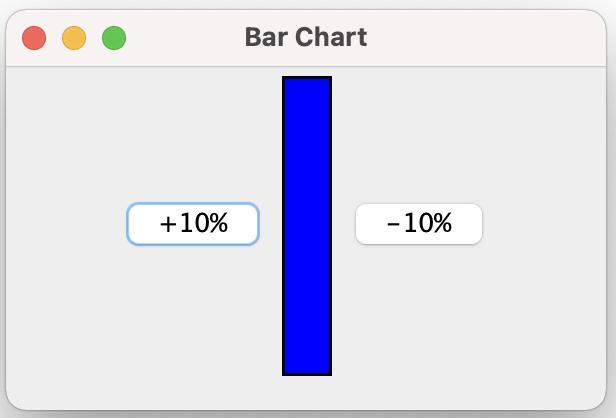
Here’s a simple JavaBean — a bar chart. (It more properly might be called a ‘temperature gauge’.)
This is the source code for the bar chart bean:
package javaBeans_0;

import java.awt.Color;
import java.awt.Dimension;
import java.awt.Graphics;

import javax.swing.BorderFactory;
import javax.swing.JPanel;

/**
 * A BarChart JavaBean class.
 *
 * @author Bryan J. Higgs, 12 March, 2000
 */
public class BarChart extends JPanel
{

  /**
   * Constructs a BarChart instance
   */
  public BarChart()
  {
    setPreferredSize(new Dimension(m_barWidth, m_barHeight));
    setBorder(BorderFactory.createLineBorder(m_borderColor, m_borderWidth));
  }

  /**
   * Sets the percent for bar display.
   */
  public void setPercent(int percent)
  {
    if (percent <= 100 && percent >= 0)
    {
      m_percent = percent;
      repaint();
    }
  }

  /**
   * Gets the percent for bar display.
   */
  public int getPercent()
  {
    return m_percent;
  }

  /**
   * Paints the BarChart using the specified Graphics.
   */
  public void paintComponent(Graphics g)
  {
    super.paintComponent(g);
    System.out.println("Painting for new value of " + m_percent);
    System.out.println("Width: " + getWidth() + " Height: " + getHeight());

    // Paint the background color for the bar
    setBackground(m_floodColor);

    // Paint the part of the bar that represents the percentage
    g.setColor(m_fillColor);
    int y = (getHeight() * (100 - m_percent) / 100);
    int width = getWidth();
    int height = getHeight() * m_percent / 100;
    System.out.println("Filling Rectangle at [" + 0 + ", " + y + "] Width: " +
                       width + " Height: " + height);
    System.out.println("m_barWidth = " + m_barWidth);
    g.fillRect(0, y, width, height);
  }

  //// Private data ////
  private int m_percent = 0;
  private Color m_floodColor = Color.blue;
  private Color m_fillColor = Color.red;
  private Color m_borderColor = Color.black;
  private int m_barWidth = 25;
  private int m_barHeight = 150;
  private int m_borderWidth = 2;
}
and here is the source for the Java application that displays it:
package javaBeans_0;

import java.awt.FlowLayout;
import java.awt.event.ActionEvent;
import java.awt.event.ActionListener;

import javax.swing.JButton;
import javax.swing.JFrame;
import javax.swing.JPanel;

/**
 * BarChartFrame -- a class to display a BarChart Bean.
 *
 * @author Bryan J. Higgs, 12 March, 2000
 */
public class BarChartFrame extends JFrame
{

  /**
   * Main entry point
   */
  public static void main(String[] args)
  {
    BarChartFrame frame = new BarChartFrame();
    frame.setDefaultLookAndFeelDecorated(true);
    frame.setDefaultCloseOperation(EXIT_ON_CLOSE);
    frame.setVisible(true);
  }

  /**
   * Constructs a BarChartFrame
   */
  public BarChartFrame()
  {
    setSize(300, 200);
    setTitle("Bar Chart");
    JPanel contentPane = (JPanel) getContentPane();
    contentPane.setLayout(new FlowLayout(FlowLayout.CENTER));

    // Add the up button, and handle its action event
    contentPane.add(m_buttonUp);
    m_buttonUp.addActionListener(
            new ActionListener()
    {
      public void actionPerformed(ActionEvent ev)
      {
        m_barChart.setPercent(m_barChart.getPercent() + 10);
      }
    }
    );

    // Add the BarChart
    contentPane.add(m_barChart);
    // Add the down button, and handle its action event
    contentPane.add(m_buttonDown);
    m_buttonDown.addActionListener(
            new ActionListener()
    {
      public void actionPerformed(ActionEvent ev)
      {
        m_barChart.setPercent(m_barChart.getPercent() - 10);
      }
    }
    );
  }

  //// Private data ////
  private BarChart m_barChart = new BarChart();
  private JButton m_buttonUp = new JButton("+10%");
  private JButton m_buttonDown = new JButton("-10%");
}
When the application is run, it produces:
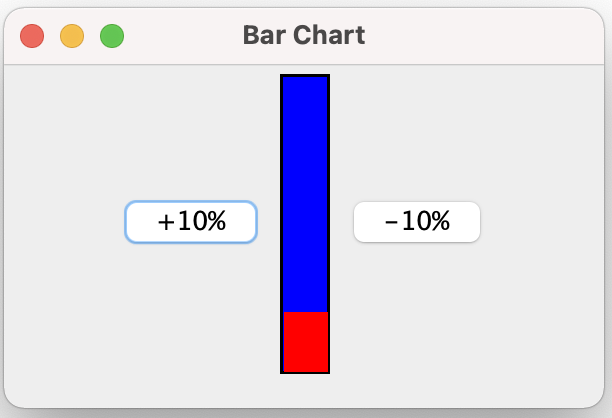
When the “+10%” button is clicked a couple of times, it will display:
So what makes the BarChart class a JavaBean?
Remember that a JavaBean exports properties, events, and methods. It exports properties through public set and get methods. In this case, there is a single exported property, percent, which is exported via the methods setPercent() and getPercent().
Another requirement for a JavaBean is that it implement the java.io.Serializable interface. While the above BarChart class does not implement Serializable explicitly, it does implement it implicitly, by virtue of extending (via JPanel) class java.awt.Component, which implements Serializable. All GUI classes extending from Component are JavaBeans.
Properties
Properties are attributes of a bean that are changeable at design time (in the IDE), as well as at run time. A JavaBean-enabled IDE discovers a bean’s properties through a process called introspection. (We’ll talk more about introspection later.) It will:
- Determine a bean’s properties
- Determine each property’s’ read/write attributes
- Determine each property’s type
- Locate an appropriate property editor for each property type
- Display the bean’s properties (usually in a properties window, common called a property sheet)
- Allow the user to change the bean’s properties (at design time)
Simple Property Naming Patterns
Naming patterns are used by the introspection process to determine the properties of a bean. The naming pattern for properties is very simple. Any pair of methods with the signatures:
public Type getPropertyName()
public void setPropertyName(Type t)
exports a read/write property PropertyName, of type Type. For example, in the above BarChart class, there are methods:
public int getPercent()
public void setPercent(int pct)
which export a read/write property percent, of type int, for that bean.
If you have a get method without a corresponding set method, then the property is read-only.
Property Name Capitalization
Note that a pair of get/set methods:
public int getPercent()
public void setPercent(int pct)
define a property percent (with a lowercase first character)
Get Methods for boolean Type Properties
To make code read more naturally, a boolean property’s get method can have the following signature:
public boolean isPropertyName()
while the set method signature remains the same. For example:
public boolean isRunning()
public void setRunning(boolean b)
would export a read/write property running, of type boolean.
Simple & Indexed Properties
Simple Properties
A simple property is one that takes a single value. The percent property in the BarChart bean is a simple property.
Simple Property Naming Patterns
The naming pattern for simple properties is any pair of methods with the signatures:
public Type getPropertyName()
public void setPropertyName(Type t)
which exports a read/write simple property PropertyName, of type Type.
A get method without a corresponding set method exports a read-only property.
Indexed Properties
An indexed property is one whose value is an array.
Indexed Property Naming Patterns
The naming pattern for indexed properties is any pair of methods with the signatures:
public Type[] getPropertyName()
public void setPropertyName(Type[] t)
which exports a read/write indexed property PropertyName, of type Type[]. For example, a Bean that implements a graphical chart, might have methods:
public double[] getValues()
public void setValues(double[] values)
which export a read/write indexed property values, of type double[]. The values could be the values being graphed.
A get method without a corresponding set method exports a read-only indexed property.
Individual elements in the indexed property array may be got and set, using methods with the following signatures:
public Type getPropertyName(int index)
public void setPropertyName(int index, Type t)
where index is the (0-based) index into the array. Since these methods index into the array of property values, it is possible for an ArrayIndexOutOfBoundsException to occur. Therefore, you may declare them as follows, if you wish:
public Type getPropertyName(int index)
	throws ArrayIndexOutOfBoundsException
public void setPropertyName(int index, Type t)
	throws ArrayIndexOutOfBoundsException
(Note that ArrayIndexOutOfBoundsException is a RuntimeException, and so is unchecked; consequently, you don’t have to declare it, even if the method can throw it.)
Example: A SimpleScatterPlot Bean
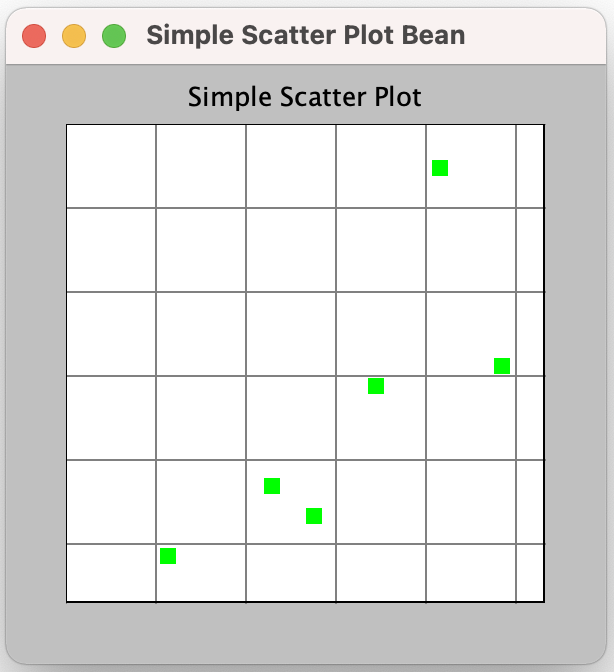
Here’s an example that shows the use of both simple and indexed properties — a Simple Scatter Plot bean.
The code for the Bean is as follows. It’s rather long. You don’t really have to study the paint() method and other related methods. Instead, concentrate on the get/set methods for now.
package javaBeans;

import java.awt.Color;
import java.awt.Dimension;
import java.awt.Graphics;
import java.awt.Point;
import java.awt.Rectangle;

import java.util.Random;
import javax.swing.JPanel;

/**
 * A class that implements a simple scatter plot Java Bean.
 *
 * @author Bryan J. Higgs, 6 April 2000
 */
public class SimpleScatterPlot extends JPanel
{
  /**
   * Constructor
   */
  public SimpleScatterPlot()
  {
    m_title = "Simple Scatter Plot";
    setBackground(Color.lightGray);
  }

  //// Set/get properties ////
  /**
   * Gets the array of points being displayed.
   */
  public Point[] getPoints()
  {
    return m_points;
  }

  /**
   * Sets the array of points to be displayed. Causes the display to be
   * automatically refreshed.
   */
  public void setPoints(Point[] points)
  {
    m_points = points;
    m_autoRangingDone = false;
    repaint();
  }

  /**
   * Gets the i-th (0-based) point being displayed.
   *
   * @return the Point, or null if the index is out of range.
   */
  public Point getPoints(int i)
  {
    Point p = null;
    if (m_points != null && i >= 0 && i < m_points.length)
    {
      p = m_points[i];
    }
    return p;
  }

  /**
   * Sets the i-th point being displayed. If i represents one of the existing
   * points, it is replaced. If i represents a point immediately after the last
   * point, then it is added to the end, becoming the new last point. Otherwise,
   * an IllegalArgumentException is thrown.
   */
  public void setPoints(int i, Point p)
  {
    if (m_points != null)
    {
      int currentSize = m_points.length;
      if (i >= 0 && i < currentSize)
      {
        // Replace an existing point
        m_points[i] = p;
        m_autoRangingDone = false;
        repaint();
        return;
      }
      else if (i > currentSize)
      {
        // We can't add this, since it would
        // create a null entry.
        throw new IllegalArgumentException();
      }
    }

    // Add a new point
    addPoint(p);
  }

  /**
   * Adds a point to the existing array of points to be displayed.
   */
  public void addPoint(Point p)
  {
    if (m_points == null)
    {
      m_points = new Point[1];
      m_points[0] = p;
    }
    else
    {
      int currentSize = m_points.length;
      Point[] newArray = new Point[currentSize + 1];
      System.arraycopy(m_points, 0, // from
              newArray, 0, // to
              currentSize // size
      );
      m_points = newArray;
      m_points[currentSize] = p;
    }

    m_autoRangingDone = false;
    repaint();
  }

  /*
    *   Gets the number of points currently being displayed.
   */
  public int getPointCount()
  {
    int count = 0;
    if (m_points != null)
    {
      count = m_points.length;
    }
    return count;
  }

  /**
   * Gets the scatter plot title.
   */
  public String getTitle()
  {
    return m_title;
  }

  /**
   * Sets the scatter plot title. Refreshes the display.
   */
  public void setTitle(String title)
  {
    m_title = title;
    repaint();
  }

  /**
   * Gets the current title text color.
   */
  public Color getTitleColor()
  {
    return m_titleColor;
  }

  /**
   * Sets the title text color. Refreshes the display.
   */
  public void setTitleColor(Color color)
  {
    m_titleColor = color;
    repaint();
  }

  /**
   * Gets the current plot background color.
   */
  public Color getPlotBackColor()
  {
    return m_plotBackColor;
  }

  /**
   * Sets the plot background color. Refreshes the display.
   */
  public void setPlotBackColor(Color color)
  {
    m_plotBackColor = color;
    repaint();
  }

  /**
   * Gets the current point display color.
   */
  public Color getPointColor()
  {
    return m_pointColor;
  }

  /**
   * Sets the point display color.
   */
  public void setPointColor(Color color)
  {
    m_pointColor = color;
    repaint();
  }

  /**
   * Gets the current grid color.
   */
  public Color getGridColor()
  {
    return m_gridColor;
  }

  /**
   * Sets the grid color. Refreshes the display.
   */
  public void setGridColor(Color color)
  {
    m_gridColor = color;
    repaint();
  }

  /**
   * Gets the current plot bounds.
   */
  public PlotBounds getPlotBounds()
  {
    return m_bounds;
  }

  /**
   * Sets the plot bounds. Refreshes the display.
   */
  public void setPlotBounds(PlotBounds bounds)
  {
    m_bounds = bounds;
    m_autoRangingDone = false;
    repaint();
  }

  /**
   * Gets whether auto-ranging is turned on for the x direction.
   */
  public boolean isAutoRangeX()
  {
    return m_autoRangeX;
  }

  /**
   * Sets auto-ranging on or off for the x direction. Refreshes the display.
   */
  public void setAutoRangeX(boolean autoRangeX)
  {
    m_autoRangeX = autoRangeX;
    m_autoRangingDone = false;
    repaint();
  }

  /**
   * Gets whether auto-ranging is turned on for the y direction.
   */
  public boolean isAutoRangeY()
  {
    return m_autoRangeY;
  }

  /**
   * Sets auto-ranging on or off for the y direction. Refreshes the display.
   */
  public void setAutoRangeY(boolean autoRangeY)
  {
    m_autoRangeY = autoRangeY;
    m_autoRangingDone = false;
    repaint();
  }

  /**
   * Gets whether the gird should be shown.
   */
  public boolean isShowGrid()
  {
    return m_showGrid;
  }

  /**
   * Sets the display of the grid on or off. Refreshes the display.
   */
  public void setShowGrid(boolean showGrid)
  {
    m_showGrid = showGrid;
    repaint();
  }

  /**
   * Sets the preferred size for the scatter plot canvas.
   */
  public Dimension getPreferredSize()
  {
    if (m_preferredSize == null)
    {
      m_preferredSize = new Dimension(300, 300);
    }
    return m_preferredSize;
  }

  /**
   * Sets the preferred size for the scatter plot canvas. Refreshes the display.
   */
  public void setPreferredSize(Dimension d)
  {
    m_preferredSize = d;
    repaint();
  }

  /**
   * Paints the scatter plot canvas.
   */
  public void paintComponent(Graphics g)
  {
    super.paintComponent(g);
    // Get information necessary to paint
    Dimension size = getSize();
    int width = size.width;
    int height = size.height;

    paintTitle(g, width, height);

    autoRange();

    // Create a new clipped area to draw the actual plot into.
    Graphics area
            = g.create((int) ((width / 10.0) + 0.5),
                    (int) ((height / 10.0) + 0.5),
                    (int) ((width * 8.0 / 10.0) + 0.5),
                    (int) ((height * 8.0 / 10.0) + 0.5)
            );

    plotPoints(area);

    if (isShowGrid())
    {
      paintGrid(area);
    }

    // Draw rectangle around the plot
    Rectangle rect = area.getClipBounds();
    area.setColor(Color.black);
    area.drawRect(0, 0, rect.width - 1, rect.height - 1);
  }

  //// Protected methods ////
  /**
   * Paints the title text.
   */
  protected void paintTitle(Graphics g, int width, int height)
  {
    // Baseline at 7% from top
    int baseline = height * 7 / 100;
    int titleWidth = getFontMetrics(getFont()).stringWidth(m_title);
    int xStart = (width - titleWidth) / 2;

    if (xStart < 0)
    {
      xStart = 0;
    }

    g.setColor(m_titleColor);
    g.drawString(m_title, xStart, baseline);
  }

  /**
   * Determines and sets the bounds from the set of points being displayed.
   */
  protected void autoRange()
  {
    // If there are points, and we're autoranging, do the work...
    // (If autoranging has been done, don't bother doing it again.)
    if (m_points != null
            && !m_autoRangingDone
            && (m_autoRangeX || m_autoRangeY))
    {
      if (m_autoRangeX)
      {
        m_bounds.setXMin(m_points[0].x);
        m_bounds.setXMax(m_points[0].x);
      }
      if (m_autoRangeY)
      {
        m_bounds.setYMin(m_points[0].y);
        m_bounds.setYMax(m_points[0].y);
      }
      for (int i = 1; i < getPointCount(); i++)
      {
        if (m_autoRangeX)
        {
          if (m_points[i].x < m_bounds.getXMin())
          {
            m_bounds.setXMin(m_points[i].x);
          }
          if (m_points[i].x > m_bounds.getXMax())
          {
            m_bounds.setXMax(m_points[i].x);
          }
        }
        if (m_autoRangeY)
        {
          if (m_points[i].y < m_bounds.getYMin())
          {
            m_bounds.setYMin(m_points[i].y);
          }
          if (m_points[i].y > m_bounds.getYMax())
          {
            m_bounds.setYMax(m_points[i].y);
          }
        }
      }

      m_autoRangingDone = true;
    }
  }

  /**
   * Plots the points on the scatter plot.
   */
  protected void plotPoints(Graphics g)
  {
    Rectangle rect = g.getClipBounds();

    // Set window for graphics
    int height = rect.height;
    int width = rect.width;

    // Fill background
    g.setColor(m_plotBackColor);
    g.fillRect(0, 0, width - 1, height - 1);

    Point thePoint;
    for (int i = 0; i < getPointCount(); i++)
    {
      thePoint = getPoints(i);

      // Figure out where the point goes.
      // If autoscaling is on along one axis, we extend
      // the scale by 10% so points don't end up
      // being cut off by the graph edges.
      double dyExpand = m_autoRangeY ? 1.1 : 1.0;
      int y = height
              - (int) (height * thePoint.y / (m_bounds.getYMax() * dyExpand));

      double dxExpand = m_autoRangeX ? 1.1 : 1.0;
      int x
              = (int) (width * thePoint.x / (m_bounds.getXMax() * dxExpand));

      // Draw points.
      g.setColor(m_pointColor);
      g.fillRect(x - 4, y - 4, 8, 8); // Draw a colored rectangle 'point'.
    }
  }

  /**
   * Paints the scatter plot grid.
   */
  protected void paintGrid(Graphics g)
  {
    Rectangle rect = g.getClipBounds();
    if (!m_showGrid)
    {
      return;
    }

    // Set window for graphics
    int height = rect.height;
    int width = rect.width;

    if (m_xTic == 0)
    {
      m_xTic = ((m_bounds.getXMax() - m_bounds.getXMin()) / 5);
    }
    if (m_xTic == 0)
    {
      m_xTic = 10;
    }

    if (m_yTic == 0)
    {
      m_yTic = ((m_bounds.getYMax() - m_bounds.getYMin()) / 5);
    }
    if (m_yTic == 0)
    {
      m_yTic = 10;
    }

    // Draw x grid lines
    g.setColor(m_gridColor);

    int xRange = m_bounds.getXMax() - m_bounds.getXMin();
    if (xRange == 0)
    {
      xRange = 100;
    }
    double xPixPerUnit = width / xRange;

    for (int xval = 0; xval <= m_bounds.getXMax(); xval += m_xTic)
    {
      int xpos = (int) (xval * xPixPerUnit);
      g.drawLine(xpos, 0, xpos, height);
    }

    // Draw y grid lines
    int yRange = m_bounds.getYMax() - m_bounds.getYMin();
    if (yRange == 0)
    {
      yRange = 100;
    }
    double yPixPerUnit = height / yRange;

    for (int yval = 0; yval <= m_bounds.getYMax(); yval += m_yTic)
    {
      int ypos = (int) (yval * yPixPerUnit);
      g.drawLine(0, ypos, width, ypos);
    }
  }

  //// Private data ////
  private String m_title;
  private Point m_points[];
  private PlotBounds m_bounds = new PlotBounds(0, 0, 0, 0);
  private boolean m_showGrid = true;
  private boolean m_autoRangeY = true;
  private boolean m_autoRangeX = true;

  private Color m_titleColor = Color.black;
  private Color m_plotBackColor = Color.white;
  private Color m_pointColor = Color.green;
  private Color m_gridColor = Color.gray;

  private int m_xTic = 0;
  private int m_yTic = 0;

  private Dimension m_preferredSize;
  private boolean m_autoRangingDone = false;
}
Here is the PlotBounds class that it uses:
package javaBeans;

/**
 * A class to represent the bounds of a scatter plot.
 *
 * @author Bryan J. Higgs, 6 April, 2000
 */
public class PlotBounds
{
  /**
   * Constructor
   */
  public PlotBounds(int xMin, int yMin, int xMax, int yMax)
  {
    m_xMin = xMin;
    m_yMin = yMin;
    m_xMax = xMax;
    m_yMax = yMax;
  }

  public int getXMin()
  {
    return m_xMin;
  }

  public void setXMin(int x)
  {
    m_xMin = x;
  }

  public int getYMin()
  {
    return m_yMin;
  }

  public void setYMin(int y)
  {
    m_yMin = y;
  }

  public int getXMax()
  {
    return m_xMax;
  }

  public void setXMax(int x)
  {
    m_xMax = x;
  }

  public int getYMax()
  {
    return m_yMax;
  }

  public void setYMax(int y)
  {
    m_yMax = y;
  }

  //// Private Data ////
  private int m_xMin = 0;     // The minimum x value
  private int m_yMin = 0;     // The minimum y value
  private int m_xMax = 0;     // The maximum x value
  private int m_yMax = 0;     // The maximum y value
}
and finally, the test program that displays it:
package javaBeans;

import java.awt.BorderLayout;
import java.awt.Point;
import java.awt.event.WindowAdapter;
import java.awt.event.WindowEvent;

import javax.swing.JFrame;
import javax.swing.JPanel;
import static javax.swing.WindowConstants.EXIT_ON_CLOSE;

/**
 * A class to test the SimpleScatterPlot Java Bean.
 *
 * @author Bryan J. Higgs, 6 April, 2000
 */
public class TestSimpleScatterPlot
{
  /**
   * Main entry point
   */
  public static void main(String[] args)
  {
    JFrame frame = new JFrame("Simple Scatter Plot Bean");
    JPanel panel = (JPanel) frame.getContentPane();
    panel.setLayout( new BorderLayout() );
    // Create the scatter plot
    SimpleScatterPlot p = new SimpleScatterPlot();
    // Specify the set of points for it to display
    p.setPoints(m_points);
    // Add it to the content panel
    panel.add(p, BorderLayout.CENTER);
    // Autosize the Frame, based on its contents.
    frame.pack();

    frame.setDefaultLookAndFeelDecorated(true);
    frame.setDefaultCloseOperation(EXIT_ON_CLOSE);
    // Finally, make it visible.
    frame.setVisible(true);
  }

  //// Private Data ////
  /**
   * The set of points to display.
   */
  private static final Point[] m_points =
  {
    new Point(10, 12),
    new Point(5, 5),
    new Point(15, 22),
    new Point(21, 24),
    new Point(12, 9),
    new Point(18, 44)
  };
}
This produces the following:
You can use such Java Beans within a Java IDE, and the IDE will recognize the properties, and, if supports a property editor (about which more later), allow you to change their values, and include them in visual components.
Bound Properties
When the value of a Bean property changes, it’s sometimes useful for interested Bean listeners to be informed of those changes.
Bound properties tell these interested listeners when their value changes. They cause events to be sent to those interested listeners when a value changes, to allow those listeners to take some appropriate action in response. For example, a SpreadSheet Bean might tell a PieChart bean to redraw itself whenever the spreadsheet changes.
Bound Property Requirements
To implement a bound property, you must follow the normal property naming conventions, and also implement the following:
- The Bean must implement the following two methods to allow other classes to register as PropertyChangeListeners:public void addPropertyChangeListener( PropertyChangeListener listener)public void removePropertyChangeListener( PropertyChangeListener listener)
- Whenever the value of the bound property changes, the Bean must send a PropertyChangeEvent to all registered listeners
The PropertyChangeListener Interface
The PropertyChangeListener interface has a single method:
public void propertyChange(PropertyChangeEvent evt)
When a class implements this interface, it must implement this method. The method is called, if the class is registered as a PropertyChangeListener, when it receives a PropertyChangeEvent.
The PropertyChangeSupport Class
The java.beans package contains a convenience class, PropertyChangeSupport, that makes it trivial to write the addPropertyChangeListener and removePropertyChangeListener methods:
private void PropertyChangeSupport m_changeSupport =
	new PropertyChangeSupport(this);
public void addPropertyChangeListener(PropertyChangeListener l)
{
    m_changeSupport.addPropertyChangeListener(l);
}
public void removePropertyChangeListener(PropertyChangeListener l)
{
    m_changeSupport.removePropertyChangeListener(l);
}
PropertyChangeSupport also makes it simple to “fire” a PropertyChangeEvent:
m_changeSupport.firePropertyChange(propertyName,
				   oldValue,
				   newValue);
If the property has a primitive type, then you must “wrap” the values:
m_changeSupport.firePropertyChange(propertyName,
				   new Integer(oldValue),
				   new Integer(newValue));
Example: A New BarChart Bean
The example is an extension of the earlier BarChart bean.
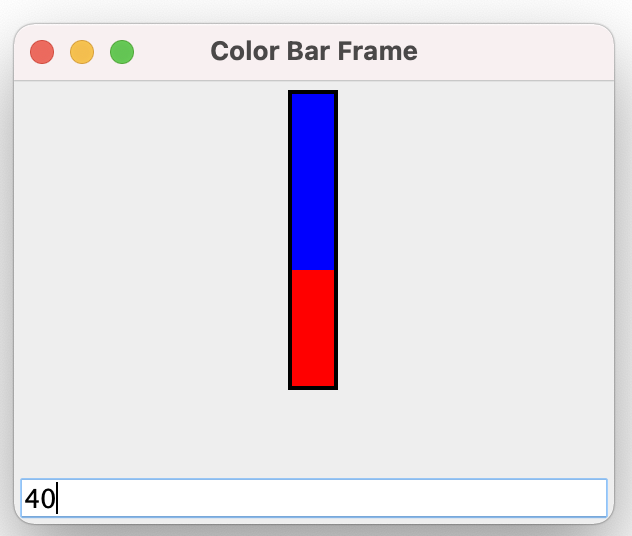
The program is similar to the previous BarChart example, but in place of the two buttons, it now has an input text field to supply the value for the bar chart.
The input text field is an JFormattedTextField bean, which is restricted to integer values. Whenever the value is changed (enter a new value, and hit Enter, or Tab), it will cause the bar chart to display appropriately. This is implemented using a bound property “value” supplied by the JFormattedTextField bean, and the use of a PropertyChangeListener in the BarChart bean.
Here’s the code for the BarChart bean:
package javaBeans_1;

import java.awt.Color;
import java.awt.Dimension;
import java.awt.Graphics;

import java.beans.PropertyChangeEvent;
import java.beans.PropertyChangeListener;

import javax.swing.BorderFactory;
import javax.swing.JPanel;

/**
 * A BarChart JavaBean class.
 *
 * @author Bryan J. Higgs, 12 March, 2000
 */
public class BarChart extends JPanel
        implements PropertyChangeListener
{
  /**
   * Constructs a BarChart instance
   */
  public BarChart()
  {
    setPreferredSize(new Dimension(m_barWidth, m_barHeight));
    setBorder(BorderFactory.createLineBorder(m_borderColor, m_borderWidth));
    System.out.println("m_barWidth = " + m_barWidth);
  }

  //// Accessor methods ////
  /**
   * Sets the percent for bar display.
   */
  public void setPercent(int percent)
  {
    if (percent <= 100 && percent >= 0)
    {
      m_percent = percent;
      repaint();
    }
  }

  /**
   * Gets the percent for bar display.
   */
  public int getPercent()
  {
    return m_percent;
  }

  // Respond to a property change event for the property
  // "value" by updating my value to a new value.
  public void propertyChange(PropertyChangeEvent event)
  {
    System.out.println("Property changed!");
    String propertyName = event.getPropertyName();
    if (propertyName.equals("value"))
    {
      System.out.println("Property '" + propertyName + "' changed.");
      Object newValue = event.getNewValue();
      int value = ((Number) newValue).intValue();
      System.out.println("New value = " + value);
      setPercent(value);
    }
  }

  /**
   * Paints the BarChart using the specified Graphics.
   */
  public void paintComponent(Graphics g)
  {
    super.paintComponent(g);
    System.out.println("Painting for new value of " + m_percent);
    System.out.println("Width: " + getWidth() + " Height: " + getHeight());

    // Paint the background color for the bar
    setBackground(m_floodColor);

    // Paint the part of the bar that represents the percentage
    g.setColor(m_fillColor);
    int y = (getHeight() * (100 - m_percent) / 100);
    int width = getWidth();
    int height = getHeight() * m_percent / 100;
    System.out.println("Filling Rectangle at [" + 0 + ", " + y + "] Width: " +
                       width + " Height: " + height);
    System.out.println("m_barWidth = " + m_barWidth);
    g.fillRect(0, y, width, height);
  }

  //// Private data ////
  private int m_percent = 0;
  private Color m_floodColor = Color.blue;
  private Color m_fillColor = Color.red;
  private Color m_borderColor = Color.black;
  private int m_barWidth = 25;
  private int m_barHeight = 150;
  private int m_borderWidth = 2;
}
Finally, the code for the BarChartFrame:
package javaBeans_1;

import java.awt.BorderLayout;
import java.awt.Color;
import java.awt.Panel;
import java.awt.Rectangle;
import java.awt.event.ComponentAdapter;
import java.awt.event.ComponentEvent;
import java.text.NumberFormat;
import javax.swing.JFormattedTextField;

import javax.swing.JFrame;
import javax.swing.JPanel;

/**
 * The BarChartFrame contains two beans: BarChart and JFormattedTextField.
 *
 * @author Bryan J. Higgs, 8 April, 2021
 */
public class BarChartFrame extends JFrame
{

  /**
   * Main entry point
   */
  public static void main(String[] args)
  {
    BarChartFrame frame = new BarChartFrame();
    frame.setDefaultLookAndFeelDecorated(true);
    frame.setDefaultCloseOperation(EXIT_ON_CLOSE);
    frame.setVisible(true);
  }

  /**
   * Constructor
   */
  public BarChartFrame()
  {
    setSize(300, 250);
    setTitle("Color Bar Frame");

    // Initialize the beans
    m_barChart.setPercent(0);
    m_intBox.setText("0");
    m_intBox.setEditable(true);

    JPanel contentPane = (JPanel) getContentPane();
    contentPane.setLayout(new BorderLayout());

    JPanel panel = new JPanel();
    panel.add(m_barChart);

    contentPane.add(panel, BorderLayout.CENTER);
    contentPane.add(m_intBox, BorderLayout.SOUTH);

    // Set the BarChart to listen for property change events for the
    // JFormattedTextField 'value' property.
    m_intBox.addPropertyChangeListener("value", m_barChart);

  }

  //// Private Data ////
  private static BarChart m_barChart = new BarChart();
  private static JFormattedTextField m_intBox
          = new JFormattedTextField( NumberFormat.getIntegerInstance() );
}
When run, this application shows a window like this (I’ve entered 40 into the text box):
Note that I have left in the code some debugging prints that can show you what’s happening.
Constrained Properties
A Bean can be set up to listen for a property value change and “make a fuss” if the value is not to its liking. In fact, the listener can prevent the property change from happening, by vetoing it.
A property that is prepared to handle this is called a constrained property.
Constrained Property Requirements
A constrained property is also a bound property (a constrained property that is not a bound property doesn’t make much sense, as you’ll see).
To implement a constrained property, you must follow the normal bound property naming conventions, and also implement the following:
- The Bean must implement the following two methods to allow other classes to register as VetoableChangeListeners:
public void addVetoableChangeListener(
VetoableChangeListener listener)
public void removeVetoableChangeListener(
VetoableChangeListener listener) - Whenever the value of the constrained property changes, the Bean must send a PropertyChangeEvent to all registered VetoableChangeListeners.
The VetoableChangeListener Interface
The VetoableChangeListener interface has a single method:
public void vetoableChange(PropertyChangeEvent evt)
		throws PropertyVetoException
When a class implements this interface, it must implement this method. The method is called, if the class is registered as a VetoableChangeListener, when it receives a vetoable PropertyChangeEvent.
The VetoableChangeSupport Class
In a manner similar to the case of PropertyChangeListeners, the java.beans package contains a convenience class, VetoableChangeSupport, that makes it trivial to write the addVetoableChangeListener and removeVetoableChangeListener methods:
private void VetoableChangeSupport m_vetoSupport =
	new VetoableChangeSupport(this);
public void addVetoableChangeListener(VetoableChangeListener l)
{
    m_vetoSupport.addVetoableChangeListener(l);
}
public void removeVetoableChangeListener(VetoableChangeListener l)
{
    m_vetoSupport.removeVetoableChangeListener(l);
}
VetoableChangeSupport also makes it simple to “fire” a vetoable PropertyChangeEvent:
m_vetoSupport.fireVetoableChange(propertyName,
			   	 oldValue,
				 newValue);
As before, if the property has a primitive type, then you must “wrap” the values:
m_vetoSupport.firePropertyChange(propertyName,
				 new Integer(oldValue),
				 new Integer(newValue));
Example: A BarChart with a Constrained Property
The example is a modification of the earlier BarChart Bean.
Previously, you could set the JFormattedTextField to contain a value outside the range 0 – 100. If you did that, the BarChart would check for an invalid value, and ignore any invalue value you’re trying to set.
In this version, when you attempt to enter a value outside the range, the previous value is forced back into the JFormattedTextField, reverting to its former value.
This is implemented using a constrainted property in the JFormattedTextField, and a VetoableChangeListener in the BarChart Bean.
NOTE:
I really struggled coming up with this example. The main sticking point was figuring out how to cause the JFormattedTextField to revert back to its original value. What I came up with is, admittedly, somewhat of a kludge. It works, but I’m not happy with it. It causes too many property change events, and I had to expose knowledge of the property source (owner) to the BarChart. Consequently, the example is somewhat convoluted, which you’ll see if you study it. If you run the example, you’ll see some output which might help you figure out what’s happening.
Note also that the example depends on JFormattedTextField being a bean, and exposing a number of Javabean interfaces.
It should go without saying that this example will take a fair amount of study to understand…
Here’s the code for the BarChart Bean:
package javaBeans_2;

import java.awt.Color;
import java.awt.Component;
import java.awt.Dimension;
import java.awt.Graphics;

import java.beans.PropertyChangeEvent;
import java.beans.PropertyChangeListener;
import java.beans.PropertyChangeSupport;
import java.beans.PropertyVetoException;
import java.beans.VetoableChangeListener;
import java.beans.VetoableChangeSupport;

import javax.swing.BorderFactory;
import javax.swing.JFormattedTextField;
import javax.swing.JPanel;
import javax.swing.event.ChangeListener;

/**
 * A BarChart JavaBean class.
 *
 * @author Bryan J. Higgs, 8 April, 2021
 */
public class BarChart extends JPanel
        implements PropertyChangeListener,
                   VetoableChangeListener
{
  /**
   * Constructs a BarChart instance
   */
  public BarChart()
  {
    setPreferredSize(new Dimension(m_barWidth, m_barHeight));
    setBorder(BorderFactory.createLineBorder(m_borderColor, m_borderWidth));
    System.out.println("m_barWidth = " + m_barWidth);

    // Have this instance listen for properties and vetoable changes
    addPropertyChangeListener("percent", this);
    addVetoableChangeListener(this);
  }

  //// Accessor methods ////
  /**
   * Sets the percent for bar display.
   */
  public void setPercent(int newPercent)
          throws PropertyVetoException // Now, this setter can be vetoed
  {
    // If no change, do nothing...
    if (newPercent == m_percent)
      return;

    Integer oldValue = new Integer(m_percent);
    Integer newValue = new Integer(newPercent);
    fireVetoableChange("percent", oldValue, newValue);


    // If we get here, nobody vetoed, so we make the change
    m_percent = newPercent;

    // Ensure any other listeners see the change
    firePropertyChange("percent", oldValue, newValue);

    // Ensure the GUI updates
    System.out.println("Repainting...");
    repaint();
  }

  /**
   * Gets the percent for bar display.
   */
  public int getPercent()
  {
    return m_percent;
  }

  /**
   * Respond to a property change event for the property
   * "value" by updating my value to a new value.
   */
  public void propertyChange(PropertyChangeEvent event)
  {
    // If the property changed is "value", use it to try
    // to update the percent property (which is subject to constraints)
    String propertyName = event.getPropertyName();
    System.out.println("Property '" + propertyName + "' change...");

    // Is it of interest?
    if ( propertyName.equals("value") )
    {
      Number newValue = (Number)(event.getNewValue());
      // If there's nothing to change, just exit
      if (newValue == null || newValue.intValue() == m_percent)
      {
        return;
      }

      // If we get here, we try to change the value, subject to constraints
      int value = newValue.intValue();
      System.out.println("Property '" + propertyName +
                         "': changing to " + value);

      // Change the percent property (subject to constraints)
      try
      {
        // If this returns without throwing an exception, we changed the value
        setPercent(value);
      }
      catch (PropertyVetoException pve)
      {
        // Somebody vetoed, so revert the value of the property back to its
        // original value.
        Number oldValue = (Number)(event.getOldValue());
        short oldInt = oldValue.shortValue();
        System.out.println("Reverting value back to " + oldInt);
        JFormattedTextField source = (JFormattedTextField)(event.getSource());
        source.setValue(oldValue);
      }
    }
    else
    {
      System.out.println("Property '" + propertyName
                         + "' change to " +  event.getNewValue());
      // We don't care about properties other than "value" here
      // so do nothing
    }
  }

  /**
   * Respond to a vetoable property change event for the
   * property "value" by checking the new value for validity
   * If it's not valid, a PropertyVetoException is thrown.
   * (We leave it to the propertyChange() method above to
   * actually change the value.)
   */
  public void vetoableChange(PropertyChangeEvent event)
      throws PropertyVetoException
  {
    String propertyName = event.getPropertyName();
    System.out.println("Received vetoable change for property '"
                       + propertyName + "'");
    if ( propertyName.equals("percent") )
    {
      int newPercent = ((Integer)event.getNewValue()).intValue();
      System.out.println("Checking property change '"
                         + propertyName + "' for potential veto...");
      if (newPercent < 0 || newPercent > 100)
      {
        System.out.println("Vetoing!");
        throw new PropertyVetoException("No way, Jose!", event);
      }
      else
      {
        System.out.println("Not vetoed!");
      }
    }
    else
    {
      // We don't expect, or care, about other properties, here
    }
  }

  /**
   * Paints the BarChart using the specified Graphics.
   */
  public void paintComponent(Graphics g)
  {
    super.paintComponent(g);
    System.out.println("Painting for new value of " + m_percent);
    System.out.println("Width: " + getWidth() + " Height: " + getHeight());

    // Paint the background color for the bar
    setBackground(m_floodColor);

    // Paint the part of the bar that represents the percentage
    g.setColor(m_fillColor);
    int y = (getHeight() * (100 - m_percent) / 100);
    int width = getWidth();
    int height = getHeight() * m_percent / 100;
    System.out.println("Filling Rectangle at [" + 0 + ", " + y + "] Width: " +
                       width + " Height: " + height);
    System.out.println("m_barWidth = " + m_barWidth);
    g.fillRect(0, y, width, height);
  }

  //// Private data ////
  private int m_percent = 0;
  private Color m_floodColor = Color.blue;
  private Color m_fillColor = Color.red;
  private Color m_borderColor = Color.black;
  private int m_barWidth = 25;
  private int m_barHeight = 150;
  private int m_borderWidth = 2;
}
Here’s the source code for the BarChartFrame:
package javaBeans_2;

import java.awt.BorderLayout;
import java.awt.Color;
import java.awt.Panel;
import java.awt.Rectangle;
import java.awt.event.ComponentAdapter;
import java.awt.event.ComponentEvent;
import java.text.NumberFormat;
import javax.swing.JFormattedTextField;

import javax.swing.JFrame;
import javax.swing.JPanel;

/**
 * The BarChartFrame contains two beans: BarChart and JFormattedTextField.
 *
 * @author Bryan J. Higgs, 8 April, 2021
 */
public class BarChartFrame extends JFrame
{

  /**
   * Main entry point
   */
  public static void main(String[] args)
  {
    BarChartFrame frame = new BarChartFrame();
    frame.setDefaultLookAndFeelDecorated(true);
    frame.setDefaultCloseOperation(EXIT_ON_CLOSE);
    frame.setVisible(true);
  }

  /**
   * Constructor
   */
  public BarChartFrame()
  {
    setSize(300, 250);
    setTitle("Color Bar Frame");

    // Initialize the beans
    m_intBox.setText("0");
    m_intBox.setEditable(true);

    JPanel contentPane = (JPanel) getContentPane();
    contentPane.setLayout(new BorderLayout());

    JPanel panel = new JPanel();
    panel.add(m_barChart);

    contentPane.add(panel, BorderLayout.CENTER);
    contentPane.add(m_intBox, BorderLayout.SOUTH);

    // Set the BarChart to listen for property change events for the
    // JFormattedTextField 'value' property.
    m_intBox.addPropertyChangeListener("value", m_barChart);

    // Set the BarChart to listen for vetoable change events from the
    // JFormattedTextField.
    m_intBox.addVetoableChangeListener(m_barChart);
  }

  //// Private Data ////
  private static BarChart m_barChart = new BarChart();
  private static JFormattedTextField m_intBox
          = new JFormattedTextField( NumberFormat.getIntegerInstance() );
}
The output is identical with the former examples, except that if you enter, say, 200 in the text box, it refuses to accept that value, and the former value replaces the 200.
PropertyChangeSupport & VetoableChangeSupport
PropertyChangeSupport is a thread-safe utility/convenience class that can be used by beans that support bound properties. It manages a list of listeners and dispatches PropertyChangeEvents to them. You can use an instance of this class as a member field of your bean and delegate these types of work to it. The PropertyChangeListener can be registered for all properties or for a property specified by name. It simplifies the implementation of property change listeners; it does a lot of the hard work for you.
Here is an example of PropertyChangeSupport usage that follows the rules and recommendations laid out in the JavaBeans™ specification [from the JavaDoc]
public class MyBean {
     private final PropertyChangeSupport pcs = new PropertyChangeSupport(this);

     public void addPropertyChangeListener(PropertyChangeListener listener) {
         this.pcs.addPropertyChangeListener(listener);
     }

     public void removePropertyChangeListener(PropertyChangeListener listener) {
         this.pcs.removePropertyChangeListener(listener);
     }

     private String value;

     public String getValue() {
         return this.value;
     }

     public void setValue(String newValue) {
         String oldValue = this.value;
         this.value = newValue;
         this.pcs.firePropertyChange("value", oldValue, newValue);
     }

     [...]
 }
VetoableChangeSupport is a thread-safe utility/convenience class that can be used by beans that support constrained properties. It manages a list of listeners and dispatches PropertyChangeEvents to them. You can use an instance of this class as a member field of your bean and delegate these types of work to it. The VetoableChangeListener can be registered for all properties or for a property specified by name.
Here is an example of VetoableChangeSupport usage that follows the rules and recommendations laid out in the JavaBeans™ specification:
public class MyBean {
     private final VetoableChangeSupport vcs = new VetoableChangeSupport(this);

     public void addVetoableChangeListener(VetoableChangeListener listener) {
         this.vcs.addVetoableChangeListener(listener);
     }

     public void removeVetoableChangeListener(VetoableChangeListener listener) {
         this.vcs.removeVetoableChangeListener(listener);
     }

     private String value;

     public String getValue() {
         return this.value;
     }

     public void setValue(String newValue) throws PropertyVetoException {
         String oldValue = this.value;
         this.vcs.fireVetoableChange("value", oldValue, newValue);
         this.value = newValue;
     }

     [...]
 }
Simplified Example of a Bound and Constrained Property
Here’s a simpler version of an application with a bound and constrained property.
We have a GUI application that contains two buttons and two labels. The buttons control a value (incrementing up or down), and directly control the value in the “primary label”. This primary label provides a single property, “value”. The other label (“mirror label”) listens to the changes in the primary label’s “value” property, and changes its own value to match.
In addition, we have a class Constrainer, which prevents the value of the primary button from going out of the range 10 – 20. It uses a constrained property to accomplish this.
Here’s the code for the class NumberLabel, which is the class used for each of the two labels:
package javaBeans_3;

import java.beans.PropertyChangeEvent;
import java.beans.PropertyChangeListener;
import java.beans.PropertyChangeSupport;
import java.beans.PropertyVetoException;
import java.beans.VetoableChangeListener;
import java.beans.VetoableChangeSupport;
import javax.swing.JLabel;

/**
 * The NumberLabel class is a subclass of java.swing.JLabel that has a bound
 * and constrained property named Value
 *
 * @author bryanhiggs
 */
// the NumberLabel class
class NumberLabel extends JLabel
        implements PropertyChangeListener
{
  /**
   * Constructor
   */
  public NumberLabel(String text)
  {
    // call the super class
    super(text);
    // Defer property change support
    boundSupport = new PropertyChangeSupport(this);
    // Defer vetoable change support
    vetoSupport = new VetoableChangeSupport(this);
  }

  // add a bound property listener
  public void addPropertyChangeListener(PropertyChangeListener listener)
  {
    if (boundSupport == null)
      boundSupport = new PropertyChangeSupport(this);
    // defer to the support object
    boundSupport.addPropertyChangeListener(listener);
  }

  // remove a bound property listener
  public void removePropertyChangeListener(PropertyChangeListener listener)
  {
    // defer to the support object
    boundSupport.removePropertyChangeListener(listener);
  }

  // add a constrained property listener
  public void addVetoableChangeListener(VetoableChangeListener listener)
  {
    if (vetoSupport == null)
      vetoSupport = new VetoableChangeSupport(this);
    // defer to the support object
    vetoSupport.addVetoableChangeListener(listener);
  }

  // remove a constrained property listener
  public void removeVetoableChangeListener(VetoableChangeListener listener)
  {
    // defer to the support object
    vetoSupport.removeVetoableChangeListener(listener);
  }

  // the get method for the Value property
  public int getValue()
  {
    return theValue;
  }

  // the set method for the Value property -- subject to constraints
  public void setValue(int newValue)
          throws PropertyVetoException
  {
    // fire the change to any constrained listeners
    vetoSupport.fireVetoableChange("Value",
                                   Integer.valueOf(theValue),
                                   Integer.valueOf(newValue));

    // no veto, so save the old value and then change it
    Integer oldVal = Integer.valueOf(theValue);
    theValue = newValue;
    setText(String.valueOf(theValue));
    repaint();

    // fire the change to any bound listeners
    boundSupport.firePropertyChange("Value",
                                    oldVal,
                                    Integer.valueOf(theValue));
  }

  // handle property change events from others
  public void propertyChange(PropertyChangeEvent evt)
  {
    // only interested in changes to Value properties
    if (evt.getPropertyName().equals("Value"))
    {
      // just change our own property
      Integer val = (Integer)(evt.getNewValue());

      try
      {
        setValue(val.intValue());
      }
      catch (PropertyVetoException e)
      {
      }
    }
  }

  // Private data

  // the support object for bound listeners
  protected PropertyChangeSupport boundSupport;

  // the support object for constrained listeners
  protected VetoableChangeSupport vetoSupport;

  // the implementation of the Value property
  protected int theValue = 15;
}
This is the Constrainer class:
package javaBeans_3;

import java.beans.PropertyChangeEvent;
import java.beans.PropertyVetoException;
import java.beans.VetoableChangeListener;

/**
 * The Constrainer class vetoes any property changes that
 * attempt to change the Value property of a NumberLabel
 * object to a value below 10 or above 20.
 *
 * @author bryanhiggs
 */
public class Constrainer implements VetoableChangeListener
{
   // handle the vetoable change event
   public void vetoableChange(PropertyChangeEvent event)
           throws PropertyVetoException
   {
      // we constrain the value to between 10 and 20
      Integer value = (Integer)event.getNewValue();
      if (value.intValue() < 10 || value.intValue() > 20)
      {
         throw new PropertyVetoException("Bad Value", event);
      }
   }
}
Here’s the main application that implements the GUI:
package javaBeans_3;

import java.awt.BorderLayout;
import java.awt.Color;
import static java.awt.FlowLayout.CENTER;
import java.awt.FlowLayout;
import java.awt.event.ActionEvent;
import java.awt.event.ActionListener;

import java.beans.PropertyVetoException;

import javax.swing.JButton;
import javax.swing.JFrame;
import javax.swing.JPanel;

/**
 * Example of use of a constrained property in a Javabean
 *
 * @author bryanhiggs
 */
public class ConstrainedPropertyExample extends JFrame
{

  /**
   * Main entry point
   */
  public static void main(String[] args)
  {
    ConstrainedPropertyExample frame = new ConstrainedPropertyExample();
    frame.setDefaultLookAndFeelDecorated(true);
    frame.setDefaultCloseOperation(EXIT_ON_CLOSE);
    frame.setVisible(true);
  }

  /**
   * Constructor
   */
  public ConstrainedPropertyExample()
  {
    setSize(300, 125);
    setTitle("Constrained Property Example");
    JPanel panel = (JPanel) getContentPane();
    panel.setLayout( new BorderLayout() );
    JPanel northPanel = new JPanel();
    panel.add(northPanel, BorderLayout.NORTH);
    JPanel southPanel = new JPanel( new FlowLayout(CENTER, 20, 5) );
    panel.add(southPanel, BorderLayout.SOUTH);

    // add the user interface elements
    northPanel.add(decButton);
    northPanel.add(incButton);
    southPanel.add(primaryLabel);
    southPanel.add(mirrorLabel);

    decButton.addActionListener(new ActionListener() {
         public void actionPerformed(ActionEvent event) {
            handleDecrement(event);
         }
      });
    incButton.addActionListener(new ActionListener() {
         public void actionPerformed(ActionEvent event) {
            handleIncrement(event);
         }
      });

    // register the constrainer with the primary label
    primaryLabel.addVetoableChangeListener(constrainer);

    // register the mirroring label with the primary label
    primaryLabel.addPropertyChangeListener(mirrorLabel);

    // start the labels at different values
    try
    {
      primaryLabel.setValue(15);
      mirrorLabel.setValue(5);
    }
    catch (PropertyVetoException pve)
    {
    }
  }

  // handle the decrement button push
  public void handleDecrement(ActionEvent evt)
  {
    // get the current value and subtract 1
    int value = primaryLabel.getValue() - 1;

    // try to set the new value
    try
    {
      primaryLabel.setValue(value);
    }
    catch (PropertyVetoException pve)
    {

    }
  }

  // handle the increment button push
  public void handleIncrement(ActionEvent evt)
  {
    // get the current value and add 1
    int value = primaryLabel.getValue() + 1;

    try
    {
      // try to set the new value
      primaryLabel.setValue(value);
    }
    catch (PropertyVetoException ex)
    {

    }
  }

  // Private data

  // the decrement button
  protected JButton decButton = new JButton("<<");

  // the increment button
  protected JButton incButton = new JButton(">>");

  // the constrained label
  protected NumberLabel primaryLabel = new NumberLabel("*****");

  // the label that mirrors the primary label
  protected NumberLabel mirrorLabel = new NumberLabel("*****");

  // the constraining object
  protected Constrainer constrainer = new Constrainer();
}
The application produces a frame that looks like this:
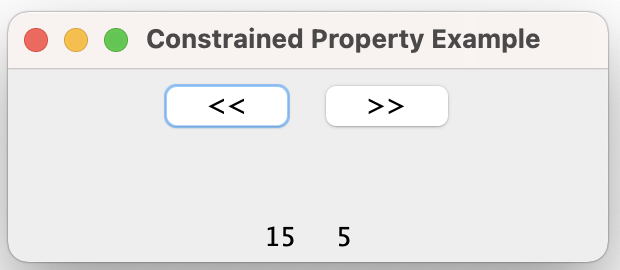
When you click on the “<<” button, you will see that the values displayed in the labels at the bottom of the frame change, to cause them both to show 14, and so on, until the values reach 10, at which point they won’t go lower. Similarly, if you click on the “>>” button, the values increase until they reach 20 and then will not go higher.
Let’s work through the high-level steps. Once the GUI is up and running, let’s see what happens if the user clicks on the “<<” button:
- The ActionListener for the decButton is invoked. It calls the handleDecrement method
- The handleDecrement method extracts the value from the primaryLabel into a local copy and decrements it. It then attempts to set the value of the primaryLabel to that value, by calling the primaryLabel‘s setValue method.
- The primaryLabel‘s setValue method first calls the fireVetoableChange method to ask all the vetoableChange listeners if it’s OK with them.
- The fireVetoableChange method, via the VetoableChangeSupport class, invokes the Constrainer class’s vetoableChange method (the Constrainer class was previously registered as a VetoableChangeListener on the primaryLabel).
- The Constrainer class’s vetoableChange method checks the new value to see whether it is within the allowed bounds (10 to 20).
- If it is within bounds:
- It simply returns to the primaryLabel‘s setValue method, which extracts the old and new values of the property, and sets the new value of the primaryLabel
- It then calls the firePropertyChange method to inform all PropertyListeners of the change.
- This causes the mirrorLabel‘s propertyChange method to be invoked, which first calls the fireVetoableChange method, but this has no effect as there are no VetoableChangeListeners registered for the mirrorLabel.
- The mirrorLabel‘s propertyChange method then extracts the value of the mirrorLabel‘s old and new values, and sets the new value for the mirrorLabel.
- Finally, the mirrorLabel‘s propertyChange method calls the firePropertyChange method, which has no effect, because the mirrorLabel has no PropertyChangeListeners registered.
- If it is not within bounds:
- the Constrainer class’s vetoableChange method throws a PropertyVetoException, which goes back through the primaryLabel‘s setValue method (which indicates that it can throw a PropertyVetoException), to the handleDecrement method, which catches the exception. It does nothing in the catch handler, because there is no further action to take, at this point.
As a result, the application has caused the primaryLabel to display changes made, and the mirrorLabel to mirror the value from the primaryLabel, through a bound property. The primaryLabel and mirrorLabel both are constrained to displaying values within the range, through a constrained property enforced by the Constrainer class.