
Table of Contents
Threads are very important in Java, especially when it comes to GUI programming. Every Java program has at least two threads; every Java GUI program has at least three threads.
What is Multithreading?
Multithreading is the ability to do (or appear to do) more than one thing at a time.
Every Java program is multithreaded, whether you write it to be that way, or not:
- The AWT (and JEWT) rely on multithreading to do their work
- There is always a garbage collector thread running in the background
The Java Virtual Machine is what implements and supports multithreading:
- Most JVMs use the native operating system threads on whatever platform they run
- Most machines only have a single CPU, and so multiple threads have to share the same CPU, and don’t actually run concurrently — they only give the illusion of concurrency.
- Some machines have more than a single CPU, and native operating system threads can actually run concurrently.
- Some JVMs have to implement their own threads, if the native platforms don’t provide the necessary support.
Bouncing Ball Demos
Here are some bouncing ball demos:
A non-threaded bouncing ball demo.
Click the Start button to start bouncing a ball. You’ll notice that, when you click on the Start button, nothing seems to happen until, finally, the balls appears, at the end of its ‘journey’.
Here’s the source for this program:
package noThreads;

import java.awt.BorderLayout;
import java.awt.Component;
import java.awt.Container;
import java.awt.Graphics;
import java.awt.Graphics2D;
import java.awt.event.ActionEvent;
import java.awt.event.ActionListener;
import java.awt.geom.Ellipse2D;
import java.awt.geom.Rectangle2D;
import java.util.ArrayList;
import javax.swing.JButton;
import javax.swing.JComponent;
import javax.swing.JFrame;
import javax.swing.JPanel;
import static javax.swing.WindowConstants.EXIT_ON_CLOSE;

/**
 *
 * @author bryanhiggs
 */
public class BouncingBallsFrame extends JFrame
{
  public static void main(String[] args)
  {
    BouncingBallsFrame frame = new BouncingBallsFrame();
    frame.setDefaultLookAndFeelDecorated(true);
    frame.setDefaultCloseOperation(EXIT_ON_CLOSE);
    frame.setVisible(true);
  }

  public BouncingBallsFrame()
  {
    setSize(DEFAULT_WIDTH, DEFAULT_HEIGHT);
    setTitle("Non-threaded Bouncing Balls");

    canvas = new BallDrawingCanvas();
    add(canvas, BorderLayout.CENTER);

    JPanel buttonPanel = new JPanel();
    add(buttonPanel, BorderLayout.SOUTH);

    addButton(buttonPanel, "Start", new ActionListener()
    {
      public void actionPerformed(ActionEvent event)
      {
        addBall();
      }
    });

    addButton(buttonPanel, "Close", new ActionListener()
    {
      public void actionPerformed(ActionEvent event)
      {
        System.exit(0);
      }
    });
  }

  /**
   * Adds a button to a container. (Convenience method.)
   *
   * @param c
   *          the container
   * @param title
   *          the button title
   * @param listener
   *          the action listener for the button
   */
  public static void addButton(Container c, String title, ActionListener listener)
  {
    JButton button = new JButton(title);
    c.add(button);
    button.addActionListener(listener);
  }

  /**
   * Adds a bouncing ball to the canvas and starts it bouncing
   */
  public void addBall()
  {
    BouncingBall ball = new BouncingBall(canvas);
    canvas.add(ball);
    ball.run();
  }

  // Private data
  public static final int DEFAULT_WIDTH = 450;
  public static final int DEFAULT_HEIGHT = 350;

  private BallDrawingCanvas canvas;
}

/**
 * The Swing Component that draws the balls.
 *
 * @version 1.33 2007-05-17
 * @author Cay Horstmann
 */
class BallDrawingCanvas extends JComponent
{
  /**
   * Add a ball to the panel.
   *
   * @param b
   *          the ball to add
   */
  public void add(BouncingBall b)
  {
    balls.add(b);
  }

  public void paintComponent(Graphics g)
  {
    super.paintComponent(g);
    Graphics2D g2 = (Graphics2D) g;
    for (BouncingBall ball : balls)
    {
      g2.fill(ball.getShape());
    }
  }

  // Private data
  private ArrayList<BouncingBall> balls = new ArrayList<BouncingBall>();
}

/**
 * A ball that moves and bounces off the edges of a rectangle
 *
 * @version 1.33 2007-05-17
 * @author Cay Horstmann
 */
class BouncingBall
{
  /**
   * Constructor
   * Associates the ball with its drawing canvas
   */
  public BouncingBall(BallDrawingCanvas canvas)
  {
      m_canvas = canvas;
  }

  /**
   * Runs the bouncing ball
   */
  public void run()
  {
    try
    {
      for (int i = 1; i <= STEPS; i++)
      {
        move(m_canvas.getBounds());
        m_canvas.repaint();
        Thread.sleep(DELAY);
      }
    }
    catch (InterruptedException e)
    {}
  }

  /**
   * Moves the ball to the next position, reversing direction if it hits one of
   * the edges
   */
  public void move(Rectangle2D bounds)
  {
    x += dx;
    y += dy;
    if (x < bounds.getMinX())
    {
      x = bounds.getMinX();
      dx = -dx;
    }
    if (x + XSIZE >= bounds.getMaxX())
    {
      x = bounds.getMaxX() - XSIZE;
      dx = -dx;
    }
    if (y < bounds.getMinY())
    {
      y = bounds.getMinY();
      dy = -dy;
    }
    if (y + YSIZE >= bounds.getMaxY())
    {
      y = bounds.getMaxY() - YSIZE;
      dy = -dy;
    }
  }

  /**
   * Gets the shape of the ball at its current position.
   */
  public Ellipse2D getShape()
  {
    return new Ellipse2D.Double(x, y, XSIZE, YSIZE);
  }

  // Private data members

  private static final int XSIZE = 15;
  private static final int YSIZE = 15;
  private double x = 0;
  private double y = 0;
  private double dx = 1;
  private double dy = 1;
  public static final int STEPS = 1000;
  public static final int DELAY = 5;

  private BallDrawingCanvas m_canvas;
}
Here’s what the above program produces (it’s a video):
A threaded bouncing ball demo
By making the implementation multi-threaded, you’ll find that the applet supports starting a number of balls concurrently. (Just click on the Start button multiple times.)
Here’s the source for this program:
package threads;

import java.awt.BorderLayout;
import java.awt.Component;
import java.awt.Container;
import java.awt.Graphics;
import java.awt.Graphics2D;
import java.awt.event.ActionEvent;
import java.awt.event.ActionListener;
import java.awt.geom.Ellipse2D;
import java.awt.geom.Rectangle2D;
import java.util.ArrayList;
import javax.swing.JButton;
import javax.swing.JComponent;
import javax.swing.JFrame;
import javax.swing.JPanel;
import static javax.swing.WindowConstants.EXIT_ON_CLOSE;

/**
 * A Class to provide a frame for drawing bouncing balls
 *
 * @author bryanhiggs
 */
public class BouncingBallsFrame extends JFrame
{
  public static void main(String[] args)
  {
    BouncingBallsFrame frame = new BouncingBallsFrame();
    frame.setDefaultLookAndFeelDecorated(true);
    frame.setDefaultCloseOperation(EXIT_ON_CLOSE);
    frame.setVisible(true);
  }

  public BouncingBallsFrame()
  {
    setSize(DEFAULT_WIDTH, DEFAULT_HEIGHT);
    setTitle("Threaded Bouncing Balls");

    canvas = new BallDrawingCanvas();
    add(canvas, BorderLayout.CENTER);

    JPanel buttonPanel = new JPanel();
    add(buttonPanel, BorderLayout.SOUTH);

    addButton(buttonPanel, "Start", new ActionListener()
    {
      public void actionPerformed(ActionEvent event)
      {
        addBall();
      }
    });

    addButton(buttonPanel, "Close", new ActionListener()
    {
      public void actionPerformed(ActionEvent event)
      {
        System.exit(0);
      }
    });
  }

  /**
   * Adds a button to a container. (Convenience method.)   *
   */
  public static void addButton(Container c, String title, ActionListener listener)
  {
    JButton button = new JButton(title);
    c.add(button);
    button.addActionListener(listener);
  }

  /**
   * Adds a bouncing ball to the canvas and starts it bouncing
   */
  public void addBall()
  {
    BouncingBall ball = new BouncingBall(canvas);
    canvas.add(ball);
    ball.start();
  }

  // Private data
  public static final int DEFAULT_WIDTH = 450;
  public static final int DEFAULT_HEIGHT = 350;

  private BallDrawingCanvas canvas;
}

/**
 * The Swing Component on which the balls are drawn.
 */
class BallDrawingCanvas extends JComponent
{
  /**
   * Add a ball to the canvas.
   */
  public void add(BouncingBall b)
  {
    balls.add(b);
  }

  public void paintComponent(Graphics g)
  {
    super.paintComponent(g);
    Graphics2D g2 = (Graphics2D) g;
    for (BouncingBall ball : balls)
    {
      g2.fill(ball.getShape());
    }
  }

  // Holds the balls currently being drawn
  private ArrayList<BouncingBall> balls = new ArrayList<BouncingBall>();
}

/**
 * A ball that moves and bounces off the edges of a rectangle
 */
class BouncingBall extends Thread
{
  /**
   * Constructor
   * Associates the ball with its drawing canvas
   */
  public BouncingBall(BallDrawingCanvas canvas)
  {
      m_canvas = canvas;
  }

  /**
   * Runs the bouncing ball
   */
  public void run()
  {
    try
    {
      for (int i = 1; i <= STEPS; i++)
      {
        move(m_canvas.getBounds());
        m_canvas.repaint();
        Thread.sleep(DELAY);
      }
    }
    catch (InterruptedException e)
    {}
  }

  /**
   * Moves the ball to the next position, reversing direction if it hits one of
   * the edges
   */
  public void move(Rectangle2D bounds)
  {
    x += dx;
    y += dy;
    if (x < bounds.getMinX())
    {
      x = bounds.getMinX();
      dx = -dx;
    }
    if (x + XSIZE >= bounds.getMaxX())
    {
      x = bounds.getMaxX() - XSIZE;
      dx = -dx;
    }
    if (y < bounds.getMinY())
    {
      y = bounds.getMinY();
      dy = -dy;
    }
    if (y + YSIZE >= bounds.getMaxY())
    {
      y = bounds.getMaxY() - YSIZE;
      dy = -dy;
    }
  }

  /**
   * Gets the shape of the ball at its current position.
   */
  public Ellipse2D getShape()
  {
    return new Ellipse2D.Double(x, y, XSIZE, YSIZE);
  }

  // Private data members

  private static final int XSIZE = 15;
  private static final int YSIZE = 15;
  private double x = 0;
  private double y = 0;
  private double dx = 1;
  private double dy = 1;
  public static final int STEPS = 1000;
  public static final int DELAY = 5;

  private BallDrawingCanvas m_canvas;
}
This program is very slightly modified from the first, non-threaded, version, and now works correctly. It allows the user to click on the Start button multiple times, each time creating a new bouncing balls, and multiple balls may now be seen on the window. See the following video:
Threads & Thread Properties
Let’s talk about threads and their properties.
What is a Thread?
A thread of control in a program.
Each thread:
- Starts at some predefined location
- Executes in its own context, independent of other threads in the program
- May choose to cooperate with one or more threads in the program
- Appears to have a degree of simultaneous execution (in the case of multiple CPUs, may actually execute simultaneously with other threads in the program)
Java has a class, Thread, which provides an abstraction to support the concept of a thread within a Java Virtual Machine. It, together with other Java features, provides the necessary functionality and context to allow Java programmers to write multithreaded programs.
Thread States
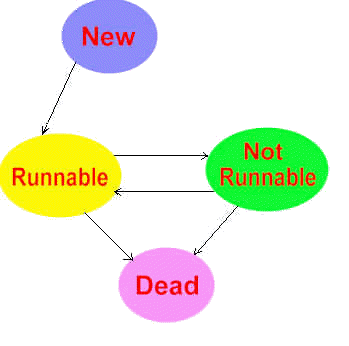
- When a thread is first created, it enters the NEW state, at which point it is not executing
- When the thread’s start() method is invoked, the thread changes to the RUNNABLE state.
- When the thread is RUNNABLE, it is eligible for execution, but not necessarily running.
- When certain events happen to a RUNNABLE thread, it may enter the NOT RUNNABLE state, where it is still alive, but not eligible for execution. Such events include:
- Thread is waiting for an I/O operation to complete
- Thread has put itself to sleep for a certain period of time (by calling sleep())
- Thread has called wait()
- Thread has called yield()
- A NOT RUNNABLE thread becomes RUNNABLE again when the condition that caused the thread to become NOT RUNNABLE ends:
- I/O completes
- Sleep period expires
- etc.
- When the thread terminates, it becomes DEAD — permanently! Once the thread enters the DEAD state, there is no way to resuscitate it. There are a number of ways a thread may terminate, including:
- By returning from its run() method (this is the recommended approach)
- By being stopped (dangerous! — don’t do it!)
Daemon Threads
Some threads are intended to be “background” threads, providing services to other threads. These threads are called daemon threads.
UNIX has a similar concept for processes, where certain operating system services are provided by daemon processes. (For some reason, it has become traditional to use the archaic spelling for demon.) Microsoft Windows uses Windows services for similar operations.
When a Java thread is created, it is a non-daemon thread. It may be changed (or change itself) to a daemon thread by calling its setDaemon() method. (There is also a matching isDaemon() method.)
When a Java Virtual Machine starts up, there is usually a single non-daemon thread (which typically calls the method named main of some designated class), and one daemon thread — the garbage collection thread. The Java Virtual Machine continues to execute threads until either of the following occurs:
- The exit method of class Runtime has been called (System.exit() calls this method) and the security manager has permitted the exit operation to take place,
or:
- All threads that are not daemon threads have died, either by returning from the call to the run method or by their stop (deprecated!)method being called.
Thread Operations
Here are the most fundamental of thread operations:
How to start, stop, and run a thread.
Creating a Thread
There are two ways of creating a thread:
- Using a class that extends the Thread class
- Using a class that implements the Runnable interface (note that
ThreadimplementsRunnable)
You start a thread by calling Thread‘s start() method from some thread. The start() method does the following:
- Creates a separate thread of execution
- Starts that thread of execution at the Thread‘s or Runnable‘s run() method
- Returns from the start() call in the starting thread.
Stopping a Thread
You stop a thread by causing the thread to return from its run() execution.
Note: There is a stop() method in the Thread class, but its use is now deprecated, because it is inherently unsafe. DO NOT USE THIS METHOD!
For example, here is a typical run() method for a thread that will terminate after doing a finite amount of work:
public void run()
{
   for (int i = 0; i < 100; i++)
   {
      doWork();
   }
}
It simply terminates after a finite number of iterations through its work loop. Of course, the run() method is not required to loop at all; the thread may be doing one-time-only type work, and simply return when it has finished.
Some threads, once started, loop forever until some outside event causes them to terminate the loop. Here is how you typically write code to cause a thread to stop prematurely:
public class MyThreadOrRunnable ...
{
    ...

   public void run()
   {
      while (m_running)
      {
         doFiniteWork();
      }
   }

   public void stopExecution()
   {
      m_running = false;
   }

   private boolean m_running = true;
}
Note: Do not use the Thread‘s stop() method!
This is a simple case. If doWork() can take some time, and if you wish the thread to respond quickly to the request to stop its execution, then you must arrange for the code to check for the change of status on a regular basis.
Canceling an executing thread is a non-trivial exercise.
For more details, see Doug Lea’s “Cancelable Activities”. In general, Doug Lea’s “Concurrent Programming in Java” is an excellent detailed reference for advanced use of threads in Java. See his Online Supplement.
Extending the Thread Class
One way of implementing a thread is to create a class that extends from the java.lang.Thread class, and that then overrides the run() method.
Here’s an example of how to extend from class Thread:
package threads;

public class CountDownThread extends Thread
{
  public CountDownThread(String name, int countDown,
                         CountDownProgress progress)
  {
    super(name);
    m_countDown = countDown;
    m_progress = progress;
  }

  // The method that does the work of the thread
  public void run()
  {
    m_progress.started(getName() +
                       ": started (counting from " +
                       m_countDown + ")");
    try
    {
      for (int i = m_countDown; i >= 0; i--)
      {
        sleep(1000);    // Sleep for 1 second
        // Audible 'tick'
        m_progress.tick(getName() + ": " + i);
      }
    }
    catch (InterruptedException e)
    {
      // Ignore
    }
    finally
    {
      m_progress.done(getName() + ": done!");
    }
  }

  /////// Private data ///////
  private int m_countDown;
  private CountDownProgress m_progress;
}
Notice that it uses a CountDownProgress interface:
package threads;

/**
 * Interface to provide a simple progress
 * for the CountDownThread.
 */
public interface CountDownProgress
{
  public void started(String message);

  public void tick(String message);

  public void done(String message);
}
and here’s a program to test it out:
package threads;

import java.util.Random;

public class CountDownThreadTester implements CountDownProgress
{
  /**
   *   Main entry point.
   *
   *   Arguments: list of thread names to use.
   */
  public static void main(String[] args)
  {
    Random random = new java.util.Random();
    CountDownThreadTester tester = new CountDownThreadTester();
    int threadCount = 5;
    for (int i = 1; i <= threadCount; i++)
    {
      // Generate a random number between 5 and 10
      int countDown = random.nextInt(5) + 5;
      CountDownThread thread =
          new CountDownThread("Thread " + i, countDown, tester);
      thread.start();
    }
  }

  public void started(String message)
  {
    System.err.println(message);
  }

  public void tick(String message)
  {
    System.err.println(message);
  }

  public void done(String message)
  {
    System.err.println(message);
  }
}
In other words, it creates 5 threads, telling each to count down starting from a value somewhere between 5 and 10.
Note that the above test program implements the CountDownProgress interface, and outputs the resulting messages to System.err — intentional, because System.err is not buffered.
When I ran this, it produced the following output:
Thread 1: started (counting from 7)
Thread 2: started (counting from 7)
Thread 3: started (counting from 6)
Thread 4: started (counting from 7)
Thread 5: started (counting from 6)
Thread 1: 7
Thread 5: 6
Thread 4: 7
Thread 3: 6
Thread 2: 7
Thread 1: 6
Thread 5: 5
Thread 3: 5
Thread 4: 6
Thread 2: 6
Thread 1: 5
Thread 3: 4
Thread 5: 4
Thread 4: 5
Thread 2: 5
Thread 1: 4
Thread 2: 4
Thread 4: 4
Thread 5: 3
Thread 3: 3
Thread 1: 3
Thread 5: 2
Thread 4: 3
Thread 2: 3
Thread 3: 2
Thread 1: 2
Thread 2: 2
Thread 4: 2
Thread 5: 1
Thread 3: 1
Thread 1: 1
Thread 2: 1
Thread 4: 1
Thread 5: 0
Thread 5: done!
Thread 3: 0
Thread 3: done!
Thread 1: 0
Thread 1: done!
Thread 4: 0
Thread 4: done!
Thread 2: 0
Thread 2: done!
It should be evident that the threads are running asynchronously.
Implementing Runnable
There are, however, situations where you want to have a class do thread work, but you also need that class to extend from another class. Since Java doesn’t allow you to extend from more than a single class, you wouldn’t be able to use the previous technique.
In this case, you’ll need to use the Runnable interface instead. In general, you may prefer to use the Runnable technique, because it’s more flexible.
Here’s how you do the same thing as above, but using the Runnable interface:
package threads;

public class CountDownRunnable implements Runnable
{
  public CountDownRunnable(int countDown,
                           CountDownProgress progress)
  {
    m_countDown = countDown;
    m_progress = progress;
  }

  // The method that does the work of the thread
  public void run()
  {
    m_progress.started(getName() +
                       ": started (counting from " +
                       m_countDown + ")");
    try
    {
      for (int i = m_countDown; i >= 0; i--)
      {
        Thread.sleep(1000);    // Sleep for 1 second
        // Audible 'tick'
        m_progress.tick(getName() + ": " + i);
      }
    }
    catch (InterruptedException e)
    {
      // Ignore
    }
    finally
    {
      m_progress.done(getName() + ": done!");
    }
  }

  /**
   * Gets the name of the thread this is running
   */
  private String getName()
  {
    return Thread.currentThread().getName();
  }

  /////// Private data ///////
  private int m_countDown;
  private CountDownProgress m_progress;
}
and here’s the corresponding test program:
package threads;

import java.util.Random;

public class CountDownRunnableTester implements CountDownProgress
{
  /**
   *   Main entry point.
   *
   *   Arguments: list of thread names to use.
   */
  public static void main(String[] args)
  {
    Random random = new java.util.Random();
    CountDownRunnableTester tester = new CountDownRunnableTester();
    int threadCount = 5;
    for (int i = 1; i <= threadCount; i++)
    {
      // Generate a random number between 5 and 10
      int countDown = random.nextInt(5) + 5;
      CountDownRunnable runnable =
          new CountDownRunnable(countDown, tester);
      Thread thread = new Thread(runnable, "Thread " + i);
      thread.start();
    }
  }

  public void started(String message)
  {
    System.err.println(message);
  }

  public void tick(String message)
  {
    System.err.println(message);
  }

  public void done(String message)
  {
    System.err.println(message);
  }
}
We still use the Thread class to cause a thread to start, but now we use it directly, specifying in the Thread constructor the class that implements the Runnable interface, to associate the runnable class with the thread.
The effect of using the Runnable interface is to separate the work (the code in the run() method) from the context in which it runs (the thread).
Here’s what this program produced on my machine when I ran it (note that the actual output may vary because of the nature of multi-threading applications):
Thread 1: started (counting from 6)
Thread 2: started (counting from 7)
Thread 3: started (counting from 9)
Thread 4: started (counting from 6)
Thread 5: started (counting from 9)
Thread 1: 6
Thread 2: 7
Thread 3: 9
Thread 4: 6
Thread 5: 9
Thread 1: 5
Thread 2: 6
Thread 3: 8
Thread 4: 5
Thread 5: 8
Thread 2: 5
Thread 1: 4
Thread 5: 7
Thread 4: 4
Thread 3: 7
Thread 2: 4
Thread 1: 3
Thread 5: 6
Thread 3: 6
Thread 4: 3
Thread 2: 3
Thread 1: 2
Thread 5: 5
Thread 4: 2
Thread 3: 5
Thread 2: 2
Thread 1: 1
Thread 5: 4
Thread 3: 4
Thread 4: 1
Thread 2: 1
Thread 1: 0
Thread 1: done!
Thread 5: 3
Thread 4: 0
Thread 4: done!
Thread 3: 3
Thread 2: 0
Thread 2: done!
Thread 5: 2
Thread 3: 2
Thread 5: 1
Thread 3: 1
Thread 5: 0
Thread 5: done!
Thread 3: 0
Thread 3: done!
An Example
Here is an example of a program that uses the Runnable interface technique: a clock program
Here’s the source for this program.
Note how the program causes the thread to stop, by setting the m_clockThread field to null, thus causing the thread’s run loop to terminate.
package threads;

import java.awt.BorderLayout;
import java.awt.Color;
import java.awt.EventQueue;
import java.awt.Font;
import java.awt.Graphics;
import java.awt.event.ActionEvent;
import java.awt.event.ActionListener;
import java.util.Calendar;
import java.util.Date;
import java.text.DateFormat;
import javax.swing.BorderFactory;
import javax.swing.JButton;
import javax.swing.JFrame;
import javax.swing.JLabel;
import javax.swing.JPanel;
import javax.swing.SwingConstants;
import static javax.swing.WindowConstants.EXIT_ON_CLOSE;

/**
 * Class to display the current time, updated every second,
 * using threads
 */
public class Clock extends JPanel implements Runnable
{
  /**
   * Main entry point
   */
  public static void main(String[] args)
  {
    JFrame frame = new JFrame("Clock");
    frame.setDefaultLookAndFeelDecorated(true);
    frame.setDefaultCloseOperation(EXIT_ON_CLOSE);
    frame.setSize(300, 200);

    JPanel contentPane = (JPanel) frame.getContentPane();
    contentPane.setLayout(new BorderLayout());

    // Add the Clock canvas to the content pane, to the CENTER
    Clock clockCanvas = new Clock();
    contentPane.add(clockCanvas, BorderLayout.CENTER);

    // Construct the button panel
    JPanel buttonPanel = new JPanel();
    buttonPanel.setBorder(BorderFactory.createLineBorder(Color.lightGray));
    contentPane.add(buttonPanel, BorderLayout.SOUTH);

    // Add the Start button
    addButton(buttonPanel, "Start",
              new ActionListener()
                {
                  public void actionPerformed(ActionEvent evt)
                  {
                    clockCanvas.start(); // Start the ball bouncing
                  }
                }
              );
    // Add the Stop button
    addButton(buttonPanel, "Stop",
              new ActionListener()
                {
                  public void actionPerformed(ActionEvent evt)
                  {
                    clockCanvas.stop();
                  }
                }
              );

    frame.setVisible(true);
  }

  /**
   * Convenience method for adding a button to a panel
   * @param panel - the panel to use
   * @param title - the button title
   * @param listener - the button's action listener
   */
  private static void addButton(JPanel panel,
                                String title,
                                ActionListener listener)
  {
    JButton button = new JButton(title);
    panel.add(button);
    button.addActionListener(listener);
  }

  /**
   * Constructor
   */
  private Clock()
  {
    EventQueue.invokeLater( new Runnable()
      {
        public void run()
        {
          m_timeLabel = new JLabel("The Time is...", SwingConstants.CENTER);
          m_timeLabel.setFont( new Font("Dialog", Font.BOLD, 16) );
          add(m_timeLabel);
        }
      }
    );
  }

  /**
   * Start the clock
   * Starts up the thread to keep the clock updated.
   */
  private void start()
  {
    if (m_clockThread == null)
    {
      m_clockThread = new Thread(this, "Clock");
      m_clockThread.start();
    }
  }

  /**
   * The Runnable run method for this Clock
   * Keeps the clock updated every second.
   */
  public void run()
  {
    // Loop until m_clockThread is set to null
    while (m_clockThread != null)
    {
      try
      {
        Thread.sleep(1000); // For 1 second
        // Change the label to the current time
        EventQueue.invokeLater( new Runnable()
          {
            // Update the label in the event handling thread.
            public void run()
            {
              Calendar cal = Calendar.getInstance();
              Date date = cal.getTime();
              DateFormat dateFormatter = DateFormat.getTimeInstance();
              m_timeLabel.setText(dateFormatter.format(date));
            }
          }
        );
      }
      catch (InterruptedException e)
      {
        // Ignore
      }
    }
  }

  /**
   * Stop the clock
   */
  private void stop()
  {
    m_clockThread = null; // Will cause the thread to end
  }

  /////// Private data ///////////
  private Thread m_clockThread = null;
  private JLabel m_timeLabel;
}
which produces the following (a video):
Some Useful Methods
Here are some useful methods provided by the Thread class:
| Method | Description |
| public Thread() | Constructs a new Thread object, with an automatically generated name |
| public Thread(String name) | Constructs a new Thread object, with the specified name |
| public Thread(Runnable target) | Constructs a new Thread object, with the associated Runnable object and an automatically generated name |
| public Thread(Runnable target, String name) | Constructs a new Thread object, with the associated Runnable object and the specified name. |
| public static Thread currentThread() | Returns a reference to the currently executing thread object. |
| public static void dumpStack() | Prints a stack trace of the current thread. This method is used only for debugging |
| public final String getName() | Returns this thread’s name. |
| public void interrupt() | Interrupts this thread. |
| public final boolean isAlive() | Tests if this thread is alive. A thread is alive if it has been started and has not yet died. |
| public final void setName( String name) | Changes the name of this thread to be equal to the argument name. |
| public static void sleep( long millis) throws InterruptedException | Causes the currently executing thread to sleep (temporarily cease execution) for the specified number of milliseconds. |
| public static void sleep( long millis, int nanos) throws InterruptedException | Causes the currently executing thread to sleep (cease execution) for the specified number of milliseconds plus the specified number of nanoseconds. |
| public synchronized void start() | Causes this thread to begin execution; the Java Virtual Machine calls the run method of this thread. |
| public static void yield() | Causes the currently executing thread object to temporarily pause and allow other threads to execute. |
Deprecated Methods
The following thread methods have been deprecated since JDK 1.2:
- stop()
- suspend()
- resume()
The stop() method is inherently unsafe, and the suspend() and resume() methods are deadlock-prone.
They should not be used!
For details, see here.
Thread Scheduling & Priority
Thread Scheduling
Thread scheduling is the mechanism used to allocate CPU time to threads.
There are two basic types of thread scheduling:
- Preemptive
- Non-preemptive
Preemptive Scheduling
In this type of scheduling, the scheduler preempts a running thread to allow other threads to run. The process of switching from one thread running to another thread running is transparent to the writer of the thread code.
Non-Preemptive Scheduling
Here, the scheduler never interrupts a running thread. Instead, the thread code is expected to cooperate and yield control at the appropriate times so that other threads can execute. If a thread does not cooperate, it may cause other threads to starve (never get CPU time). for example, if a thread has code like:
while (forALongTime)
{
    codeThatDoesNotYieldNorBlock();
}
then, with a non-preemptive scheduler, no other threads would get scheduled while this thread was running this piece of code.
Here are some things to do when you are writing code that must run in a thread with a non-preemptive scheduler:
- Don’t loop for a long time executing code that does not yield, nor sleeps, nor does blocking I/O.
- Occasionally call yield() when performing CPU-intensive operations.
- Lower the priority of CPU-intensive threads (but they still need to yield).
Writing for preemptive thread models is easier than writing for non-preemptive thread models. Note that, if you are trying to write portable Java code, and you’re developing on a platform that uses preemptive threads, you can’t make assumptions that all Java platforms will provide this level of thread support.
Thread Priority
Different native operating system threads have different thread priority schemes. The Java Thread class attempts to accommodate these in its abstraction.
In the Thread class, there are the following constants:
| public static final int MAX_PRIORITY | The maximum priority that a thread can have. |
| public static final int MIN_PRIORITY | The minimum priority that a thread can have. |
| public static final int NORM_PRIORITY | The default priority assigned to a thread. |
which are mapped to the native thread priorities.
There are also the following methods in class Thread:
| public final int getPriority() | Returns this thread’s priority. |
| public final void setPriority( int newPriority) | Changes the priority of this thread. (The priority must be in the range MIN_PRIORITY to MAX_PRIORITY, and the calling thread must have the proper access rights to change the thread priority.) |
The setPriority() method may be called to change the priority of a thread. Typically, the call would look like:
thread.setPriority(NORM_PRIORITY + 1);
or:
thread.setPriority(NORM_PRIORITY - 3);
Be aware:
- It should only be necessary to make small changes to a thread’s priority.
- If you elevate too many threads’ priorities to MAX_PRIORITY (or close to it), priority will quickly become meaningless.
Types of Threads
Programs that use threads can often be divided into the following levels of difficulty:
- Threads that are unrelated to each other (Easiest)
- Threads that are related to each other, but do not need to be synchronized
- Threads that are related to each other, and need to be synchronized
- Communicating, synchronized threads (Hardest)
Here, we’ll discuss only the first two (simplest) types. The last two (harder) types we’ll discuss later.
Unrelated Threads
Here’s an example of a set of unrelated threads:
package threads;

public class LanguageBigots
{
    public static void main(String[] args)
    {
        new Thread( new COBOL() ).start();
        new Thread( new CPlusPlus() ).start();
        new Thread( new FORTRAN() ).start();
        new Thread( new Pascal() ).start();
        new Thread( new Java() ).start();
    }
}

abstract class ProgrammingLanguage implements Runnable
{
    public void run()
    {
        for (int i = 0; i < 5; i++)
        {
            opinion();
            Thread.currentThread().yield();
        }
    }

    abstract protected void opinion();
}

class COBOL extends ProgrammingLanguage
{
    protected final void opinion()
    {
        System.out.println("COBOL: WE HAVE THE MOST LINES OF CODE! (ALL IN UPPER CASE)");
    }
}

class CPlusPlus extends ProgrammingLanguage
{
    protected final void opinion()
    {
        System.out.println("C++: Bjarne Stroustrup rules!");
    }
}

class FORTRAN extends ProgrammingLanguage
{
    protected final void opinion()
    {
        System.out.println("FORTRAN: Can *you* CONTINUE from a DO loop?");
    }
}

class Pascal extends ProgrammingLanguage
{
    protected final void opinion()
    {
        System.out.println("Pascal: Niklaus Wirth could teach you a lot!");
    }
}

class Java extends ProgrammingLanguage
{
    protected final void opinion()
    {
        System.out.println("Java: Write once, run (er, test) everywhere!");
    }
}
Notice that the threads are unrelated, even though they have code that is shared.
One run of this program produced the following output:
COBOL: WE HAVE THE MOST LINES OF CODE! (ALL IN UPPER CASE)
COBOL: WE HAVE THE MOST LINES OF CODE! (ALL IN UPPER CASE)
C++: Bjarne Stroustrup rules!
COBOL: WE HAVE THE MOST LINES OF CODE! (ALL IN UPPER CASE)
C++: Bjarne Stroustrup rules!
COBOL: WE HAVE THE MOST LINES OF CODE! (ALL IN UPPER CASE)
C++: Bjarne Stroustrup rules!
COBOL: WE HAVE THE MOST LINES OF CODE! (ALL IN UPPER CASE)
C++: Bjarne Stroustrup rules!
C++: Bjarne Stroustrup rules!
FORTRAN: Can *you* CONTINUE from a DO loop?
FORTRAN: Can *you* CONTINUE from a DO loop?
FORTRAN: Can *you* CONTINUE from a DO loop?
FORTRAN: Can *you* CONTINUE from a DO loop?
FORTRAN: Can *you* CONTINUE from a DO loop?
Pascal: Niklaus Wirth could teach you a lot!
Java: Write once, run (er, test) everywhere!
Pascal: Niklaus Wirth could teach you a lot!
Java: Write once, run (er, test) everywhere!
Pascal: Niklaus Wirth could teach you a lot!
Java: Write once, run (er, test) everywhere!
Pascal: Niklaus Wirth could teach you a lot!
Java: Write once, run (er, test) everywhere!
Pascal: Niklaus Wirth could teach you a lot!
Java: Write once, run (er, test) everywhere!
The output would typically vary from run to run, because of the inherent non-deterministic behavior of multi-threaded programs.
Related but Unsynchronized Threads
Often a problem can be partitioned into smaller, independent, pieces, and worked on simultaneously using a set of related threads. Some examples of this kind of thread might be:
- Breaking up a computational problem into smaller, concurrently executing, units
- A set of “worker threads“, perhaps dynamically started on demand, to perform overlapping work. For example:
- Spawning a new thread to peform work on a new socket connection on a server (see Networking, later in the course)
- Keeping around a set of threads available to do work, and assigning the work to an available thread on demand.
Here’s an example of partitioning a problem — the problem of determining the factors of a specified number. We’ll start up a separate thread to test for factors within a particular range of numbers, and use as many threads as we need to obtain all the factors.
package threads;

public class FindFactors
{
  public static void main(String[] args)
  {
    long number = Long.parseLong(args[0]);
    TestRange.setNumber(number);

    System.err.println("Finding the factors of " + number);

    // Determine the number of threads to start up,
    // one for each RANGE of divisors to test for.
    int threadCount = (int)(number/RANGE) + 1;

    long from = 0, to = RANGE - 1;
    for (int thread = 0; thread < threadCount; thread++)
    {
      new TestRange(from, to).start();
      from += RANGE;
      to += RANGE;
    }
  }

  private static final int RANGE = 100;
}

class TestRange extends Thread
{
  public TestRange(long from, long to)
  {
    if (from == 0)
      m_from = 2;
    else
      m_from = from;
    m_to = to;

    // Set the thread name to something self-describing
    setName("Factor (" + m_from + " - " + m_to + ")");
  }

  public void run()
  {
    System.err.println("Starting thread '" + this.getName() + "'");
    int count = 0;
    for (long div = m_from; div <= m_to && div < m_number; div++)
    {
      if (m_number % div == 0)  // Exactly divisible?
      {
        System.err.println("Factor " + div +
            " found by thread '" + getName() + "'");
        count++;
      }
      yield();
    }
    System.err.println("Thread '" + this.getName() +
        "' ending (found " + count + " factors)");
  }

  public static void setNumber(long number)
  {
    m_number = number;
  }

  ///// Private data ///////

  private static long m_number;   // All TestRange threads share this
  private long m_from, m_to;
}
When supplied with an input parameter of 456, a typical run of this program will output something like:
Finding the factors of 456
Starting thread 'Factor (2 - 99)'
Factor 2 found by thread 'Factor (2 - 99)'
Starting thread 'Factor (100 - 199)'
Starting thread 'Factor (200 - 299)'
Factor 3 found by thread 'Factor (2 - 99)'
Starting thread 'Factor (300 - 399)'
Starting thread 'Factor (400 - 499)'
Factor 4 found by thread 'Factor (2 - 99)'
Factor 6 found by thread 'Factor (2 - 99)'
Factor 8 found by thread 'Factor (2 - 99)'
Factor 12 found by thread 'Factor (2 - 99)'
Factor 114 found by thread 'Factor (100 - 199)'
Factor 19 found by thread 'Factor (2 - 99)'
Factor 228 found by thread 'Factor (200 - 299)'
Thread 'Factor (400 - 499)' ending (found 0 factors)
Thread 'Factor (300 - 399)' ending (found 0 factors)
Factor 24 found by thread 'Factor (2 - 99)'
Factor 152 found by thread 'Factor (100 - 199)'
Thread 'Factor (200 - 299)' ending (found 1 factors)
Factor 38 found by thread 'Factor (2 - 99)'
Thread 'Factor (100 - 199)' ending (found 2 factors)
Factor 57 found by thread 'Factor (2 - 99)'
Factor 76 found by thread 'Factor (2 - 99)'
Thread 'Factor (2 - 99)' ending (found 11 factors)
In the above example, while the threads do share data (the number under test), they only need to read that number. They do not need to change it. Consequently, there is no synchronization problem.