
Table of Contents
Swing presents some particular problems relating to multi-threaded programs.
Since every Java GUI program is always multi-threaded, it’s important to understand what these problems are, and how to circumvent them.
The Problem
Swing was not designed to be fully thread-safe. Instead, it was designed in such a way that only code running in the event thread — that is, the thread in which events are delivered, or dispatched — is allowed to access Swing components. Code running in other threads which attempts to access Swing components is not guaranteed to work correctly, and has the potential of corrupting data in the Swing components..
This was intentional, but it makes things more difficult for the programmer.
This single-threaded, event thread-centric, design results in two distinct problems:
- Trying to update Swing components from outside the event thread, and
- Trying to do too much work in the event thread
The Single Thread Rule
Swing event handling code runs on a special thread known as the Event Dispatch Thread. Most code that invokes Swing methods also runs on this thread. This is necessary because most Swing object methods are not “thread safe”: invoking them from multiple threads risks thread interference or memory consistency errors.
The purpose of the Event Dispatch Thread is to serialize all GUI events, so that they cannot interfere with each other.
Some Swing component methods are labeled “thread safe” in the API specification; these can be safely invoked from any thread. However, these are in the minority. All other Swing component methods must be invoked from the event dispatch thread. Programs that ignore this rule may function correctly most of the time, but are subject to unpredictable errors that are difficult to reproduce.
The most useful of these thread-safe methods include:
JTextComponent.setTextJTextArea.insertJTextArea.appendJTextArea.replaceRangeJComponent.repaintJComponent.revalidate
Other Swing methods should be presumed not to be thread-safe.
The GUI main Method
Of late, it has become much more important to require programmers to write their main entry points for a Swing GUI application in the following way:
package swingThreads;

import java.awt.EventQueue;
import javax.swing.JFrame;

/**
 * An example of how a typical main entry point should
 * be coded for a Swing GUI application
 */
public class SwingMain
{
  /**
   * Main entry point
   */
  public static void main(String[] args)
  {
    EventQueue.invokeLater( new Runnable()
      {
        public void run()
        {
          JFrame frame = new JFrame("My GUI Application Frame");
          frame.setBounds(200, 200, 500, 300);
          frame.setVisible(true);
        }
      }
    );
  }
}
One reason for this is the rapid increase in the number of truly multiprocessor machines, even at the low end of the PC market. These multiple processors turn multi-threading into true multi-processing, and enormously increase the possibility of race conditions.
By writing the main entry point in this way, we can ensure that the changes to the relevant GUI objects are made exclusively in the Event Dispatch Thread, and so are appropriately serialized.
The invokeLater method
Here’s what the javadocs say about the EventQueue.invokeLater method:
public static void invokeLater(Runnable runnable)
Causes runnable to have its run method called in the dispatch thread of the system EventQueue. This will happen after all pending events are processed.
Parameters:
runnable – the Runnable whose run method should be executed asynchronously in the event dispatch thread of the system EventQueue
In other words, it prevents race conditions from occurring when executing such code within Swing programs.
Update Swing Only from the EDT
The first problem to deal with is that one must update Swing GUI components from within, and not from outside the Event Dispatch Thread.
Here’s some detail…
Illustrating the Problem
Here’s a program that breaks the Swing single thread rule:
package potentialCorruption;

import java.awt.BorderLayout;
import java.awt.Color;
import java.awt.Container;
import java.awt.Font;
import java.awt.event.ActionEvent;
import java.awt.event.ActionListener;
import java.util.concurrent.atomic.AtomicInteger;
import javax.swing.JFrame;
import javax.swing.JButton;
import javax.swing.JLabel;
import javax.swing.JPanel;
import javax.swing.JScrollPane;
import javax.swing.JTextArea;
import javax.swing.SwingConstants;
import javax.swing.WindowConstants;

/**
 * This class invokes multiple threads which (incorrectly) update the contents
 * of a Swing component from outside the event thread.
 */

public class PotentialCorruptor extends JFrame
{
  /**
   * Main entry point for Java application
   */
  public static void main(String[] args)
  {
    PotentialCorruptor frame = new PotentialCorruptor();
    frame.setVisible(true);
  }

  /**
   * Construct the class
   */
  public PotentialCorruptor()
  {
    setTitle("Potential Corruptor Example");
    setDefaultCloseOperation(WindowConstants.HIDE_ON_CLOSE);

    Container panel = getContentPane();
    panel.setLayout( new BorderLayout() );
    m_buttonPanel = new ButtonPanel();
    panel.add(m_buttonPanel, BorderLayout.CENTER);

    m_statusLabel.setFont( new Font( "dialog", Font.BOLD, 14 ) );
    panel.add(m_statusLabel, BorderLayout.SOUTH);
    pack();
  }

  /**
   * Button Panel
   */
  class ButtonPanel extends JPanel
  {
    ButtonPanel()
    {
      setBackground(Color.blue);
      m_startButton.addActionListener( new ActionListener()
        {
          public void actionPerformed(ActionEvent ev)
          {
            setBackground(Color.red);
            m_turnYellowButton.setEnabled(true);
            m_textArea.setText("");
            m_statusLabel.setText("Running...");
            for (int i = 1; i < TOTAL_THREADS; i++)
            {
              Thread thread = new CorruptorThread("Thread " + i);
              thread.start();
            }
          }
        }
      );
      add(m_startButton);

      m_turnYellowButton.addActionListener( new ActionListener()
        {
          public void actionPerformed(ActionEvent ev)
          {
            ButtonPanel.this.setBackground(Color.yellow);
          }
        }
      );
      m_turnYellowButton.setEnabled(false);  // Disable for now
      add(m_turnYellowButton);

      add( new JScrollPane(m_textArea) );
    }

    /**
     * The thread to run
     */
    class CorruptorThread extends Thread
    {
      CorruptorThread(String name)
      {
        super(name);
      }

      public void run()
      {
        int threadNumber = m_threadCount.incrementAndGet();
        m_statusLabel.setText("Running (" + threadNumber + " threads)");
        for (int i = 0; i < 50; i++)
        {
          try
          {
            Thread.sleep(1);
            update("" + i);
          }
          catch (InterruptedException ie)
          {
            ie.printStackTrace();
          }
        }

        update("Thread Done");
        threadNumber = m_threadCount.decrementAndGet();
        m_statusLabel.setText("Running (" + threadNumber + " threads)");
        if (threadNumber == 0)
        {
          m_statusLabel.setText("Done!");
          m_buttonPanel.setBackground(Color.blue);
          m_turnYellowButton.setEnabled(false);
        }
      }

      private void update(String text)
      {
        String temp = m_textArea.getText();
        temp += "\n" + getName() + ": " + text;
        m_textArea.setText(temp);
      }
    }
  }

  private ButtonPanel m_buttonPanel;
  private JButton m_startButton = new JButton("Start (Turn Red)");
  private JButton m_turnYellowButton = new JButton("Now Turn Yellow");
  private JTextArea m_textArea = new JTextArea(10, 20);
  private JLabel m_statusLabel = new JLabel("", SwingConstants.CENTER);
  private static final int TOTAL_THREADS = 10;
  private AtomicInteger m_threadCount = new AtomicInteger(0);
}
Note that the program fires up 9 threads, each of which repeatedly sleeps, wakes up, updates the GUI (specifically a text area), and goes back to sleep again, exiting after a relatively large number of iterations.
Note: I have specifically avoided using the
JTextArea‘sappend()method, because, unlike most Swing methods, it is thread-safe. Instead, I used a combination ofgetText()andsetText()methods to exhibit the behavior.
When I tried running this program, it produced something like this, after several clicks on the button:
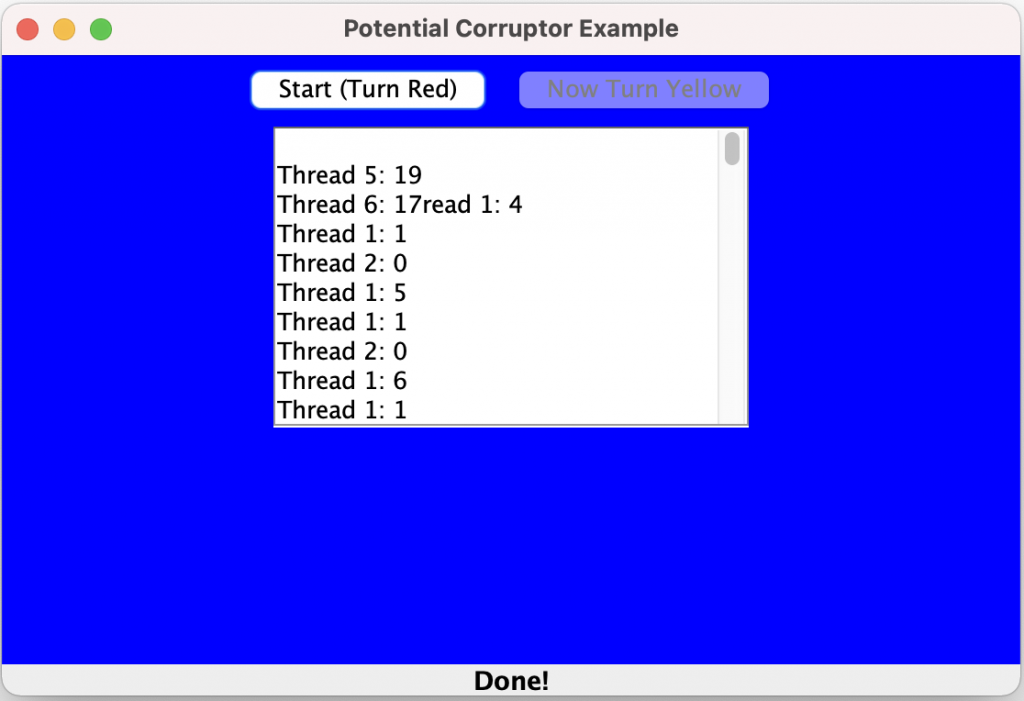
Did you notice that the contents of the JTextArea occasionally get corrupted? I also noticed that the GUI layout changed.
Even worse, you might experience more serious problems. I encountered at least one occasion when the entire GUI locked up, and became totally unresponsive. Probably, there was some internal corruption taking place.
Fixing the Problem
Because you very often need to be able to update Swing components from outside the event thread, Swing provides two useful methods which allow you to cause your code to run in the event loop. They are static methods in the javax.swing.SwingUtilities class (also in java.awt.EventQueue):
public static void invokeLater(Runnable doRun)
public static void invokeAndWait(Runnable doRun)
                          throws InterruptedException,
                               InvocationTargetException
In each case, you must provide an instance of a class which implements the Runnable interface. Each method will cause the run() method of this class to be invoked asynchronously in the event dispatching thread. It will be processed in turn, based on what other requests are pending in that thread.
An invokeLater() call will simply cause the scheduling of the Runnable class code.
An invokeAndWait() call will will block the thread until all pending AWT events have been processed and (then) doRun.run() returns.
For obvious reasons, invokeAndWait() should not be called from the event dispatch thread.
Here’s the example, fixed, using these techniques:
package notPotentialCorruption;

import java.awt.Color;
import java.awt.event.ActionEvent;
import java.awt.event.ActionListener;
import javax.swing.JFrame;
import javax.swing.JButton;
import javax.swing.JPanel;
import javax.swing.JScrollPane;
import javax.swing.JTextArea;
import javax.swing.SwingUtilities;

/**
 * This class invokes multiple threads which (incorrectly) update the contents
 * of a Swing component from outside the event thread.
 */

public class NotPotentialCorruptor extends JFrame
{
   //Construct the frame
   public NotPotentialCorruptor()
   {
      setTitle("Not Potential Corruptor Example");
      getContentPane().add( new ButtonPanel() );
      pack();
   }

   class ButtonPanel extends JPanel implements ActionListener
   {
      ButtonPanel()
      {
         setBackground(Color.blue);
         m_clickMeButton.addActionListener(this);
         add(m_clickMeButton);

         m_nowClickMeButton.addActionListener( new ActionListener()
         {
            public void actionPerformed(ActionEvent ev)
            {
               ButtonPanel.this.setBackground(Color.yellow);
            }
         }
         );
         m_nowClickMeButton.setEnabled(false);  // Disable for now
         add(m_nowClickMeButton);

         add( new JScrollPane(m_statusArea) );
      }

      public void actionPerformed(ActionEvent ev)
      {
         setBackground(Color.red);
         m_nowClickMeButton.setEnabled(true);
         for (int i = 1; i < 10; i++)
         {
            Thread thread = new CorruptorThread("Thread " + i);
            thread.start();
         }
      }

      private JButton m_clickMeButton = new JButton("Click me!");
      private JButton m_nowClickMeButton = new JButton("Now try to click me!");
      private JTextArea m_statusArea = new JTextArea(10, 20);

      class CorruptorThread extends Thread
      {
         CorruptorThread(String name)
         {
            super(name);
         }

         public void run()
         {
            for (int i = 0; i < 100; i++)
            {
               try
               {
                  Thread.sleep(1);
                  update("" + i);
               }
               catch (InterruptedException ie)
               {
                  ie.printStackTrace();
               }
            }

            update("Done");
         }

         private void update(final String text)
         {
            Runnable runnable = new Runnable()
            {
              public void run()
              {
                 String temp = m_statusArea.getText();
                 temp += "\n" + getName() + ": " + text;
                 m_statusArea.setText(temp);
              }
            };
            SwingUtilities.invokeLater(runnable);
         }
      }
   }

   public static void main(String[] args)
   {
      NotPotentialCorruptor frame = new NotPotentialCorruptor();
      frame.setDefaultCloseOperation(JFrame.EXIT_ON_CLOSE);
      frame.setVisible(true);
   }
}
Note that the code inside the update method has been enclosed within the run() method of an inner class which implements the Runnable interface. The inner class is then passed into a call to the invokeLater() method.
This produces the following, which behaves much better.
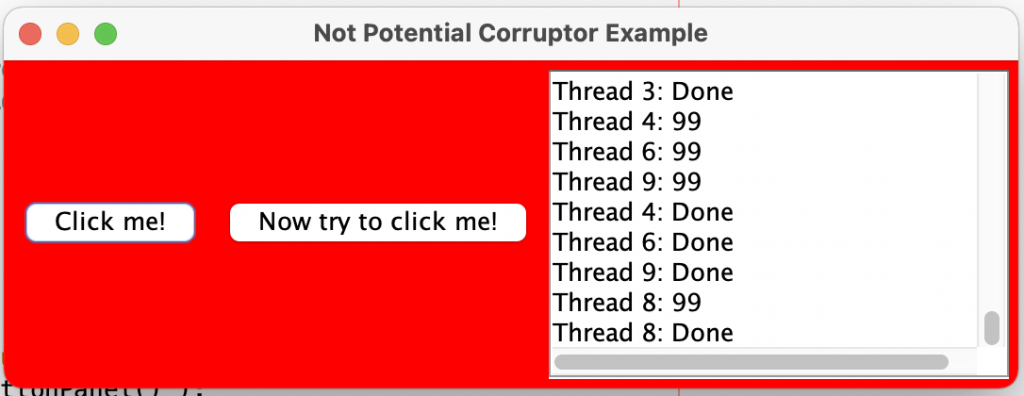
The contents of the text area do not get corrupted, and the GUI layout remains stable.
Note that the threads can take a while, so be patient!
Avoid Too Much Work in the EDT
The second problem to deal with is that one must avoid doing too much work from within the Event Dispatch Thread.
Illustrating the problem
Consider the following code:
package hangThread;

import java.awt.BorderLayout;
import java.awt.Color;
import java.awt.Container;
import java.awt.event.ActionEvent;
import java.awt.event.ActionListener;
import javax.swing.JButton;
import javax.swing.JFrame;
import javax.swing.JLabel;
import javax.swing.JPanel;
import javax.swing.SwingConstants;
import javax.swing.SwingUtilities;

/**
 * This is a frame which illustrates the problems associated with trying to
 * do large amounts of work from within the Event Dispatch Thread.
 */

public class HangThreadExample extends JFrame
{
  public HangThreadExample()
  {
    setTitle("Hang Thread Example");
    setSize(200, 200);
    Container contentPane = getContentPane();
    contentPane.setLayout(new BorderLayout());
    contentPane.add( new ButtonPanel(), BorderLayout.CENTER );
    contentPane.add(m_progressLabel, BorderLayout.SOUTH);
  }

  private void doWork()
  {
    try
    {
      Thread.sleep(10000); // represents a long operation of some kind.
    }
    catch (InterruptedException ie)
    {
      ie.printStackTrace();
    }
  }

  private void setProgress(final String text)
  {
    m_progressLabel.setText(text);
  }

  class ButtonPanel extends JPanel implements ActionListener
  {
    ButtonPanel()
    {
      setBackground(Color.blue);
      m_clickMeButton.addActionListener(this);
      add(m_clickMeButton);

      m_nowClickMeButton.addActionListener( new ActionListener()
      {
        public void actionPerformed(ActionEvent ev)
        {
          ButtonPanel.this.setBackground(Color.yellow);
        }
      }
      );
      m_nowClickMeButton.setEnabled(false);  // Disable for now
      add(m_nowClickMeButton);
    }

    public void actionPerformed(ActionEvent ev)
    {
      m_clickMeButton.setEnabled(false);
      Color oldColor = getBackground(); // Save color
      setBackground(Color.red);
      m_nowClickMeButton.setEnabled(true);

      setProgress("Working...");
      doWork();
      setProgress("Done");

      m_clickMeButton.setEnabled(true);
    }
  }

  public static void main(String[] args)
  {
    HangThreadExample frame = new HangThreadExample();
    frame.setDefaultCloseOperation(JFrame.EXIT_ON_CLOSE);
    frame.setVisible(true);
  }

  private JButton m_clickMeButton = new JButton("Click me!");
  private JButton m_nowClickMeButton = new JButton("Now try to click me!");
  private JLabel m_progressLabel = new JLabel(" ", SwingConstants.CENTER);
}
It simulates doing a lot of time-consuming work from the AWT event dispatch thread.
Note the ButtonPanel’s actionPerformed method, which is invoked (from the AWT event dispatch thread) when you click on the “Click me!” button. It does the following:
- Sets the background color of the ButtonPanel to red
- Enables the “Now try to click me!” button.
- Calls the HangThreadExample class’s doWork() method
- After returning from the doWork() method, it sets the background back to its original color, and disables the “Now try to click me!” button.
Here is a sequence of image captures from running this program:
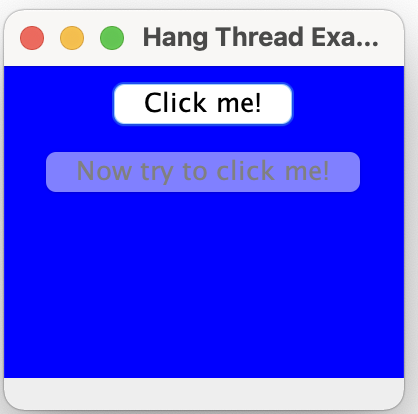
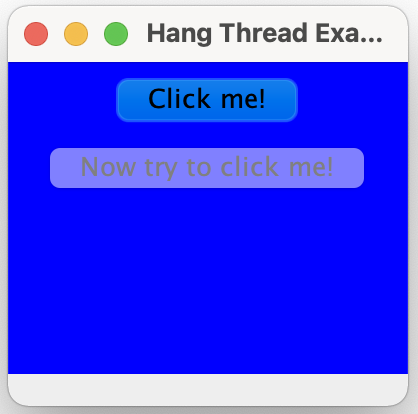
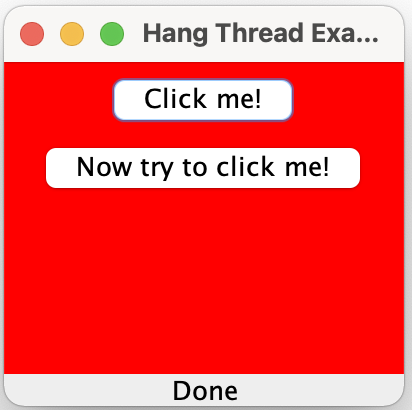
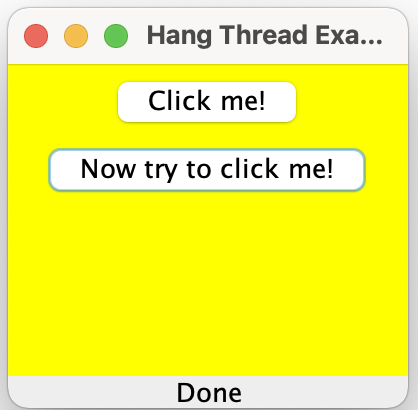
If I were to click on the “Click me!” button again, it would again hang for a while.
What’s happening?
Did you notice that:
- The “Click me!” button remains depressed, and doesn’t “spring back” until after a long delay?
- The background color similarly did not change to red until after the same delay?
- The “Now try to click me!” button is not enabled, again, until after the same delay?
- The whole GUI freezes for a long time?
All of this is because the doWork() method was invoked from, and therefore runs in the context of, the Event Dispatch Thread. All of the requests for changes to the GUI that the actionPerformed() method requested were entered in the queue for the event dispatch thread. However, since events are dispatched serially, one at a time, and because the doWork() method was hogging the event dispatch thread, none of the GUI requests were acted upon until the work had been completed, by which time the actionPerformed() method had undone its requests (actually, requested additional changes to the GUI which reversed the original requests.
The above program is a typical example of what happens when a listener for an event tries to do too much work in direct response to receiving the listener callback for its event. Doing this kind of thing can result in GUIs which respond poorly to user interaction.
We’ve probably all experienced GUI programs which exhibit such poor behavior — but we can do better!
Fixing the Problem
The solution to this problem is to cause long-running work to be done in a separate thread.
Here is a version of the above program that solves the problem:
package noHangThread;

import java.awt.BorderLayout;
import java.awt.Color;
import java.awt.Container;
import java.awt.event.ActionEvent;
import java.awt.event.ActionListener;
import javax.swing.JFrame;
import javax.swing.JButton;
import javax.swing.JLabel;
import javax.swing.JPanel;
import javax.swing.SwingConstants;
import javax.swing.SwingUtilities;

/**
 * This is a frame which solves the problems associated with trying to
 * do large amounts of work from within the Event Dispatch Thread.
 */

public class NoHangThreadExample extends JFrame
{
  //Construct the frame
  public NoHangThreadExample()
  {
    setTitle("No Hang Thread Example");
    setSize(200, 200);
    Container contentPane = getContentPane();
    contentPane.setLayout(new BorderLayout());
    contentPane.add( new ButtonPanel(), BorderLayout.CENTER );
    contentPane.add(m_progressLabel, BorderLayout.SOUTH);
  }

  private void doWork()
  {
    setProgress(false, "Working...");
    try
    {
      Thread.sleep(10000); // represents a long operation of some kind.
    }
    catch (InterruptedException ie)
    {
      ie.printStackTrace();
    }
    setProgress(true, "Done");
  }

  private void setProgress(final boolean enableButton, final String text)
  {
    SwingUtilities.invokeLater( new Runnable()
    {
      public void run()
      {
        m_clickMeButton.setEnabled(enableButton);
        m_progressLabel.setText(text);
      }
    }
    );
  }

  class ButtonPanel extends JPanel implements ActionListener
  {
    ButtonPanel()
    {
      setBackground(Color.blue);
      m_clickMeButton.addActionListener(this);
      add(m_clickMeButton);

      m_nowClickMeButton.addActionListener( new ActionListener()
      {
        public void actionPerformed(ActionEvent ev)
        {
          ButtonPanel.this.setBackground(Color.yellow);
        }
      }
      );
      m_nowClickMeButton.setEnabled(false);  // Disable for now
      add(m_nowClickMeButton);
    }

    public void actionPerformed(ActionEvent ev)
    {
      setBackground(Color.red);
      m_nowClickMeButton.setEnabled(true);
      Thread thread = new Thread()
      {
        public void run()
        {
          doWork();
        }
      };
      thread.start();
    }
  }

  public static void main(String[] args)
  {
    NoHangThreadExample frame = new NoHangThreadExample();
    frame.setDefaultCloseOperation(JFrame.EXIT_ON_CLOSE);
    frame.setVisible(true);
  }

  private JButton m_clickMeButton = new JButton("Click me!");
  private JButton m_nowClickMeButton = new JButton("Now try to click me!");
  private JLabel m_progressLabel = new JLabel(" ", SwingConstants.CENTER);
}
Note that the only change is to invoke doWork() from a separate thread.
The following images show the improved behavior:
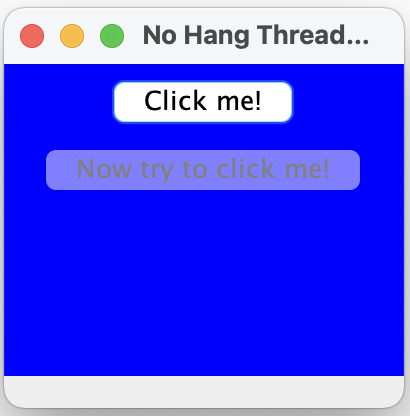
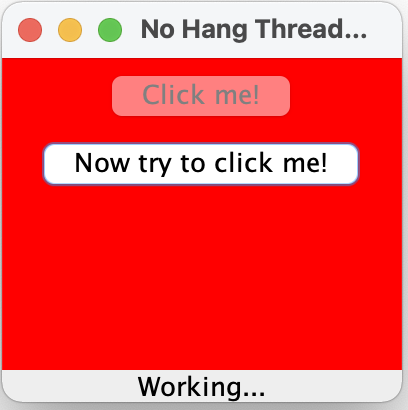
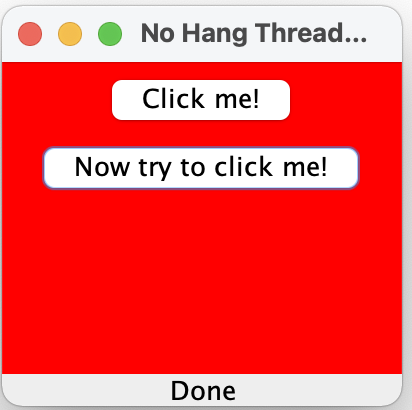
Did you notice that, now:
- The “Click me!” button “springs back” immediately?
- The background color changes to red immediately?
- The “Now try to click me!” button is now enabled immediately?
- The whole GUI does not freeze?
- That the state of the “work” is correctly indicated in the bottom bar?
Providing Visual Feedback
As you have already seen, it is usually very important to provide some kind of feedback — usually visual — to ensure that the user understands that something is happening, and so the user can tell when background work has completed.
There are a number of ways of accomplishing this.
Example: A 2-Phase Responder
Here’s a simple example of how one might provide visual feedback from time-consuming work processing in a background thread: A “2-Phase Responder”.
package multiResponse;

/**
 * This is an interface for a two-phase progress responder.
 */
public interface TwoPhaseResponder
{
  /**
   * Called when the work has started
   */
  public void started();

  /**
   * Called when the first phase of the work is complete
   */
  public void phase1Complete();

  /**
   * Called when the second phase of the work is complete
   */
  public void phase2Complete();

  /**
   * Called when all the work is complete
   */
  public void done();
}
package multiResponse;

/**
 * This is a two-phase worker thread
 */
public class TwoPhaseWorker extends Thread
{
  public TwoPhaseWorker(TwoPhaseResponder responder)
  {
    m_responder = responder;
  }

  public void run()
  {
    m_responder.started();
    try
    {
      Thread.sleep(5000); // represents a long operation of some kind.
      m_responder.phase1Complete();

      Thread.sleep(5000); // represents another long operation of some kind.
      m_responder.phase2Complete();

      Thread.sleep(500); // Give the user a chance to see the second phase completed message
    }
    catch (InterruptedException ie)
    {
      ie.printStackTrace();
    }
    m_responder.done();
  }

  private TwoPhaseResponder m_responder;
}
package multiResponse;

import java.awt.BorderLayout;
import java.awt.Color;
import java.awt.Container;
import java.awt.event.ActionEvent;
import java.awt.event.ActionListener;
import java.lang.reflect.InvocationTargetException;
import javax.swing.JFrame;
import javax.swing.JButton;
import javax.swing.JLabel;
import javax.swing.JPanel;
import javax.swing.SwingUtilities;

/**
 * This is a frame which shows how we can provide visual responses from each of
 * several phases of time-consuming work in a background worker thread.
 */
public class TwoPhaseResponderExample extends JFrame
{
  public TwoPhaseResponderExample()
  {
    setTitle("Two-phase Responder Example");
    setSize(200, 200);
    Container contentPane = getContentPane();
    contentPane.setLayout(new BorderLayout());
    contentPane.add( new ButtonPanel(), BorderLayout.CENTER );
    contentPane.add(m_progressLabel, BorderLayout.SOUTH);
  }

  class ButtonPanel extends JPanel implements ActionListener, TwoPhaseResponder
  {
    ButtonPanel()
    {
      setBackground(Color.blue);
      m_clickMeButton.addActionListener(this);
      add(m_clickMeButton);

      m_nowClickMeButton.addActionListener( new ActionListener()
      {
        public void actionPerformed(ActionEvent ev)
        {
          ButtonPanel.this.setBackground(Color.yellow);
        }
      }
      );
      m_nowClickMeButton.setEnabled(false);  // Disable for now
      add(m_nowClickMeButton);
    }

    public void actionPerformed(ActionEvent ev)
    {
      setBackground(Color.red);
      m_nowClickMeButton.setEnabled(true);
      m_progressLabel.setText("Background work in progress");
      TwoPhaseWorker thread = new TwoPhaseWorker(this);
      thread.start();
    }

    public void started()
    {
      setStatus("Started work...");
    }

    public void phase1Complete()
    {
      setStatus("Phase 1 complete");
    }

    public void phase2Complete()
    {
      setStatus("Phase 2 complete");
    }

    public void done()
    {
      setStatus("Work Completed");
    }

    private void setStatus(final String text)
    {
      SwingUtilities.invokeLater( new Runnable()
        {
          public void run()
          {
            m_progressLabel.setText(text);
          }
        }
      );
    }
  }

  public static void main(String[] args)
  {
    TwoPhaseResponderExample frame = new TwoPhaseResponderExample();
    frame.setDefaultCloseOperation(JFrame.EXIT_ON_CLOSE);
    frame.setVisible(true);
  }

  private JButton m_clickMeButton = new JButton("Click me!");
  private JButton m_nowClickMeButton = new JButton("Now try to click me!");
  private JLabel m_progressLabel = new JLabel(" ", SwingUtilities.CENTER);
}
After you’ve brought up the JFrame, click on the “Click me!” button, and see what actually happens!
The resulting JFrame should contain a JLabel field that is updated at appropriate places in the program, to indicate when work has started, when phase 1 is complete, when phase 2 is complete, and when all work has completed.
Here is what the program produces:
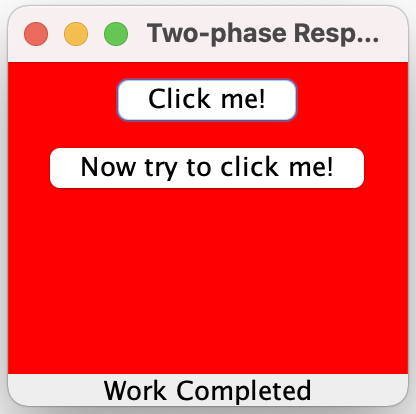
The message in the bottom bar goes from blank, and when the “Click me! button is clicked, to “Started work”, to “Phase 1 complete”, to “Phase 2 complete” to “Work Completed”.
Using a Worker Thread
If we want to separate out the work from the way it is invoked (“separation of form vs. function”), we can create ourselves a worker thread which can perform the necessary long-running work:
package workerThread;

/**
 * This is an interface for a status responder.
 */
public interface StatusResponder
{
  /**
   * Called when the work has started
   */
  public void started();

  /**
   * Called when all the work is complete
   */
  public void done();
}
package workerThread;

/**
 * This class is a worker thread which can be used to perform
 * time-consuming work outside of the event dispatch thread.
 */

public class WorkerThread extends Thread
{
  public WorkerThread(StatusResponder responder)
  {
    m_responder = responder;
  }

  /**
   * The run method for the worker thread,
   * where the work gets done.
   */
  public void run()
  {
    m_responder.started();
    try
    {
      Thread.sleep(10000); // represents a long operation of some kind.
    }
    catch (InterruptedException ie)
    {
      ie.printStackTrace();
    }
    m_responder.done();
  }

  private StatusResponder m_responder;
}
package workerThread;

import java.awt.BorderLayout;
import java.awt.Color;
import java.awt.Container;
import java.awt.event.ActionEvent;
import java.awt.event.ActionListener;
import javax.swing.JFrame;
import javax.swing.JButton;
import javax.swing.JLabel;
import javax.swing.JPanel;
import javax.swing.SwingConstants;
import javax.swing.SwingUtilities;

/**
 * This is a frame which solves the problems associated with trying to
 * do large amounts of work from within the Event Dispatch Thread.
 * It uses a separate WorkerThread class.
 */

public class WorkerThreadExample extends JFrame
{
  //Construct the frame
  public WorkerThreadExample()
  {
    setTitle("Worker Thread Example");
    setSize(200, 200);
    Container contentPane = getContentPane();
    contentPane.setLayout(new BorderLayout());
    contentPane.add( new ButtonPanel(), BorderLayout.CENTER );
    contentPane.add(m_progressLabel, BorderLayout.SOUTH);
  }

  class ButtonPanel extends JPanel implements ActionListener
  {
    ButtonPanel()
    {
      setBackground(Color.blue);
      m_clickMeButton.addActionListener(this);
      add(m_clickMeButton);

      m_nowClickMeButton.addActionListener( new ActionListener()
        {
          public void actionPerformed(ActionEvent ev)
          {
            ButtonPanel.this.setBackground(Color.yellow);
          }
        }
      );
      m_nowClickMeButton.setEnabled(false);  // Disable for now
      add(m_nowClickMeButton);
    }

    public void actionPerformed(ActionEvent ev)
    {
      setBackground(Color.red);
      m_nowClickMeButton.setEnabled(true);
      new WorkerThread( new Responder() ).start();
    }
  }

  public static void main(String[] args)
  {
    WorkerThreadExample frame = new WorkerThreadExample();
    frame.setDefaultCloseOperation(JFrame.EXIT_ON_CLOSE);
    frame.setVisible(true);
  }

  /**
   * Inner responder class
   */
  class Responder implements StatusResponder
  {
    public void started()
    {
      setStatus(false, "Started work...");
    }

    public void done()
    {
      setStatus(true, "Done!");
    }

    private void setStatus(final boolean enable, final String text)
    {
      SwingUtilities.invokeLater( new Runnable()
        {
          public void run()
          {
            m_progressLabel.setText(text);
            m_clickMeButton.setEnabled(enable);
          }
        }
      );
    }
  }

  private JButton m_clickMeButton = new JButton("Click me!");
  private JButton m_nowClickMeButton = new JButton("Now try to click me!");
  private JLabel m_progressLabel = new JLabel(" ", SwingConstants.CENTER);
}
The only change we made was to move the work out into the separate WorkerThread‘s run() method.
Note that we have provided a StatusResponder to provide some user feedback.
The results of this program are very similar to earlier versions; we are just using a WorkerThread to do the time-consuming work.
Using SwingWorker
Some Sun Java folks came up with a class that they called SwingWorker, to illustrate good practice using a worker thread model.In this section, we’ll show some examples of the use of SwingWorker.
Note that a version of the
SwingWorkerclass was included in Java 6.0 (javax.swing.SwingWorker); it was not the same as the originalSwingWorker. Before 6.0, you had to download it separately.
They introduced a useful class called SwingWorker, which provides some very useful features. Here‘s where to find more information about SwingWorker.
SwingWorkeris an abstract class which you can extend in your own subclass to add useful functionality.- It allows you to compute a value in a new thread.
- Your subclass will override the construct() method, within which the value will be computed (in the new thread)
- Your subclass can override the finished() method, which is automatically invoked in the event thread at the end of the work performed in computing the value.
- The work performed by a SwingWorker can be interrupted
The old version of the SwingWorker class is not part of the Java distribution (and will not be), but it can be downloaded from the above web pages.
The “New” SwingWorker
The original SwingWorker class used not to be part of the Java distribution, but a new version of it is now included in Java 6.0 (javax.swing.SwingWorker).
SwingWorker provides a number of communication and control features:
- The
SwingWorkersubclass can define a method,done(), which is automatically invoked on the event dispatch thread when the background task is finished. SwingWorkerimplementsjava.util.concurrent.Future. This interface allows the background task to provide a return value to the other thread. Other methods in this interface allow cancellation of the background task and discovering whether the background task has finished or been cancelled.- The background task can provide intermediate results by invoking
SwingWorker.publish(), causingSwingWorker.process()to be invoked from the event dispatch thread. - The background task can define bound properties. Changes to these properties trigger events, causing event-handling methods to be invoked on the event dispatch thread.
An Example
Here’s an example of the use of the “new” (i.e. Java 6.0) SwingWorker class:
package swingWorker;

import java.awt.BorderLayout;
import java.awt.Color;
import java.awt.Container;
import java.awt.EventQueue;
import java.awt.event.ActionEvent;
import java.awt.event.ActionListener;
import java.beans.PropertyChangeEvent;
import java.beans.PropertyChangeListener;
import java.math.BigInteger;
import java.util.ArrayList;
import java.util.List;
import java.util.Random;
import javax.swing.JButton;
import javax.swing.JFrame;
import javax.swing.JLabel;
import javax.swing.JPanel;
import javax.swing.JProgressBar;
import javax.swing.JScrollPane;
import javax.swing.JTextArea;
import javax.swing.JTextField;
import javax.swing.SwingWorker;

/**
 * Class to demonstrate the use of a SwingWorker thread.
 *
 */
public class SwingWorkerExample extends JFrame
{
  /**
   * Main entry point
   */
  public static void main(String[] args)
  {
    EventQueue.invokeLater( new Runnable()
      {
        public void run()
        {
          JFrame frame = new SwingWorkerExample();
          frame.setDefaultCloseOperation(JFrame.EXIT_ON_CLOSE);
          frame.pack();
          frame.setVisible(true);
        }
      }
    );
  }

  /**
   * Creates a new instance of SwingWorkerExample
   */
  public SwingWorkerExample()
  {
    Container panel = getContentPane();
    panel.setLayout( new BorderLayout() );
    panel.add( new InputPanel(), BorderLayout.NORTH );
    m_textArea.setRows(30);
    panel.add( new JScrollPane(m_textArea), BorderLayout.CENTER );
    panel.add( m_progressBar, BorderLayout.SOUTH );
    m_progressBar.setForeground(Color.RED);
    m_progressBar.setStringPainted(true);
  }

  //// Inner classes /////

  /**
   * Input panel to allow user to enter values, and start generation
   */
  private class InputPanel extends JPanel implements ActionListener
  {
    InputPanel()
    {
      add( new JLabel("Bits:") );
      add(m_bits);
      add( new JLabel("# of primes to generate:") );
      add(m_total);
      add(m_startButton);
      m_startButton.addActionListener(this);
      add(m_cancelButton);
      m_cancelButton.setEnabled(false);
      m_cancelButton.addActionListener( new ActionListener()
        {
          public void actionPerformed(ActionEvent event)
          {
            m_task.cancel(true);
          }
        }
      );
    }

    /**
     * Invoked on start button click
     */
    public void actionPerformed(ActionEvent e)
    {
      try
      {
        // Extract the input values
        // (Can generate NumberFormatExceptions)
        int bits = Integer.parseInt(m_bits.getText());
        int count = Integer.parseInt(m_total.getText());
        // Prevent multiple starts during work in progress
        m_startButton.setEnabled(false);
        // Allow for cancellation
        m_cancelButton.setEnabled(true);
        // Clear the text area
        m_textArea.setText("");
        // Create the worker task
        m_task = new PrimeNumbersTask(bits, count);
        // Set up to listen for progress changes
        m_task.addPropertyChangeListener( new PropertyChangeListener()
        {
          public  void propertyChange(PropertyChangeEvent evt)
          {
            if ("progress".equals(evt.getPropertyName()))
            {
              m_progressBar.setValue((Integer)evt.getNewValue());
            }
          }
        }
        );
        // Start the task thread
        m_task.execute();
      }
      catch (NumberFormatException nfe)
      {
        // No nothing (silently ignore the button click)
      }
    }
  }


  /**
   * Class to calculate a set of prime m_numbers in a worker thread.
   */
  private class PrimeNumbersTask extends SwingWorker< List<BigInteger>, BigInteger >
  {
    /**
     * Constructor.
     * @param bitCount the number of bits for a prime
     * @param primeCount the number of primes to generate
     */
    PrimeNumbersTask(int bitCount, int primeCount)
    {
      m_bitCount = bitCount;
      m_primeCount = primeCount;
    }

    /**
     * This method runs in the background, in the worker thread.
     */
    @Override
    public List<BigInteger> doInBackground()
    {
      while ( (m_numbers.size() < m_primeCount) && ! isCancelled())
      {
        BigInteger number = nextPrimeNumber();
        m_numbers.add(number);
        publish(number);
        setProgress(100 * m_numbers.size() / m_primeCount);
      }
      return m_numbers;
    }

    /**
     * Receives data chunks from the publish method
     * asynchronously on the Event Dispatch Thread.
     */
    @Override
    protected void process(List<BigInteger> chunks)
    {
      for (BigInteger number : chunks)
      {
        m_textArea.append(number + "\n");
      }
    }

    /**
     * Automatically invoked after the doBackground() method is finished.
     * This method runs in the context of the Event Dispatch Thread
     */
    @Override
    protected void done()
    {
      m_textArea.append("Generated total of " + m_numbers.size() +
        " primes of size " + m_bitCount + " bits.\n");
      // Reset state of buttons.
      m_startButton.setEnabled(true);
      m_cancelButton.setEnabled(false);
    }

    /**
     * Returns the next prime number
     */
    private BigInteger nextPrimeNumber()
    {
      return BigInteger.probablePrime(100, m_randomGenerator);
    }

    //// Private data ////
    private final int m_bitCount;
    private final int m_primeCount;
    private ArrayList<BigInteger> m_numbers = new ArrayList<BigInteger>();
    private Random m_randomGenerator = new Random(0);
  }

  //// Private data /////
  private JTextField m_bits = new JTextField(4);
  private JTextField m_total = new JTextField(4);
  private JButton m_startButton = new JButton("Start");
  private JButton m_cancelButton = new JButton("Cancel");
  private JTextArea m_textArea = new JTextArea();
  private final JProgressBar m_progressBar = new JProgressBar(0, 100);
  private PrimeNumbersTask m_task;
}
which produces something like:
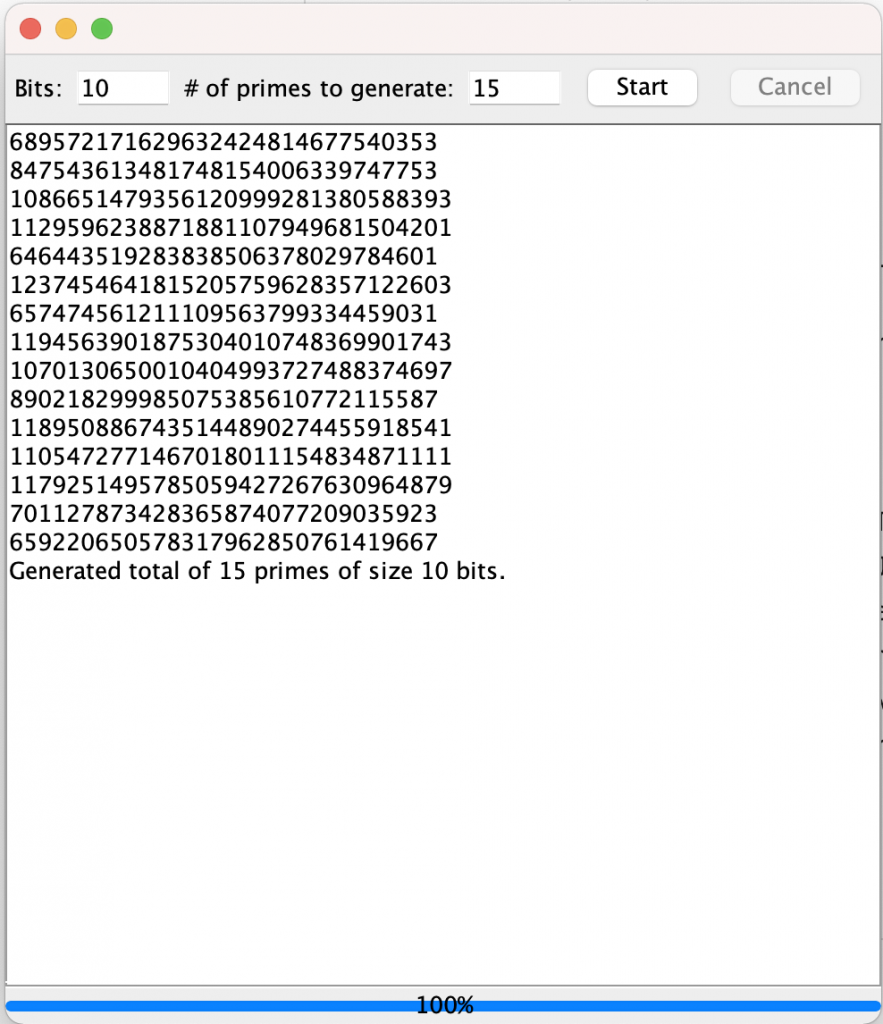
I had told it to generate 15 primes of 10 bits each.