
Table of Contents
Bean Introspection
How does a builder tool determine a Bean’s properties, events and methods?
It does it by using introspection, implemented in the java.beans.Introspector class. The Introspector class uses the Java reflection mechanism, among other mechanisms, to gather information about the Bean.
As one wag put it:
Although Java may be reflective, even introspective, omphaloskepsis is still not part of the core distribution.
So far, in the Beans we’ve developed, we’ve used the naming conventions for getting and setting properties: methods called getPropertyName and setPropertyName, etc.
Note: These naming conventions are called “design patterns” by JavaSoft.
This may be a little confusing and misleading. See here for a description of Design Patterns.Also, refer to the book Design Patterns: Elements of Reusable Object-Oriented Software, which became very influential in the field of software engineering. The Java class library has been strongly influenced by these concepts.
Sometimes, the information we supply implicitly, using such conventions, is not enough for our needs, and sometimes the reflection mechanism exposes more information than we wish.
For example, remember the SimpleScatterPlot properties sheet?
The original BeanBox (which, sadly appears to have disappeared), displayed the SimpleScatterPlot properties like this:
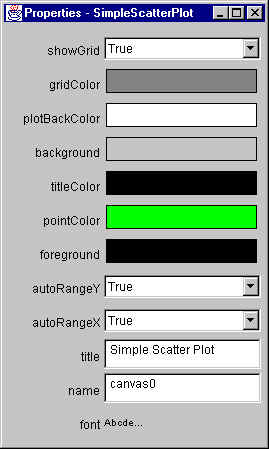
Note that each property is displayed with what is called a Property Editor, chosen to be appropriate for the property’s type. So the various color properties show a property editor that allows you to choose the property value visually. Alternatively, the Boolean type properties display a dropdown list that allows you to choose True or False. And String properties display a text field that you can use to change their values.
There are a number of properties that we’d rather not expose:
backgroundforeground
Plus, there are some properties that we would like to be displayed, that aren’t exposed at all, such as:
points, because it is an indexed property, and its type is not displayableplotBounds, because its type is not displayable
Additionally, there are times when we want to expose something about our Beans that can’t be represented by the standard naming conventions.
Modern day Java IDEs provide “Bean Pattern” GUI interfaces for a Java Bean’s properties. Apache NetBeans, for example, displays such a Bean Pattern as part of its GUI, if you choose SimpleScatterPlot, and the “Bean Patterns” option in the Navigator:
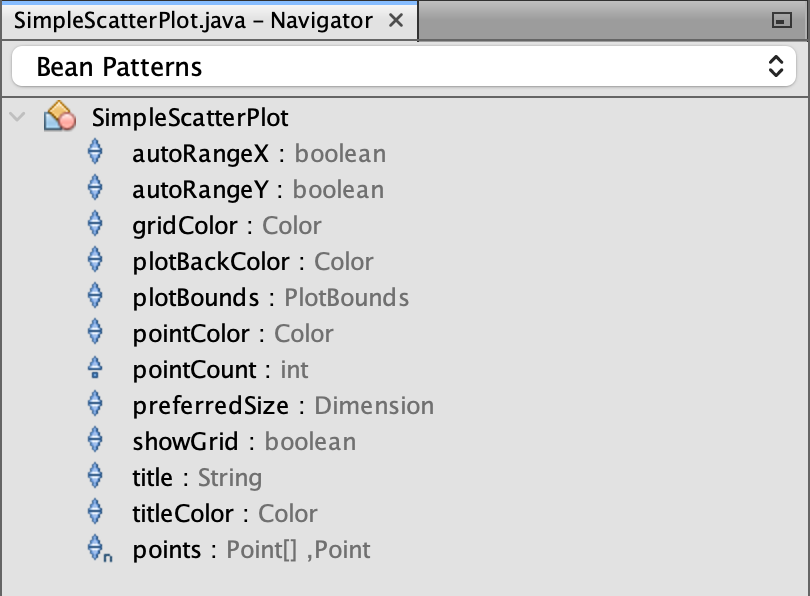
Note that it doesn’t provide any obvious property editors, at least by default. Therefore, it provides no way of changing a property’s value.
The BeanInfo Interface
The Introspector class provides a standard way for tools to learn about the properties, events, and methods supported by a target Java Bean.
For each of these three kinds of information, the Introspector will separately analyze the Bean’s class and superclasses looking for either explicit or implicit information and use that information to build a BeanInfo object that comprehensively describes the target Bean.
For each class “Foo“, explicit information may be available if there exists a corresponding “FooBeanInfo” class that provides a non-null value when queried for the information. The Introspector class first looks for the BeanInfo class by taking the full package-qualified name of the target bean class and appending “BeanInfo” to form a new class name. If it fails to find this class within the classpath, then it takes the final classname component of this name, and looks for that class in each of the packages specified in the BeanInfo package search path.
Thus, for a class such as “grover.myBeans.OurButton“, it would first look for a BeanInfo class called “grover.myBeans.OurButtonBeanInfo“. If that fails, it would look in each package in the BeanInfo search path for an OurButtonBeanInfo class. With the default search path, this means looking for “sun.beans.infos.OurButtonBeanInfo“, but the search path may be accessed and changed by the caller, using the getBeanInfoSearchPath and setBeanInfoSearchPath methods.
If a class provides explicit BeanInfo about itself then the Introspector class adds that to the BeanInfo information it obtained from analyzing any derived classes, but it regards the explicit information as being definitive for the current class and its base classes, and does not proceed any further up the superclass chain.
If the Introspector class doesn’t find explicit BeanInfo on a class, it uses low-level reflection to study the methods of the class and apply standard design patterns to identify property accessors, event sources, or public methods. It then proceeds to analyze the class’s superclass and add in the information from it (and possibly on up the superclass chain).
The BeanInfo Interface specifies the following methods:
| Method | Description |
|---|---|
| public BeanInfo[] getAdditionalBeanInfo() | Returns any additional BeanInfo objects that are relevant to the associated Bean. |
| public BeanDescriptor getBeanDescriptor() | Returns the BeanDescriptor object |
| public int getDefaultEventIndex() | Returns the default event index |
| public int getDefaultPropertyIndex() | Returns the default property index |
| public EventSetDescriptor[] getEventSetDescriptors() | Returns the event set descriptors. |
| public Image getIcon(int iconKind) | Returns the specified icon for the Bean |
| public MethodDescriptor[] getMethodDescriptors() | Returns the method descriptors. |
| public PropertyDescriptor[] getPropertyDescriptors() | Returns the property descriptors |
It is important to note that, if you provide a BeanInfo class for your Bean, you do not have to specify everything about your Bean in it. If your BeanInfo class returns a null from any of these above methods, then the Introspector will use Reflection to provide that information for itself.
On the other hand, if you do supply some information in your own BeanInfo class, then that is considered definitive, and reflection will not be used. This can get confusing at times, if you don’t understand it.
One interesting feature of the BeanInfo class is that you can associate an icon with your Bean, which can be used by a builder tool (and is used by the BeanBox) at design time.
The Default Property
It is sometimes useful, in some contexts (such as a scripting language, or similar) to define a default property. If so, the BeanInfo class can return the index of the desired default property.
The SimpleBeanInfo Class
To make things easier for you, the java.beans.SimpleBeanInfo class implements the BeanInfo interface, and provides method implementations that simply return null. This is similar to the set of event Adapter classes each of which implements its corresponding event Listener interface, and provide method implementations which do nothing. To create your BeanInfo class, you merely extend the SimpleBeanInfo class, and override what you need.
The SimpleBeanInfo class provides one additional, and useful, method:
public Image loadImage(String resourceName)
This is a utility method to help in loading icon images. It takes the name of a resource file associated with the current object’s class file and loads an image object from that file. (Typically images will be GIFs.)
The SimpleBeanInfo class’ implementation of the getDefaultPropertyIndex method returns -1, indicating that there is no default property.
The FeatureDescriptor Class
The FeatureDescriptor class is the common base class for the PropertyDescriptor, EventSetDescriptor, and MethodDescriptor classes, etc. It supports some common information that can be set and retrieved for any of the introspection descriptors.
In addition it provides an extension mechanism so that arbitrary attribute/value pairs can be associated with a design feature.
It contains the following methods:
| Method | Description |
|---|---|
| public Enumeration attributeNames() | Returns an enumeration of the locale-independent names of any attributes that have been registered with setValue. |
| public String getDisplayName() | Returns the localized display name for the property/method/event. This defaults to the same as its programmatic name from getName. |
| public String getName() | Returns the programmatic name of the property/method/event |
| public String getShortDescription() | Returns a localized short description associated with this property/method/event. This defaults to be the display name. |
| public Object getValue(String attributeName) | Retrieve a named attribute with this feature. |
| public boolean isExpert() | Returns true if this feature is intended for use by experts only. The “expert” flag is used to distinguish between those features that are intended for expert users from those that are intended for normal users. |
| public boolean isHidden() | Returns true if this feature should be hidden from human users. The “hidden” flag is used to identify features that are intended only for tool use, and which should not be exposed to humans. |
| public void setDisplayName(String displayName) | Sets the localized display name for the property/method/event. |
| public void setExpert(boolean expert) | Sets the “expert” flag. |
| public void setHidden(boolean hidden) | Sets the “hidden” flag. |
| public void setName(String name) | Sets the programmatic name of the property/method/event. |
| public void setShortDescription(String text) | Associates a short descriptive string with a feature. Normally these descriptive strings should be less than about 40 characters. |
| public void setValue(String attributeName, Object value) | Associates a named attribute with this feature. |
The BeanDescriptor Class
A BeanDescriptor, a subclass of FeatureDescriptor, provides global information about a Bean. It is used to describe the classes that implement the Bean and the Bean customizer, if any.
BeanDescriptor contains the following methods, in addition to those present in FeatureDescriptor:
| Method | Description |
|---|---|
| public BeanDescriptor(Class beanClass, Class customizerClass) | Constructs a BeanDescriptor for a bean that has a customizer. |
| public BeanDescriptor(Class beanClass) | Constructs a BeanDescriptor for a bean that doesn’t have a customizer. |
| public Class getBeanClass() | Returns the Class object for the bean. |
| public Class getCustomizerClass() | Returns the Class object for the bean’s customizer. This may be null if the bean doesn’t have a customizer. |
The PropertyDescriptor Class
A PropertyDescriptor, a subclass of FeatureDescriptor, describes one property that a Java Bean exposes.
PropertyDescriptor contains the following methods, in addition to those present in FeatureDescriptor:
| Method | Description |
|---|---|
| public PropertyDescriptor(String propertyName, Method getter, Method setter) throws IntrospectionException | Constructs a PropertyDescriptor, using the name of a simple property, and Method objects for reading and writing the property. |
| public PropertyDescriptor(String propertyName, Class beanClass, String getterName, String setterName) throws IntrospectionException | Constructs a PropertyDescriptor, using the name of a simple property, and method names for reading and writing the property. |
| public PropertyDescriptor(String propertyName, Class beanClass) throws IntrospectionException | Constructs a PropertyDescriptor for a property that follows the standard Java convention by having getFoo and setFoo accessor methods. Thus if the argument name is “fred”, it will assume that the reader method is “getFred” and the writer method is “setFred”. Note that the property name should start with a lower case character, which will be capitalized in the method names. |
| public Class getPropertyEditorClass() | Returns any explicit PropertyEditor Class that has been registered for this property. Normally this will return null, indicating that no special editor has been registered, so the PropertyEditorManager should be used to locate a suitable PropertyEditor. |
| public Class getPropertyType() | Returns the Java type information for the property. Note that the “Class” object may describe a built-in Java type such as “int”. The result may be null if this is an indexed property that does not support non-indexed access. This is the type that will be returned by the ReadMethod. |
| public Method getReadMethod() | Returns the method that should be used to read the property value. May return null if the property can’t be read. |
| public Method getWriteMethod() | Returns the method that should be used to write the property value. May return null if the property can’t be written. |
| public boolean isBound() | Returns whether the property is a bound property. Updates to “bound” properties will cause a “PropertyChange” event to get fired when the property is changed. |
| public boolean isConstrained() | Returns whether the property is a constrained property. Attempted updates to “Constrained” properties will cause a “VetoableChange” event to get fired when the property is changed. |
| public void setBound(boolean bound) | Sets whether this property is a bound property. |
| public void setConstrained(boolean constrained) | Sets whether this property is a constrained property. |
| public void setPropertyEditorClass(Class propertyEditorClass) | Sets the PropertyEditor for the property. Normally PropertyEditors will be found using the PropertyEditorManager. However, if for some reason you want to associate a particular PropertyEditor with a given property, then you can do it with this method. |
The IndexedPropertyDescriptor Class
An IndexedPropertyDescriptor, subclass of PropertyDescriptor, describes a property that acts like an array and has an indexed read and/or indexed write method to access specific elements of the array. An indexed property may also provide simple non-indexed read and write methods. If these are present, they read and write arrays of the type returned by the indexed read method.
IndexedPropertyDescriptor contains the following methods, in addition to those present in PropertyDescriptor:
| Method | Description |
|---|---|
| public IndexedPropertyDescriptor( String propertyName, Method getter, Method setter, Method indexedGetter, Method indexedSetter) throws IntrospectionException | Constructs an IndexedPropertyDescriptor, using the name of a simple property, and Method objects for reading and writing the property. |
| public IndexedPropertyDescriptor( String propertyName, Class beanClass, String getterName, String setterName, String indexedGetterName, String indexedSetterName) throws IntrospectionException | Constructs an IndexedPropertyDescriptor, using the name of a simple property, and method names for reading and writing the property, both indexed and non-indexed. |
| public IndexedPropertyDescriptor( String propertyName, Class beanClass) throws IntrospectionException | Constructs an IndexedPropertyDescriptor for a property that follows the standard Java conventions by having getFoo and setFoo accessor methods, for both indexed access and array access. Thus if the argument name is “fred”, it will assume that there is an indexed reader method “getFred”, a non-indexed (array) reader method also called “getFred”, an indexed writer method “setFred”, and finally a non-indexed writer method “setFred”. |
| public Class getIndexedPropertyType() | Returns the Java Class for the indexed properties type. Note that the Class may describe a primitive Java type such as int. This is the type that will be returned by the indexedReadMethod. |
| public Method getIndexedReadMethod() | Returns the method that should be used to read an indexed property value. May return null if the property isn’t indexed or is write-only. |
| public Method getIndexedWriteMethod() | Returns the method that should be used to write an indexed property value. May return null if the property isn’t indexed or is read-only. |
The MethodDescriptor Class
A MethodDescriptor, a subclass of FeatureDescriptor, describes a particular method that a Bean supports for external access from other components.
Normally, Bean methods are exposed by making them public. The use of a method descriptor allows you to define explicitly which methods are available to be called for the Bean. It also allows you to provide more descriptive information than can be provided by low-level reflection.
MethodDescriptor contains the following methods, in addition to those present in FeatureDescriptor:
| Method | Description |
|---|---|
| public MethodDescriptor(Method method, ParameterDescriptor[] parameterDescriptors) | Constructs a MethodDescriptor from the low-level method information and descriptive information for each of the method’s parameters |
| public MethodDescriptor(Method method) | Constructs a MethodDescriptor from the low-level method information. |
| public Method getMethod() | Returns the low-level description of the method |
| public ParameterDescriptor[] getParameterDescriptors() | Returns the locale-independent names of the parameters. May return a null array if the parameter names aren’t known. |
The EventSetDescriptor Class
An EventSetDescriptor, a subclass of FeatureDescriptor, describes a group of events that a given Java bean fires. The given group of events are all delivered as method calls on a single event listener interface, and an event listener object can be registered via a call on a registration method supplied by the event source.
EventSetDescriptor contains the following methods, in addition to those present in FeatureDescriptor:
| Method | Description |
|---|---|
| public EventSetDescriptor( String eventSetName, Class listenerType, Method[] listenerMethods, Method addListenerMethod, Method removeListenerMethod) throws IntrospectionException | Constructs an EventSetDescriptor from scratch using java.lang.reflect.Method and java.lang.Class objects. |
| public EventSetDescriptor( String eventSetName, Class listenerType, MethodDescriptor[] listenerMethodDescriptors, Method addListenerMethod, Method removeListenerMethod) throws IntrospectionException | Constructs an EventSetDescriptor from scratch using java.lang.reflect.MethodDescriptor and java.lang.Class objects. |
| public EventSetDescriptor( Class sourceClass, String eventSetName, Class listenerType, String listenerMethodName) throws IntrospectionException | Constructs an EventSetDescriptor assuming that you are following the most simple standard design pattern, where a named event “fred” is (1) delivered as a call on the single method of interface FredListener, (2) has a single argument of type FredEvent, and (3) where the FredListener may be registered with a call on an addFredListener method of the source component and removed with a call on a removeFredListener method. |
| public EventSetDescriptor( Class sourceClass, String eventSetName, Class listenerType, String[] listenerMethodNames, String addListenerMethodName, String removeListenerMethodName) throws IntrospectionException | Constructs an EventSetDescriptor from scratch using string names. |
| public Method getAddListenerMethod() | Returns the method used to register a listener at the event source. |
| public MethodDescriptor[] getListenerMethodDescriptors() | Returns an array of MethodDescriptor objects for the target methods within the target listener interface that will get called when events are fired. |
| public Method[] getListenerMethods() | Returns an array of Method objects for the target methods within the target listener interface that will get called when events are fired. |
| public Class getListenerType() | Returns the Class object for the target interface that will get invoked when the event is fired. |
| public Method getRemoveListenerMethod() | Returns the method used to register a listener at the event source. |
| public boolean isInDefaultEventSet() | Reports whether an event set is in the “default set”. |
| public boolean isUnicast() | Reports whether the set is unicast. Defaults to “false”. Normally event sources are multicast. However there are some exceptions that are strictly unicast. |
| public void setInDefaultEventSet(boolean inDefaultEventSet) | Marks an event set as being in the “default” set (or not). By default this is true. |
| public void setUnicast(boolean unicast) | Marks an event set as unicast (or not). |
Property Editors
We’ve seen with the Beans we’ve implemented so far, that only some properties can be displayed and/or modified from within a builder tool such as the BeanBox. If the type of the property is simple such as a primitive type, or common object types, such as Font or Color, then the BeanBox supplies the appropriate mechanism for displaying and modifying a property of that type. However, if the type of the property is not in one of these classes, or if it is an indexed property, the BeanBox ignores the property, and outputs text telling you that it’s skipping that property:
...
Warning: Can't find public property editor for property "preferredSize".  Skipping.
Warning: Can't find public property editor for property "plotBounds".  Skipping.
But that isn’t very helpful. What if we want to be able to display or change that property in a builder tool? We have to provide the support for that ourselves, by following a set of rules. We provide that support by supplying a class that implements the PropertyEditor interface.
The PropertyEditor Interface
A class that implements the PropertyEditor interface provides support for GUIs that want to allow users to edit a property value of a given type. PropertyEditor supports a variety of different kinds of ways of displaying and updating property values. Most PropertyEditors will only need to support a subset of the different options available in this API.
Simple PropertyEditors may only support the getAsText and setAsText methods and need not support (say) paintValue or getCustomEditor. More complex types may be unable to support getAsText and setAsText but will instead support paintValue and getCustomEditor.
Every PropertyEditor class must support one or more of the three simple display styles. Thus it can either
- Support isPaintable(), or
- Both return a non-null String[] from getTags() and return a non-null value from getAsText(), or
- Simply return a non-null String from getAsText().
Every property editor must support a call on setValue when the argument object is of the type for which this is the corresponding PropertyEditor. In addition, each property editor must either support a custom editor, or support setAsText.
Each PropertyEditor should have a null (no-argument) constructor.
The PropertyEditor interface requires the following methods:
| Method | Description |
|---|---|
| public void addPropertyChangeListener( PropertyChangeListener listener) | Registers a listener for the PropertyChange event. When a PropertyEditor changes its value it should fire a PropertyChange event on all registered PropertyChangeListeners, specifying the null value for the property name and itself as the source. |
| public String getAsText() | Returns the property value as a human editable string. Returns null if the value can’t be expressed as an editable string. If a non-null value is returned, then the PropertyEditor should be prepared to parse that string back in setAsText(). |
| public Component getCustomEditor() | A PropertyEditor may choose to make available a full custom Component that edits its property value. It is the responsibility of the PropertyEditor to hook itself up to its editor Component itself and to report property value changes by firing a PropertyChange event. The higher-level code that calls getCustomEditor may either embed the Component in some larger property sheet, or it may put it in its own individual dialog, or … Returns a java.awt.Component that will allow a human to directly edit the current property value. May be null if this is not supported. |
| public String getJavaInitializationString() | This method is intended for use when generating Java code to set the value of the property. It should return a fragment of Java code that can be used to initialize a variable with the current property value. Example results are “2”, “new Color(127,127,34)”, “Color.orange”, etc. |
| public String[] getTags() | If the property value must be one of a set of known tagged values, then this method should return an array of the tags. This can be used to represent (for example) enum values. If a PropertyEditor supports tags, then it should support the use of setAsText with a tag value as a way of setting the value and the use of getAsText to identify the current value. Returns an array of Strings containing the tag values for this property. May be null if this property cannot be represented as a tagged value. |
| public Object getValue() | Returns the value of the property. Primitive types such as int will be wrapped as the corresponding object type such as “java.lang.Integer”. |
| public boolean isPaintable() | Returns true if the class will honor the paintValue method, false otherwise. |
| public void paintValue(Graphics gfx, Rectangle box) | Paint a representation of the value into a given area of screen real estate. Note that the propertyEditor is responsible for doing its own clipping so that it fits into the given rectangle. If the PropertyEditor doesn’t honor paint requests (see isPaintable) this method should be a silent noop. The given Graphics object will have the default font, color, etc of the parent container. The PropertyEditor may change graphics attributes such as font and color and doesn’t need to restore the old values. |
| public void removePropertyChangeListener( PropertyChangeListener listener) | Removes a listener for the PropertyChange event. |
| public void setAsText(String text) throws IllegalArgumentException | Sets the property value by parsing a given String. May raise java.lang.IllegalArgumentException if either the String is badly formatted or if this kind of property can’t be expressed as text. |
| public void setValue(Object value) | Set (or change) the object that is to be edited. Primitive types such as int must be wrapped as the corresponding object type such as “java.lang.Integer”. The parameter value is the new target object to be edited. Note that this object should not be modified by the PropertyEditor, rather the PropertyEditor should create a new object to hold any modified value. |
| public boolean supportsCustomEditor() | Returns true if the propertyEditor can provide a custom editor, false otherwise. |
Techniques for Displaying and Changing a Property Value
As discussed above, the PropertyEditor interface provides support for three techniques for displaying the value of a property, and two techniques for allowing the user to edit the value of a property. The value of a property can be displayed:
- As a string. If you implement the getAsText() method, the property value can be converted into a String, and can then be displayed as text in the Bean’s properties.
- As an enumerated value. If the property may only take on one of a fixed set of values, you can implement the getTags() method to allow the BeanBox to use a drop-down menu of those values.
- In a graphical display. If you implement paintValue(), the BeanBox can ask the property editor to display the value using some graphical format within the entry in the Bean’s properties. You must also implement isPaintable() to return true, to specify that the BeanBox should use the paintValue() method.
The two techniques for editing the value of a property are:
- String editing. If you implement setAsText(), the BeanBox can simply have the user enter a value directly in the bean’s properties sheet. If your property editor implements getTags(), then it should also implement setAsText() so that the BeanBox can set the property value using one of the allowed tag values.
- Custom editing. If your property editor implements getCustomEditor(), the BeanBox can call that custom editor to obtain an AWT Component that can be displayed in a dialog box. The Component serves as the custom editor for that property.
The PropertyEditorSupport Class
As we have seen a number of times before, there is a convenience class to simplify how we construct a PropertyEditor — PropertyEditorSupport, which we subclass to create a custom PropertyEditor.
PropertyEditorSupport implements the PropertyEditor interface, and provides a set of methods which may be overridden in its subclasses.
PropertyEditorSupport provides the following methods, in addition to those required by the PropertyEditor interface:
| Method | Description |
|---|---|
| protected PropertyEditorSupport(Object source) | Constructor for use when a PropertyEditor is delegating to us. The source parameter is the source to use for any events we fire. |
| protected PropertyEditorSupport() | Constructor for use by derived PropertyEditor classes. |
| public void firePropertyChange() | Fires a PropertyChange event to report to any interested listeners that we have been modified. |
What the BeanBox Does
During its introspection of a Bean, the BeanBox does the following:
- It obtains the PropertyDescriptors from the BeanInfo (either a BeanInfo class that you supply, or, if you don’t supply one, it creates a BeanInfo class automatically for you)
- For each PropertyDescriptor, it calls that descriptor’s getPropertyEditor method.
- If this returns a specific property editor, then it is used.
- If it returns a null, then it attempts to find an existing registered editor for that property’s type. If it finds one, it uses it.
- If it does not find a registered editor for the property’s type, it looks for a class whose name is <TypeName>Editor. If it finds such a class, it uses it.
- Otherwise, it will not display that property.
Creating a PropertyEditor for an Enumerated Property Type
Creating a property editor that supports an enumerated type is an example of a simple property editor. We’ll use a new version of the previous SimpleScatterPlot Bean as an example.
Creating a New SimpleScatterPlot Bean
Let’s look at our earlier example of the SimpleScatterPlot Bean:
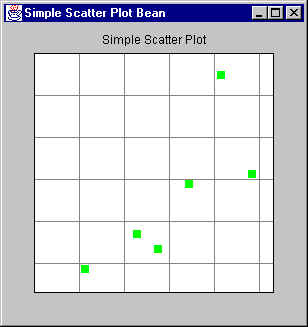
Let’s change it to allow the user to specify how the points are displayed on the plot.
We’ll do this by providing an abstraction interface, PlotType, which externalizes the way the plotting is done. That is, the code that does the drawing of the point is moved outside of the SimpleScatterPlot class, and the PlotType interface provides a standard interface which different classes may implement in different ways to plot a point differently.
Here’s the PlotType interface:
[TBS]
Customizers
Well, after all that work to create Property Editors for our various properties, we still have some problems with displaying and editing the properties for our SimpleScatterPlot Bean:
- There are a number of interacting properties. For example, we have our plotBounds property, but this is only used when autoRangeX or autoRangeY are turned off. This is not obvious from the property sheet representation.
- We still have quite a number of properties that arise from superclasses of our Bean. Many of those properties we’d like to suppress.
- Once you get more than a handful of properties, the property sheet isn’t the most convenient way of looking at or editing properties for a Bean.
For this reason, the JavaBeans specification allows us to completely override the property sheet for a Bean, and replace it with something more aesthetically pleasing and easier to use. This is called a customizer.
The Customizer Interface
[TBS]