
Table of Contents
What is HTTP?
The HyperText Transfer Protocol (HTTP) is a stateless, TCP/IP-based protocol for communication over the World-Wide Web. It is typically used between a client browser and a web server:
- The client browser issues a request to the web server. The client:
- Opens a TCP connection to the web server’s HTTP port (usually port 80)
- Sends an HTTP request message to the web server
- The web server:
- Receives the request
- Does the requested work
- Returns the information requested in a response message back to the client
- The connection is closed
The HTTP Request
The most common form of request from a browser is a GET. In its simplest form, it looks like:
GET /index.html HTTP/1.0
a single line, where:
- The first item on the line is called the method (here a
GET) - The second item is the pathname of the requested file
- The third item indicates we are using the HTTP protocol, and specifies the version.
A GET request can also include a request header. Here’s an example:
GET /index.html HTTP/1.0
Host: localhost:90
Pragma: no-cache
Accept: image/gif, image/x-xbitmap, image/jpeg, image/pjpeg, application/msword,
application/vnd.ms-powerpoint, application/vnd.ms-excel, */*
iM-Running: 2.42SE+
Connection: close
User-Agent: Mozilla/4.0 (compatible; MSIE 6.0; Windows NT 5.1; YComp 5.0.0.0)
Accept-Language: en-us
As you can see, this GET request was generated by the Microsoft Internet Explorer 6.0 browser, and there is lots of other information you could extract.
The HTTP Response
In response to the above HTTP request, the web server generates an HTTP response.
If the request was successfully satisfied by the web server, then the first line of the response will look like:
HTTP/1.0 200 OK
The 200 is the status code for success. “OK” is a human-readable description of the meaning of 200.
Following the first line are a number of response header lines, which communicate a number of useful pieces of information about the server, and a description of the contents of the file that follows in the response. A blank line which separates the header from the file contents. For example:
HTTP/1.0 200 OK
Server: Apache/1.3.9 (Win32)
Content-Type: text/html
Content-Length: 94

<HTML>
<HEAD>
<TITLE>HTTP Request Successful</TITLE>
</HEAD>
<BODY>
It Worked!
</BODY>
</HTML>
Note the blank line after the ‘Content-Length: ” line
HTTP Status Codes
If the web server encountered problems — perhaps it could not find the requested file — then the first line of the response contains one of a number of error status codes. Status codes are organized numerically to indicate the level/type of error:
| Code Range | Category | Description |
|---|---|---|
1xx | Informational | Mostly experimental application codes. HTTP/1.0 does not define any Informational status codes; HTTP/1.1 does. |
2xx | Successful | Request was received, understood and accepted. |
3xx | Redirection | The server is redirecting the client to another URL. |
4xx | Client Error | The request is improperly formatted, or cannot be fulfilled. |
5xx | Server Error | A valid request was received, but the server cannot fulfill it. |
Here are some actual status codes (this is not a complete list):
| Status Code | Description |
|---|---|
200 OK | The request succeeded. |
201 Created | The request was successful, and resulted in the creation of a new resource. |
301 Moved Permanently | The resource has been moved permanently. The Location header field specifies the new location. |
302 Moved Temporarily | The resource has been moved temporarily. The Location header field specifies the new location. |
400 Bad Request | The request used invalid syntax. |
401 Unauthorized | Authorization, such as username and password, is required to access this resource. A WWW_Authenticate header field containing an authorization challenge is returned. The web browser will normally display a username/password dialog box to the user |
403 Forbidden | The server refuses to fulfill the response. |
404 Not Found | No resource matching the requested URL exists on the server. |
500 Internal Server Error | The server encountered an unexpected problem. |
501 Not Implemented | The server does not implement the requested functionality. |
A Simple Java Web Server
To make things perhaps a little clearer, let’s implement a very simple web server.
The HttpServer class
First, here’s the main class, HttpServer, which opens a server socket, and responds to client connections
import java.io.IOException;
import java.net.ServerSocket;
import java.util.Date;

/**
 * Java HTTP Server
 *
 * This is a very simple HTTP server.
 *
 */
public class HttpServer
{

  public static boolean VERBOSE = false;

  /**
   * Usage
   */
  private static void usage()
  {
    //print instructions to standard out
    String instructions
            = "usage: java HttpServer [-options] [port-number]\n\n"
            + "where options include:\n"
            + "    -? -help\t print out this message\n"
            + "    -v -verbose\t turn on verbose mode\n\n"
            + "  and port-number is the port number to listen on";

    System.out.println(instructions);
    System.out.flush();
  }

  /**
   * Extract command line arguments
   */
  private static void extractArguments(String[] args)
  {
    if (args.length > 0)
    {
      int arg = 0;
      if (args[arg].equals("-?") || args[arg].equals("-help"))
      {
        usage();
        arg++;
      }

      if (args.length >= arg)
      {
        if (args[arg].equals("-v") || args[arg].equals("-verbose"))
        {
          VERBOSE = true;
          arg++;
        }
      }

      if (args.length >= arg)
      {
        try
        {
          m_port = Integer.parseInt(args[arg]);
        }
        catch (java.lang.NumberFormatException nfe)
        {
          System.err.println("Invalid port number specified: " + args[arg]);
          System.err.println("  Defaulting to: " + m_port);
        }
      }
    }
  }

  /**
   * Main method
   *
   * @param args [-options] [port-number]
   */
  public static void main(String[] args)
  {
    extractArguments(args);

    ServerSocket serverConnect = null;
    try
    {
      System.out.println("\nConnecting to port " + m_port + "...\n");
      serverConnect = new ServerSocket(m_port); //listen on port
      System.out.println("Listening for connections on port " + m_port + "...\n");
      while (true) //listen until user halts execution
      {
        RequestHandler handler = new RequestHandler(serverConnect.accept());
        if (VERBOSE)
        {
          System.out.println("Connection opened. (" + new Date() + ")");
        }
        handler.start(); // Start the request handler thread
      }
    }
    catch (IOException e)
    {
      System.err.println("Server error: " + e);
    }
  }

  ///// Private data /////
  private static int m_port = 8080; //default port value
}
In its main method, it connects to the specified port, and when it accepts a client connection, it creates a new instance of the RequestHandler class, which will receive the request, and process it.
The RequestHandler Class
Here’s RequestHandler, which is the class that does most of the work:
import java.io.BufferedReader;
import java.io.BufferedOutputStream;
import java.io.File;
import java.io.FileInputStream;
import java.io.FileNotFoundException;
import java.io.InputStreamReader;
import java.io.IOException;
import java.io.OutputStream;
import java.io.OutputStreamWriter;
import java.io.PrintWriter;
import java.net.Socket;
import java.util.StringTokenizer;
import java.util.Date;

/**
 * HTTP Request Handler
 *
 * This class handles a single request received by the HTTP server. It currently
 * supports only the GET method.
 *
 */
public class RequestHandler extends Thread
{
  // Constructor
  public RequestHandler(Socket connect)
  {
    m_connect = connect;
  }

  /**
   * Services each request in a separate thread
   */
  public void run()
  {
    BufferedReader in = null;
    PrintWriter out = null;
    BufferedOutputStream dataOut = null;
    try
    {
      // Get character input stream from the client
      in = new BufferedReader(new InputStreamReader(m_connect.getInputStream()));
      // Get output stream to client
      OutputStream clientOut = m_connect.getOutputStream();
      // Get character output stream to client (for headers)
      if (HttpServer.VERBOSE)
      {
        // Insert a TeeWriter to capture the response header
        // output by the rest of the program.
        out = new PrintWriter(
                new TeeWriter(
                        new OutputStreamWriter(clientOut),
                        new OutputStreamWriter(System.out)
                )
        );

      }
      else
      {
        out = new PrintWriter(m_connect.getOutputStream());
      }
      // Get binary output stream to client (for requested data)
      dataOut = new BufferedOutputStream(clientOut);

      // Get first line of request from client
      String input = in.readLine();
      // Save the header for this request
      m_requestHeader = input;
      while (true)
      {
        String line = in.readLine();
        // Read until end of stream, or blank line
        if (line == null || line.length() == 0)
        {
          break;
        }
        m_requestHeader += ("\n<br>" + line);
      }

      // Use StringTokenizer to parse request's first line, which is of the form:
      //    method file-requested HTTP/version-number
      // where:
      //    method is GET, HEAD, POST, etc.
      //    version-number is 1.0, 1.1, etc.
      //
      StringTokenizer parse = new StringTokenizer(input);
      String method = parse.nextToken().toUpperCase();// Parse out method
      String fileRequested = parse.nextToken().toLowerCase();// file

      if (HttpServer.VERBOSE)
      {
        System.out.println("--------Begin Request-----");
        System.out.println(m_requestHeader);
        System.out.println("--------End Request-------");
        System.out.flush();
      }

      // Dispatch, based on method type
      if (method.equals("GET"))
      {
        processGetRequest(fileRequested, in, out, dataOut);
      }
      else
      {
        // Other HTTP methods are not yet implemented in this HTTP server
        unsupportedRequest(method, in, out);
      }
    }
    catch (IOException e)
    {
      System.err.println("Server Error: " + e);
    } finally
    {
      // Ensure all streams are closed
      try
      {
        if (in != null)
        {
          in.close();
        }
        if (out != null)
        {
          out.close();
        }
        if (dataOut != null)
        {
          dataOut.close();
        }

        // Ensure the connection is closed
        m_connect.close();
        if (HttpServer.VERBOSE)
        {
          System.out.println("Connection closed.\n");
        }
      }
      catch (IOException ioe)
      {
        // Do nothing -- no recovery possible.
      }
    }
  }

  /**
   * Process a GET request
   */
  private void processGetRequest(String fileRequested,
          BufferedReader in,
          PrintWriter out,
          BufferedOutputStream dataOut)
          throws IOException
  {
    // Handle "special" requests
    int index = fileRequested.indexOf("special/");
    if (index != -1)
    {
      processSpecialGetRequest(fileRequested, in, out);
      return;
    }

    if (fileRequested.endsWith("/"))
    {
      //append default file name to request
      fileRequested += DEFAULT_FILE;
    }

    FileInputStream fileIn = null;
    try
    {
      File file = new File(WEB_ROOT, fileRequested);
      if (!file.exists())
      {
        throw new FileNotFoundException();
      }

      // Get the file's MIME content type
      String content = MIMETypes.getType(fileRequested);

      // Generate HTTP response header
      out.println("HTTP/1.0 200 OK");
      out.println("Server: HttpServer 1.0");
      out.println("Date: " + new Date());
      out.println("Content-type: " + content);
      out.println("Content-length: " + file.length());
      out.println(); // Blank line between headers and content
      out.flush(); // Flush character output stream buffer

      // Now the content...
      // Open input stream on the file
      fileIn = new FileInputStream(file);
      // Create a byte array to store the file contents
      byte[] fileData = new byte[(int) file.length()];
      // Read file into byte array
      fileIn.read(fileData);
      // Write file to stream
      dataOut.write(fileData, 0, (int) file.length());
      dataOut.flush(); //flush binary output stream buffer
      if (HttpServer.VERBOSE)
      {
        System.out.println("File " + fileRequested
                + " of type " + content + " returned.");
      }
    }
    catch (IOException e)
    {
      // Tell client that file doesn't exist
      fileNotFound(fileRequested, out);
    } finally
    {
      // Ensure that the fileIn is closed.
      if (fileIn != null)
      {
        fileIn.close();
      }
    }
  }

  /**
   * Process a "special" GET request. Currently, the only implementation of this
   * is where the user specifies a "special/" directory in the request. In this
   * case, the special GET request simply returns the contents of the request
   * header in a displayable form on the browser.
   */
  private void processSpecialGetRequest(String fileRequested,
          BufferedReader in,
          PrintWriter out)
          throws IOException
  {
    String page
            = "<HTML>\n"
            + "<HEAD><TITLE>Request Header Echo</TITLE></HEAD>\n"
            + "<BODY>\n"
            + "<H2>The Header from this Request was:</H2>\n"
            + m_requestHeader + "\n"
            + "</BODY>\n"
            + "</HTML>";

    // Generate HTTP response header
    out.println("HTTP/1.0 200 OK");
    out.println("Server: HttpServer 1.0");
    out.println("Date: " + new Date());
    out.println("Content-type: " + "text/html");
    out.println("Content-length: " + page.length());
    out.println(); // Blank line between headers and content
    out.println(page);
    out.flush(); // Flush character output stream buffer
  }

  /**
   * Process unsupported requests
   */
  private void unsupportedRequest(String method, BufferedReader in, PrintWriter out)
  {
    if (HttpServer.VERBOSE)
    {
      System.out.println("501 Not Implemented: " + method + " method.");
    }

    // Send Not Implemented message to client
    out.println("HTTP/1.0 501 Not Implemented");
    out.println("Server: HttpServer 1.0");
    out.println("Date: " + new Date());
    out.println("Content-Type: text/html");
    out.println(); // Blank line between headers and content
    out.println("<HTML>");
    out.println("<HEAD><TITLE>Not Implemented</TITLE></HEAD>");
    out.println("<BODY>");
    out.println("<H2>501 Not Implemented: " + method + " method.</H2>");
    out.println("</BODY>");
    out.println("</HTML>");
    out.flush(); // Flush character output stream buffer
  }

  /**
   * Informs client that requested file does not exist.
   */
  private void fileNotFound(String fileRequested, PrintWriter out)
          throws IOException
  {
    if (HttpServer.VERBOSE)
    {
      System.out.println("404 File Not Found: " + fileRequested);
    }

    out.println("HTTP/1.0 404 File Not Found");
    out.println("Server: HttpServer 1.0");
    out.println("Date: " + new Date());
    out.println("Content-Type: text/html");
    out.println();  // Blank line between headers and content
    out.println("<HTML>");
    out.println("<HEAD><TITLE>File Not Found</TITLE></HEAD>");
    out.println("<BODY>");
    out.println("<H2>404 File Not Found: " + fileRequested + "</H2>");
    out.println("</BODY>");
    out.println("</HTML>");
    out.flush(); // Flush character output stream buffer
  }

  ///// Private data /////
  // HttpServer root is the current directory
  private static final File WEB_ROOT = new File(".");
  // Default file name for unspecified request filename
  private static final String DEFAULT_FILE = "index.html";

  private Socket m_connect;

  private String m_requestHeader;
}
RequestHandler relies on some useful utility classes.
The MIMEType class
First, the MIMETypes class to map a filetype to a MIME type:
import java.util.HashMap;
import java.util.Iterator;
import java.util.Map;

/**
 * This class provides a mapping from filetype to MIME type.
 */
public class MIMETypes
{

  /**
   * Returns the MIME type, given a filename
   */
  public static String getType(String fileName)
  {
    String type = null;
    // Extract the filetype from the filename
    int dotIndex = fileName.lastIndexOf('.');
    if (dotIndex != -1)
    {
      String fileType = fileName.substring(dotIndex);
      // Now, look up the filetype to get the MIME type
      type = (String) m_map.get(fileType);
    }
    if (type == null)
    {
      type = UNKNOWN_MIME_TYPE;
    }
    return type;
  }

  /**
   * Adds a file type/MIME type mapping.
   */
  public static void add(String fileType, String MIMEType)
  {
    m_map.put(fileType, MIMEType);
  }

  /**
   * Removes a file type/MIME type mapping
   */
  public static void remove(String fileType)
  {
    m_map.remove(fileType);
  }

  /**
   * Suppress the constructor, since all methods in this class are static.
   */
  private MIMETypes()
  {
  }

  /////// Private data ///////
  // The HashMap used to store the relationships between filetype and MIME type
  private static HashMap m_map = new HashMap();

  // The MIME types this web server is initially aware of
  private static final String[][] m_initialValues =
  {
    {
      ".class", "application/x-java-vm"
    },
    {
      ".css", "text/css"
    },
    {
      ".doc", "application/msword"
    },
    {
      ".gif", "image/gif"
    },
    {
      ".htm", "text/html"
    },
    {
      ".html", "text/html"
    },
    {
      ".jar", "application/x-java-archive"
    },
    {
      ".jpg", "image/jpeg"
    },
    {
      ".jpeg", "image/jpeg"
    },
    {
      ".mpg", "video/mpeg"
    },
    {
      ".mpeg", "video/mpeg"
    },
    {
      ".pdf", "application/pdf"
    },
    {
      ".png", "image/png"
    },
    {
      ".ppt", "application/vnd.ms-powerpoint"
    },
    {
      ".ps", "application/postscript"
    },
    {
      ".ser", "application/x-java-serialized-object"
    },
    {
      ".tiff", "image/tiff"
    },
    {
      ".txt", "text/plain"
    },
    {
      ".xls", "application/vnd.ms-excel"
    },
    {
      ".zip", "application/zip"
    },
  };

  // Populate the HashMap on class load.
  static
  {
    for (int i = 0; i < m_initialValues.length; i++)
    {
      String key = m_initialValues[i][0];
      String value = m_initialValues[i][1];
      m_map.put(key, value);
    }
  }

  /**
   * Main entry point, for testing
   */
  public static void main(String[] args)
  {
    System.out.println("----BEGIN-----");
    for (Iterator iter = m_map.entrySet().iterator(); iter.hasNext();)
    {
      Map.Entry entry = (Map.Entry) iter.next();
      String key = (String) entry.getKey();
      String value = (String) entry.getValue();
      System.out.println(key + " : " + value);
    }
    System.out.println("-----END-----");

    String type = null;
    type = getType("bar");
    System.out.println("foo type is: " + type);
    type = getType(".foo");
    System.out.println(".foo type is: " + type);
    type = getType(".css");
    System.out.println(".css type is: " + type);
    type = getType("fromage.pdf");
    System.out.println("fromage.pdf type is: " + type);
  }

    private static final String UNKNOWN_MIME_TYPE = "application/octet-stream";
}
Note that MIMETypes class has only static methods.
The TeeWriter Class
The second utility class is TeeWriter, which is a class for inserting a “Tee” into a stream, and “siphoning off” the output sent to the stream. It is used to capture the response header generated by different parts of the RequestHeader class. Here it is:
import java.io.FileWriter;
import java.io.FilterWriter;
import java.io.IOException;
import java.io.OutputStreamWriter;
import java.io.PrintWriter;
import java.io.Writer;

/**
 * This class provides a "Tee" so that anything written to it is sent to both
 * its Writers. This can be quite useful for logging everything written to a
 * stream.
 */
public class TeeWriter extends FilterWriter
{
  /**
   * Constructor
   */
  public TeeWriter(Writer out1, Writer out2)
  {
    super(out1);
    m_out = out2;
  }

  /**
   * Write a single character.
   *
   * @exception IOException If an I/O error occurs
   */
  public void write(int c) throws IOException
  {
    super.write(c);
    m_out.write(c);
  }

  /**
   * Write a portion of an array of characters.
   *
   * @param cbuf Buffer of characters to be written
   * @param off Offset from which to start reading characters
   * @param len Number of characters to be written
   *
   * @exception IOException If an I/O error occurs
   */
  public void write(char cbuf[], int off, int len) throws IOException
  {
    super.write(cbuf, off, len);
    m_out.write(cbuf, off, len);
  }

  /**
   * Write a portion of a string.
   *
   * @param str A String
   * @param off Offset from which to start writing characters
   * @param len Number of characters to write
   *
   * @exception IOException If an I/O error occurs
   */
  public void write(String str, int off, int len) throws IOException
  {
    super.write(str, off, len);
    m_out.write(str, off, len);
  }

  /**
   * Flush the stream.
   *
   * @exception IOException If an I/O error occurs
   */
  public void flush() throws IOException
  {
    super.flush();
    m_out.flush();
  }

  /**
   * Close the stream.
   *
   * @exception IOException If an I/O error occurs
   */
  public void close() throws IOException
  {
    super.close();
    m_out.close();
  }

  /**
   * Main entry point, for testing.
   */
  public static void main(String[] args)
  {
    PrintWriter pw = null;
    try
    {
      FileWriter fileOut = new FileWriter("teeTest.out");
      OutputStreamWriter stdOut = new OutputStreamWriter(System.out);
      TeeWriter tee = new TeeWriter(fileOut, stdOut);
      pw = new PrintWriter(tee);
      pw.println("   Jabberwocky");
      pw.println("       by ");
      pw.println("  Lewis Carroll");
      pw.println();
      pw.println("Twas brillig, and the slithy toves\n"
              + "Did gyre and gimble in the wabe:\n"
              + "All mimsy were the borogoves,\n"
              + "And the mome raths outgrabe.");
      pw.flush();
    }
    catch (IOException ioe)
    {
      ioe.printStackTrace();
    } finally
    {
      pw.close();
    }
  }

  ///// Private data //////
  private Writer m_out;
}
The Common Gateway Interface (CGI)
The problem with plain HTML pages is that they are static, and never change.
If we want to do something more dynamic — for example, show the details of a book which the user specifies — then we have to do something to cause HTML pages to be generated dynamically.
The Common Gateway Interface (CGI) was the first solution to this problem. A Web server that implements CGI recognizes that certain requested resources are special, and redirects the request to a separate program for processing. The program may be written in just about any language: C, C++, Perl, Java, etc. and is dynamically launched by the web server as a result of receiving the request.
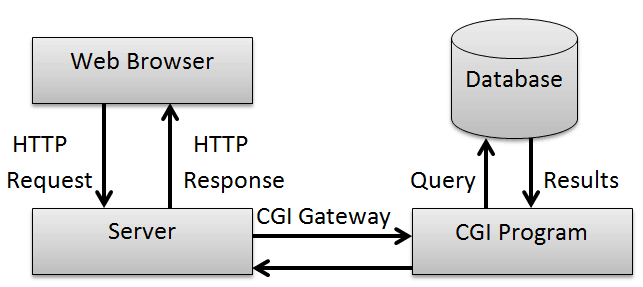
The CGI request is typically handled like this:
- The Web server receives a request for a resource (for example:
/cgi-bin/foo) - The Web server recognizes that the resource either is in a “special folder”
cgi-bin, or that it has a.cgifiletype, and so knows that it should launch the specified filefooas a program. The Web server passes to the CGI program a set of “CGI variables” in the form of environment variables, and other items in the form of command line arguments. The CGI program’sstdinis supplied by the web server, and itsstdoutandstderrgo to the web server. - The foo program executes, processing the necessary information based on the command line arguments and environment variables, and generates a dynamic HTML document, which it outputs to its
stdout. - The Web server receives the output from the CGI program, and returns it to the client.
Note that, to the client, this process is transparent. The client is not aware that a CGI program was involved.
So, every time you go to a Web search engine and type in something to search for, the search engine is doing something like this to generate its results dynamically.
The Problems with CGI
But there are problems with using CGI. The most obvious is that the overhead of firing up a new CGI process for every request is very large. And a typical web server has to deal with very many (thousands or more) simultaneous requests (think online businesses like Amazon, etc.). It is simply not feasible to have that many processes running simultaneously on a single server machine. And if the web server cannot keep up, it is likely to crash or run extremely slowly.
Java Servlets
Java Servlets are Sun’s Java-based solution to the problems with CGI.
Later, we’ll see that Java Server Pages (JSPs) and servlets work together to provide an even better solution.
In order to use Servlets or JSPs, you must have a web server with a Java servlet ‘container’. There are a number of free servlet containers; the most popular, at least for development purposes, is the Apache Foundation’s Tomcat (since this was first written, many others have appeared).
Apache Tomcat

Tomcat is a free, open-source implementation of Java Servlet and JavaServer Pages technologies developed under the Jakarta project at the Apache Software Foundation. Tomcat is available for commercial use, under the ASF license, from the Apache web site, in both binary and source versions.
To download your own version of Apache Tomcat, go to https://tomcat.apache.org/, and follow the instructions there. It will also tell you about the operational details of how to run it.
Note that the various Java IDEs often provide their own equivalent to Apache Tomcat, or even Tomcat itself, so you may not have to download Tomcat; just use what the IDE provides — often as an optional plugin.