
Table of Contents
Connecting to Databases
Connecting to a database with JDBC involves the following:
- Obtain a JDBC Driver and Database
There are many vendors who supply JDBC drivers for a number of different databases systems. There are plenty of options, including IBM DB2, Microsoft SQL Server, MySQL, Oracle, and PostgreSQL.
Note that every JDK comes with an implementation of Apache Derby, that is likely to be a useful way of trying things out. It’s called Java DB (which isn’t very helpful). - In your Java program, load the chosen JDBC Driver.
There are a number of ways of doing this:- Explicitly call new to load your driver’s implementation of Driver.
For example:
Driver driver = new DriverImplementationClass(); - Use the jdbc.drivers property.
The DriverManager will automatically load all classes listed in the jdbc.drivers System property.
For example:
System.getProperties().put(“jdbc.drivers”, “sun.jdbc.odbc.JdbcOdbcDriver:” + “ORG.as220.tinySQL.textFileDriver:” + “org.gjt.mm.mysql.Driver”);
or the property can be set on the command line:
java … –Djdbc.drivers=sun.jdbc.odbc.JdbcOdbcDriver:org.gjt.mm.mysql.Driver MyProgram
(Note that the items in the property list are separated by colons (‘:‘).) - Load the class using:
Class.forName(<driverImplementationClass>);
When you load a driver, by whatever mechanism, it registers itself with the DriverManager.
- Explicitly call new to load your driver’s implementation of Driver.
- Get a connection using DriverManager and a JDBC URL.
For example, here’s how you typically do it:
Connection conn = DriverManager.getConnection(“jdbc:odbc:Employees”, username, password);
There are three forms of the getConnection() method:
public static Connection getConnection(String url);
public static Connection getConnection(String url, String username, String password);
public static Connection getConnection(String url, Properties props);(All three can throw a SQLException on failure to get a connection.) This is because some databases require a username and password to make a connection to the database, while others do not. Still others require a more complex set of parameters.
A JDBC URL looks like this:
jdbc:<subprotocol>:<other-driver-specific-parameters>- The URL protocol is jdbc
- You specify a subprotocol, which a particular JDBC driver supports
- After the subprotocol, you specify a number of driver-specific parameters.
Once you’ve connected, you can access the database using SQL statements.
Here’s a simple example, which uses the JDBC/ODBC Bridge driver:
package jdbc;

import java.sql.Driver;
import java.sql.DriverManager;
import java.sql.Connection;
import java.sql.SQLException;

public class ConnectToDatabase
{
    public static void main(String[] args)
    {
        Connection conn = null;
        try
        {
            Class.forName("sun.jdbc.odbc.JdbcOdbcDriver");
            conn = DriverManager.getConnection("jdbc:odbc:Employees");
        }
        catch(ClassNotFoundException ex)
        {
            // The Class.forName() failed to find the class
            ex.printStackTrace();
        }
        catch(SQLException ex)
        {
            // The getConnection() failed
            ex.printStackTrace();
        }
        finally
        {
            if (conn != null)
            {
                try
                {
                    conn.close();
                }
                catch(SQLException ex)
                { /* Do nothing */ }
            }
        }
    }
}
Note: You should be cleaning up (i.e. closing) your connections explicitly, as in the above example.
JDBC2 Connections and JNDI
In JDBC2, you can use the Java Naming and Directory Interface (JNDI) to connect to a database, using code such as:
Context jndiContext = ...;
DataSource dataSource = (DataSource)jndiContext.lookup("jdbc/myDatabase");
Connection conn = dataSource.getConnection(username, password);
which allows you to specify the data source name externally, bypasses the DriverManager, and simplifies the code.
We will find that a number of Enterprise Java components use JNDI in similar ways. This is a definite trend.
SQL Errors and Warnings
When you use SQL in a program, you need to be able to tell when something goes wrong — that is when an error occurs.
SQLCODE
The SQL standard defined a special status parameter, SQLCODE, which you declare in your program as a variable (in C, of type long). When you execute SQL statements, you specify (explicitly or implicitly, depending on how you are invoking the SQL statements) that SQLCODE is to be used to contain the return status code. In the SQL standard, the only defined values for SQLCODE were:
- 0 — successful completion
- +100 — no data (meaning that the statement did not incur errors, but found no [more] rows on which to operate)
- < 0 — error occurred
The specific negative values were left up to each SQL vendor’s implementation (when the SQL-89 standard was written, the vendors already had their own sets of incompatible values for SQLCODE, so the standard could not make their implementations obsolete, nor could it favor one vendor over others).
SQLSTATE
SQL-92 tried to fix this situation, but could not do away with SQLCODE, nor could it define new SQLCODE values, for fear of making existing applications obsolete. So it deprecated SQLCODE, and introduced a second status parameter, SQLSTATE, which has many predefined values, plus lots of room for vendor-specific values. The rules about the contents of SQLState are as follows:
- It is a 5-character string
- May only include upper case characters (A-Z) and digits (0-9)
- The first two characters are called the class code.
- The last three characters are called the subclass code.
- Any class code that starts with the characters A-H or 0-4 indicates an SQLSTATE value defined by the SQL standard, or by other standards related to the SQL standard. For those class codes, any subclass code starting with the same character is also defined by the standard.
- Any class code that starts with the characters I-Z or 5-9 is implementor-defined, and all subclass codes (except for 000) are also implementor-defined.
- Subclass code 000 always mean no subclass code defined.
There are many defined values for SQLSTATE (see a SQL text or a vendor manual for details), but some interesting ones are:
- 00000 — successful completion
- 01xxx — warning values
The SQL Diagnostics Area
However, just getting a single status value (SQLCODE or SQLSTATE, or both) back from the execution of a SQL statement doesn’t give you much information. For one thing, it is possible for more than one error to occur during the execution of a SQL statement, and you’d like to be able to obtain all the necessary information about the errors that occurred..
The SQL standard introduced the concept of a SQL diagnostics area. The diagnostics area is structured as follows:
- A header area, followed by
- One or more detail areas (an array)
The header area contains:
| Name | Description |
|---|---|
| NUMBER | Number of detail entries in this diagnostics area |
| MORE | ‘Y’ if all conditions detected by the database were recorded in the diagnostics area ‘N’ if additional conditions were detected but not recorded. |
| COMMAND_FUNCTION | If the SQL statement being reported is a static SQL statement, contains a string representing the statement. If the SQL statement was a dynamic SQL statement, will contain ‘EXECUTE’ or ‘EXECUTE_IMMEDIATE’, and DYNAMIC_FUNCTION will contain the code for the dynamic SQL statement itself. |
| DYNAMIC_FUNCTION | If the SQL statement was a dynamic SQL statement, contains the code for the SQL statement being executed. |
| ROW_COUNT | Number of rows that were affected by the SQL statement |
The detail area contains the RETURNED_SQLSTATE for the SQL exception, plus much more information, such as the name of the constraint that was violated (if the error was a constraint violation), catalog name, schema name, table, name, column name, etc. For more details, refer to a SQL text or vendor manual.
The SQL standard invented some SQL syntax to allow access to the information in the SQL diagnostics area:
GET DIAGNOSTICS target = item [ , target = item ]...
which obtains information from the header area, and:
GET DIAGNOSTICS EXCEPTION number target = item [ , target = item ]...
which obtains information from a detail area.
Each item is the name of a field (such as ROW_COUNT) in the diagnostics area header or specified detail area.
SQL Warnings
When you perform a JDBC operationt, and a SQL error occurs, you can assume that the SQL operation did not execute correctly. In addition to this, it is possible for an operation to succeed, but indicate a warning condition.
Back in SQL-89 days, when SQLCODE ruled, the concept of a SQL warning translated into a positive value in SQLCODE. One such positive value was 100, which indicated no [more] data. When you are executing in a loop, reading data from a database, you better not ignore the no more data warning, unless you want to end up in an endless loop! So note that warnings are not to be completely ignored…
SQLSTATE values starting with a class code of 01 are warnings.
SQLExceptions
In JDBC, when an operation produces an SQL error, an SQLException is thrown. SQLException extends from Exception, and thus is a checked exception, so you typically will have to deal with it via a try/catch block.
There are two interesting methods in class SQLException:
public String getSQLState()
which returns the value of SQLSTATE, and:
public int getErrorCode()
which returns the vendor-specific error code.
Just as a SQL error can represent several error conditions, a SQLException can also represent several SQL Exceptions. From the thrown SQLException, you can find the next related SQLException using the method:
public SQLException getNextException()
and so on. The SQLExceptions are chained, one to the next.
So, when you catch a SQLException, the code ought to look something like:
        try
        {
           // ...
        }
        catch(SQLException ex)
        {
            System.err.println("\n--- SQLException caught ---\n");
            for ( ;ex != null; ex = ex.getNextException())
            {
                System.err.println("Message:   " + ex.getMessage());
                System.err.println("SQLState:  " + ex.getSQLState());
                System.err.println("ErrorCode: " + ex.getErrorCode());
                ex.printStackTrace(System.err);
                System.err.println();
            }

	    // ...
        }
SQLWarnings
When a JDBC operation succeeds, but with some conditional state, then a SQLWarning is associated with the execution, but is not thrown. SQLWarning is a class that extends from SQLException.
If SQLWarnings are not thrown, how do you determine if any warnings occurred, and if so where do you find them?
Answer: You have to explicitly test for them!
Connection, ResultSet and Statement each has a method getWarnings(), which returns the first in a set of SQLWarnings. (Like SQLExceptions, multiple SQLWarnings can be chained together.) If there are no SQLWarnings, getWarnings() returns null.
So, when you perform some JDBC operation that can produce warnings, you need to write code something like:
       m_con = getConnection();
       SQLWarning warn = m_con.getWarnings();
       if (warn != null)
       {
           printWarnings(warn);
           // ...
       }

    // ...

    private static void printWarnings(SQLWarning warn)
    {
        System.err.println("\n--- SQLWarning ---\n");
        for ( ;warn != null; warn = warn.getNextWarning())
        {
            System.err.println("Message:   " + warn.getMessage());
            System.err.println("SQLState:  " + warn.getSQLState());
            System.err.println("ErrorCode: " + warn.getErrorCode());
            warn.printStackTrace(System.err);
            System.err.println();
        }
    }
Data Truncation
SQL warnings are not terribly common. By far the most common of SQL warnings are data truncation warnings, when JDBC or SQL unexpected truncates a data value.
There is a special class, DataTruncation (a subclass of SQLWarning) to represent this.
When JDBC unexpectedly truncates a data value, it:
- reports a DataTruncation warning (on reads)
- throws a DataTruncation exception (on writes).
The SQLSTATE value for all DataTruncation warnings is “01004”.
To help you determine the source of the problem, DataTruncation includes the following methods:
- public int getIndex()
Get the index of the column or parameter that was truncated.
This may be -1 if the column or parameter index is unknown, in which case the “parameter” and “read” fields should be ignored.
- public boolean getParameter()
Returns true if the value was a parameter; false if it was a column value.
- public boolean getRead()
Returns true if the value was truncated when read from the database; false if the data was truncated on a write.
- public int getDataSize()
Get the number of bytes of data that should have been transferred. This number may be approximate if data conversions were being performed. The value may be “-1” if the size is unknown.
- public int getTransferSize()
Get the number of bytes of data actually transferred. The value may be “-1” if the size is unknown.
Accessing Databases
Once you’ve established a connection with a database, you can now start to use SQL to access the database. To do this, you use the Statement interface. Each driver has an associated class which implements the Statement interface (It also has an associated class which implements the Connection interface.)
The Statement Interface
Given a Connection, you obtain an instance of Statement as follows:
Connection conn = DriverManager.getConnection(...);
Statement stmt = conn.createStatement();
Now, you can use the Statement to execute a SQL statement:
stmt.executeUpdate("CREATE TABLE ...");
Here’s an example:
package jdbc;

import java.sql.Driver;
import java.sql.DriverManager;
import java.sql.Connection;
import java.sql.SQLException;
import java.sql.Statement;

public class ConnectToDatabase
{
    public static void main(String[] args)
    {
        Connection conn = null;
        Statement stmt = null;
        try
        {
            Class.forName("sun.jdbc.odbc.JdbcOdbcDriver");
            conn = DriverManager.getConnection("jdbc:odbc:Employees");
            stmt = conn.createStatement();
            stmt.executeUpdate("CREATE TABLE address " +
                               "(" +
                               "Street     char(50)," +
                               "Town       char(40)," +
                               "State      char(2)," +
                               "PostalCode char(9)" +
                               ")" );
        }
        catch(ClassNotFoundException ex)
        {
            ex.printStackTrace();
        }
        catch(SQLException ex)
        {
            ex.printStackTrace();
        }
        finally
        {
            if (conn != null)
            {
                try
                {
                    if (stmt != null)
                        stmt.close();
                    conn.close();
                }
                catch(SQLException ex)
                { /* Do nothing */ }
            }
        }
    }
}
Note: You should be cleaning up your statements explicitly, as in the above example.
The executeUpdate() Method
You use Statement‘s executeUpdate() method to execute SQL statements such as CREATE TABLE, DROP TABLE, INSERT, UPDATE and DELETE. It returns the count of rows that were affected by the statement.
For example, here are some INSERTs:
package jdbc;

import java.sql.Driver;
import java.sql.DriverManager;
import java.sql.Connection;
import java.sql.SQLException;
import java.sql.Statement;

public class ConnectToDatabase
{
    public static void main(String[] args)
    {
        Connection conn = null;
        Statement stmt = null;
        try
        {
            Class.forName("sun.jdbc.odbc.JdbcOdbcDriver");
            conn = DriverManager.getConnection("jdbc:odbc:Employees");
            stmt = conn.createStatement();

            int totalCount = 0;
            int count = 0;
            count = addAddress(stmt,
                            "27 Bellvue Ave", "Carson City", "NV", "94567");
            totalCount += count;
            count = addAddress(stmt,
                            "9000 Spontadema St", "Jersey City", "NJ", "34267");
            totalCount += count;
            count = addAddress(stmt,
                            "756 Fickle Circle", "Sun City", "IA", "87345");
            totalCount += count;
            System.out.println(totalCount + " addresses added.");
        }
        catch(ClassNotFoundException ex)
        {
            ex.printStackTrace();
        }
        catch(SQLException ex)
        {
            ex.printStackTrace();
        }
        finally
        {
            if (conn != null)
            {
                try
                {
                    if (stmt != null)
                        stmt.close();
                    conn.close();
                }
                catch(SQLException ex)
                { /* Do nothing */ }
            }
        }
    }

    private static int addAddress(Statement stmt,
                                  String street, String town,
                                  String state, String postalCode)
        throws SQLException
    {
        String st = (street != null) ? ("'" + street + "'") : ("NULL");
        String tw = (town != null) ? ("'" + town + "'") : ("NULL");
        String sta = (state != null) ? ("'" + state + "'") : ("NULL");
        String code = (postalCode != null) ? ("'" + postalCode + "'") : ("NULL");

        String sql =
            "INSERT INTO address " +
            "VALUES(" + st + ", " + tw + ", " + sta + ", " + code + ")";
        System.out.println("Executing statement:\n" + sql);

        int count = stmt.executeUpdate(sql);
        return count;
    }
}
and here is a DELETE:
package jdbc;

import java.sql.Driver;
import java.sql.DriverManager;
import java.sql.Connection;
import java.sql.SQLException;
import java.sql.Statement;

public class ConnectToDatabase
{
    public static void main(String[] args)
    {
        Connection conn = null;
        Statement stmt = null;
        try
        {
            Class.forName("sun.jdbc.odbc.JdbcOdbcDriver");
            conn = DriverManager.getConnection("jdbc:odbc:Employees");
            stmt = conn.createStatement();

            int totalCount = stmt.executeUpdate("DELETE FROM address");
            System.out.println(totalCount + " addresses deleted.");
        }
        catch(ClassNotFoundException ex)
        {
            ex.printStackTrace();
        }
        catch(SQLException ex)
        {
            ex.printStackTrace();
        }
        finally
        {
            if (conn != null)
            {
                try
                {
                    if (stmt != null)
                        stmt.close();
                    conn.close();
                }
                catch(SQLException ex)
                { /* Do nothing */ }
            }
        }
    }
}
Note: Some ODBC drivers apparently do not support DELETE!
Performing Queries
If we wish to perform a SQL query (i.e. a SELECT statement), then we have to use the executeQuery() method, which returns a ResultSet. ResultSet represents the rows returned by the query, and you can use its methods to move through the rows, obtaining information about each row’s column values:
package jdbc;

import java.sql.Driver;
import java.sql.DriverManager;
import java.sql.Connection;
import java.sql.ResultSet;
import java.sql.SQLException;
import java.sql.Statement;

public class ConnectToDatabase
{
    public static void main(String[] args)
    {
        Connection conn = null;
        Statement stmt = null;
        ResultSet rs = null;
        try
        {
            Class.forName("sun.jdbc.odbc.JdbcOdbcDriver");
            conn = DriverManager.getConnection("jdbc:odbc:Employees");
            stmt = conn.createStatement();
            rs = stmt.executeQuery(
                        "SELECT street, town, state, postalCode " +
                        "FROM address " +
                        "ORDER BY state");
            int count = 0;
            while (rs.next())
            {
                String street = rs.getString(1);
                String town   = rs.getString(2);
                String state  = rs.getString(3);
                String postalCode = rs.getString(4);
                System.out.println("[" + ++count + "]");
                System.out.println(" Street: [" + street + "]");
                System.out.println(" Town:   [" + town + "]");
                System.out.println(" State:  [" + state + "]");
                System.out.println(" Postal Code: [" + postalCode + "]");
            }
        }
        catch(ClassNotFoundException ex)
        {
            ex.printStackTrace();
        }
        catch(SQLException ex)
        {
            ex.printStackTrace();
        }
        finally
        {
            if (conn != null)
            {
                try
                {
                    if (stmt != null)
                    {
                        if (rs != null)
                            rs.close();
                        stmt.close();
                    }
                    conn.close();
                }
                catch(SQLException ex)
                { /* Do nothing */ }
            }
        }
    }
}
Here’s some output from this program:
[1]
 Street: [756 Fickle Circle                                 ]
 Town:   [Sun City                                ]
 State:  [IA]
 Postal Code: [87345    ]
[2]
 Street: [9000 Spontadema St                                ]
 Town:   [Jersey City                             ]
 State:  [NJ]
 Postal Code: [34267    ]
[3]
 Street: [27 Bellvue Ave                                    ]
 Town:   [Carson City                             ]
 State:  [NV]
 Postal Code: [94567    ]
Note the padding that results from using CHAR(n) data types.
SQL Data Type/Java Data Type Mapping
In the above example, we did a SELECT and retrieved column values for each row using the ResultSet‘s getString() method. We could do that because we knew that all the columns retrieved were of SQL data type CHAR(n), and we knew that it maps to Java data type String. If we had to deal with other SQL data types, we would need to know how those data types map to Java data types.
Data type mappings from SQL to Java:
| SQL Data Type | Java Data Type | Comments |
|---|---|---|
| BIGINT | long | |
| INTEGER,INT | int | |
| SMALLINT | short | |
| TINYINT | byte | |
| NUMERIC,DECIMAL | java.math.BigDecimal | Not java.sql.Numeric, as several books maintain. (This appears to be a result of an early change in JDBC that was not picked up by some.) |
| FLOAT | double | |
| REAL | float | |
| DOUBLE | double | |
| CHAR | String | Space-padded to the right |
| VARCHAR,LONGVARCHAR | String | |
| BIT | boolean | |
| DATE | java.sql.Date | Not java.util.Date. |
| TIME | java.sql.Time | |
| TIMESTAMP | java.sql.Timestamp | |
| BINARY,VARBINARY, LONGVARBINARY | byte[] | |
| BLOB | java.sql.Blob | JDBC 2.0 / SQL3 |
| CLOB | java.sql.Clob | JDBC 2.0 / SQL3 |
Data type mappings from Java to SQL:
| Java Data Type | SQL Data Type | Comments |
|---|---|---|
| boolean | BIT | |
| byte | TINYINT | |
| byte[] | VARBINARY | If value is too large for VARBINARY, mapped to LONGVARBINARY. |
| double | DOUBLE | |
| float | FLOAT | |
| int | INTEGER | |
| java.sql.Date | DATE | |
| java.math.BigDecimal | NUMERIC | |
| String | VARCHAR | If value is too large for VARCHAR, mapped to LONGVARCHAR. |
| java.sql.Time | TIME | |
| java.sql.Timestamp | TIMESTAMP | |
| java.sql.Array | ARRAY | JDBC 2.0 / SQL3 |
| java.sql.Blob | BLOB | JDBC 2.0 / SQL3 |
| java.sql.Clob | CLOB | JDBC 2.0 / SQL3 |
The java.sql.Types class
The java.sql.Types class that defines constants that are used to identify generic SQL types, called JDBC types. The actual type constant values are equivalent to those in XOPEN.
The getXXX() Methods
Every Java type that corresponds to a SQL type has a getXXX method in the ResultSet interface. However, some SQL type values may be retrieved using more than one of these getXXX methods, since JDBC does conversion in some cases.
Here is a table that shows which SQL types may be retrieved by which methods, and also which method is the recommended method to use:
Use of ResultSet.getXXX Methods to Retrieve JDBC Types
| T I N Y I N T | S M A L L I N T | I N T E G E R | B I G I N T | R E A L | F L O A T | D O U B L E | D E C I M A L | N U M E R I C | B I T | C H A R | V A R C H A R | L O N G V A R C H A R | B I N A R Y | V A R B I N A R Y | L O N G V A R B I N A R Y | D A T E | T I M E | T I M E S T A M P | |
|---|---|---|---|---|---|---|---|---|---|---|---|---|---|---|---|---|---|---|---|
getByte | X | x | x | x | x | x | x | x | x | x | x | x | x | ||||||
getShort | x | X | x | x | x | x | x | x | x | x | x | x | x | ||||||
getInt | x | x | X | x | x | x | x | x | x | x | x | x | x | ||||||
getLong | x | x | x | X | x | x | x | x | x | x | x | x | x | ||||||
getFloat | x | x | x | x | X | x | x | x | x | x | x | x | x | ||||||
getDouble | x | x | x | x | x | X | X | x | x | x | x | x | x | ||||||
getBigDecimal | x | x | x | x | x | x | x | X | X | x | x | x | x | ||||||
getBoolean | x | x | x | x | x | x | x | x | x | X | x | x | x | ||||||
getString | x | x | x | x | x | x | x | x | x | x | X | X | x | x | x | x | x | x | x |
getBytes | X | X | x | ||||||||||||||||
getDate | x | x | x | X | x | ||||||||||||||
getTime | x | x | x | X | x | ||||||||||||||
getTimestamp | x | x | x | x | x | X | |||||||||||||
getAsciiStream | x | x | X | x | x | x | |||||||||||||
getUnicodeStream | x | x | X | x | x | x | |||||||||||||
getBinaryStream | x | x | X | ||||||||||||||||
getObject | x | x | x | x | x | x | x | x | x | x | x | x | x | x | x | x | x | x | x |
An “x” indicates that the getXXX method may legally be used to retrieve the given JDBC type.
An “X” indicates that the getXXX method is recommended for retrieving the given JDBC type.
JDBC 2.0 has also introduced the following getXXX methods:
- getArray()
- getBlob()
- getCLob()
- getBigDecimal()
- getRef()
among others.
getXXX(int columnPosition) versus getXXX(String columnName)
The ResultSet interface has two sets of getXXX() methods — one that expects a column position (1-based), and one that expects a column name. It is recommended to use the column position version for the following reasons:
- You may not always know the column name ahead of time (for example, when using a SELECT * FROM table statement)
- If there are more than one columns in the select list with the same name, only the first one is retrieved.
- There are case-sensitivity issues (should getXXX(“name”) find a column “NAME” ? What if there is a column “Name“?)
- It is often considerably less efficient to look up a column by name rather than by position.
Creating & Populating a Database
In CORE Java, Volume II, Horstmann and Cornell create a program called MakeDB, which they use to create and populate tables in a database using JDBC. In their program, which JDBC driver to use, the JDBC URL to use, etc., are all specified in a properties file. For example:
jdbc.drivers=sun.jdbc.odbc.JdbcOdbcDriver
jdbc.url=jdbc:odbc:Employees
jdbc.username=myName
jdbc.password=myPassword
Here’s a modified version of the program, called CreateDatabase, that allows you to specify a file which contains the names of all the tables to be created:
package jdbc;

import java.io.BufferedReader;
import java.io.File;
import java.io.FileInputStream;
import java.io.FileReader;
import java.io.IOException;
import java.sql.Connection;
import java.sql.DriverManager;
import java.sql.ResultSet;
import java.sql.ResultSetMetaData;
import java.sql.Statement;
import java.sql.SQLException;
import java.util.Properties;

public class CreateDatabase
{
    /**
     *  Main entry point
     *  @param args command line arguments:
     *  <br>
     *  The name of a file containing the names of tables
     *  to be created, one table name per line.
     *  Each table name must have an associated <tablename>.dat
     *  file to define the fields and data for the table.
     */
    public static void main(String[] args)
    {
        Connection con = null;
        Statement stmt = null;
        try
        {
            con = getConnection();
            stmt = con.createStatement();

            String tableList = "";
            if (args.length > 0)
                tableList = args[0];
            else
            {
                System.out.println(
                       "Usage: CreateDatabase <table-list-file>");
                System.exit(0);
            }

            // Create the tables listed in the tableList file
            createTables(tableList, stmt);
        }
        catch (SQLException ex)
        {
            dumpSQLException(ex);
        }
        catch (IOException ex)
        {
            dumpIOException(ex);
        }
        finally
        {
            try
            {
                if (stmt != null)
                    stmt.close();
                if (con != null)
                    con.close();
            }
            catch (SQLException ex)
            {   /* Do nothing */ }
        }
    }

    /**
     *  Gets a connection to the appropriate database, based
     *  on the contents of a properties file.
     */
    public static Connection getConnection()
        throws SQLException, IOException
    {
        Properties props = new Properties();
        File propsFile = new File("jdbc", "CreateDatabase.properties");
        props.load( new FileInputStream(propsFile) );

        String drivers = props.getProperty("jdbc.drivers");
        if (drivers != null)
        {
            // Set the System property "jdbc.drivers"
            System.getProperties().put("jdbc.drivers", drivers);
        }
        String url = props.getProperty("jdbc.url");
        String username = props.getProperty("jdbc.username");
        String password = props.getProperty("jdbc.password");

        return DriverManager.getConnection(url, username, password);
    }

    /**
     *  Creates the tables listed in the tableList file.
     *  @param tableList the filename containing the table list
     *  @param stmt the Statement to use
     */
    public static void createTables(String tableList,
                                    Statement stmt)
        throws IOException
    {
        BufferedReader in = null;
        try
        {
            in = new BufferedReader(
                       new FileReader(
                            new File("jdbc", tableList) ) );

            // Each line contains the name of a table to create
            String tableName = null;
            while (true)
            {
                tableName = in.readLine();
                if (tableName == null)
                    break;
                tableName = tableName.trim();
                try
                {
                    createTable(tableName, stmt);
                    showTable(tableName, stmt);
                }
                catch (Exception ex)
                {
                    ex.printStackTrace();
                    // Ignore any exceptions, so we can continue
                    // on to the next table
                }
            }
        }
        finally
        {
            if (in != null)
                in.close();
        }
    }

    /**
     *  Creates the specified table.
     *  @param tableName the name of the table to create.
     *  (There must be a file with the name tableName.dat
     *  that supplies information about the columns and data.)
     *  @param stmt the Statement to use.
     */
    public static void createTable(String tableName,
                                   Statement stmt)
        throws SQLException, IOException
    {
        BufferedReader in = null;
        try
        {
            in = new BufferedReader(
                       new FileReader(
                            new File("jdbc", tableName + ".dat") ) );

            // First, drop the table in case it already exists
            String command = "DROP TABLE " + tableName;
            System.out.println(
                 "Attempting to drop table " + tableName + "...");
            try
            {
                stmt.executeUpdate(command);
            }
            catch (SQLException ex)
            {
                // Ignore; presumably the table doesn't exist
            }

            String line = in.readLine();

            command = "CREATE TABLE " + tableName +
                            "(" + line + ")";

            System.out.println("Creating table " + tableName + "...");
            System.out.println("Statement:\n" + command);

            stmt.executeUpdate(command);

            System.out.println("Populating table " + tableName + "...");
            while ( (line = in.readLine()) != null)
            {
                command = "INSERT INTO " + tableName +
                          " VALUES(" + line + ")";
                stmt.executeUpdate(command);
            }
        }
        catch (SQLException ex)
        {
            dumpSQLException(ex);
        }

        finally
        {
            if (in != null)
                in.close();
        }
    }

    /**
     *  Displays the contents of the table.
     *  @param tableName the name of the table
     *  @param stmt the Statement to use
     */
    public static void showTable(String tableName,
                                 Statement stmt)
        throws SQLException
    {
        String query = "SELECT * FROM " + tableName;
        ResultSet rs = null;
        try
        {
            rs = stmt.executeQuery(query);
            ResultSetMetaData rsmd = rs.getMetaData();
            int columnCount = rsmd.getColumnCount();
            while (rs.next())
            {
                for (int i = 1; i <= columnCount; i++)
                {
                    if (i > 1)
                        System.out.print(", ");
                    System.out.print(rs.getString(i));
                }
                System.out.println();
            }
        }
        finally
        {
            if (rs != null)
                rs.close();
        }
    }

    private static void dumpSQLException(SQLException ex)
    {
        System.out.println("SQLException:");
        while (ex != null)
        {
            System.out.println("SQLState: " + ex.getSQLState());
            System.out.println("Message:  " + ex.getMessage());
            System.out.println("Vendor:   " + ex.getErrorCode());
            ex = ex.getNextException();
            System.out.println();
        }
    }

    private static void dumpIOException(IOException ex)
    {
        System.out.println("IOException: " + ex);
        ex.printStackTrace();
    }
}
This program contains a number of other improvements over MakeDB:
- The filename passed into the program as its first parameter contains a list of the names of tables to be created, one table per line. For example, in our Employees and Departments case, this file contains:
Employees
Departments
- For each table specified in the above file, the program expects to find a file
<table-name>.dat, which contains the columns to be created for that table, and also the data to be inserted into the table. For example, here’s the Employess.dat file:
EmployeeID integer, Name char(40), Department integer, Age integer, Salary double
10063, 'Alfred J Prufrock', 10, 45, 120000
204567, 'Angela Parfitt', 30, 36, 78000
345890, 'Michael Solistes', 20, 28, 90000
89567, 'Charles Schultz', 20, 56, 230000
56435, 'Barbara Smith', 30, 48, 134000
and here is the Departments.dat file:
DepartmentID integer, Name char(40), Manager integer
10, 'Accounting', 10063
20, 'Sales', 89567
30, 'Information Technology', 56435
I used this program to populate my database with tables and data.
Transactions
Transactions are crucial to proper use of databases. They provide the necessary atomicity and isolation necessary for consistent updates to be performed to a database.
Here are some JDBC policies regarding transactions:
- At most one transaction can exist at any time per database connection.
- Drivers are required to allow concurrent requests from different threads using the same Connection. If the driver cannot perform the requests in parallel, they are serialized.
- You may cancel a statement’s execution asynchronously by calling Statement’s cancel() method from another thread.
- By default, each (DML) statement encompasses a transaction by itself (autocommit mode). setAutoCommit(false) turns autocommit mode off.
- Deadlock detection behavior is not specified. Most implementations throw an exception, but it could be a SQLException, an RuntimeException, or even an Error.
- If autocommit mode is disabled, and you perform operations within a transaction that opens locks on database entities (such as rows in a table), those locks remain in effect until the transaction ends, either by explicit calls to Connection’s commit() or rollback() methods, or when the connection is closed.
Transaction Isolation Levels
Remember the ACID properties that databases must support? The I is for Isolated, and there are a variety of isolation levels supported by various databases. The isolation levels supply a kind of hierarchy that goes all the way from no transactions supported to the most isolated form, serializable.
The Connection interface defines a set of isolation levels
- TRANSACTION_NONE — Transactions are not supported.
- TRANSACTION_READ_COMMITTED — Dirty reads are prevented; non-repeatable reads and phantom reads can occur.
- TRANSACTION_READ_UNCOMMITTED — Dirty reads, non-repeatable reads and phantom reads can occur.
- TRANSACTION_REPEATABLE_READ — Dirty reads and non-repeatable reads are prevented; phantom reads can occur.
- TRANSACTION_SERIALIZABLE — Dirty reads, non-repeatable reads and phantom reads are prevented.
Setting Your Isolation Level
You can determine whether your database supports a particular isolation level:
boolean b = DatabaseMetaData.supportsTransactionIsolationLevel(
			Connection.TRANSACTION_REPEATABLE_READ);
and you can then set the isolation level using:
setTransactionIsolation(Connection.TRANSACTION_REPEATABLE_READ);
Prepared & Callable Statements
Prepared Statements
The work that a database must do to execute a SQL statement is not inconsiderable. In general, it must:
- Interpret/Parse the statement for valid syntax; throw an exception if invalid.
- Perform semantic analysis on the statement to match referenced tables and columns to tables and columns in the database; throw an exception if a referenced table or column does not exist, or there is a type mismatch of some kind, invalid operation, etc.
- Optimize the statement. In other words, figure out the most efficient way of executing the statement, given the existence (or otherwise) of indexes on columns referenced in the statement, etc.
- Create a plan. That is, create a series of instructions for how to execute the statement, based on the results of the optimization.
- Execute the statement, by following the plan instructions..
- Return any results to the user.
That’s a lot of work!
There are many applications where the same statement, or almost the same statement, is executed many times during the course of a typical day. This is especially true in OLTP (On-Line Transaction Processing) applications, where there typically is a small number of transactions types being executed many, many times during a day.
What does ‘almost the same statement’ mean? Typically, it means that the application is repeatedly executing the same statement over and over again, with only certain parameters changing. For example, consider the following statements:
SELECT name, salary
FROM employees
WHERE salary > 70000;
and:
SELECT name, salary
FROM employees
WHERE salary > 200000;
You’ll notice that they are essentially the same statement, except for the value supplied in the WHERE clause.
Normally, you’d execute this by using the following kind of code:
stmt = conn.createStatement();
rs = stmt.executeQuery(
                  "SELECT name, salary " +
                  "FROM employees " +
                  "WHERE salary > 70000"
// ...
rs = stmt.executeQuery(
                  "SELECT name, salary " +
                  "FROM employees " +
                  "WHERE salary > 200000");
// ...
In other words, you’d execute almost the same query twice (or in a typically application, many hundreds or thousands of times a day). This can be quite inefficient, because it repeats many of the steps involved in that execution unnecessarily.
The PreparedStatement Interface
There’s a better way. Notice that the small change in the WHERE clause value doesn’t really have any significant effect on many of the initial steps for execution of the SQL statement? Let’s extract the essence of the above statement:
SELECT name, salary
FROM employees
WHERE salary > ?;
By replacing the literal value with a ‘?‘, we have parameterized the statement.
Now, let’s see if we can separate out those steps which don’t have to be performed every time, in order to execute the statement:
- Interpret/Parse the statement for valid syntax; throw an exception if invalid.
- Perform semantic analysis on the statement to match referenced tables and columns to tables and columns in the database; throw an exception if a referenced table or column does not exist, or there is a type mismatch of some kind, invalid operation, etc.
- Optimize the statement. In other words, figure out the most efficient way of executing the statement, given the existence (or otherwise) of indexes on columns referenced in the statement, etc.
- Create a plan. That is, create a series of instructions for how to execute the statement, based on the results of the optimization.
In other words, we need to perform most of the work only once, and then when we actually wish to execute the statement, all we have to do is:
- Supply the actual value for the parameter
- Execute the query, using the plan.
The execution of the first 4 steps, which need only to be performed once, is known as preparing the statement.
To represent this concept, JDBC provides the PreparedStatement class. A PreparedStatement extends from Statement, so it is a kind of statement that provides additional capabilities: the ability to be prepared.
PreparedStatement provides the ability to bind parameters to the various ? present in the statement source. In order to accomplish this, it provides a number of setXXX(…) methods which can specify the data and type to be bound to each ? in the statement.
Here’s an example:
package jdbc;

import java.sql.Driver;
import java.sql.DriverManager;
import java.sql.Connection;
import java.sql.ResultSet;
import java.sql.SQLException;
import java.sql.PreparedStatement;

public class PreparedStatementUse
{
    public static void main(String[] args)
    {
        Connection conn = null;
        PreparedStatement stmt = null;
        try
        {
            Class.forName("sun.jdbc.odbc.JdbcOdbcDriver");
            conn = DriverManager.getConnection("jdbc:odbc:Employees");
            stmt = conn.prepareStatement(
                        "SELECT name, salary " +
                        "FROM employees " +
                        "WHERE salary > ? " +
                        "ORDER BY salary");

            listEmployees(stmt, 80000.00);
            listEmployees(stmt, 200000.00);
        }
        catch(ClassNotFoundException ex)
        {
            ex.printStackTrace();
        }
        catch(SQLException ex)
        {
            ex.printStackTrace();
        }
        finally
        {
            if (conn != null)
            {
                try
                {
                    if (stmt != null)
                    {
                        stmt.close();
                    }
                    conn.close();
                }
                catch(SQLException ex)
                { /* Do nothing */ }
            }
        }
    }

    private static void listEmployees(PreparedStatement stmt,
                                      double minSalary)
        throws SQLException
    {
        System.out.println(
            "==List of employees with salary > " + minSalary + "==");

        ResultSet rs = null;
        try
        {
            stmt.setDouble(1, minSalary);
            rs = stmt.executeQuery();

            int count = 0;
            while (rs.next())
            {
                String name = rs.getString(1);
                double salary = rs.getDouble(2);
                System.out.print(" Name:  " + name);
                System.out.println(", Salary: $" + salary);
            }
        }
        finally
        {
            if (rs != null)
            {
                try
                {
                    rs.close();
                }
                catch(SQLException ex)
                { /* Do nothing */ }
            }
        }
    }
}
which outputs something like:
==List of employees with salary > 80000.0==
 Name:  Michael Solistes                        , Salary: $90000.0
 Name:  Alfred J Prufrock                       , Salary: $120000.0
 Name:  Barbara Smith                           , Salary: $134000.0
 Name:  Charles Schultz                         , Salary: $230000.0
==List of employees with salary > 200000.0==
 Name:  Charles Schultz                         , Salary: $230000.0
Callable Statements
Most real relational databases now provide the ability to store executable procedures, which may be called by clients. These are called persistent stored modules (PSM) by the SQL standard. To use these procedures, you must do the following:
- Create (and debug) the stored procedure.
- Store it in the database
- Call the procedure from SQL
In the case of JDBC, the call to the procedure is done with a CallableStatement, which extends PreparedStatement, and provides additional capabilities above and beyond what that class provides.
While PreparedStatement supplied a number of setXXX(…) methods which are used to bind input parameters for the statement, CallableStatement can also bind output parameters, that is parameters that return data back to the client. So CallableStatement provides a set of getXXX() methods for this purpose.
- To call a stored procedure, you first construct a CallableStatement. For example:
CallableStatement cs = con.prepareCall("{ call DOWORK(?, ?) }");
Notice the syntax of the “SQL statement”:
{ call DOWORK(?, ?) }
This is an example of the syntax used by JDBC when it needs to be able to adapt to different native database syntax for a feature. In this case, many databases have their own special syntax for how they make a call to a stored procedure. Rather than forcing clients to write explicit syntax for a call, different for each database driver, JDBC, like ODBC, provides a way of specifying that the appropriate syntax needs to be invoked in a database-specific way. The JDBC driver is responsible for interpreting the syntax, and automatically converting it into the native database call syntax.
- Once you have constructed the CallableStatement, you must register each parameter that can return a value (i.e. each OUT or INOUT parameter):
cs.registerOutParameter(2, java.sql.VARCHAR);
- You must set the values of the input parameters exactly as you would for a PreparedStatement.
cs.setDouble(1, minSalary);
- You can execute the CallableStatement the same way you execute a PreparedStatement:
boolean resultSetReturned = cs.execute();
- To retrieve the values of returned parameters, you use the getXXX() methods:
String s = cs.getString(2);
- It is possible for the CallableStatement to return more than one ResultSet, in which case you can call getMoreResults() to check if there is another result set available.
Stored procedures can also return values.
- If the stored procedure returns a value, it can be constructed using the following syntax:
CallableStatement cs = con.prepareCall("{ ? = call GETVALUE(?) }");
In this case, the result is identified as an OUT parameter by the first ?. A return value is treated as the first OUT parameter, and it must be registered in the same way as other OUT parameters.
Using Metadata
Metadata, that is, data about data, is very valuable for relational databases, especially if you are writing very generalized tools. For example, consider the problem of writing a program to provide an interactive SQL capability. It should be able to connect to any database and then allow the user to type in SQL statements for it to execute against that database. The user would very likely wish to know what tables are available in the database, and, given a table, what columns exist in that table, and so on.
Metadata is even more important in JDBC, because its role is to provide access to many different databases, whose properties vary somewhat from one database to another. So, JDBC provides lots of data about data.
Driver Metadata
You can find out information about your JDBC drivers, using:
- DriverManager.getDrivers()
and:
- Various Driver informational methods
For example:
package jdbc;

import java.util.Enumeration;
import java.util.Properties;

import java.sql.Driver;
import java.sql.DriverManager;
import java.sql.DriverPropertyInfo;
import java.sql.SQLException;

/**
*   Class to list the loaded JDBC drivers, together with their properties.
*
*   @author Bryan J. Higgs, 4 March 2000
*/
public class ListDrivers
{
    public static void main(String[] args)
    {
        try
        {
            // Cause the JDBC drivers to be automatically loaded
            System.getProperties().put("jdbc.drivers",
                                       "sun.jdbc.odbc.JdbcOdbcDriver:" +
                                       "ORG.as220.tinySQL.textFileDriver:" +
                                       "org.gjt.mm.mysql.Driver");
            // List details of the loaded drivers
            listDrivers();
        }
        catch (Exception e)
        {
            e.printStackTrace();
        }
    }

    private static void listDrivers()
        throws SQLException
    {
        Enumeration drivers = DriverManager.getDrivers();
        while (drivers.hasMoreElements())
        {
            Driver driver = (Driver) drivers.nextElement();
            // Display information about the driver
            print("Driver: " + driver.getClass().getName());
            print("  Major version: " + driver.getMajorVersion());
            print("  Minor version: " + driver.getMinorVersion());
            print("  JDBC compliant: " + driver.jdbcCompliant());
            // List details of the driver properties
            listDriverProperties(driver);
        }
    }

    private static void listDriverProperties(Driver driver)
        throws SQLException
    {
        DriverPropertyInfo props[] = driver.getPropertyInfo(
					"", new Properties());
        if (props != null && props.length > 0)
        {
            print("  Properties: ");
            // Display each property name and value
            for (int i = 0; i < props.length; i++)
            {
                print("    Name: " + props[i].name);
                print("      Description: " + props[i].description);
                print("      Value: " + props[i].value);
                if (props[i].choices != null)
                {
                    print("      Choices: ");
                    for (int choice = 0;
                         choice < props[i].choices.length;
                         choice++)
                    {
                        print("        " + props[i].choices[choice]);
                    }
                }
                print("      Required: " + props[i].required);
            }
        }
}

    private static void print(String text)
    {
        System.out.println(text);
    }
}
This produces the following results on my machine:
Driver: sun.jdbc.odbc.JdbcOdbcDriver
  Major version: 1
  Minor version: 1001
  JDBC compliant: true
Driver: ORG.as220.tinySQL.textFileDriver
  Major version: 0
  Minor version: 9
  JDBC compliant: false
Driver: org.gjt.mm.mysql.Driver
  Major version: 1
  Minor version: 2
  JDBC compliant: false
  Properties:
    Name: HOST
      Description: Hostname of MySQL Server
      Value: null
      Required: true
    Name: PORT
      Description: Port number of MySQL Server
      Value: 3306
      Required: false
    Name: DBNAME
      Description: Database name
      Value: null
      Required: false
    Name: user
      Description: Username to authenticate as
      Value: null
      Required: true
    Name: password
      Description: Password to use for authentication
      Value: null
      Required: true
    Name: autoReconnect
      Description: Should the driver try to re-establish bad connections?
      Value: false
      Choices:
        true
        false
      Required: false
    Name: maxReconnects
      Description: Maximum number of reconnects to attempt if autoReconnect is true
      Value: 3
      Required: false
    Name: initialTimeout
      Description: Initial timeout (seconds) to wait between failed connections
      Value: 2
      Required: false
The DatabaseMetadata Interface
Once you have made a connection to a database, you can call the Connection class’ getMetaData() method to obtain the database’s metadata, which is encapsulated in the DatabaseMetaData class. This class supplies a lot of useful information, such as:
- The database product name and version number
- The default transaction isolation level
- JDBC driver name, and major and minor version numbers
- All the “extra” characters that can be used in unquoted identifier names (those beyond a-z, A-Z, 0-9 and _).
- The string used to quote SQL identifiers (JDBC-compliant drivers always use the double quote character, ” )
- The maximum sizes of names, literals, etc.
- The maximum columns per table.
- The maximum number of concurrent connections supported
- The maximum row size
- The tables that exist in the database
- Information about the datatypes available for the database
- The column names that exist in the database, and their attributes
- The indexes that exist in the database, and their statistics.
- The procedures that exist in the database
- The table privileges
- Whether SQL92 entry, intermediate, or full levels are supported.
- What foreign key columns reference the primary key columns of a primary key table
- What user name is being used for this connection
- Whether this database connection is read-only
- What keywords are used by the database that are not SQL-92 standard
- Whether the database supports column aliasing
- Whether multiple result sets from a single execute() call are supported
- Whether outer joins are supported
- What the primary keys are for a table
and a whole host of other information, both basic and esoteric. Take a look at the DatabaseMetaData class to get a sense for how much information is available!
The ResultSetMetaData Interface
Once you have created a ResultSet, you can query its attributes by using the ResultSetMetaData interface.
For example:
package jdbc;

import java.sql.Driver;
import java.sql.DriverManager;
import java.sql.Connection;
import java.sql.ResultSet;
import java.sql.ResultSetMetaData;
import java.sql.SQLException;
import java.sql.Statement;

public class GetResultSetMetaData
{
    public static void main(String[] args)
    {
        Connection conn = null;
        Statement stmt = null;
        ResultSet rs = null;
        try
        {
            Class.forName("sun.jdbc.odbc.JdbcOdbcDriver");
            conn = DriverManager.getConnection("jdbc:odbc:Employees");
            stmt = conn.createStatement();
            rs = stmt.executeQuery(
              "SELECT employees.name, NULL, departments.name, age, salary " +
              "FROM employees, departments " +
              "WHERE employees.department = departmentID");

            printResultSetMetaData(rs);

        }
        catch(ClassNotFoundException ex)
        {
            ex.printStackTrace();
        }
        catch(SQLException ex)
        {
            ex.printStackTrace();
        }
        finally
        {
            if (conn != null)
            {
                try
                {
                    if (stmt != null)
                    {
                        if (rs != null)
                            rs.close();
                        stmt.close();
                    }
                    conn.close();
                }
                catch(SQLException ex)
                { /* Do nothing */ }
            }
        }
    }

    private static void printResultSetMetaData(ResultSet rs)
        throws SQLException
    {
        ResultSetMetaData rsmd = rs.getMetaData();
        int count = rsmd.getColumnCount();
        System.out.println("ResultSet has " + count + " columns:");
        for (int i = 1; i <= count; i++)
        {
            println("[" + i + "]");
            println(" Name:      " + rsmd.getColumnName(i));
            println(" Label:     " + rsmd.getColumnLabel(i));
            println(" Catalog:   " + rsmd.getCatalogName(i));
            println(" Schema:    " + rsmd.getSchemaName(i));
            println(" Table:     " + rsmd.getTableName(i));
            println(" Type:      " + rsmd.getColumnTypeName(i));
            println(" Display size: " + rsmd.getColumnDisplaySize(i));
            println(" Precision:    " + rsmd.getPrecision(i));
            println(" Scale:        " + rsmd.getScale(i));
            println(" CaseSensitive:" + rsmd.isCaseSensitive(i));
            println(" Currency:     " + rsmd.isCurrency(i));
            println(" Nullable:     " + rsmd.isNullable(i));
            // etc...
        }
    }

    private static void println(String text)
    {
        System.out.println(text);
    }
}
which outputs, on my machine, with one ODBC data source:
ResultSet has 5 columns:
[1]
 Name:      name
 Label:     name
 Catalog:
 Schema:
 Table:
 Type:      CHAR
 Display size: 40
 Precision:    40
 Scale:        0
 CaseSensitive:true
 Currency:     false
 Nullable:     1
[2]
 Name:      Expr1001
 Label:     Expr1001
 Catalog:
 Schema:
 Table:
 Type:
 Display size: -4
 Precision:    -100
 Scale:        0
 CaseSensitive:false
 Currency:     false
 Nullable:     1
[3]
 Name:      name
 Label:     name
 Catalog:
 Schema:
 Table:
 Type:      CHAR
 Display size: 40
 Precision:    40
 Scale:        0
 CaseSensitive:true
 Currency:     false
 Nullable:     1
[4]
 Name:      age
 Label:     age
 Catalog:
 Schema:
 Table:
 Type:      INTEGER
 Display size: 11
 Precision:    10
 Scale:        0
 CaseSensitive:false
 Currency:     false
 Nullable:     1
[5]
 Name:      salary
 Label:     salary
 Catalog:
 Schema:
 Table:
 Type:      FLOAT
 Display size: 22
 Precision:    15
 Scale:        0
 CaseSensitive:false
 Currency:     false
 Nullable:     1
and the following with a different ODBC data source that contained the same data (which shows some subtle differences):
[1]
 Name:      name
 Label:     name
 Catalog:
 Schema:
 Table:
 Type:      CHAR
 Display size: 40
 Precision:    40
 Scale:        0
 CaseSensitive:false
 Currency:     false
 Nullable:     1
[2]
 Name:      Expr1001
 Label:     Expr1001
 Catalog:
 Schema:
 Table:
 Type:      BINARY
 Display size: -4
 Precision:    -100
 Scale:        0
 CaseSensitive:false
 Currency:     false
 Nullable:     1
[3]
 Name:      name
 Label:     name
 Catalog:
 Schema:
 Table:
 Type:      CHAR
 Display size: 40
 Precision:    40
 Scale:        0
 CaseSensitive:false
 Currency:     false
 Nullable:     1
[4]
 Name:      age
 Label:     age
 Catalog:
 Schema:
 Table:
 Type:      INTEGER
 Display size: 11
 Precision:    10
 Scale:        0
 CaseSensitive:false
 Currency:     false
 Nullable:     1
[5]
 Name:      salary
 Label:     salary
 Catalog:
 Schema:
 Table:
 Type:      DOUBLE
 Display size: 22
 Precision:    15
 Scale:        0
 CaseSensitive:false
 Currency:     false
 Nullable:     1
Putting it All Together
Here is a program that can connect to a database, and display all the tables in it. Then, if you select one of those tables, you can see the columns in the table, and the data in the rows of that table.
Initially, when you run the program, you see a window like this:
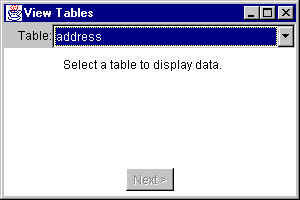
If you select the Employees table, you then see the following:
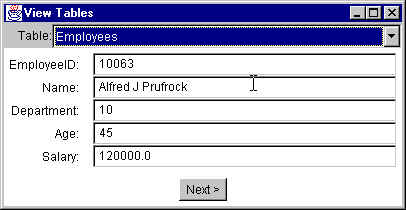
which shows the columns in the table, and the values for the first row of the table. You can click on the Next > button to move to the next row’s data, etc.
If you select the Departments table, you will see the following:
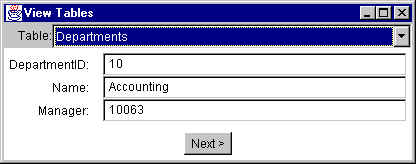
and so on.
Here is the program that accomplishes this. It is based on the ViewDB program in CORE Java, Vol II: Advanced Features, by Cay Horstmann & Gary Cornell, with some changes and restructuring. It also switches back to using AWT, rather than JFC/Swing.
package jdbc;

import java.awt.BorderLayout;
import java.awt.Button;
import java.awt.Choice;
import java.awt.Color;
import java.awt.Component;
import java.awt.Container;
import java.awt.Dimension;
import java.awt.Frame;
import java.awt.GridBagConstraints;
import java.awt.GridBagLayout;
import java.awt.Insets;
import java.awt.Label;
import java.awt.Panel;
import java.awt.Rectangle;
import java.awt.TextField;
import java.awt.Toolkit;
import java.awt.event.ActionListener;
import java.awt.event.ActionEvent;
import java.awt.event.ItemListener;
import java.awt.event.ItemEvent;
import java.awt.event.WindowAdapter;
import java.awt.event.WindowEvent;
import java.awt.event.WindowListener;

import java.sql.Connection;
import java.sql.DatabaseMetaData;
import java.sql.DriverManager;
import java.sql.ResultSet;
import java.sql.ResultSetMetaData;
import java.sql.Statement;
import java.sql.SQLException;
import java.sql.SQLWarning;

import java.util.Vector;

import messageBox.MessageBox;

/**
 *  Class to view the tables in a database, and their data.
 *
 *  @author Bryan J. Higgs, 4 March 2000
 */
public class ViewTables extends Frame
{
    public static void main(String[] args)
    {
        Frame f = new ViewTables();
        // Center frame on screen
        Toolkit toolkit = Toolkit.getDefaultToolkit();
        Dimension screen = toolkit.getScreenSize();
        Dimension frame = f.getSize();
        f.setLocation( (screen.width - frame.width)/2,
                       (screen.height - frame.height)/2);
        // Make it visible
        f.setVisible(true);
    }

    /**
     *  Constructs an instance of ViewTables.
     */
    public ViewTables()
    {
        super("View Tables");
        setSize(300, 200);
        addWindowListener(new WindowAdapter()
            {
                public void windowClosing(WindowEvent ev)
                {
                    dispose();
                    System.exit(0);
                }
            }
        );

        // Do layout...

        // Top panel goes to the North
        Panel top = new Panel( new BorderLayout() );
        top.setBackground(Color.lightGray);
        // Contains a label...
        Label tableLabel = new Label("Table:", Label.RIGHT);
        top.add(tableLabel, BorderLayout.WEST);
        // ...and a Choice
        Choice tableNames = new Choice();
        tableNames.addItemListener(new ItemListener()
            {
                public void itemStateChanged(ItemEvent ev)
                {
                    if (ev.getStateChange() == ItemEvent.SELECTED)
                    {
                        // We have selected a table name, so figure
                        // out what columns we have and lay them out.
                        loadColumnDisplay((String)ev.getItem());
                    }
                }
            }
        );
        top.add(tableNames, BorderLayout.CENTER);
        add(top, BorderLayout.NORTH);

        // Data panel goes in the Center
        m_dataPanel = new Panel();
        // Initially contains a helpful label
        m_dataPanel.add( new Label("Select a table to display data.") );
        add(m_dataPanel, BorderLayout.CENTER);

        // Bottom panel goes to the South
        Panel bottom = new Panel();
        // Contains just a button
        m_nextButton = new Button("Next >");
        m_nextButton.setEnabled(false);
        m_nextButton.addActionListener(new ActionListener()
            {
                public void actionPerformed(ActionEvent ev)
                {
                    // Cause the current data to be displayed
                    // and the next row to be read.
                    displayRow();
                }
            }
        );
        bottom.add(m_nextButton);
        add(bottom, BorderLayout.SOUTH);

        // Load the table names into the choice box.
        loadTableNames(tableNames);
    }

    /**
     *  Gets a connection to the specified database,
     *  using the specified driver.
     */
    private static Connection getConnection()
        throws SQLException, ClassNotFoundException
    {
        Class.forName("sun.jdbc.odbc.JdbcOdbcDriver");
        Connection con = DriverManager.getConnection(
				"jdbc:odbc:Employees");
        SQLWarning warn = con.getWarnings();
        if (warn != null)
            printSQLWarnings(warn);
        return con;
    }

    /**
     *  Loads the specified choice box with the names of all the tables.
     */
    private void loadTableNames(Choice tableNames)
    {
        // Make the connection, then discover all the tables
        // and load their names into the table names choice box.
        ResultSet metaRs = null;
        try
        {
            m_con = getConnection();
            m_stmt = m_con.createStatement();
            // Obtain the metadata for the tables
            DatabaseMetaData dbMd = m_con.getMetaData();
            metaRs = dbMd.getTables(null, // Catalog name
                                    null, // Schema name
                                    null, // Table name
                                    new String [] { "TABLE", "VIEW" }
                                          // Types
                                   );
            SQLWarning warn = metaRs.getWarnings();
            if (warn != null)
                printSQLWarnings(warn);
            while (metaRs.next())
            {
                tableNames.addItem(metaRs.getString(3));
            }
        }
        catch(SQLException ex)
        {
            printSQLExceptions(ex);
            MessageBox.show(this, ex.toString());
        }
        catch(ClassNotFoundException ex)
        {
            MessageBox.show(this, ex.toString());
        }
        finally
        {
            try
            {
                if (metaRs != null)
                    metaRs.close();
            }
            catch (SQLException ex)
            {   /* Do nothing */ }
        }
    }

    /**
     *  Adds the specified component to the specified container,
     *  using the specified GridBagConstraints, grid position,
     *  width & height.
     */
    private void addComponent(
                    Container container, Component component,
                    GridBagConstraints gbc,
                    int x, int y, int width, int height)
    {
        gbc.gridx = x;
        gbc.gridy = y;
        gbc.gridwidth = width;
        gbc.gridheight = height;
        container.add(component, gbc);
    }

    /**
     *  Loads the information about the table columns, and
     *  sets up the GUI layout to accommodate the data for a row.
     */
    private void loadColumnDisplay(String tableName)
    {
        // Remove the existing data panel
        remove(m_dataPanel);
        // and replace it with a new one
        m_dataPanel = new Panel()
        {
            public Insets getInsets()
            {
                return new Insets(5, 5, 5, 5);
            }
        };
        m_dataPanel.setLayout( new GridBagLayout() );
        // Remove all the column textfields from the Vector
        m_fields.removeAllElements();
        // Now, execute a SELECT * FROM table query against this
        // table and then use the ResultSet meta data to find
        // column information.
        // Then dynamically lay out the data panel.
        GridBagConstraints gbc = new GridBagConstraints();
        gbc.weighty = 100;
        try
        {
            if (m_rs != null)
                m_rs.close();
            m_rs = m_stmt.executeQuery("SELECT * from " + tableName);
            SQLWarning warn = m_rs.getWarnings();
            if (warn != null)
                printSQLWarnings(warn);
            ResultSetMetaData rsmd = m_rs.getMetaData();
            for (int col = 1; col <= rsmd.getColumnCount(); col++)
            {
                String columnName = rsmd.getColumnLabel(col);
                int columnWidth = rsmd.getColumnDisplaySize(col);
                TextField colField = new TextField(columnWidth);
                // Keep track of the TextFields in a Vector
                m_fields.addElement(colField);
                // Add a label for the column, containing the column name
                gbc.weightx = 0;
                gbc.anchor = GridBagConstraints.EAST;
                gbc.fill = GridBagConstraints.NONE;
                addComponent(m_dataPanel, new Label(columnName + ":"),
                             gbc, 0, col-1, 1, 1);
                // Add a text field for the data in the column
                gbc.weightx = 100;
                gbc.anchor = GridBagConstraints.WEST;
                gbc.fill = GridBagConstraints.HORIZONTAL;
                addComponent(m_dataPanel, colField,
                             gbc, 1, col-1, 1, 1);
            }

        }
        catch(Exception ex)
        {
            MessageBox.show(this, ex.toString());
        }
        // Add the new data panel in place of the old one.
        add(m_dataPanel, BorderLayout.CENTER);
        // Force a layout and sizing.
        pack();

        // Enable Next button so user can navigate rows
        m_nextButton.setEnabled(true);

        // Read first row
        readRow();

        // Display row results
        displayRow();
    }

    /**
     *  Reads the next row for the table.
     *  When it comes to the end of the rows, closes the ResultSet
     *  and disables the Next button so we can't go any further.
     */
    private void readRow()
    {
        if (m_rs != null)
        {
            try
            {
                if (!m_rs.next())   // Move to next row
                {
                    m_rs.close();   // We're done
                    m_rs = null;

                    // Disable the Next button
                    m_nextButton.setEnabled(false);
                }
            }
            catch (Exception ex)
            {
                MessageBox.show(this, ex.toString());
            }
        }
    }

    /**
     *  Displays the current row contents in the GUI text fields.
     *  Then reads the next row, so we're ready for it, and so we
     *  can disable the Next button properly, if there is no next row.
     */
    private void displayRow()
    {
        try
        {
            for (int col = 1; col <= m_fields.size(); col++)
            {
                String colValue = m_rs.getString(col);
                TextField colField = (TextField) m_fields.elementAt(col-1);
                colField.setText(colValue);
            }
        }
        catch (Exception ex)
        {
            MessageBox.show(this, ex.toString());
        }

        // Read next row
        readRow();
    }

    /**
     *  Prints out a SQLException and its related SQLExceptions
     */
    private static void printSQLExceptions(SQLException ex)
    {
        System.err.println("\n--- SQLException caught ---\n");
        for ( ;ex != null; ex = ex.getNextException())
        {
            System.err.println("Message:   " + ex.getMessage());
            System.err.println("SQLState:  " + ex.getSQLState());
            System.err.println("ErrorCode: " + ex.getErrorCode());
            ex.printStackTrace(System.err);
            System.err.println();
        }
    }

    /**
     *  Prints out a SQLWarning and its related SQLWarnings
     */
    private static void printSQLWarnings(SQLWarning warn)
    {
        System.err.println("\n--- SQLWarning ---\n");
        for ( ;warn != null; warn = warn.getNextWarning())
        {
            System.err.println("Message:   " + warn.getMessage());
            System.err.println("SQLState:  " + warn.getSQLState());
            System.err.println("ErrorCode: " + warn.getErrorCode());
            warn.printStackTrace(System.err);
            System.err.println();
        }
    }

    ///// Private data /////
    private Button     m_nextButton;    // Next button
    private Panel      m_dataPanel;     // Panel for column data display
    private Vector     m_fields = new Vector();
                                        // Holds column TextFields

    private Connection          m_con;  // Connection to use
    private Statement           m_stmt; // Statement to use
    private ResultSet           m_rs;   // ResultSet used to read rows
}
For completeness, here’s the MessageBox class that the above program uses:
package messageBox;

import java.awt.BorderLayout;
import java.awt.Button;
import java.awt.Dialog;
import java.awt.Dimension;
import java.awt.Frame;
import java.awt.Graphics;
import java.awt.Insets;
import java.awt.Panel;
import java.awt.Rectangle;
import java.awt.TextArea;
import java.awt.event.ActionEvent;
import java.awt.event.ActionListener;
import java.awt.event.WindowAdapter;
import java.awt.event.WindowEvent;

/**
 *  Shows a message box with the specified text.
 *  @author Bryan J. Higgs, 4 March 2000
 */
public class MessageBox extends Dialog
{
    /**
     *  Shows a message box with the specified message text
     *  with the specified parent Frame.
     */
    public static void show(Frame frame, String msg)
    {
        MessageBox box = new MessageBox(frame, msg);
        box.setVisible(true);
    }

    /**
     *  Constructs a MessageBox instance.
     *  (Private, so the only way of using a MessageBox is
     *  via the show() method.)
     */
    private MessageBox(Frame frame, String msg)
    {
        super(frame, "Message");
        addWindowListener
        (
            new WindowAdapter()
            {
                public void windowClosing(WindowEvent ev)
                {
                    closeWindow();
                }
            }
        );
        Panel message = new MessagePanel(msg);
        add(message, BorderLayout.CENTER);
        Panel p = new Panel();
        Button ok = new Button("OK");
        p.add(ok);
        add(p, BorderLayout.SOUTH);
        ok.addActionListener
        (
            new ActionListener()
            {
                public void actionPerformed(ActionEvent ev)
                {
                    closeWindow();
                }
            }
        );
        pack();

        // Ensure that the message box displays close to
        // its parent frame.
        Rectangle frameRect = frame.getBounds();
        Rectangle boxRect = getBounds();
        boxRect.x = frameRect.x + 10;
        boxRect.y = frameRect.y + 10;
        setBounds(boxRect.x, boxRect.y, boxRect.width, boxRect.height);
    }

    /**
     *  Closes the MessageBox window.
     */
    private void closeWindow()
    {
        setVisible(false);
        dispose();
    }

    /**
     *  Main entry point, for testing.
     */
    public static void main(String[] args)
    {
        Frame frame = new Frame("Testing MessageBox");
        frame.setBounds(100, 100, 300, 200);
        frame.addWindowListener
        (
            new WindowAdapter()
            {
                public void windowClosing(WindowEvent ev)
                {
                    System.exit(0);
                }
            }
        );
        frame.setVisible(true);
        show(frame, "Hello\nHow\nAre\nYou");
    }

    ///// Inner classes /////

    /**
     *  A Message Panel, to display a message in the MessageBox.
     */
    class MessagePanel extends Panel
    {
        MessagePanel(String msg)
        {
            m_msg = new TextArea(msg, 4, 30,
                                 TextArea.SCROLLBARS_NONE);
            m_msg.setEditable(false);
            setLayout( new BorderLayout() );
            add(m_msg, BorderLayout.CENTER);
        }

        public Insets getInsets()
        {
            return new Insets(10, 10, 10, 10);
        }

        //// Private Data ////
        private TextArea  m_msg;
        private Dimension m_dim = null;
    }
}