
Table of Contents
What is RMI?
It seems that, since I wrote this course back in 2008 or so, things have changed with RMI.
For one thing, it seems to have been removed from the Core Java books.
By many accounts, while RMI is still around, it is considered obsolete; today, people tend to choose to expose a remote server as web services, and access them via HTTP[S].
RMI stands for Remote Method Invocation, and it’s a Java technology that supports distributed computing.
Here’s what the RMI Home page says:
Java Remote Method Invocation (Java RMI) enables the programmer to create distributed Java technology-based to Java technology-based applications, in which the methods of remote Java objects can be invoked from other Java virtual machines, possibly on different hosts.
The RMI White Paper says:
Java Remote Method Invocation (RMI) allows you to write distributed objects using Java.
The Wikipedia RMI page says, at http://en.wikipedia.org/wiki/Java_remote_method_invocation :
The Java Remote Method Invocation API, or Java RMI, is a Java application programming interface for performing the object equivalent of remote procedure calls.
Remote Objects
Distributed systems involve not only clients and servers, but also remote objects. Java provides good support for all of these areas:
- RMI is a higher-level API built on top of the Sockets interface
- RMI allows you not only to pass data among objects on different systems, but also to invoke methods on a remote object.
- Remote objects can act as a client and/or a server, depending on the requirements of what is being distributed.
- RMI goes beyond the normal concepts of a remote procedure call by providing the ability to pass objects between clients and servers
There are also other technologies that support distributed objects, among them:
- CORBA (Common Object Request Broker Architecture) supports calls among distributed objects written in different languages.
- SOAP (Simple Object Access Protocol) supports web services, which is a relatively hot topic at the time of writing (2008).
We won’t be talking about these other technologies; each of them could be a course unto itself!
Remote Method Calls
How Does RMI Perform a Remote Method Call?
There are a number of components and actions involved in performing a remote method call:
- In order for a remote method call to appear as if it is local, there has to be a local object which ‘stands in for’ the remote object — that is, it presents the same interface to the client as the remote object does.
- The local object is called the client stub.
- The interface that both the stub and the remote object present is known as the remote interface
- When a call is made to one of the methods in the client stub, the stub is responsible for somehow:
- Invoking the corresponding method on the remote object
- Passing any parameters provided on the local call to the remote object’s method
- Eventually, obtaining any return values from the remote method (output parameters, or the return value from the method) and passing them back to the local caller.
- The mechanism used to pass values back and forth between the client stub and the remote object is called marshalling:
- Data to be passed over the connection from the client to the server is first marshalled into a form that may be conveniently transported over the ‘wire’.
- On the server side, the data is received, and must be unmarshalled into a form that can be used by, and supplied to, the remote object.
- Data to be returned from the remote object to the client stub must similarly be marshalled on the server side, and subsequently unmarshalled on the client side.
- Remember that code can cause exceptions to occur; exceptions can be [un]marshalled, too.
Components
So, here are the components that one must create in order to construct an RMI client/server application:
- The remote object interface: This describes what methods may be called on the remote object. (Note that this is shared between the client and the server code.)
- The remote object implementation: This provides the implementation for the remote object interface. (This only needs to exist on the server.)
- The server program that creates remote objects. (Server only)
- The client program that invokes the methods on the remote object. (Client-only)
- The client stub: A local object that resides on the client and serves as a ‘surrogate’ for the remote object. (Client-only)
- The server skeleton: An object that resides on the server, and communicates with the client stub and the actual remote object. (Server-only)
Note that, prior to JDK 1.5 (aka 5.0), you had to use a tool provided with the JDK, rmic (the RMI stub compiler), to generate the client stub and server skeleton classes.
In JDK 1.5 and beyond, the stub class is dynamically generated. In JDK 1.2 and beyond, the skeleton class no longer exists as a separate entity.
RMI Class Naming Conventions
Here are the naming conventions for the above components:
| Description | Class/Interface | Required? |
|---|---|---|
| Remote Object Interface | <applicationName> | Yes |
| Remote Object Implementation | <applicationName>Impl | Yes |
| Server Program | <applicationName>Server | Yes |
| Client Program | <applicationName>Client | Yes |
| Client Stub | <applicationName>Impl_Stub | Only prior to JDK 1.5 |
| Server Skeleton | <applicationName>Impl_Skel | Only prior to JDK 1.2 |
The RMI Registry
However, before we can actually perform a remote method invocation, we have one more thing to accomplish:
How do we locate the remote object?
The RMI library provides a bootstrap registry service through which the remote object may register itself, and then subsequently be located.
There are a number of different ways in which the registry may be accessed. We’ll see some of them as we go through the examples.
The RMI Registry must be up and running before the server/remote object can start up and register itself, and before the client can locate the remote object.
The JDK supplies a utility, rmiregistry which must be run to start the service — that is, it must be run before you can perform any remote method invocations.
Click here for a synopsis of the rmiregistry command.
- On Windows, it is recommended that you use the command:
start rmiregistry [port] - On Unix/Linux, it is recommended that you use the command:
rmiregistry [port] &
In both cases, this causes the command to be run in the background, with any potential error messages appearing in the associated console window.
(Naturally, the above commands assume that the rmiregistry executable directory location is included in the PATH.)
The default port number used by the RMI Registry is 1099, but you can override that (for example, if that port is already in use) by specifying the port number explicitly.
Note: A peculiar restriction appears to be the case for rmiregistry:
You must start the program in the directory which forms the top of your classes hierarchy. (In NetBeans, that will be your project’s Build/classes subdirectory.)
You must ensure that you start the program with no class path and in a directory with no class files.
If you fail to do this, your server will fail in its startup, with a mysterious error about not being able to find the remote interface.
There is a reason for this strange behavior; see here.
A Simple Example
Here’s a simple example.
We’ll implement a trivial “Hello” server and client.
The Remote Interface
We’ll create a really trivial Hello server, which implements the following remote interface:
package rmi;

import java.rmi.Remote;
import java.rmi.RemoteException;

/**
 * RMI Remote interface for Hello Server
 * @author Bryan Higgs
 */
public interface Hello extends Remote
{
  String sayHello() throws RemoteException;
}
Note that:
- The interface must extend the java.rmi.Remote interface
- Each remote method must throw the java.rmi.RemoteException exception.
The Remote Implementation
Here’s the implementation of the Hello server.
Notice that in this case the remote object and the remote server are the same class.
package rmiServer;

import java.rmi.AlreadyBoundException;
import java.rmi.RemoteException;
import java.rmi.registry.LocateRegistry;
import java.rmi.registry.Registry;
import java.rmi.server.UnicastRemoteObject;

import rmi.Hello;

/**
 * Server for RMI Hello
 *
 * @author Bryan Higgs
 * @version 1.0
 */
public class HelloServer implements Hello
{
  public String sayHello() throws RemoteException
  {
    return "Hello, RMI world!";
  }

  /**
   * Main entry point for server
   * @param args the command line arguments
   *             args[0] contains the port number for the registry
   */
  public static void main(String[] args)
  {
    // Determine the port number
    int port = 1099;  // the default port number for the registry
    if (args.length > 0)
    {
      try
      {
        port = Integer.parseInt(args[0]);
      }
      catch (NumberFormatException nfe)
      {
        System.err.println("Port number " + args[1] + " invalid");
        return;
      }
    }

    try
    {
      // Create the object that provides the service
      HelloServer object = new HelloServer();
      // Export the remote object to the Java RMI runtime
      Hello stub = (Hello) UnicastRemoteObject.exportObject(object, 0);

      // Bind the remote object's stub in the RMI registry
      Registry registry = LocateRegistry.getRegistry(port);
      registry.bind("Hello", stub);

      System.err.println("Server ready...");
    }
    catch (AlreadyBoundException abe)
    {
      // The attempt to bind failed, because it's already bound
      abe.printStackTrace();
    }
    catch (RemoteException re)
    {
      re.printStackTrace();
    }
  }
}
Note that we:
- Export the remote object to the Java RMI runtime, using the java.rmi.server.UnicastRemoteObject class’s exportObject() method. This causes a corresponding stub class to be loaded and an instance of that stub class to be constructed
- Use the java.rmi.registry.LocateRegistry class to locate the registry (on the server machine), and then java.rmi.registry.Registry to bind the remote object in the RMI registry.
- If the object is already bound, then an AlreadyBoundException will occur. Another possible choice is to call the rebind() method to cause this binding to replace any already existing one.
- Implement the remote object in the sayHello() method.
The Client Program
Here’s the client program:
package rmiClient;

import java.rmi.NotBoundException;
import java.rmi.RemoteException;
import java.rmi.registry.LocateRegistry;
import java.rmi.registry.Registry;

import rmi.Hello;

/**
 * Client for Hello RMI server.
 *
 * @author Bryan Higgs
 * @version 1.0
 */
public class HelloClient
{
  /**
   * Main entry point for client
   * @param args the command line arguments
   *             args[0] contains the server hostname
   *             args[1] contains the port number for the registry
   */
  public static void main(String[] args)
  {
    // Determine server hostname
    String host = null;
    if (args.length > 0)
      host = args[0];

    // Determine the port number
    int port = 1099;  // the default port number for the registry
    if (args.length > 1)
    {
      try
      {
        port = Integer.parseInt(args[1]);
      }
      catch (NumberFormatException nfe)
      {
        System.err.println("Port number " + args[1] + " invalid");
        return;
      }
    }

    try
    {
      // Find the RMI registry
      Registry registry = LocateRegistry.getRegistry(host, port);
      // Look up the server
      Hello stub = (Hello) registry.lookup("Hello");

      // Call the server at the sayHello entry point.
      String response = stub.sayHello();
      System.out.println("Response: " + response);
    }
    catch (NotBoundException nbe)
    {
      nbe.printStackTrace();
    }
    catch (RemoteException re)
    {
      re.printStackTrace();
    }
  }

  /**
   * Creates a new instance of HelloClient
   * (Make private to disable constructor)
   */
  public HelloClient()
  {
  }
}
Note that we:
- Use the java.rmi.registry.LocateRegistry class to locate the registry (on the server machine), and then java.rmi.registry.Registry to look up the remote object in the RMI registry.
- Call the remote object by calling the stub’s sayHello() method.
- Print out the response.
Running the Example
Now, with all the pieces constructed, we can run the example.
It’s not as straightforward as running a regular Java program! Here’s what we have to do:
- Start the RMI registry by running the rmiregistry utility.
- Start the Hello Server:
On Windows: start java rmiServer.HelloServer
On Unix/Linux: java rmiServer.HelloServer &
If all goes well, the server should output:
Server ready… - Run the Hello client:java rmiClient.HelloClient
If all goes well, the client should output:
Response: Hello, RMI world!
Note: The order in which we perform these steps is important!
Well, as I said, things have changed since my initial coverage of RMI.
The above steps do not seem to work in the latest version of the JDK.
Investigating…
Listing Remote Objects
It can be useful to determine what objects are bound in the RMI registry.
Here’s a program that does just that. It’s based on the textbook example, but augmented slightly.
package rmi;

import javax.naming.Context;
import javax.naming.InitialContext;
import javax.naming.NameClassPair;
import javax.naming.NamingEnumeration;
import javax.naming.NamingException;

/**
 * Class to list all the current RMI bindings
 *
 * @author Bryan Higgs
 * @version 1.0
 */
public class ShowRmiBindings
{
  /**
   * Main entry point
   * @param args the command line arguments
   *             args[0] contains the host name
   *             args[1] contains the port number
   */
  public static void main(String[] args)
  {
    String host = "localhost";  // the default
    int port = 1099;            // the default
    if (args.length > 0)
    {
      host = args[0];
      if (args.length > 1)
      {
        try
        {
          port = Integer.parseInt(args[1]);
        }
        catch (NumberFormatException nfe)
        {
          System.err.println("Port number " + args[1] + " invalid");
          return;
        }
      }
    }

    // Construct the rmi URL
    String rmiURL = "rmi://" + host + ":" + port;

    try
    {
      // Get the naming context
      Context namingContext = new InitialContext();
      // Get an emumeration of all RMI objects
      NamingEnumeration<NameClassPair> enumeration
                            = namingContext.list(rmiURL);
      // Print them out
      while (enumeration.hasMore())
      {
        System.out.println(enumeration.next().getName());
      }
    }
    catch (NamingException ne)
    {
      ne.printStackTrace();
    }
  }
}
An Extended Example
Here’s a more complex example.
We’ll implement a simple bank account service that supports obtaining an account ID, holder name, current balance, and deposits and withdrawals.
BankAccount
Here’s the BankAccount remote interface:
package rmi;

import java.rmi.Remote;
import java.rmi.RemoteException;

/**
 * A simple RMI remote interface to a bank account.
 * @author Bryan Higgs
 */
public interface BankAccount extends Remote
{
  /**
   * Returns the unique account id
   * @return the unique account id
   */
  public int getAccountId() throws RemoteException;

  /**
   * Returns the name of the bank account holder.
   * @return the name of the holder of this bank account
   */
  String getHolder() throws RemoteException;

  /**
   * Deposit an amount
   * @param amount the amount to deposit
   * @return the balance after the deposit completed.
   */
  double deposit(double amount) throws RemoteException;

  /**
   * Withdraw an amount
   * @param amount the amount to withdraw
   * @return the balance after the withdrawal completed.
   */
  double withdraw(double amount) throws RemoteException;

  /**
   * Gets the current balance
   * @return the current balance in the account
   */
  double getBalance() throws RemoteException;
}
It shows several methods, and also shows passing parameters to those methods, and the methods returning values.
BankAccountImpl
Here’s the BankAccountImpl class, which implements the BankAccount interface, and thus constitutes the remote object:
package rmiServer;

import java.rmi.RemoteException;
import java.rmi.server.UnicastRemoteObject;

import rmi.BankAccount;

/**
 * A BankAccount RMI remote object class.
 *
 * @author Bryan Higgs
 * @version 1.0
 */
public class BankAccountImpl
    extends UnicastRemoteObject
    implements BankAccount
{
  /**
   * Constructor
   * @param id the unique account id
   * @param holder the name of the account holder
   * @param initialDeposit the amount of the initial deposit.
   */
  public BankAccountImpl(int id, String holder, double initialDeposit)
    throws RemoteException
  {
    m_id = id;
    m_holder = holder;
    m_balance = initialDeposit;
  }

  /**
   * Returns the unique account id
   * @return the unique account id
   */
  public int getAccountId() throws RemoteException
  {
    return m_id;
  }

  /**
   * Returns the name of the bank account holder.
   * @return the name of the holder of this bank account
   */
  public String getHolder() throws RemoteException
  {
    return m_holder;
  }

  /**
   * Deposit an amount
   * @param amount the amount to deposit
   * @return the balance after the deposit completed.
   */
  public double deposit(double amount) throws RemoteException
  {
    m_balance += amount;
    return m_balance;
  }

  /**
   * Withdraw an amount
   * @param amount the amount to withdraw
   * @return the balance after the withdrawal completed.
   */
  public double withdraw(double amount) throws RemoteException
  {
    m_balance -= amount;
    return m_balance;
  }

  /**
   * Gets the current balance
   * @return the current balance in the account
   */
  public double getBalance() throws RemoteException
  {
    return m_balance;
  }


  /////// Private data //////
  private int     m_id;
  private String  m_holder;
  private double  m_balance;
}
Note that:
- It extends from java.rmi.server.UnicastRemoteObject . This causes the class to be exported automatically (done by the constructor for UnicastRemoteObject, which is automatically called from the BankAccountImpl constructor)
- It has a constructor which allows us to construct an instance with a specified account ID, holder name, and initial balance.
BankAccountServer
Here’s the BankAccountServer class, which is the remote server for all BankAccount remote objects:
package rmiServer;

import java.rmi.RemoteException;
import javax.naming.Context;
import javax.naming.InitialContext;
import javax.naming.NamingException;

import rmi.BankAccount;

/**
 * The BankAccount RMI server.
 *
 * @author Bryan Higgs
 * @version 1.0
 */
public class BankAccountServer
{
  /**
   * Main entry point for server
   * @param args the command line arguments
   *             args[0] contains the port number for the registry
   */
  public static void main(String[] args)
  {
    // Determine the port number
    int port = 1099;  // the default port number for the registry
    if (args.length > 0)
    {
      try
      {
        port = Integer.parseInt(args[0]);
      }
      catch (NumberFormatException nfe)
      {
        System.err.println("Port number " + args[1] + " invalid");
        return;
      }
    }

    try
    {
      System.err.println("Starting BankAccount Server...");

      System.err.println("Creating BankAccount objects...");

      // Create an object that provides the BankAccount service
      BankAccountImpl account1 = new BankAccountImpl(1, "Fred Bloggs", 10000);
      // Create a second object that provides the BankAccount service
      BankAccountImpl account2 = new BankAccountImpl(2, "Mary Clark", 30000);

      System.err.println("Binding remote objects to registry...");

      Context namingContext = new InitialContext();
      namingContext.bind("rmi://localhost:" + port + "/Fred", account1);
      namingContext.bind("rmi://localhost:" + port + "/Mary", account2);

      System.err.println("BankAccount Server ready...");
    }
    catch (NamingException ex)
    {
      ex.printStackTrace();
    }
    catch (RemoteException re)
    {
      re.printStackTrace();
    }
  }
}
Note the following:
- It creates the two BankAccountImpl instances.
- It uses javax.naming.InitialContext and javax.naming.Context , both from the Java Naming and Directory Interface (JNDI), to bind the two account remote objects, using the names “Fred” and “Mary” (This is just for example; in a real application, you would want a more robust naming convention, of course.)
BankAccountClient
Here’s the BankAccountClient class:
package rmiClient;

import java.awt.event.ActionEvent;
import java.awt.event.ActionListener;
import java.rmi.RemoteException;
import javax.naming.Context;
import javax.naming.InitialContext;
import javax.naming.NamingException;
import javax.swing.JButton;
import javax.swing.JFrame;
import javax.swing.JLabel;
import javax.swing.JOptionPane;
import javax.swing.JPanel;
import javax.swing.JTextField;

import rmi.BankAccount;
import rmiServer.BankAccountImpl;

/**
 * A BankAccount RMI client
 *
 * @author Bryan Higgs
 * @version 1.0
 */
public class BankAccountClient extends JFrame
{
  /**
   * Creates a new instance of BankAccountClient
   */
  public BankAccountClient()
  {
    super("Bank Account Client");
    JPanel contentPanel = new JPanel();
    setContentPane(contentPanel);
    contentPanel.add( new JLabel("Enter Account name: ") );
    contentPanel.add(m_name);
    contentPanel.add(m_button);
    m_button.addActionListener( new ActionListener()
      {
        public void actionPerformed(ActionEvent event)
        {
          findAccount();
        }
      }
    );
    pack();
  }

  /**
   * Finds the account, using the name specified
   */
  private void findAccount()
  {
    String name = m_name.getText().trim();
    BankAccount account;
    try
    {
      account = (BankAccount) m_namingContext.lookup(m_baseURL + name);
      JOptionPane.showOptionDialog(
                  this,
                  new BankAccountClientPanel(account),
                  "Bank Account Client Display",
                  JOptionPane.DEFAULT_OPTION,
                  JOptionPane.PLAIN_MESSAGE,
                  null, null, null
                 );
    }
    catch (NamingException ex)
    {
      JOptionPane.showMessageDialog(this, "Could not find account",
                                    "Error", JOptionPane.ERROR_MESSAGE);
      ex.printStackTrace();
    }
  }

  ////// Private instance data //////

  private JTextField m_name = new JTextField(10);
  private JButton    m_button = new JButton("Find Account");

  /**
   * Main entry point for client
   * @param args the command line arguments
   *             args[0] contains the server hostname
   *             args[1] contains the port number for the registry
   */
  public static void main(String[] args)
  {
    // Determine server hostname
    String host = null;
    if (args.length > 0)
      host = args[0];

    // Determine the port number
    int port = 1099;  // the default port number for the registry
    if (args.length > 1)
    {
      try
      {
        port = Integer.parseInt(args[1]);
      }
      catch (NumberFormatException nfe)
      {
        System.err.println("Port number " + args[1] + " invalid");
        return;
      }
    }

    // Construct the base URL for the lookups.
    m_baseURL = "rmi://" + host + ":" + port + "/";

    // Obtain the initial naming context for later...
    try
    {
      m_namingContext = new InitialContext();
    }
    catch (NamingException ne)
    {
      ne.printStackTrace();
      return;
    }

    // Now construct the GUI

    JFrame frame = new BankAccountClient();
    frame.setVisible(true);
  }

  ///// Private data /////
  private static Context m_namingContext;
  private static String  m_baseURL;
}
Note that it:
- Sets up the initial naming context and a base RMI URL in the main method, and then fires up a BankAccountClient JFrame.
- When the “Find Account” button is clicked, the findAccount method does a look up in the naming context, based on the name specified in the JTextField. It does this by first constructing an RMI URL from the base URL and the supplied name.
- If it succeeds in this look up, it then constructs a BankAccountClientPanel, passing in the BankAccount stub found in the look up, and then uses this panel in a JOptionPane options dialog to display the account details.
- If the look up fails, then a JOptionPane error message dialog to tell the user.
Here is the BankAccountClientPanel class:
package rmiClient;

import java.awt.BorderLayout;
import java.awt.Color;
import java.awt.event.ActionEvent;
import java.awt.event.ActionListener;
import java.rmi.RemoteException;
import javax.swing.JButton;
import javax.swing.JLabel;
import javax.swing.JOptionPane;
import javax.swing.JPanel;
import javax.swing.JTextField;
import javax.swing.SwingConstants;

import rmi.BankAccount;
import rmiServer.BankAccountImpl;

/**
 * The GUI frame for the Bank Account client
 *
 * @author Bryan Higgs
 * @version 1.0
 */
public class BankAccountClientPanel extends JPanel
{
  /**
   * Creates a new instance of BankAccountClientPanel
   */
  public BankAccountClientPanel(BankAccount account)
  {
    m_account = account;

    setLayout( new BorderLayout() );

    try
    {
      JPanel northPanel = new JPanel();
      add( northPanel, BorderLayout.NORTH );
      northPanel.add( new JLabel("Bank Account #: ") );
      northPanel.add( m_id );
      m_id.setEditable(false);
      m_id.setText( "" + m_account.getAccountId() );

      JPanel centerPanel = new JPanel( new BorderLayout() );
      add( centerPanel, BorderLayout.CENTER );
      JPanel holderPanel = new JPanel();
      centerPanel.add( holderPanel, BorderLayout.NORTH );
      holderPanel.add( new JLabel("Holder: ") );
      holderPanel.add( m_holder );
      m_holder.setEditable(false);
      m_holder.setText( m_account.getHolder() );

      JPanel middlePanel = new JPanel( new BorderLayout() );
      centerPanel.add( middlePanel, BorderLayout.SOUTH );
      JPanel depositPanel = new JPanel();
      middlePanel.add( depositPanel, BorderLayout.NORTH );
      depositPanel.add( m_depositButton );
      m_depositButton.addActionListener( new ActionListener()
        {
          public void actionPerformed(ActionEvent event)
          {
            depositMoney();
          }
        }
      );
      depositPanel.add( new JLabel("$") );
      depositPanel.add( m_depositAmount );
      JPanel withdrawPanel = new JPanel();
      middlePanel.add( withdrawPanel, BorderLayout.SOUTH );
      withdrawPanel.add( m_withdrawButton );
      m_withdrawButton.addActionListener( new ActionListener()
        {
          public void actionPerformed(ActionEvent event)
          {
            withdrawMoney();
          }
        }
      );
      withdrawPanel.add( new JLabel("$") );
      withdrawPanel.add( m_withdrawAmount );

      JPanel southPanel = new JPanel();
      add( southPanel, BorderLayout.SOUTH );
      southPanel.add( new JLabel("Balance: ") );
      southPanel.add( new JLabel("$") );
      southPanel.add( m_balance );
      m_balance.setEditable(false);
      setBalance( m_account.getBalance() );
    }
    catch (RemoteException ex)
    {
      ex.printStackTrace();
    }
  }

  /**
   * Sets the balance in the JTextField
   * and sets its color appropriately
   */
  private void setBalance(double balance)
  {
    m_balance.setText( "" + balance );
    if (balance < 0)
      m_balance.setForeground(Color.RED);
    else
      m_balance.setForeground(Color.BLACK);
  }

  /**
   * Deposits money into the account
   */
  private void depositMoney()
  {
    Double amount = getAmount(m_depositAmount);
    if (amount != null)
    {
      double balance = 0.0;
      try
      {
        balance = m_account.deposit(amount);
      }
      catch (RemoteException ex)
      {
        ex.printStackTrace();
      }
      setBalance(balance);
    }
    else
    {
      showErrorMessage();
    }
  }

  /**
   * Withdraws money from the account
   */
  private void withdrawMoney()
  {
    Double amount = getAmount(m_withdrawAmount);
    if (amount != null)
    {
      double balance = 0.0;
      try
      {
        balance = m_account.withdraw(amount);
      }
      catch (RemoteException ex)
      {
        ex.printStackTrace();
      }
      setBalance(balance);
    }
    else
    {
      showErrorMessage();
    }
  }

  /**
   * Check that the amount is valid for deposit or withdrawal
   */
  private Double getAmount(JTextField amountField)
  {
    double amount = 0.0;
    String amountString = amountField.getText();
    amountString = amountString.trim();
    if (amountString == null || amountString.equals(""))
      amountString = null;
    else
    {
      try
      {
        amount = Double.parseDouble(amountString);
      }
      catch (NumberFormatException nfe)
      {
        amountString = null;
      }
    }
    if (amountString != null)
      return amount;
    else
      return null;
  }

  /**
   * Show error message dialog
   */
  private void showErrorMessage()
  {
    JOptionPane.showMessageDialog(this, "Amount improperly specified",
                                  "Error", JOptionPane.ERROR_MESSAGE);
  }

  ///// Private data /////

  private BankAccount m_account;
  private JTextField m_id = new JTextField(4);
  private JTextField m_holder = new JTextField(15);
  private JTextField m_depositAmount = new JTextField(10);
  private JButton    m_depositButton = new JButton("Deposit this amount");
  private JTextField m_withdrawAmount = new JTextField(10);
  private JButton    m_withdrawButton = new JButton("Withdraw this amount");
  private JTextField m_balance = new JTextField(15);

  /**
   * Main entry point (for testing)
   */
  public static void main(String[] args)
  {
    try
    {
    JOptionPane.showOptionDialog(
                  null,
                  new BankAccountClientPanel(
                        new BankAccountImpl(53, "Darth Vader", 10000.00)),
                  "Bank Account Client Display",
                  JOptionPane.DEFAULT_OPTION,
                  JOptionPane.PLAIN_MESSAGE,
                  null, null, null
                 );
    }
    catch (RemoteException re)
    {
      re.printStackTrace();
    }
  }
}
Note that it:
- Has a main method which uses a local BankAccountImpl instance to test the class without relying on remote objects.
- Has a constructor that accepts a BankAccount; this allows for either a local or remote (i.e. stub) instance.
- Uses calls to the BankAccount to obtain:
- The account ID
- The holder name
- The current balance (which it displays in red if the balance is negative)
- Is basically ignorant of whether the BankAccount it is using is local or remote (aside from the testing code in the main method).
Running the Example
As before, in order to run the example, we have to do the following steps:
- Start the RMI registry by running the rmiregistry utility.
- Start the BankAccount server:
On Windows: start java rmiServer.BankAccountServer
On Unix/Linux: java rmiServer.BankAccountServer &
If all goes well, the server should output:
Starting BankAccount Server…
Creating BankAccount objects…
Binding remote objects to registry…
BankAccount Server ready… - Run the BankAccount client:
java rmiClient.BankAccountClient
If all goes well, the client should display:

Note: Again, the order in which we perform these steps is important!
Now, we can enter a name by which the bank account client can identify the bank account remote object. Remember we have two accounts, one with a name Fred, and the other with a name Mary.
As shown above, if we enter the name Mary, we’ll see a second window come up:
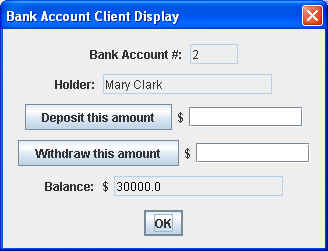
We can then deposit some money into Mary’s account:
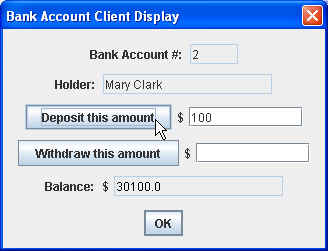
and withdraw money from her account:
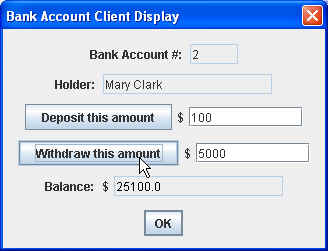
Then we can dismiss the dialog box by clicking on the OK button, which will allow us to enter another account name:

and thereby bring up another dialog box with Fred’s account details:
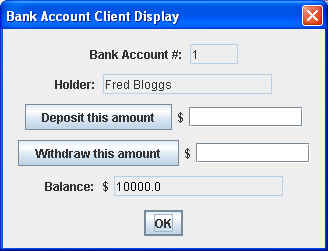
where we can also deposit and/or withdraw money from that account.
On the other hand, if we enter an account name that doesn’t exist:

we get the following displayed:
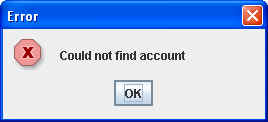
In this case, our client also does a stack trace, which looks something like:
javax.naming.NameNotFoundException: Bozo
        at com.sun.jndi.rmi.registry.RegistryContext.lookup(RegistryContext.java:95)
        at com.sun.jndi.toolkit.url.GenericURLContext.lookup(GenericURLContext.java:185)
        at javax.naming.InitialContext.lookup(InitialContext.java:351)
        at rmiClient.BankAccountClient.findAccount(BankAccountClient.java:58)
        at rmiClient.BankAccountClient.access$000(BankAccountClient.java:25)
        at rmiClient.BankAccountClient$1.actionPerformed(BankAccountClient.java:42)
	...
Caveats
RMI can be very tricky to get working. Here are some of the areas where you may have to spend some time figuring things out:
- Deployment — The textbook goes into a fair amount of detail on deployment, and for good reason: If you don’t do it right, things won’t work!
- Security — You may find that you will need to set up your own security policy, which involves setting up a policy file and using a security manager. Again, if you don’t grant all the permissions you need, things simply won’t work. See the textbook for details.
One of the reasons for these difficulties is that it’s very difficult to diagnose the underlying problem when things don’t work. You’re likely to get error messages that seem to bear no relationship to what the r/eal problem might be.
Be prepared for some degree of frustration!
Passing Objects in RMI
The Java RMI Tutorial says :
Arguments to or return values from remote methods can be of almost any type, including local objects, remote objects, and primitive data types. More precisely, any entity of any type can be passed to or from a remote method as long as the entity is an instance of a type that is a primitive data type, a remote object, or a serializable object, which means that it implements the interface
java.io.Serializable.
Some object types do not meet any of these criteria and thus cannot be passed to or returned from a remote method. Most of these objects, such as threads or file descriptors, encapsulate information that makes sense only within a single address space. Many of the core classes, including the classes in the packages
java.langandjava.util, implement theSerializableinterface.
The rules governing how arguments and return values are passed are as follows:
Remote objects are essentially passed by reference. A remote object reference is a stub, which is a client-side proxy that implements the complete set of remote interfaces that the remote object implements.
Local objects are passed by copy, using object serialization. By default, all fields are copied except fields that are marked
staticortransient. Default serialization behavior can be overridden on a class-by-class basis.
Passing a remote object by reference means that any changes made to the state of the object by remote method invocations are reflected in the original remote object. When a remote object is passed, only those interfaces that are remote interfaces are available to the receiver. Any methods defined in the implementation class or defined in non-remote interfaces implemented by the class are not available to that receiver.
…
In the parameters and return values of remote method invocations, objects that are not remote objects are passed by value. Thus, a copy of the object is created in the receiving Java virtual machine. Any changes to the object’s state by the receiver are reflected only in the receiver’s copy, not in the sender’s original instance. Any changes to the object’s state by the sender are reflected only in the sender’s original instance, not in the receiver’s copy.
An Example
Here’s an example, based on the example shown in the Java RMI Tutorial :
We’ll implement a simple Compute Server, which can accept anything that implements a Task interface.
Here’s the Task interface:
package rmi;

/**
 * An Interface describing a task to be performed
 *
 * @author Bryan Higgs
 */
public interface Task<T>
{
  T execute();
}
And here is the remote interface, ComputeEngine:
package rmi;

import java.rmi.Remote;
import java.rmi.RemoteException;

/**
 * An RMI remote interface for a compute engine.
 *
 * @author Bryan Higgs
 */
public interface ComputeEngine extends Remote
{
  /**
   * Computes the specified task
   * @param task the task to be performed.
   */
  <T> T compute(Task<T> task) throws RemoteException;
}
Note how general this interface is:
- The ComputeEngine interface contains a single method, compute().
- The compute() method accepts an argument of type Task — that is, any class that implements that interface.
- The compute() method returns a Task.
ComputeEngineImpl
Here’s the ComputeEngineImpl class.
There’s nothing much different here than from earlier examples, except for one thing, which we’ll examine below.
package rmiServer;

import java.net.MalformedURLException;
import java.rmi.Naming;
import java.rmi.RMISecurityManager;
import java.rmi.RemoteException;
import java.rmi.server.UnicastRemoteObject;
import javax.naming.Context;
import javax.naming.InitialContext;
import javax.naming.NamingException;

import rmi.ComputeEngine;
import rmi.Task;

/**
 * An implementation of an RMI remote compute engine.
 *
 * @author Bryan Higgs
 * @version 1.0
 */
public class ComputeEngineImpl
    extends UnicastRemoteObject
    implements ComputeEngine
{
  /**
   * Creates a new instance of ComputeEngineImpl
   */
  public ComputeEngineImpl() throws RemoteException
  {
  }

  /**
   * Computes the specified task
   * @param task the task to be performed.
   */
  public <T> T compute(Task<T> task) throws RemoteException
  {
    return task.execute();
  }

  /**
   * Main entry point
   * @param args the command line arguments
   *             args[0] contains the port number for the registry
   */
  public static void main(String[] args)
  {
    System.out.println("Setting java.security.policy ...");
    System.setProperty("java.security.policy", "policies/server.policy");
    // Use a security manager
    System.err.println("Setting SecurityManager ...");
    System.setSecurityManager( new SecurityManager() );

    // Determine the port number
    int port = 1099;  // the default port number for the registry
    if (args.length > 0)
    {
      try
      {
        port = Integer.parseInt(args[0]);
      }
      catch (NumberFormatException nfe)
      {
        System.err.println("Port number " + args[1] + " invalid");
        return;
      }
    }

    System.err.println("Using port " + port);

    try
    {
      System.err.println("Creating ComputeEngineImpl instance...");
      ComputeEngineImpl engine = new ComputeEngineImpl();

      System.err.println("[Re]binding ComputeEngineImpl instance in registry...");
      String url = "rmi://localhost:" + port + "/ComputeEngine";
      System.err.println("Using url: " + url);

      Context namingContext = new InitialContext();
      namingContext.rebind("rmi://localhost:" + port + "/ComputeEngine", engine);

      System.err.println("Ready to compute...");
    }
    catch (NamingException ne)
    {
      ne.printStackTrace();
    }
    catch (RemoteException re)
    {
      re.printStackTrace();
    }
  }
}
Security Policies
The ComputeEngineImpl class has a significant difference from previous RMI examples we’ve seen so far:
- It uses java.lang.SecurityManager as the security manager for the program.
Why? Because RMI’s class loader will not download any classes from remote locations if no security manager has been set.
Here is the relevant piece of code that implements this:
    System.setProperty("java.security.policy", "policies/server.policy");
    System.setSecurityManager( new SecurityManager() );
The second line sets the security manager.
The first line specified a security policy file to be used. In this case, I set up a server.policy file in a policies subfolder below the current working directory of the server program. It contained the following:
grant
{
  permission java.net.SocketPermission
    "localhost:1024-65535", "connect,accept";
};
which grants the necessary permission to connect to, and accept connections from, a socket on the localhost, in the range 1024 to 65535.
Security is an important issue for RMI applications. However, figuring out how to set up the security, and deciding what permissions need to be granted adds to the complexity of developing RMI programs.
ComputePi
Now, here’s a compute class, ComputePi, that computes the value of π to a specified number of places:
package rmiClient;

import java.io.Serializable;
import java.math.BigDecimal;

import rmi.Task;

/**
 * Class to compute the value of Pi
 *
 * (Based on the client.Pi class in the Java RMI Tutorial, at
 *  http://java.sun.com/docs/books/tutorial/rmi/client.html )
 */
public class ComputePi implements Task<BigDecimal>, Serializable
{
  /**
   * Construct a task to calculate pi to the specified
   * precision.
   * @param digits the precision
   */
  public ComputePi(int digits)
  {
    m_digits = digits;
  }

  /**
   * Calculate pi.
   */
  public BigDecimal execute()
  {
    return computePi(m_digits);
  }

  /**
   * Compute the value of pi to the specified number of
   * digits after the decimal point.  The value is
   * computed using Machin's formula:
   *
   *          pi/4 = 4*arctan(1/5) - arctan(1/239)
   *
   * and a power series expansion of arctan(x) to
   * sufficient precision.
   *
   * @param digits the number of digits of precision
   */
  public static BigDecimal computePi(int digits)
  {
    int scale = digits + 5;
    BigDecimal arctan1_5 = arctan(5, scale);
    BigDecimal arctan1_239 = arctan(239, scale);
    BigDecimal pi = arctan1_5.multiply(FOUR)
                             .subtract(arctan1_239)
                             .multiply(FOUR);
    return pi.setScale(digits, BigDecimal.ROUND_HALF_UP);
  }

  /**
   * Compute the value, in radians, of the arctangent of
   * the inverse of the supplied integer to the specified
   * number of digits after the decimal point.  The value
   * is computed using the power series expansion for the
   * arc tangent:
   *
   * arctan(x) = x - (x^3)/3 + (x^5)/5 - (x^7)/7 + (x^9)/9 ...
   */
  public static BigDecimal arctan(int inverseX, int scale)
  {
    BigDecimal result, numerator, term;
    BigDecimal invX = BigDecimal.valueOf(inverseX);
    BigDecimal invX2 = BigDecimal.valueOf(inverseX * inverseX);

    numerator = BigDecimal.ONE.divide(invX, scale, ROUNDING_MODE);

    result = numerator;
    int i = 1;
    do
    {
      numerator = numerator.divide(invX2, scale, ROUNDING_MODE);
      int denominator = 2 * i + 1;
      term = numerator.divide(BigDecimal.valueOf(denominator),
                              scale, ROUNDING_MODE);
      if ((i % 2) != 0)
      {
        result = result.subtract(term);
      }
      else
      {
        result = result.add(term);
      }
      i++;
    } while (term.compareTo(BigDecimal.ZERO) != 0);
    return result;
  }

  ///// Private data /////

  private static final long serialVersionUID = 227L;

  /** constants used in pi computation */
  private static final BigDecimal FOUR = BigDecimal.valueOf(4);

  /** rounding mode to use during pi computation */
  private static final int ROUNDING_MODE = BigDecimal.ROUND_HALF_EVEN;

  /** digits of precision after the decimal point */
  private final int m_digits;
}
ComputeEngineClient
Here’s the ComputeEngineClient class.
Note that the original version on the Java RMI Tutorial web site also set a security manager for the client. However, I found that it did not appear to be necessary for the application to work.
package rmiClient;

import java.math.BigDecimal;
import java.net.MalformedURLException;
import java.rmi.Naming;
import java.rmi.NotBoundException;
import java.rmi.RemoteException;
import javax.naming.NamingException;
import rmi.ComputeEngine;

/**
 * A class to act as a compute engine client
 * for a remote RMI compute engine object.
 *
 * @author Bryan Higgs
 * @version 1.0
 */
public class ComputeEngineClient
{
  /**
   * Main entry point for client
   * @param args the command line arguments
   *             args[0] contains the server hostname
   *             args[1] contains the port number for the registry
   */
  public static void main(String[] args)
  {
    // Determine server hostname
    String host = "localhost";
    if (args.length > 0)
      host = args[0];

    // Determine the port number
    int port = 1099;  // the default port number for the registry
    if (args.length > 1)
    {
      try
      {
        port = Integer.parseInt(args[1]);
      }
      catch (NumberFormatException nfe)
      {
        System.err.println("Port number " + args[1] + " invalid");
        return;
      }
    }

    System.out.println("Using port " + port);

    // Construct the base URL for the lookups.
    String url = "rmi://" + host + ":" + port + "/ComputeEngine";

    // Obtain the initial naming context for later...
    try
    {
      // Locate the compute engine in the registry
      System.out.println("Locating remote ComputeEngine...");
      ComputeEngine engine = (ComputeEngine) Naming.lookup(url);

      System.err.println("Creating ComputePi instance...");
      ComputePi task = new ComputePi(40); // Compute PI to 40 places

      System.err.println("Requesting remote computation...");
      BigDecimal pi = engine.compute(task);

      System.err.println("Result: PI = " + pi);
    }
    catch (NotBoundException nbe)
    {
      nbe.printStackTrace();
    }
    catch (MalformedURLException ex)
    {
      ex.printStackTrace();
    }
    catch (RemoteException ex)
    {
      ex.printStackTrace();
    }
  }
}
Note that it:
- Uses java.rmi.Naming to perform the look up.
- Creates an instance of ComputePi, specifying 40 places.
- Calls the ComputeEngine‘s compute() method, passing in a reference to the ComputePi instance.
- Prints out the result.
Running the Example
As before, in order to run the example, we have to do the following steps:
- Start the RMI registry by running the rmiregistry utility.
- Start the ComputeEngine server:
On Windows: start java rmiServer.ComputeEngineServer
On Unix/Linux: java rmiServer.ComputeEngineServer &
If all goes well, the server should output:
Setting SecurityManager …
Using port 2001
Creating ComputeEngineImpl instance…
[Re]binding ComputeEngineImpl instance in registry…
Using url: rmi://localhost:2001/ComputeEngine
Ready to compute…
(Your port number may vary.) - Run the ComputeEngine client:
java rmiClient.ComputeEngineClient
If all goes well, the client should display:
Using port 2001
Locating remote ComputeEngine…
Creating ComputePi instance…
Requesting remote computation…
Result: PI = 3.1415926535897932384626433832795028841972
Note: Again, the order in which we perform these steps is important!
Remote Callbacks
It is possible to have the remote object call the client back.
This can be useful for a number of purposes, for example to provide feedback on progress, etc.
Here’s an example of how this can be done using RMI.
We’ll implement a simple Time server, where the client registers, and then subsequently receives regular callbacks to report the time.
The Remote Interfaces
Here are the remote interfaces for our time server.
First, the interface to the Time server’s functionality:
package rmi;

import java.rmi.Remote;
import java.rmi.RemoteException;

import rmiClient.TimeMonitor;

/**
 * A Time interface
 * @author Bryan Higgs
 */
public interface Time extends Remote
{
  void registerTimeMonitor(TimeMonitor monitor) throws RemoteException;
}
Next, the interface to the client’s callback functionality:
package rmiClient;

import java.rmi.Remote;
import java.rmi.RemoteException;
import java.util.Date;

/**
 * A TimeMonitor interface
 * @author Bryan Higgs
 */
public interface TimeMonitor extends Remote
{
  void tellMeTheTime(Date time) throws RemoteException;
}
Note that:
- The Time interface makes reference to the TimeMonitor interface.
- Both are specified as implementing the Remote interface.
The TimeServer
Here’s the TimeServer:
package rmiServer;

import java.net.MalformedURLException;
import java.rmi.Naming;
import java.rmi.RMISecurityManager;
import java.rmi.Remote;
import java.rmi.RemoteException;
import java.rmi.UnknownHostException;
import java.rmi.registry.LocateRegistry;
import java.rmi.server.UnicastRemoteObject;
import java.util.Date;

import rmi.Time;
import rmiClient.TimeMonitor;

/**
 * TimeServer acts as a server for the remote "Time" service.
 */
public class TimeServer
    extends UnicastRemoteObject
    implements Time
{
  /**
   * Constructor
   */
  public TimeServer() throws RemoteException
  { }

  /**
   * Registers the specified TimeMonitor
   */
  public void registerTimeMonitor(TimeMonitor monitor)
  {
    System.out.println( "Client registering a TimeMonitor" );
    new TimeTicker(monitor).start();
    System.out.println( "Timer Started" );
  }

  /**
   * Main entry point
   */
  public static void main(String[] args)
  {
    System.out.println("Setting java.security.policy ...");
    System.setProperty("java.security.policy", "policies/server.policy");

    // Use a security manager
    System.err.println("Setting SecurityManager ...");
    System.setSecurityManager( new SecurityManager() );

    try
    {
      TimeServer server = new TimeServer();
      System.out.print("Creating registry...");
      LocateRegistry.createRegistry(PORT);
      System.out.println("created");
      System.out.println("[Re]binding to registry...");
      Naming.rebind("rmi://" + HOST + ":" + PORT + "/" + "TimeServer", server);
      System.out.println("Binding done" );
      System.out.println("Waiting for Client requests");
    }
    catch (UnknownHostException uhe)
    {
      uhe.printStackTrace();
    }
    catch (RemoteException re)
    {
      re.printStackTrace();
    }
    catch (MalformedURLException mue)
    {
      mue.printStackTrace();
    }
  }

  /// Private data ////
  private static final String HOST = "localhost";
  private static final int PORT = 2002;
}

/**
 * A TimeTicker class, used to update the client
 * on a regular basis.
 */
class TimeTicker extends Thread
{
  /**
   * Constructor
   */
  TimeTicker(TimeMonitor monitor)
  {
    m_monitor = monitor;
  }

  /**
   * The run method for the thread.
   */
  public void run()
  {
    boolean done = false;
    while (!done)
    {
      try
      {
        sleep(2000); // 2 seconds
        m_monitor.tellMeTheTime( new Date() );
      }
      catch ( Exception e )
      {
        done = true;
      }
    }
  }

  //// Private data ////
  private TimeMonitor m_monitor;
}
Note that:
- We’re creating our own registry, at a specified port
- When a client request to register a TimeMonitor comes in, a new instance of TimeTicker is created, and started up in a new thread.
- Periodically, this thread calls the TimeMonitor back at its tellMeTheTime() method.
The TimeClient
Here’s the TimeClient:
package rmiClient;

import java.awt.BorderLayout;
import java.awt.event.ActionEvent;
import java.awt.event.ActionListener;
import java.net.MalformedURLException;
import java.rmi.Naming;
import java.rmi.NotBoundException;
import java.rmi.Remote;
import java.rmi.RemoteException;
import java.rmi.server.UnicastRemoteObject;
import java.util.Date;
import javax.swing.JButton;
import javax.swing.JFrame;
import javax.swing.JPanel;
import javax.swing.JScrollPane;
import javax.swing.JTextArea;
import rmi.Time;

import rmiServer.TimeServer;

/**
 * A Time client class
 *
 * @author Bryan Higgs
 * @version 1.0
 */
public class TimeClient
    extends JFrame
{
  /**
   * Creates a new instance of TimeClient
   */
  public TimeClient()
  {
    setDefaultCloseOperation(EXIT_ON_CLOSE);

    JPanel panel = new JPanel( new BorderLayout() );
    setContentPane(panel);
    panel.add( new JScrollPane(m_textArea), BorderLayout.CENTER );

    JPanel buttonPanel = new JPanel();
    panel.add(buttonPanel, BorderLayout.SOUTH);
    buttonPanel.add(m_connectButton);
    m_connectButton.addActionListener( new ActionListener()
    {
      public void actionPerformed(ActionEvent event)
      {
        connect();
      }
    }
    );
    buttonPanel.add(m_clearButton);
    m_clearButton.addActionListener( new ActionListener()
    {
      public void actionPerformed(ActionEvent event)
      {
        m_textArea.setText("");
      }
    }
    );

    pack();
  }

  /**
   * Connect to the time server
   */
  private void connect()
  {
    try
    {
      String serverURL = "rmi://" + HOST + ":" + PORT + "/TimeServer" ;
      System.out.println( "Looking up TimeService at: " + serverURL );
      Time stub = null;
      try
      {
        stub = (Time) Naming.lookup(serverURL);
      }
      catch (NotBoundException nbe)
      {
        nbe.printStackTrace();
      }
      catch (MalformedURLException mue)
      {
        mue.printStackTrace();
      }

      System.out.println("Exporting the TimeMonitor object");
      TimeMonitorImpl monitor = new TimeMonitorImpl(m_textArea);
      UnicastRemoteObject.exportObject(monitor, 0);

      // Register the time monitor
      stub.registerTimeMonitor(monitor);
      System.out.println("We are registered!");
    }
    catch ( RemoteException re )
    {
      System.out.println( "" + re );
    }
  }

  /**
   * Main entry point
   */
  public static void main(String[] args)
  {
    System.err.println("Setting java.security.policy ...");
    System.setProperty("java.security.policy", "policies/client.policy");

    // Use a security manager
    System.err.println("Setting SecurityManager ...");
    System.setSecurityManager( new SecurityManager() );

    JFrame frame = new TimeClient();
    frame.setVisible(true);
  }

  //// Private data ////
  private static final String HOST = "localhost";
  private static final int    PORT = 2002;

  private TimeServer m_server;
  private JTextArea  m_textArea = new JTextArea(10, 20);
  private JButton    m_connectButton = new JButton("Connect");
  private JButton    m_clearButton = new JButton("Clear");
}

/**
 * A Class that implements the TimeMonitor interface
 */
class TimeMonitorImpl implements TimeMonitor
{
  TimeMonitorImpl(JTextArea textArea)
  {
    m_textArea = textArea;
  }

  /**
   * The method to be called back
   */
  public void tellMeTheTime(Date time)
  {
    m_textArea.append(time + "\n" );
  }

  /// Private data ////
  private JTextArea m_textArea;
}
Note that:
- We must use a security manager and specify a security policy. In this case, the client security policy needed to be:
grant
{
permission java.net.SocketPermission
“localhost:1024-65535”, “connect,accept”;
permission java.awt.AWTPermission
“showWindowWithoutWarningBanner”;
};
That is, we must specify socket connect and access permissions.
The second permission suppresses a “Java Applet Window” label that is displayed on any part of the GUI. - We must export the class that implements the TimeMonitor interface, so that it may be called (back).
Running the Example
This time, because we created our own registry, we did not need to run the rmiregistry utility ahead of time.
When you run the TimeServer, assuming all goes well, you should see something like:
Setting java.security.policy ...
Setting SecurityManager ...
Creating registry...created
[Re]binding to registry...
Binding done
Waiting for Client requests
When you run the client (or multiple clients), you will see:
Setting java.security.policy ...
Setting SecurityManager ...
and then a window comes up:
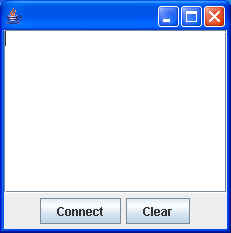
When you click on the Connect button, you should see the following output from the client:
Looking up TimeService at: rmi://localhost:2002/TimeServer
Exporting the TimeMonitor object
We are registered!
and the display should update itself every 2 seconds or so:
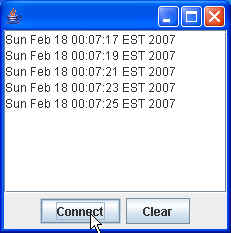
and the server should display:
Client registering a TimeMonitor
Timer Started