Table of Contents
If you’re interested in doing anything with the Internet, or anything with local area network (LAN), then you need to know something about networking. Java provides very good support for networking, and it’s quite easy to use. Indeed, that’s one significant reason why Java has become so popular and successful.
Networking Basics
Here is a short introduction to some of the basics of computer networking, and how Java supports it.
Network Communication Protocols
Computers communicate with each over the Internet using a number of protocol layers:
| Application Layer (HTTP, ftp, telnet, gopher, etc) |
| Transport Layer (TCP, UDP, etc) |
| Network Layer (IP, etc) |
| Link Layer (device driver, etc) |
Each layer uses its own set of protocols that rely on the lower layers
Host Names & IP Addresses
Every computer on the Internet has at least one host name and at least one IP address. IP addresses provide a unique identifier for each machine.
Host names provide a convenient name for human consumption, and there is a mapping between a host name and an IP address. The mapping of host name to IP address is, in general, 1:n. That is, a host machine may have one or more IP addresses. Typically, a machine has one IP address for each network interface card (NIC) it has installed.
IP addresses are 32-bit numbers which usually are represented like: 207.46.130.14, where each group of digits represents 8 bits of the 32-bit number, and is usually expressed in decimal.
Actually, IPv4 uses a 32-bit address for its Internet addresses. When it looked like they would soon run out of IPv4 addresses, they introduced IPv6. IPv6 utilizes 128-bit Internet addresses. Therefore, it can support 2128 Internet addresses —340,282,366,920,938,463,463,374,607,431,768,211,456 of them to be exact. The number of IPv6 addresses is 1028 times larger than the number of IPv4 addresses.
See later for how to discover the IP address for a given host.
There is a special host name, localhost, which translates to a special IP address, 127.0.0.1, which represents the local machine, specific to programs running on that machine.
Domains
Host names exist within Internet domains. Domains provide a hierarchical naming convention to conveniently divide up the world of Internet host names. For example, consider the host name:
purchasing.ebaubles.com
Here:
- purchasing is a host name within the ebaubles.com domain
- ebaubles is a domain within the com domain
- com is the domain for all US commercial sites.
Non-US names tend to append a name to indentify the country. For example:
benefits.porkpiesareus.co.uk
Back when the Domain Name System was invented, there were initially seven (7) domains you could choose from: .com, .net, .gov, .org, .edu, .mil, .arpa. These domains are called Top-Level Domains (TLDs) and supposedly, each one had a different purpose:
- .com was for “commercial” purposes,
- .net for “network” companies,
- .gov for “government institutions”,
- .org for “non-profit organizations”,
- .edu for “education”,
- .mil for “military” and
- .arpa for “infrastructure” (it stood for Advanced Research Projects Agency, the agency that created the internet)
It soon became obvious though, that it was important for countries to have their own, country-specific domain extensions instead of just having the generic ones mentioned above. So, a new top-level domain category was invented called Country Code Top-Level Domains (ccTLDs). These ccTLDS are exclusively to countries, for example:
- .fr for France,
- .de for Germany,
- .gr for Greece,
- .jp for Japan,
- .uk for the United Kingdom, etc.
To further confuse things, some countries decided to have a “.co.” before their ccTLDs: for example, amazon.co.uk (United Kingdom), australia.gov.au (Australia) or google.com.mx (Mexico).
Each and every country has the right to choose whether to use just its ccTLD (that would be name.jp for Japan) or also add a sub-domain (such as name.co.za for South Africa). There are no world-wide regulations as to the domain each country will use – it’s entirely up to them. Some prefer to add the sub-domain in order to distinguish between commercial (example.co.uk), government (example.gov.uk) or education (example.gov.uk). Others don’t share this opinion and only use their ccTLD.
Transport Protocols
There are two major transport protocols used on the Internet:
- User Datagram Protocol (UDP)
- Transport Control Protocol (TCP)
User Datagram Protocol (UDP)
A Connectionless Protocol. Provides for communication that is not guaranteed between two applications on the Internet. It acts rather like the postal service, where letters and packages are sent, but delivery is not guaranteed, and multiple pieces of mail are independent of each other, and may arrive in a different order from the order in which they were sent.
UDP uses independent, self-contained packets of data called datagrams.
Some applications don’t need reliable, guaranteed delivery of messages. A time service, or the ping service are examples.
Transport Control Protocol (TCP)
A Connection-oriented Protocol. Provides for reliable communication between two applications on the Internet. It is analogous to making a telephone call: One side initiates the connection and the other side answers; messages are sent back and forth over the connection, and they arrive in the same order in which they were sent. The protocol guarantees the messages sent actually arrive, or else an error is reported.
Most application level protocols (such as HTTP, ftp, telnet, etc.) rely on the TCP protocol to ensure that the data sent back and forth actually arrives, and in the proper order.
Ports
Typically, each computer on the Internet has a single physical connection to the network. However, a computer may have several applications that use data sent over that single physical connection. There must be a way of identifying which data is associated with which application. This is done by means of ports. A port is a connection point identified by a port number.
Typically, a specific application, such as a web server or a telnet service, will grab a particular port and expect clients to connect to that port in order to use the service provided by that application. Conventions have been set up to standardize port numbers for such applications.
Port Numbers
Port numbers are assigned by the Internet Assigned Numbers Authority (IANA), and are divided into three ranges: the Well Known Ports, the Registered Ports, and the Dynamic and/or Private Ports.
| Port Type | Port Range |
|---|---|
| Well Known Ports | 0 through 1023 |
| Registered Ports | 1024 through 49151 |
| Dynamic or Private Ports | 49152 through 65535 |
Here are some examples of Well Known Ports:
| echo | 7 |
| daytime | 13 |
| FTP | 21 |
| telnet | 23 |
| SMTP | 25 |
| finger | 79 |
| HTTP | 80 |
| POP3 | 110 |
The InetAddress Class
The InetAddress class encapsulates Internet addresses. It supports both host names and IP addresses.
InetAddress is a somewhat unusual class, because it has no public constructors. To get an instance of InetAddress, you use one of the static methods in the class.
To learn about the javadoc details of the InetAddress class, click here.
InetAddress Example
Here’s an example program that uses the InetAddress class to perform a lookup on a specified host:
package networking;

import java.net.InetAddress;
import java.net.UnknownHostException;
import java.util.Scanner;

/**
 *   Application to perform a lookup on the specified host.
 */
public class NodeLookup
{
  /**
   * Main entry point
   * @usage java networking.NodeLookup hostname
   *
   * If no arguments provided, will prompt for hostname
   *
   * @param args the command line arguments
   *             args[0] contains the hostname to look up
   */
  public static void main(String[] args)
  {
    String hostName;

    if (args.length < 1)
    {
      System.out.print("Hostname to look up: ");
      Scanner in = new Scanner(System.in);
      hostName = in.nextLine();
    }
    else
    {
      hostName = args[0]; // Use first argument for hostname
    }

    try
    {
      InetAddress host = InetAddress.getByName(hostName);
      System.out.println("Host name : " + host.getHostName());
      System.out.println("IP address: " + host.getHostAddress());
    }
    catch (UnknownHostException e)
    {
      System.out.println("Unknown host");
    }
  }
}
If you ask it to look up the host java.net, it will output:
Host name : java.net
IP address: 137.254.56.25
If you ask it to do the reverse lookup on 137.254.56.25, it will tell you:
Host name : lb-javanet-cms-adc.oracle.com
IP address: 137.254.56.25
(So it’s now clear that java.net is owned by Oracle)
If you ask it to look up localhost, it will output:
Host name : localhost
IP address: 127.0.0.1
If you ask it to look up 127.0.0.1, it will output the same as for localhost:
Host name : localhost
IP address: 127.0.0.1
Uniform Resource Locators (URLs)
A URL is a Uniform Resource Locator, and is a reference to a resource on the Internet.
You have used URLs to find web pages in your Internet web browser. For example, here is the URL used to access the JavaSoft home page:
The parts of this URL are as follows:
- http is the Protocol Identifier, or Scheme — in this case, identifying the HTTP protocol. Protocol identifiers include (there are others):
- http — The HyperText Transfer Protocol
- ftp — The File Transfer Protocol
- gopher — The gopher protocol
- mailto — The mailto protocol (typically invokes email client)(Protocol names are also known as schemes.)
- : (colon) separates the Protocol Identifier from the Resource Name
- www.java.com/ is the Resource Name — in this case, identifying the host name www.java.com
Occasionally, you might see an explicit port number specified within the URL. That is the port number to contact at the resource for the HTTP protocol to use. By default, the HTTP port is 80, but sometimes you may see other ports specified. For example:
http://www.example.com:1030/software/index.html
If you click on the http://www.java.com/ link, you will find that it takes you to:
The http:// protocol has been automatically converted to the https:// protocol, which is more secure, and is now preferred and strongly recommended for all websites.
Note that browsers nowadays often suppress the display of http/https and the www prefix, in their address bar.
The www is often, but not always, optional — sometimes, if you omit it, it will be automatically added; sometimes, if you included it, it will be automatically be removed. Sometimes, websites are picky about you having to include it, or not.
Note that the full resource name consists of:
- the hostname (including domain)
- a forward slash (/)
- and a path
The path identifies the specific resource in the host that the web client wants to access. For example, /software/htp/cics/index.html.
In the above case, the /en/ specifies the English version of the website.
Take a look at https://www.java.com/de/ to see an alternative language!
Finally, there can be an additional component to the URL: a query string, which is prefixed by a question mark (?). If a query string is present, it follows the path, and provides a string of information that the resource can use for some purpose (for example, as parameters for a search, or as data to be processed. Typically, a query string is a list of name/value pairs, separated from each other by an ampersand (&). For example:
?term=spring&course=physicsHere is the syntax of an https URL:
                            .-:80-----.
>>-http://--+-host name--+--+---------+--/--path component------>
            '-IP address-'  '-:--port-'

>--+-----------------+-----------------------------------------><
   '-?--query string-'
One more item you may find in a URL:
A Reference (aka Anchor), which is preceded by a hash (#), and provides the name of an anchor within a webpage, so that the browser may go to that part of the webpage directly.
For example: #url (see Relative URLs, below).
Absolute vs. Relative URLs
The URLs shown in the previous sections are examples of absolute URLs. That is, they contain all the information (perhaps defaulted) necessary to find a resource on the Internet.
There are also relative URLs, which allow you to access resources relative to a known location. For example, it is very common to use relative URLs within an HTML document:
- #Example — refers to the anchor Example in the current page
- images/myFamily.gif — refers to the myFamily.gif file within the images subdirectory on the host which supplied the current page.
Relative URLs are very useful, because they allow you to move whole sets of resources around, without having to change all the mutual references, links, etc that they contain.
The URL Class
In Java, you can use the URL class to construct a URL object.
Take a look at the API documentation for the URL class by clicking here.
Using the URL class you can construct URLs from pieces, which might involve absolute or relative URLs:
URL java = new URL("http://www.java.com/");
URL gamelan = new URL("http://www.gamelan.com/pages/");
URL gamelanGames = new URL(gamelan, "Gamelan.game.html");
URL gamelanNetwork = new URL(gamelan, "Gamelan.net.html");
new URL("http", "www.gamelan.com", "/pages/Gamelan.net.html");
new URL("http", "www.gamelan.com", 80, "/pages/Gamelan.net.html");
Here’s an example of a program that uses this class to display a web page:
package networking;

import java.awt.BorderLayout;
import java.awt.Color;
import java.awt.EventQueue;
import java.awt.event.ActionEvent;
import java.awt.event.ActionListener;

import java.net.URL;
import javax.swing.BorderFactory;
import javax.swing.JButton;
import javax.swing.JEditorPane;
import javax.swing.JFrame;
import javax.swing.JPanel;
import javax.swing.JScrollPane;
import static javax.swing.WindowConstants.EXIT_ON_CLOSE;

/**
 *   Program to display a webpage, given its URL.
 *
 *   @author Bryan J. Higgs, 9 October 1999
 */
public class ShowDocument extends JFrame
{
  public static void main(String[] args)
  {
    EventQueue.invokeLater( new Runnable()
      {
        public void run()
        {
          ShowDocument frame = new ShowDocument();
          frame.setDefaultLookAndFeelDecorated(true);
          frame.setDefaultCloseOperation(EXIT_ON_CLOSE);
          frame.setTitle("Show Document");
          frame.setBounds(200, 200, 800, 500);
          frame.setVisible(true);
        }
      }
    );

  }

  public ShowDocument()
  {
    JPanel contentPane = (JPanel) getContentPane();
    contentPane.setLayout( new BorderLayout() );
    contentPane.add(m_button, BorderLayout.SOUTH);

    JScrollPane scrollPane = new JScrollPane();
    JEditorPane editorPane = new JEditorPane();
    editorPane.setEditable(false);
    scrollPane.setViewportView(editorPane);
    contentPane.add(scrollPane, BorderLayout.CENTER);

    m_button.addActionListener( new ActionListener()
    {
      public void actionPerformed(ActionEvent event)
      {
        // Postpone the work to add the URL contents
        // to the editor pane
        EventQueue.invokeLater(new Runnable()
        {
          public void run()
          {
              try
              {
                // Open the URL in the editor pane
                editorPane.setPage( new URL(m_urlToDisplay) );
              }
              catch (Exception ex)
              {
                  // Should never happen because we're
                  // hardcoding a valid URl.
                  ex.printStackTrace();
              }
          }
        }
        );
      }
    }
  );
 }

  //// Private data ////
  private static final String m_urlToDisplay
     = "http://help.websiteos.com/websiteos/example_of_a_simple_html_page.htm";

  private JButton m_button  = new JButton("Click to display webpage");
}
which produces the following:
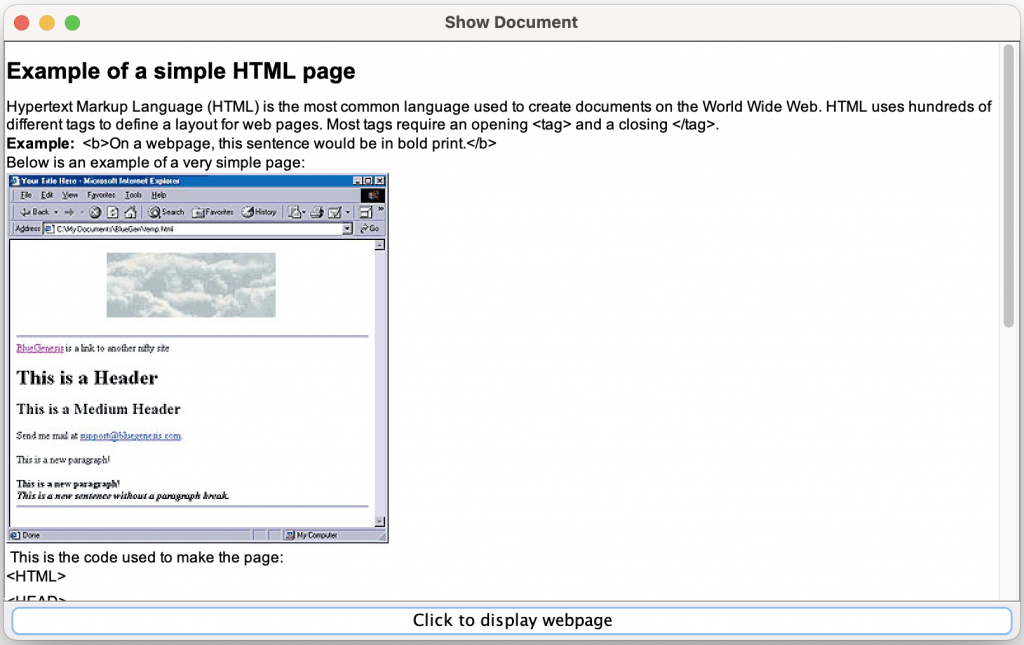
where I’ve already clicked the “Click to display webpage” button.
Note that more complex webpages will take longer to display, and if they use JavaScript or other complex features, they won’t display as well, or even not at all. I intentionally picked a very straightforward and short webpage in the above example to avoid such issues.
This emphasizes that using a JEditorPane does not constitute implementing a complete browser.
Reading from a URL
The URL class provides a method:
public InputStream openStream()
Remember, however, that if you wish to read text from this stream, you must wrap it inside an InputStreamReader, as we discussed in the I/O section.
Here’s an application that makes use of this method to read text from a specified URL:
package networking;

import java.net.URL;

import java.io.BufferedReader;
import java.io.InputStreamReader;
import java.util.Scanner;

/**
 *   Application to read text from a URL
 *   specified in the first command line argument.
 *   (Note that this is NOT a Reader, like BufferedReader.)
 */
public class URLReader
{
  /**
   *
   * @usage java networking.NodeLookup urlstring
   *
   * If no arguments provided, will prompt for urlstring
   *
   * @param args the command line arguments
   *             args[0] contains the urlstring to read
   */
  public static void main(String[] args) throws Exception
  {
    String urlName;

    if (args.length < 1)
    {
      System.out.print("URL : ");
      Scanner in = new Scanner(System.in);
      urlName = in.nextLine();
    }
    else
    {
      urlName = args[0]; // Use first argument for hostname
    }

    URL url = new URL(urlName);
    BufferedReader reader = new BufferedReader(
      new InputStreamReader( url.openStream() )
    );

    try
    {
      String line = null;
      while (true)
      {
        line = reader.readLine();
        if (line == null)
          break;
        System.out.println(line);
      }
    }
    finally
    {
      reader.close();
    }
  }
}
When I ran this on my machine, and entered the same URL I used in the previous program (chosen for its simplicity and brevity):
http://help.websiteos.com/websiteos/example_of_a_simple_html_page.htm
it output the following:
URL : http://help.websiteos.com/websiteos/example_of_a_simple_html_page.htm
<!doctype HTML public "-//W3C//DTD HTML 4.0 Frameset//EN">

<!-- saved from url=(0014)about:internet -->
<html>

<head>
<meta http-equiv="content-type" content="text/html;charset=windows-1252">
<title>Example of a simple HTML page</title>
<meta name="generator" content="Adobe RoboHelp - www.adobe.com">
<link rel="stylesheet" href="default_ns.css"><script type="text/javascript" language="JavaScript" title="WebHelpSplitCss">
<!--
if (navigator.appName !="Netscape")
{   document.write("<link rel='stylesheet' href='default.css'>");}
//-->
</script>
<style type="text/css">
<!--
img_whs1 { border:none; width:301px; height:295px; float:none; }
p.whs2 { margin-bottom:5pt; }
p.whs3 { margin-bottom:9.5pt; }
-->

...Lots of stuff omitted...

</body>
</html>
Proxy Settings
If you are using an HTTP proxy (for example if you are sitting behind a firewall) and need to access the URL through this proxy, then the following properties allow you to specify the proxy settings:
- http.proxyHost — the name of the proxy host
- http.proxyPort — the proxy host port number
If you are in a situation where you have to use a proxy server (most companies will probably require this), and fail to do this, then you will likely fail to read the URL properly.
Here’s an example of the kind of code you’d write to set these system properties:
    System.setProperty("http.proxyHost", "my-proxyhost.my-domain.com");
    System.setProperty("http.proxyPort", "89");
A proxy server is a server application or appliance that acts as an intermediary for requests from clients seeking resources from servers that provide those resources. A proxy server thus functions on behalf of the client when requesting service, potentially masking the true origin of the request to the resource server.
Instead of connecting directly to a server that can fulfill a requested resource, such as a file or web page, the client directs the request to the proxy server, which evaluates the request and performs the required network transactions. This serves as a method to simplify or control the complexity of the request, or provide additional benefits such as load balancing, privacy, or security.
Sockets
What’s a Socket?
When a client program wishes to connect to a host machine, on a specific port number, using TCP, it makes a connection request using a socket.
A socket is a low-level communication mechanism on which other, higher level, protocols are based. Sockets are both client-side and server-side.
The Socket Class
The Socket class implements client sockets (also called just “sockets”).
A socket is an endpoint for communication between two machines.
For a lot more detail on the API for the Socket class click here.
Here’s an example of how you can create a stream socket and connect it to the specified port number on the named host:
Socket socket = new Socket("myhost.com", socketNo);
The following:
Socket socket = new Socket("myhost.com", socketNo, true);
explicitly specifies that we should connect to a stream socket, whereas
Socket socket = new Socket("myhost.com", socketNo, false);
specifies that we should connect to a datagram socket.
There are corresponding constructors where the first argument is of type InetAddress, and there are other constructors with more complex sets of arguments.
Example
Here’s a client program that reads from a specified socket on a specified host, and assumes that the results are simple text:
package networking;

import java.io.BufferedReader;
import java.io.InputStreamReader;
import java.io.IOException;

import java.net.Socket;
import java.util.Scanner;

/**
 *   Application to connect to a specified host and port
 *   and print the output text received from that connection.
 */
public class SocketTest
{
  /**
   * Main entry point
   *
   * @param args the command line arguments:
   *             args[0] : host name
   *             args[1] : port number
   *
   * If no command line arguments are provided, the program
   * will prompt for them
   */
  public static void main(String[] args)
  {
    String hostName = null;
    int port = -1;

    if (args.length < 2)
    {
      System.out.print("Hostname : ");
      Scanner in = new Scanner(System.in);
      hostName = in.nextLine();
      System.out.print("Port number : ");
      port = in.nextInt();
    }
    else
    {
      // First argument is hostname
      hostName = args[0];
      // Convert port string to integer
      port = Integer.parseInt(args[1]);
    }

    Socket socket = null;
    try
    {
      // Open the socket
      socket = new Socket(hostName, port);
      // Read from the socket
      BufferedReader reader = new BufferedReader(
                                    new InputStreamReader(
                                        socket.getInputStream()
                                    )
                                );

      // Read line by line until the end
      while (true)
      {
        String line = reader.readLine();
        if (line == null)
          break;  // We hit the end
        System.out.println(line);
      }
    }
    catch (NumberFormatException e)
    {
      System.err.println("Invalid port : [" + port +"]");
    }
    catch (IOException e)
    {
      e.printStackTrace();
    }
  }
}
If you supply the following arguments to this program:
Hostname: time.nist.gov
Port.     13
(which is the time of day service running on a machine operated by the National Institute of Standards and Technology (NIST)) it will output the following:
59252 21-02-07 20:41:21 00 0 0 789.5 UTC(NIST) *
(or something similar).
UTC is Coordinated Universal Time.
This abbreviation comes as a result of the International Telecommunication Union and the International Astronomical Union wanting to use the same abbreviation in all languages. English speakers originally proposed CUT (for “coordinated universal time”), while French speakers proposed TUC (for “temps universel coordonné“). The compromise that emerged was UTC.
Server Sockets
So far, we’ve just implemented client-side code. Let’s see what’s involved in implementing server-side code.
For simplicity, rather than using multiple machines over a network, we’ll just have the server and client run on the same machine.
The ServerSocket Class
The ServerSocket class implements a server socket. A server socket waits for requests to come in over the network. It performs some operation based on that request, and then possibly returns a result to the requester.
For a lot more detail on the API for ServerSocket, click here.
The ServerSocket class’s constructors expect a port number (the host is the machine on which the server program is running). It is also possible to specify a backlog, which allows you to restrict the queue size for connections. When the queue is full, the server socket refuses further connections until such time as the queue ceases to be full.
The most commonly used method in the ServerSocket class is probably accept().
Server Example
Here’s a simple ReverseServer application, implemented using ServerSocket.
It simply accepts strings sent to it by its client, and returns the string with all the characters reversed.
package networking;

import java.net.ServerSocket;
import java.net.Socket;

import java.io.BufferedReader;
import java.io.InputStreamReader;
import java.io.IOException;
import java.io.PrintWriter;
import java.util.Scanner;

/**
 *   Application to act as a 'Reverse' server.
 *   An application can connect to this server on the specified port
 *   and send it text.  The server will reverse the text and send it back.
 *
 *   @author Bryan J. Higgs, 10 October 1999
 */
public class ReverseServer
{
  /**
   *   Main entry point.
   *
   *   @param args the command line arguments
   *               args[0] contains port to use
   *
   * If there are no arguments, the program prompts for a port number
   */
  public static void main(String[] args)
  {
    int port = -1;

    if (args.length < 1)
    {
      System.out.print("Port to use: ");
      Scanner in = new Scanner(System.in);
      port = in.nextInt();
    }
    else
    {
      port = Integer.parseInt(args[0]);
    }

    ServerSocket socket = null;
    Socket incoming = null;
    BufferedReader in = null;
    PrintWriter out = null;
    try
    {
      socket = new ServerSocket(port);
      // Wait on server socket for connection requests
      incoming = socket.accept();
      // Connection requested; get the input stream
      in = new BufferedReader(
                new InputStreamReader(
                    incoming.getInputStream()));
      // Get the output stream
      out = new PrintWriter(incoming.getOutputStream(),
                            true        // autoflush
                           );

      // Output greeting
      out.println(
          "Welcome to the Reverse Server!" +
          " Enter an empty line to exit.");

      // Loop, reversing each line received.
      while (true)
      {
        String line = in.readLine();
        if (line == null || line.equals(""))
          break; // We are at the end
        // We read a line, so reverse it
        StringBuffer buffer = new StringBuffer(line);
        line = buffer.reverse().toString();
        // and return the result
        out.println(line);
      }
    }
    catch (Exception e)
    {
      e.printStackTrace();
    }
    finally
    {
      // Close everything necessary
      try
      {
        if (out != null)
          out.close();
        if (in != null)
          in.close();
        if (incoming != null)
          incoming.close();
        if (socket != null)
          socket.close();
      }
      catch (IOException e)
      {
        // Ignore any errors here
      }
    }
  }
}
So, you run it, and after giving it a port number, it sits there, seemingly doing nothing.
That’s because it’s waiting for a client connection. So how to we connect to it? Here’s one way…
Using a telnet Client
A simple way of testing our ReverseServer is to use a telnet client to connect to it. Unix/Linux, Apple MacOS, and Windows all come with a telnet client.
You can start the Windows Telnet client by clicking on the Windows Start menu’s Run… menu item, and entering ‘telnet’ at the resulting prompt:
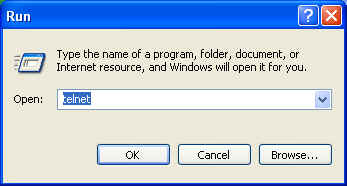
and clicking on the OK button.
This results in the telnet client coming up in a console window, where you will need to set the telnet client’s mode to local echo:
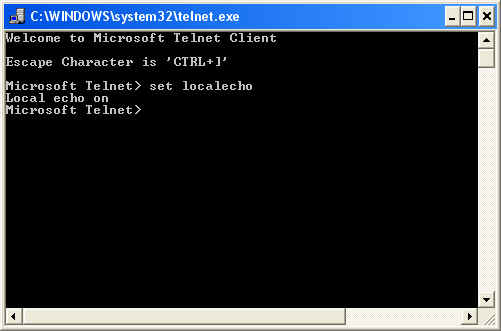
Then you connect to the specified host and port using the open command. For example, for our ReverseServer, running on the local machine, and listening on port 5000:
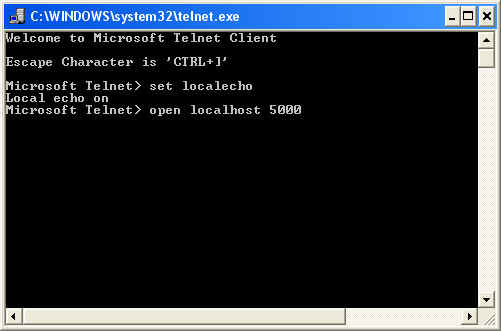
This command connects to the server, and the contents of the window changes to:
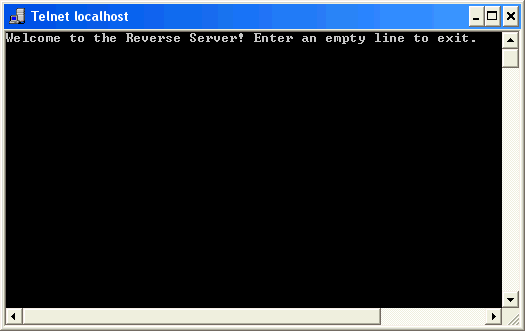
As the previous window indicated, a Ctrl+] will allow you to return to the other mode.
Now, you can interact with the ReverseServer:
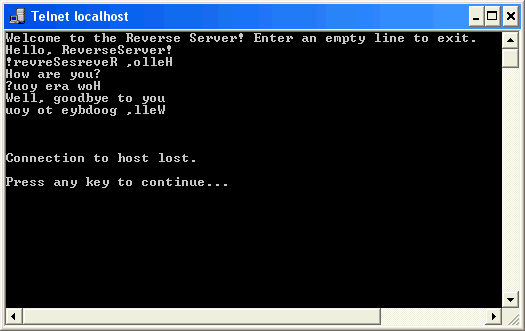
Note that an empty line causes the ReverseServer to close down, which closes the connection. In other words, this version of the ReverseServer only handles a single client, and then exits — not too useful!
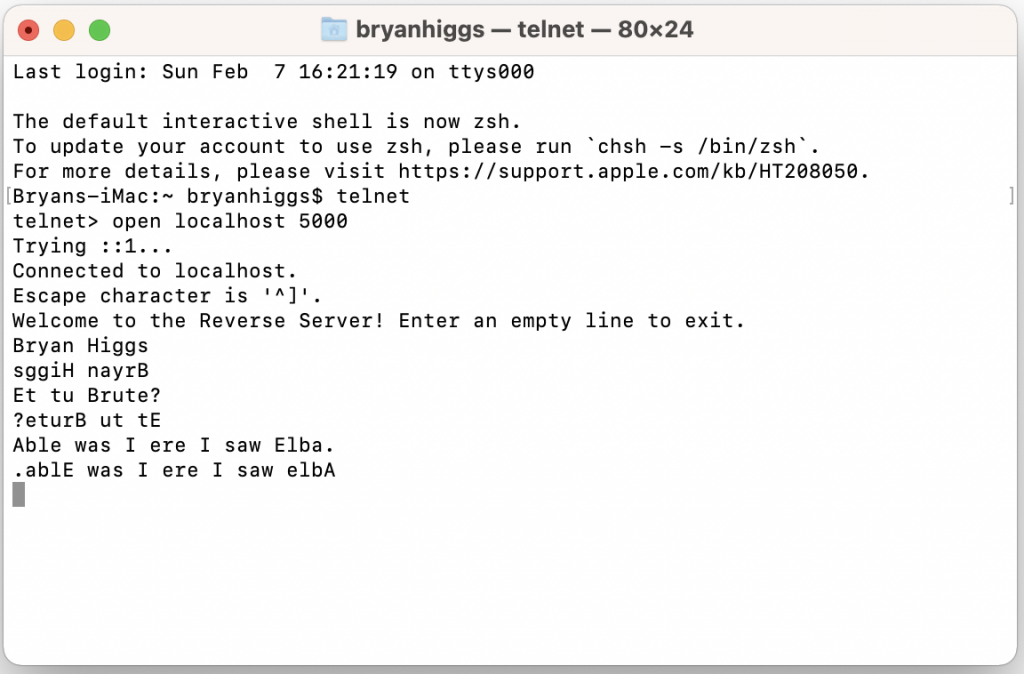
On Unix/Linux, you use a command window (aka Terminal on macOS) in a similar way. Here is what a macOS interaction looks like:
ReverseServer Client Example
Here’s a simple Java client written to access ReverseServer:
package networking;

import java.io.BufferedReader;
import java.io.InputStreamReader;
import java.io.IOException;
import java.io.OutputStreamWriter;
import java.io.PrintWriter;

import java.net.Socket;
import java.net.UnknownHostException;
import java.util.Scanner;

/**
 *   Application to connect to a specified host and port
 *   and print the output text received from that connection.
 */
public class ReverseClient
{
  /**
   * Main entry point
   *
   * @param args the command line arguments:
   *             args[0] : host name
   *             args[1] : port number
   *
   * In the absence of arguments, the program will prompt for them
   */
  public static void main(String[] args)
  {
    String hostName = null;
    int port = -1;

    if (args.length < 2)
    {
      System.out.print("Hostname : ");
      Scanner in = new Scanner(System.in);
      hostName = in.nextLine();
      System.out.print("Port number : ");
      port = in.nextInt();
    }
    else
    {
      // First argument is hostname
      hostName = args[0];
      // Convert port string to integer
      port = Integer.parseInt(args[1]);
    }

    // Connect a BufferedReader to System.in
    BufferedReader inputReader = new BufferedReader(
                     new InputStreamReader(System.in) );

    Socket socket;
    try
    {
      socket = new Socket(hostName, port);

      // Connect a BufferedReader to read from the socket
      BufferedReader socketReader = new BufferedReader(
                       new InputStreamReader( socket.getInputStream() ) );

      // Connect a PrintWriter to write to the socket
      PrintWriter socketWriter = new PrintWriter(
            new OutputStreamWriter(socket.getOutputStream() ),
            true // autoflush
            );

      // Loop on input and server's response
      while (true)
      {
        // Read the reverse server's response
        String line = socketReader.readLine();
        if (line == null)
          break;  // We hit the end
        System.out.println(line);
        // Prompt the user for another line
        System.err.print("> ");
        line = inputReader.readLine();
        if (line == null)
          line = "";  // Send an empty line for end of input
        socketWriter.println(line);
      }
    }
    catch (UnknownHostException ex)
    {
      ex.printStackTrace();
    }
    catch (IOException ex)
    {
      ex.printStackTrace();
    }
  }
}
So, with the ReverseServer running on the localhost using port 5000, I ran this ReverseClient program, and here were the results:
Hostname : localhost
Port number : 5000
Welcome to the Reverse Server! Enter an empty line to exit.
> Hello!
!olleH
> It's me, Bryan
nayrB ,em s'tI
> Bye!
!eyB
>
Multi-Threaded Example
You’ll note that the previous ReverseServer isn’t very friendly.
Here are some of its problems:
- It accepts a single connection only
- When the connection ends, it simply exits
Not terribly useful!
How can we do better? Use threads!
Here’s an example:
package networking;

import java.net.ServerSocket;
import java.net.Socket;

import java.io.BufferedReader;
import java.io.InputStreamReader;
import java.io.IOException;
import java.io.PrintWriter;
import java.util.Scanner;

/**
 *   Application to act as a Reverse server for multiple clients.
 *   An application can connect to this server on the specified port
 *   and send it text.  The server will reverse the text and send it back.
 *
 *   @author Bryan J. Higgs, 10 October 1999
 */
public class MultiThreadedReverseServer
{
  /**
   *   Main entry point.
   *
   *   @param args the command line arguments
   *               args[0] contains port to use
   *
   * If there are no arguments, the program prompts for a port number
   */
  public static void main(String[] args)
  {
    int port = -1;

    if (args.length < 1)
    {
      System.out.print("Port to use: ");
      Scanner in = new Scanner(System.in);
      port = in.nextInt();
    }
    else
    {
      port = Integer.parseInt(args[0]);
    }

    ServerSocket socket = null;
    Socket incoming = null;
    int client = 0;
    try
    {
      socket = new ServerSocket(port);
      while (true)
      {
        // Wait on server socket for connection request
        incoming = socket.accept();
        // Create a handler thread for this request, and start it.
        new ReverseHandler(incoming, ++client).start();
      }
    }
    catch (Exception e)
    {
      e.printStackTrace();
    }
    finally
    {
      // Close the ServerSocket, regardless of success
      try
      {
        if (socket != null)
          socket.close();
      }
      catch (IOException e)
      {
        // Ignore any errors here
      }
    }
  }
}

/**
 *   Class to handle the connection request for a single client.
 */
class ReverseHandler extends Thread
{
  public ReverseHandler(Socket incoming, int client)
  {
    m_incoming = incoming;
    m_client = client;
    setName("ReverseHandler for client #" + m_client);
  }

  public void run()
  {
    BufferedReader in = null;
    PrintWriter out = null;

    try
    {
      // Get the connection input stream
      in = new BufferedReader(
              new InputStreamReader(
                  m_incoming.getInputStream() ) );
      // Get the connection output stream
      out = new PrintWriter(
                  m_incoming.getOutputStream(),
                  true        // autoflush
                );

      // Output greeting to client
      out.println(
          "Welcome to the Reverse Server!" +
          " You are client #" + m_client + "." +
          " Enter an empty line to exit.");

      // Loop, reversing each line received.
      while (true)
      {
        String line = in.readLine();
        if (line == null || line.equals(""))
          break;
        StringBuffer buffer = new StringBuffer(line);
        line = buffer.reverse().toString();
        out.println(line);
      }
    }
    catch (Exception e)
    {
      e.printStackTrace();
    }
    finally
    {
      // Close everything necessary
      try
      {
        if (out != null)
          out.close();
        if (in != null)
          in.close();
        if (m_incoming != null)
          m_incoming.close();
      }
      catch (IOException e)
      {
        // Ignore any errors here
      }
    }
  }

  //// Private data ////
  private Socket m_incoming;
  private int    m_client;
}
We simply use threads to handle multiple simultaneous connections. The server looks exactly the same to its clients, except that it no longer goes away after the first connection ends.
Here’s proof that it works:
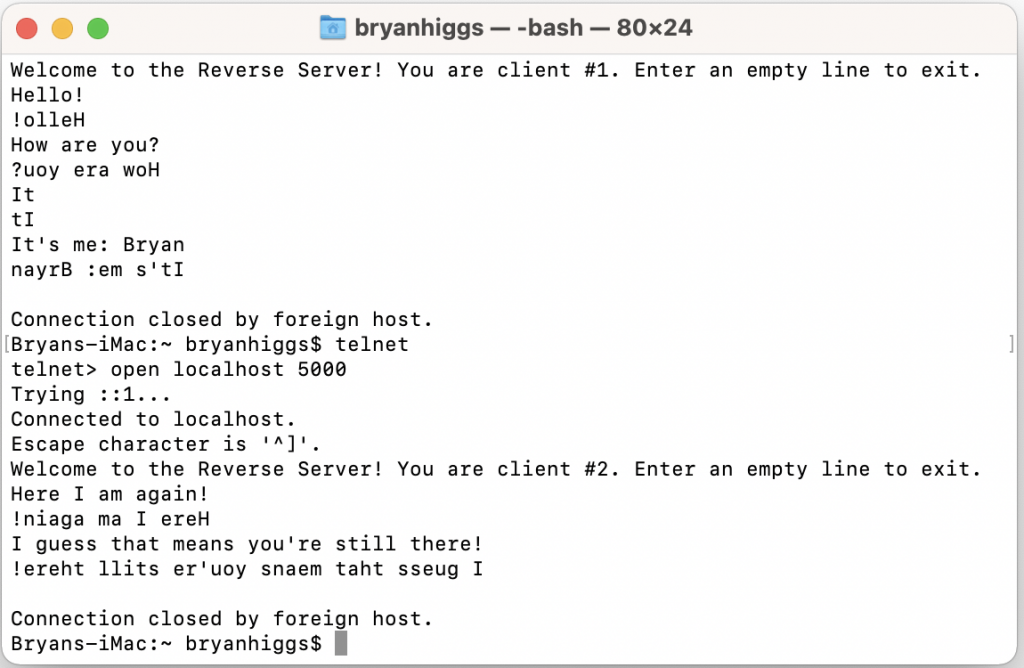
Ta-da!
Web Servers
Let’s focus our discussion for the moment on talking to a particular kind of server — a web server. That is, a server that implements HTTP (HyperText Transfer Protocol).
More information about HTTP may be found at http://www.w3.org/Protocols/
The CGI
The Common Gateway Interface (CGI) is a very common mechanism for communicating between a web browser and a web server. Typically, the steps are:
- The user fills in a form, which typically has input fields such as text fields, and lists, checkboxes, etc.
- The user submits the data from the form, typically using a Submit button or similar mechanism
- The web browser sends the data to the web server.
- The web server sends the data to a CGI script.
- The CGI script processes the form data and dynamically generates an HTML page
- The web server passes the HTML page back to the browser
- The web browser displays the HTML page, which are the results of the query.
CGI scripts may be written in a number of different languages, including Java, perl, C, etc.
CGI Queries
Many web sites allow you use a CGI query.
A CGI query is:
- A regular URL, followed by
- A question mark (?), followed by
- A query string
A query string is a set of name/value pairs:
name=value
with each name/value pair separated from the next with an ampersand (&) character.
For example:
http://www.google.com/search?q=cgi+query&sourceid=ie7&rls=com.microsoft:en-US&ie=utf8&oe=utf8
which comprises the following sets of name/value pairs:
- q=cgi+query
- sourceid=ie7
- rls=com.microsoft:en-US
- ie=utf8
- oe=utf8
Google Maps Example
Here’s an example. It performs a CGI query against Google Maps:
package networking;

import java.awt.BorderLayout;
import java.awt.EventQueue;
import java.awt.Font;
import java.awt.event.ActionEvent;
import java.awt.event.ActionListener;

import java.net.URL;
import java.net.MalformedURLException;

import java.util.Properties;

import javax.swing.JButton;
import javax.swing.JEditorPane;
import javax.swing.JFrame;
import javax.swing.JPanel;
import javax.swing.JScrollPane;
import static javax.swing.WindowConstants.EXIT_ON_CLOSE;

/**
 *   Program to perform a query against Google Maps.
 */
public class CGIQueryMapsExample extends JFrame
{
  /**
   * Main entry point
   *
   * @param args
   */
  public static void main(String[] args)
  {
    EventQueue.invokeLater( new Runnable()
      {
        public void run()
        {
          CGIQueryMapsExample frame = new CGIQueryMapsExample();
          frame.setDefaultLookAndFeelDecorated(true);
          frame.setDefaultCloseOperation(EXIT_ON_CLOSE);
          frame.setTitle("CGI Query Google Maps");
          frame.setBounds(200, 200, 800, 500);
          frame.setVisible(true);
        }
      }
    );

  }

  /**
   * Constructor
   */
  public CGIQueryMapsExample()
  {
    JPanel contentPane = (JPanel) getContentPane();
    contentPane.setLayout( new BorderLayout() );
    contentPane.add(m_button, BorderLayout.SOUTH);
    contentPane.add(m_browserButton, BorderLayout.NORTH);

    // Set attributes of the buttons
    m_button.setFont( new Font("SansSerif", Font.PLAIN, 14) );
    m_browserButton.setFont( new Font("SansSerif", Font.PLAIN, 14) );
    m_browserButton.setEnabled(false); // Disabled until query done

    JScrollPane scrollPane = new JScrollPane();
    m_editorPane = new JEditorPane();
    m_editorPane.setEditable(false);
    scrollPane.setViewportView(m_editorPane);
    contentPane.add(scrollPane, BorderLayout.CENTER);

    m_button.addActionListener( new ActionListener()
    {
      public void actionPerformed(ActionEvent e)
      {
        // Postpone the work to perform the query
        EventQueue.invokeLater(new Runnable()
        {
          public void run()
          {
            performQuery();
          }
        }
        );
      }
    }
    );

    m_browserButton.addActionListener( new ActionListener()
    {
      public void actionPerformed(ActionEvent e)
      {
        if (m_url != null)
        {
          BareBonesBrowserLaunch.openURL(m_url.toString());
        }
      }
    }
    );
  }

  /**
   *   Perform the query, firing up a new browser window.
   */
  private void performQuery()
  {
    try
    {
      // Create the base URL
      URL url = new URL("http://maps.google.com/maps");

      // Create the set of properties needed for the query
      Properties props = new Properties();
      props.put("f", "q");
      props.put("hl", "en");
      props.put("q", "Eiffel Tower, Paris France");
      props.put("ie", "UTF8");
      props.put("z", "12");
      props.put("om", "1");
      try
      {
        // Create the final query URL
        url = URLQuery.createQuery(url, props);
System.out.println("Showing document: " + url);
        // Open the URL in the editor pane
        m_editorPane.setPage(url);
        // Now we succeeded, set the class instance url field
        // and enable the browser button
        m_url = url;
        m_browserButton.setEnabled(true);
      }
      catch (Exception ex)
      {
        ex.printStackTrace();
      }
    }
    catch (MalformedURLException e)
    {
      e.printStackTrace();
    }
  }

  //// Private data ////
  private JEditorPane m_editorPane = null;
  private URL m_url = null;
  private JButton m_button = new JButton("Google Maps Query");
  private JButton m_browserButton = new JButton("Try it in a browser window");
}
The above program makes use of a useful class URLQuery , which allows convenient construction of a query URL from a base URL and a set of properties:
package networking;

import java.io.UnsupportedEncodingException;
import java.net.URL;
import java.net.URLEncoder;
import java.net.MalformedURLException;

import java.util.Enumeration;
import java.util.Properties;

/**
 *   Class to create a URL to perform a CGI query against a web server.
 */
public class URLQuery
{
  /**
   *   Creates a URL query from the base URL and the set of properties.
   */
  public static URL createQuery(URL baseURL, Properties params)
      throws MalformedURLException, UnsupportedEncodingException
  {
    // Queries use the URL followed by a '?' character
    String file = baseURL.getFile() + "?";

    // And then append the query parameters to the URL string
    Enumeration e = params.propertyNames();
    int count = 0;
    while ( e.hasMoreElements() )
    {
      String propertyName = (String) e.nextElement();
      propertyName = URLEncoder.encode(propertyName, "UTF-8");
      if (count > 0)
        file += "&";        // Separate parameters with '&' character
      file += propertyName;
      String propertyValue = params.getProperty(propertyName);
      if (propertyValue != null)
      {
        propertyValue = URLEncoder.encode(propertyValue, "UTF-8");
        file += "=" + propertyValue;
      }
      count++;
    }

    return new URL(baseURL.getProtocol(),
                   baseURL.getHost(),
                   baseURL.getPort(),
                   file);
  }

  /**
   * Constructor disabled by making it private
   */
  private URLQuery()
  {
  }
}
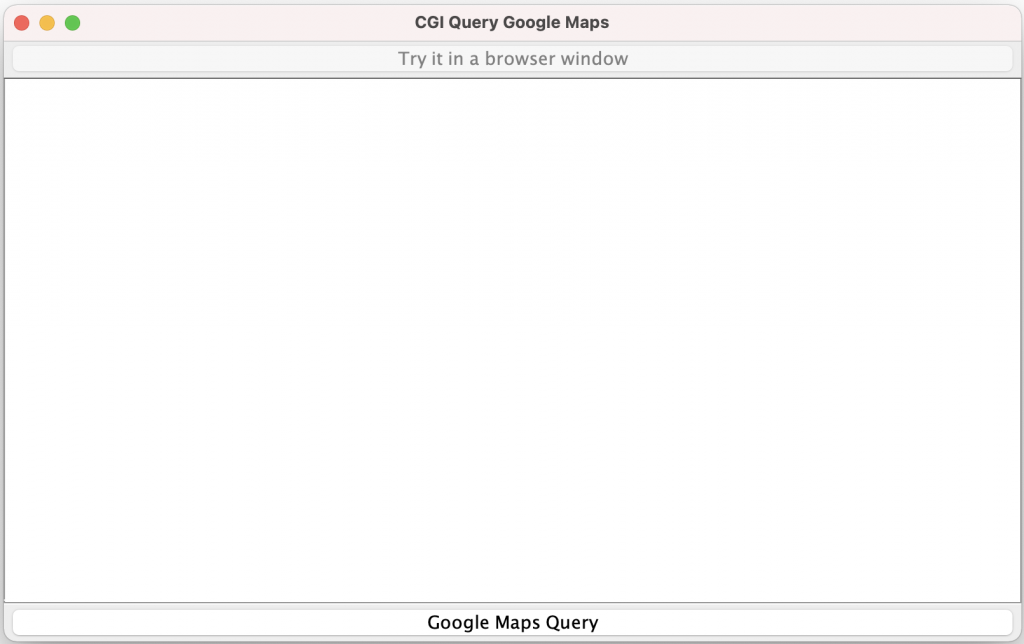
When I ran this program, here’s what it produced:
And when I clicked on the Google Maps Query button (at the bottom), after a slight delay, it showed the following:
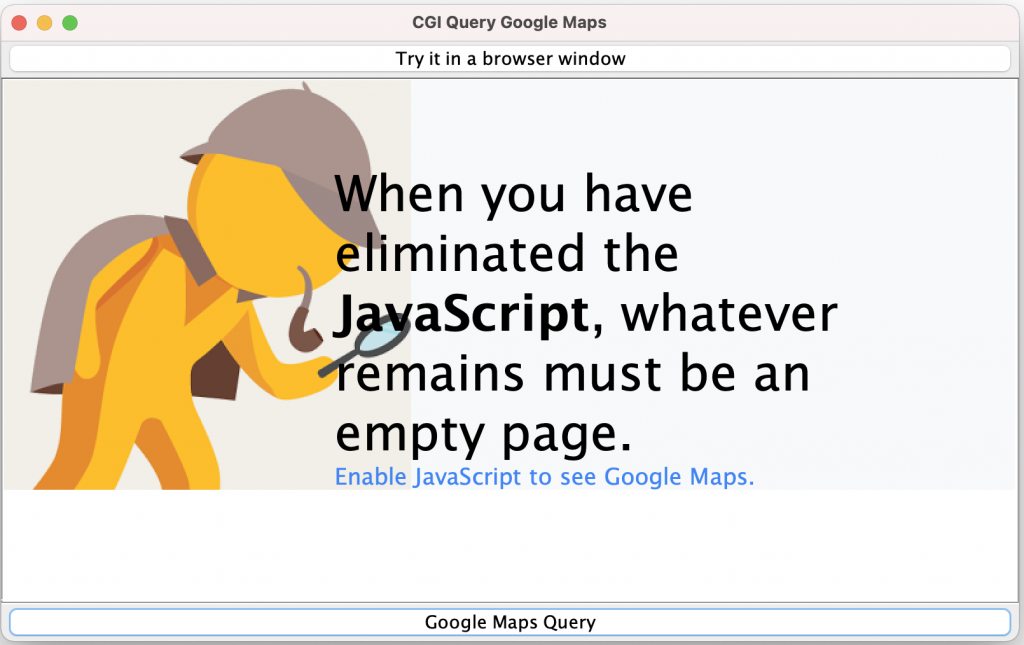
Google appears to have a rather original way of telling you that it needs JavaScript to show the results. (That is true of a large number of websites, today.)
Notice the button at the top of the window: “Try it in a browser window”. This button is initially disabled. However, once we have completed our CGI query, and displayed the “results” in the program, it is now enabled, and allows you to click on it. When I clicked on it, it fired up a browser page using the constructed URL, and correctly displays the Google Map results.
If you want to try it yourself, you’ll need a very useful class BareBonesBrowserLaunch, which you can find at https://centerkey.com/java/browser/ . You’ll have to change its package name to networking in order to use it with this application.
The CGI GET & POST Methods
There are two basic methods for performing CGI queries:
- GET, and
- POST
The CGI GET Method
The protocol for an HTTP GET method is for the client to send the following string to the web server:
GET scriptname?parameters
followed by a blank line.
The CGI POST Method
Coverage of the CGI POST Method is beyond the scope of this topic. Suffice it to say that, with a GET Method, the data is passed within the URL. In a POST Method, the data is passed separately in the message sent to the browser, or returned from the browser.
The URLConnection class
Another approach is to use an HTTP-oriented class called URLConnection.
The abstract class URLConnection is the superclass of all classes that represent a communications link between the application and a URL. Instances of this class can be used both to read from and to write to the resource referenced by the URL.
In general, creating a connection to a URL is a multistep process:
| openConnection() | connect() |
| Manipulate parameters that affect the connection to the remote resource. | Interact with the resource; query header fields and contents |
| —————————-> | |
| time |
- The connection object is created by invoking the openConnection method on a URL.
- The setup parameters and general request properties are manipulated.
- The actual connection to the remote object is made, using the connect method.
- The remote object becomes available. The header fields and the contents of the remote object can be accessed.
The setup parameters are modified using the following methods:
- setAllowUserInteraction
- setDoInput
- setDoOutput
- setIfModifiedSince
- setUseCaches
and the general request properties are modified using the method:
- setRequestProperty
Default values for the AllowUserInteraction and UseCaches parameters can be set using the methods setDefaultAllowUserInteraction and setDefaultUseCaches. Default values for general request properties can be set using the setDefaultRequestProperty method.
Each of the above set methods has a corresponding get method to retrieve the value of the parameter or general request property. The specific parameters and general request properties that are applicable are protocol specific.
The following methods are used to access the header fields and the contents after the connection is made to the remote object:
- getContent
- getHeaderField
- getInputStream
- getOutputStream
Certain header fields are accessed frequently. The methods:
- getContentEncoding
- getContentLength
- getContentType
- getDate
- getExpiration
- getLastModified
provide convenient access to these fields. The getContentType method is used by the getContent method to determine the type of the remote object; subclasses may find it convenient to override the getContentType method.
In the common case, all of the pre-connection parameters and general request properties can be ignored: the pre-connection parameters and request properties default to sensible values. For most clients of this interface, there are only two interesting methods: getInputStream and getObject, which are mirrored in the URL class by convenience methods.
Note about fileNameMap: In versions prior to JDK 1.1.6, field fileNameMap of URLConnection was public. In JDK 1.1.6 and later, fileNameMap is private; accessor method getFileNameMap() and mutator method setFileNameMap(FileNameMap) are added to access it. This change is also described on the JDK 1.1.x Compatibility page.
Reading from a URL using URLConnection
Here’s the equivalent to the URLReader program we developed earlier, but using a URLConnection:
package networking;

import java.net.URL;
import java.net.URLConnection;

import java.io.BufferedReader;
import java.io.InputStreamReader;
import java.util.Scanner;

/**
*   Application to read text from a URL specified in the
*   first command line argument, using a URLConnection
*   (Note that this is NOT a Reader in the same sense as BufferedReader.)
*/
public class URLConnectionReader
{
  /**
   * Main entry point
   *
   * @usage java networking.NodeLookup urlstring
   *
   * If no arguments provided, will prompt for urlstring
   *
   * @param args the command line arguments
   *             args[0] contains the urlstring to read
   */
   public static void main(String[] args) throws Exception
   {
     String urlName;

     if (args.length < 1)
     {
       System.out.print("URL : ");
       Scanner in = new Scanner(System.in);
       urlName = in.nextLine();
     }
     else
     {
       urlName = args[0]; // Use first argument for hostname
     }

     URL url = new URL(urlName);
     URLConnection conn = url.openConnection();
     BufferedReader reader = new BufferedReader(
                                        new InputStreamReader(
                                                conn.getInputStream()));
     try
     {
        String line = null;
        while (true)
        {
          line = reader.readLine();
          if (line == null)
            break;
          System.out.println(line);
        }
     }
     finally
     {
        reader.close();
     }
   }
}
When I ran it, using the same webpage URL as I used with the previous program, it gave me the same results.
Writing to a URL using URLConnection
For the HTTP protocol, writing to a URL means using CGI (Common Gateway Interface) scripts on the server.
Many CGI scripts use the POST METHOD for reading the data from the client — hence the term posting to a URL. Server-side scripts use the POST METHOD to read from their standard input.
The following program uses a CGI script available at
http://java.sun.com/cgi-bin/reverse
or
http://java.sun.com/cgi-bin/backwards
The script reverses any string supplied to it.
Unfortunately, somewhere in the transfer of Java from Sun Microsystems to Oracle, this reverse server seems to have disappeared. I’ll try to find an alternative…
package networking;

import java.net.URL;
import java.net.URLConnection;
import java.net.URLEncoder;

import java.io.BufferedReader;
import java.io.IOException;
import java.io.InputStreamReader;
import java.io.PrintWriter;
import java.net.MalformedURLException;
import java.nio.charset.Charset;
import java.util.Scanner;

public class ReverseCGIClient
{
    /**
    * Main entry point
    *
    * @usage java networking.ReverseCGIClient string-to-reverse>
    *
    * @param args
    *
    */
    public static void main(String[] args)
    {
        String reverseMe;

        if (args.length < 1)
        {
        System.out.print("String to reverse : ");
        Scanner in = new Scanner(System.in);
        reverseMe = in.nextLine();
        }
        else
        {
        reverseMe = args[0]; // Use first argument for string to reverse
        }

        // Translate into x-www-form-urlencoded format:
        reverseMe = URLEncoder.encode(reverseMe, Charset.defaultCharset());

        URLConnection conn = null;
        PrintWriter out = null;
        BufferedReader in = null;

        try
        {
            // Open connection to URL
            System.err.println("Accessing URL");
            URL url = new URL("http://java.sun.com/cgi-bin/backwards");
            System.err.println("Opening URL connection");
            conn = url.openConnection();
            // Set connection so it can do output
            conn.setDoOutput(true);

            // Provide input to server using the output stream.
            out = new PrintWriter(conn.getOutputStream());

            out.println("string=" + reverseMe);

            // Read response from server
            in = new BufferedReader( new InputStreamReader(
                                            conn.getInputStream()));
            String line = null;
            while (true)
            {
                line = in.readLine();
                if (line == null)
                    break;
                System.out.println(line);
            }
        }
        catch (MalformedURLException ex)
        {
            ex.printStackTrace();
        }
        catch (IOException ex)
        {
            ex.printStackTrace();
        }
        finally
        {
            out.close();
            try
            {
                in.close();
            }
            catch (IOException ex)
            {
                ex.printStackTrace();
            }
        }
    }
}
GET & POST
There are two basic methods for performing CGI queries:
- GET, and
- POST
(Actually, there are a number of additional methods, but we will ignore these others for the purposes of this discussion.)
The CGI GET Method
The protocol for an HTTP GET method is for the client to send a request message to the web server that looks something like:
GET /images/logo.gif HTTP/1.1
Accept: image/gif, image/x-xbitmap, image/jpeg, image/pjpeg, */*
Accept-Language: en-us
Accept-Encoding: gzip, deflate
User-Agent: Mozilla/4.0 (compatible; MSIE 5.01; Windows NT)
Host: www.rivier.edu
Connection: Keep-Alive
followed by a blank line.
In the above GET request message, the first line requests a file logo.gif from the web server. The file is expected to be located in the images folder.
If any CGI query string is present, it is appended to the URL in the first line. Problems with this include:
- The entire URL is usually displayed in the Address field of the browser, so any sensitive information (such as passwords) are too visible.
- Every browser (and probably every web server) has some upper limit on the size of a URL, including any query string, so there is a limit on how much data can be passed using this method.
The lines following the first line, and preceding the blank line are Request Headers (one request header per line).
The CGI POST Method
The POST method attempts to solve these problems by moving the name/value pairs that comprise the query string into the main body of the request message:
POST /cg-bin/queryProcessor HTTP/1.1
Accept: image/gif, image/x-xbitmap, image/jpeg, image/pjpeg, */*
Accept-Language: en-us
Accept-Encoding: gzip, deflate
User-Agent: Mozilla/4.0 (compatible; MSIE 5.01; Windows NT)
Host: www.rivier.edu
Connection: Keep-Alive

name=Bryan
college=Rivier
Which allows larger amounts of data to be passed in the message.
The data inside the message is also not displayed in the browser’s address field.
Extended Example
Here’s a more extended example of the use of URLConnection.
To learn more about Basic Authorization in HTTP, you can go to:
- RFC 2616, Hypertext Transfer Protocol — HTTP/1.1
- RFC 2617, HTTP Authentication: Basic and Digest Access Authentication
The passing of Basic Authorization credentials (username and password) involves Base64 encoding.
You can learn more about Base64 encoding at http://en.wikipedia.org/wiki/Base64 .
package networking;

import java.io.ByteArrayOutputStream;
import java.io.IOException;
import java.net.MalformedURLException;
import java.net.URL;
import java.net.URLConnection;
import java.util.List;
import java.util.Map;
import java.util.Scanner;

/**
 * Class to connect to a URL and display the response header
 * data and first ten lines of the the requested data.
 *
 * (Based on the class supplied in Core Java 2, Vol II,
 *  Advanced Concepts, by Horstmann & Cornell, Prentice-Hall, 2005)
 */
public class URLConnectionTest
{
  /**
   * Main entry point
   * @param args the command line arguments
   *             args[0] contains the URL
   *             args[1] & args[2] contain an optional
   *                     username and password.
   */
  public static void main(String[] args)
  {
    String urlString = null;
    String username = null;
    String password = null;

    if (args.length > 0)
    {
      urlString = args[0];

      if (args.length > 1)
      {
        username = args[1];

        if (args.length > 2)
        {
          password = args[2];
        }
      }
    }
    else
    {
      // No arguments supplied, so prompt for them
      Scanner in = new Scanner(System.in);
      System.out.print("URL : ");
      urlString = in.nextLine();
      System.out.print("Username (optional) : ");
      username = in.nextLine();
      if (username.isBlank())
        username = null;
      System.out.print("Password (optional) : ");
      password = in.nextLine();
      if (password.isBlank())
        password = null;
    }

    try
    {
        URL url = new URL(urlString);
        URLConnection connection = url.openConnection();

        if (username != null)
        {
          String input = username + ":" + password;
          String encoding = base64Encode(input);
          connection.setRequestProperty("Authorization", "Basic " + encoding);
        }

        System.out.println(">>>>");
        System.out.println("Connecting to: " + urlString);

        connection.connect();

        System.out.println("Connected...");

        // Print the Method line
        System.out.println("----------Method--------------");
        System.out.println("[0] " + connection.getHeaderField(0));

        // Print header fields
        System.out.println("----------Response Headers----");
        for (int line = 1; ; line++)
        {
          String header = connection.getHeaderField(line);
          if (header == null)
            break;
          System.out.println("[" + line + "] " +
                               connection.getHeaderFieldKey(line) + ": " +
                               header
                              );
        }

        // Print how many header lines (subtract one for the 0th entry,
        // which is the Method line).
        Map<String, List<String>> headers = connection.getHeaderFields();
        System.out.println("There were " + (headers.size() - 1) + " header lines");

        // Print convenience function outputs

        System.out.println("----------Convenience functions----");
        System.out.println("getContentType: " + connection.getContentType());
        System.out.println("getContentLength: " + connection.getContentLength());
        System.out.println("getContentEncoding: " + connection.getContentEncoding());
        System.out.println("getDate: " + connection.getDate());
        System.out.println("getExpiration: " + connection.getExpiration());
        System.out.println("getLastModified: " + connection.getLastModified());

        Scanner in = new Scanner(connection.getInputStream());

        // Print first ten lines of contents

        System.out.println("----------Content--------");
        for (int line = 1; in.hasNextLine() && line <= 10; line++)
        {
          System.out.println("[" + line + "] " + in.nextLine());
        }
        if (in.hasNextLine())
        {
          System.out.println(". . .");
        }
    }
    catch (MalformedURLException ex)
    {
        ex.printStackTrace();
    }
    catch (IOException ex)
    {
        ex.printStackTrace();
    }
  }

  /**
   * Computes the Base64 encoding of a string
   * @param string the string
   * @return the Base64 encoding of string
   */
  public static String base64Encode(String string)
  {
    ByteArrayOutputStream bytesOut = new ByteArrayOutputStream();
    Base64OutputStream out = new Base64OutputStream(bytesOut);
    try
    {
      out.write(string.getBytes());
      out.flush();
    }
    catch (IOException ioe)
    {
      // Do nothing
    }
    return bytesOut.toString();
  }
}
This uses a class to perform the necessary Base64 encoding:
package networking;

import java.io.FilterOutputStream;
import java.io.IOException;
import java.io.OutputStream;

/**
 * This class implements a stream filter that converts
 * a stream of bytes to their Base64 encoding.
 *
 * Base64 encoding encodes 3 bytes into 4 characters.
 * |11111122|22223333|444444|
 * Each set of 6 bits is encoded according to the m_toBase64 map.
 * If the number of input bytes is not a multiple of 3, then the
 * last group of characters is padded with one or two = signs.
 * Each output line is at most 76 characters.
 *
 * (Based on the class supplied in Core Java 2, Vol II,
 *  Advanced Concepts, by Horstmann & Cornell, Prentice-Hall, 2005)
 */
public class Base64OutputStream extends FilterOutputStream
{
  /**
   * Constructor
   * @param out the stream to filter
   */
  public Base64OutputStream(OutputStream out)
  {
    super(out);
  }

  /**
   * Writes the specified <code>byte</code> to this output stream.
   * <p>
   * @param      c the <code>byte</code>.
   */
  public void write(int c) throws IOException
  {
    m_inbuf[m_i] = c;
    m_i++;
    if (m_i == 3)
    {
      super.write( m_toBase64[(m_inbuf[0] & 0xFC) >> 2] );
      super.write( m_toBase64[((m_inbuf[0] & 0x03) << 4) |
                              ((m_inbuf[1] & 0xF0) >> 4)] );
      super.write( m_toBase64[((m_inbuf[1] & 0x0F) << 2) |
                              ((m_inbuf[2] & 0xC0) >> 6)] );
      super.write( m_toBase64[m_inbuf[2] & 0x3F] );
      m_col += 4;
      m_i = 0;
      if (m_col >= 76)
      {
        super.write('\n');
        m_col = 0;
      }
    }
  }

  /**
   * Flushes this output stream and forces any buffered output bytes
   * to be written out to the stream.
   */
  public void flush() throws IOException
  {
    if (m_i == 1)
    {
      super.write( m_toBase64[(m_inbuf[0] & 0xFC) >> 2] );
      super.write( m_toBase64[(m_inbuf[0] & 0x03) << 4] );
      super.write('=');
      super.write('=');
    }
    else if (m_i == 2)
    {
      super.write( m_toBase64[(m_inbuf[0] & 0xFC) >> 2] );
      super.write( m_toBase64[((m_inbuf[0] & 0x03) << 4) |
                              ((m_inbuf[1] & 0xF0) >> 4)] );
      super.write( m_toBase64[(m_inbuf[1] & 0x0F) << 2] );
      super.write('=');
    }
  }

  /////// Private data /////////
  private static char[] m_toBase64 =
  {
    'A', 'B', 'C', 'D', 'E', 'F', 'G', 'H', 'I', 'J',
    'K', 'L', 'M', 'N', 'O', 'P', 'Q', 'R', 'S', 'T',
    'U', 'V', 'W', 'X', 'Y', 'Z',
    'a', 'b', 'c', 'd', 'e', 'f', 'g', 'h', 'i', 'j',
    'k', 'l', 'm', 'n', 'o', 'p', 'q', 'r', 's', 't',
    'u', 'v', 'w', 'x', 'y', 'z',
    '0', '1', '2', '3', '4', '5', '6', '7', '8', '9',
    '+', '/'
  };

  public void write(byte[] b) throws IOException
  {
  }

  private int m_col = 0;
  private int m_i = 0;
  private int[] m_inbuf = new int[3];
}
When I ran this using the URL https://java.com/, it returned the following:
URL : https://java.com/
Username (optional) :
Password (optional) :
>>>>
Connecting to: https://java.com/
Connected...
----------Method--------------
[0] HTTP/1.1 200 OK
----------Response Headers----
[1] Content-Type: text/html; charset=UTF-8
[2] X-Frame-Options: SAMEORIGIN
[3] X-Oracle-Dms-Ecid: f6283c1a-349a-4181-b5c0-ae39da8c2640-00052eba
[4] X-Oracle-Dms-Rid: 0
[5] X-Akamai-Transformed: 9 1882 0 pmb=mRUM,2
[6] Cache-Control: max-age=60
[7] Expires: Tue, 09 Feb 2021 01:08:20 GMT
[8] Date: Tue, 09 Feb 2021 01:07:20 GMT
[9] Content-Length: 7475
[10] Connection: keep-alive
[11] Set-Cookie: AKA_A2=A; expires=Tue, 09-Feb-2021 02:07:20 GMT; path=/; domain=com; secure; HttpOnly
[12] Server-Timing: cdn-cache; desc=HIT
[13] Server-Timing: edge; dur=32
[14] Link: <https://static.oracle.com>;rel="preconnect",<https://c.oracleinfinity.io>;rel="preconnect",<https://dc.oracleinfinity.io>;rel="preconnect"
[15] Set-Cookie: akaalb_OCE_Failover=1612832900~op=JCOM_OCE:oceProdappJcomProdOrigin|~rv=56~m=oceProdappJcomProdOrigin:0|~os=2708f36cb43ca861e42dc0215e4669c5~id=34ac58c3548790706cbce606a4a7351a; path=/; Expires=Tue, 09 Feb 2021 01:08:20 GMT; Secure; SameSite=None
[16] X-XSS-Protection: 1
There were 14 header lines
----------Convenience functions----
getContentType: text/html; charset=UTF-8
getContentLength: 7475
getContentEncoding: null
getDate: 1612832840000
getExpiration: 1612832900000
getLastModified: 0
----------Content--------
[1] <!DOCTYPE html>
[2] <html>
[3] <head>
[4] <script type="text/javascript">
[5] var SCSCacheKeys = {
[6] 	product: '_cache_1e73',
[7] 	site: '_cache_1057',
[8] 	theme: '_cache_c351',
[9] 	component: '_cache_5a42',
[10] 	caas: '_cache_5cff'
. . .
Posting Form Data
The textbook also shows an example of how you can use URLConnection to POST data to a URL. In this particular example, the program connects to the US Census Bureau web site to obtain population information about particular countries.
You can go to http://www.census.gov/ipc/www/idbsum.html to obtain IDB Summary Demographic Data in more detail. However, this program just returns a simple output which it can display easily.
package networking;

import java.awt.BorderLayout;
import java.awt.event.ActionEvent;
import java.awt.event.ActionListener;
import java.io.IOException;
import java.io.InputStream;
import java.io.PrintWriter;
import java.net.HttpURLConnection;
import java.net.URL;
import java.net.URLConnection;
import java.net.URLEncoder;
import java.util.HashMap;
import java.util.Map;
import java.util.Scanner;
import javax.swing.JButton;
import javax.swing.JComboBox;
import javax.swing.JFrame;
import javax.swing.JPanel;
import javax.swing.JScrollPane;
import javax.swing.JTextArea;

/**
 * This program demonstrates how to use the URLConnection class for a POST request.
 */
public class PostTest
{
  public static void main(String[] args)
  {
    JFrame frame = new PostTestFrame();
    frame.setDefaultCloseOperation(JFrame.EXIT_ON_CLOSE);
    frame.setVisible(true);
  }
}

class PostTestFrame extends JFrame
{
  /**
   * Makes a POST request and returns the server response.
   * @param urlString the URL to post to
   * @param nameValuePairs a map of name/value pairs to supply in the request.
   * @return the server reply (either from the input stream or the error stream)
   */
  public static String doPost(String urlString, Map<String, String> nameValuePairs)
                           throws IOException
  {
    System.out.println("Connecting to URL: " + urlString);

    URL url = new URL(urlString);
    URLConnection connection = url.openConnection();
    connection.setDoOutput(true);

    PrintWriter out = new PrintWriter(connection.getOutputStream());

    boolean first = true;

    System.out.print("Query String : ");
    for (Map.Entry<String, String> pair : nameValuePairs.entrySet())
    {
      if (first)
      {
        first = false;
      }
      else
      {
        System.out.print('&');
        out.print('&'); // Output '&' separator
      }
      String name = pair.getKey();
      String value = pair.getValue();
      out.print(name);
      out.print('=');
      value = URLEncoder.encode(value, "UTF-8");
      out.print(value);
      System.out.print(name + '=' + value);
    }
    System.out.println();

    out.close();

    Scanner in;
    StringBuilder response = new StringBuilder();
    try
    {
      in = new Scanner(connection.getInputStream());
    }
    catch (IOException e)
    {
      if (!(connection instanceof HttpURLConnection))
        throw e;
      InputStream err
          = ((HttpURLConnection)connection).getErrorStream();
      if (err == null)
        throw e;
      in = new Scanner(err);
    }
    while (in.hasNextLine())
    {
      response.append(in.nextLine());
      response.append("\n");
    }

    in.close();
    return response.toString();
  }

  /**
   * Constructor
   */
  public PostTestFrame()
  {
    setSize(DEFAULT_WIDTH, DEFAULT_HEIGHT);
    setTitle("PostTest");

    JPanel northPanel = new JPanel();
    add(northPanel, BorderLayout.NORTH);

    final JComboBox combo = new JComboBox();
    for (int i = 0; i < m_countries.length; i += 2)
      combo.addItem(m_countries[i]);
    northPanel.add(combo);

    final JTextArea result = new JTextArea();
    add(new JScrollPane(result));

    JButton getButton = new JButton("Get");
    northPanel.add(getButton);
    getButton.addActionListener(new ActionListener()
      {
        public void actionPerformed(ActionEvent event)
        {
          new Thread(new Runnable()
          {
            public void run()
            {
              final String SERVER_URL = "http://www.census.gov/cgi-bin/ipc/idbsprd";
              result.setText("");
              Map<String, String> post = new HashMap<String, String>();
              post.put("tbl", "001");
              post.put("cty", m_countries[2 * combo.getSelectedIndex() + 1]);
              post.put("optyr", "latest checked");
              try
              {
                // Do the POST to the server URL
                result.setText(doPost(SERVER_URL, post));
              }
              catch (IOException e)
              {
                result.setText("" + e);
              }
            }
          }).start();
        }
      }
    );
  }

  private static String[] m_countries =
  {
    "Afghanistan", "AF", "Albania", "AL", "Algeria", "AG", "American Samoa", "AQ",
    "Andorra", "AN", "Angola", "AO", "Anguilla", "AV", "Antigua and Barbuda", "AC",
    "Argentina", "AR", "Armenia", "AM", "Aruba", "AA", "Australia", "AS", "Austria", "AU",
    "Azerbaijan", "AJ", "Bahamas, The", "BF", "Bahrain", "BA", "Bangladesh", "BG",
    "Barbados", "BB", "Belarus", "BO", "Belgium", "BE", "Belize", "BH", "Benin", "BN",
    "Bermuda", "BD", "Bhutan", "BT", "Bolivia", "BL", "Bosnia and Herzegovina", "BK",
    "Botswana", "BC", "Brazil", "BR", "Brunei", "BX", "Bulgaria", "BU", "Burkina Faso", "UV",
    "Burma", "BM", "Burundi", "BY", "Cambodia", "CB", "Cameroon", "CM", "Canada", "CA",
    "Cape Verde", "CV", "Cayman Islands", "CJ", "Central African Republic", "CT", "Chad", "CD",
    "Chile", "CI", "China", "CH", "Colombia", "CO", "Comoros", "CN", "Congo (Brazzaville", "CF",
    "Congo (Kinshasa)", "CG", "Cook Islands", "CW", "Costa Rica", "CS", "Cote d'Ivoire", "IV",
    "Croatia", "HR", "Cuba", "CU", "Cyprus", "CY", "Czech Republic", "EZ", "Denmark", "DA",
    "Djibouti", "DJ", "Dominica", "DO", "Dominican Republic", "DR", "East Timor", "TT",
    "Ecuador", "EC", "Egypt", "EG", "El Salvador", "ES", "Equatorial Guinea", "EK",
    "Eritrea", "ER", "Estonia", "EN", "Ethiopia", "ET", "Faroe Islands", "FO", "Fiji", "FJ",
    "Finland", "FI", "France", "FR", "French Guiana", "FG", "French Polynesia", "FP",
    "Gabon", "GB", "Gambia, The", "GA", "Gaza Strip", "GZ", "Georgia", "GG", "Germany", "GM",
    "Ghana", "GH", "Gibraltar", "GI", "Greece", "GR", "Greenland", "GL", "Grenada", "GJ",
    "Guadeloupe", "GP", "Guam", "GQ", "Guatemala", "GT", "Guernsey", "GK", "Guinea", "GV",
    "Guinea-Bissau", "PU", "Guyana", "GY", "Haiti", "HA", "Honduras", "HO",
    "Hong Kong S.A.R", "HK", "Hungary", "HU", "Iceland", "IC", "India", "IN", "Indonesia", "ID",
    "Iran", "IR", "Iraq", "IZ", "Ireland", "EI", "Israel", "IS", "Italy", "IT", "Jamaica", "JM",
    "Japan", "JA", "Jersey", "JE", "Jordan", "JO", "Kazakhstan", "KZ", "Kenya", "KE",
    "Kiribati", "KR", "Korea, North", "KN", "Korea, South", "KS", "Kuwait", "KU",
    "Kyrgyzstan", "KG", "Laos", "LA", "Latvia", "LG", "Lebanon", "LE", "Lesotho", "LT",
    "Liberia", "LI", "Libya", "LY", "Liechtenstein", "LS", "Lithuania", "LH", "Luxembourg", "LU",
    "Macau S.A.R", "MC", "Macedonia, The Former Yugo. Rep. of", "MK", "Madagascar", "MA",
    "Malawi", "MI", "Malaysia", "MY", "Maldives", "MV", "Mali", "ML", "Malta", "MT",
    "Man, Isle of", "IM", "Marshall Islands", "RM", "Martinique", "MB", "Mauritania", "MR",
    "Mauritius", "MP", "Mayotte", "MF", "Mexico", "MX", "Micronesia, Federated States of", "FM",
    "Moldova", "MD", "Monaco", "MN", "Mongolia", "MG", "Montserrat", "MH", "Morocco", "MO",
    "Mozambique", "MZ", "Namibia", "WA", "Nauru", "NR", "Nepal", "NP", "Netherlands", "NL",
    "Netherlands Antilles", "NT", "New Caledonia", "NC", "New Zealand", "NZ", "Nicaragua", "NU",
    "Niger", "NG", "Nigeria", "NI", "Northern Mariana Islands", "CQ", "Norway", "NO",
    "Oman", "MU", "Pakistan", "PK", "Palau", "PS", "Panama", "PM", "Papua New Guinea", "PP",
    "Paraguay", "PA", "Peru", "PE", "Philippines", "RP", "Poland", "PL", "Portugal", "PO",
    "Puerto Rico", "RQ", "Qatar", "QA", "Reunion", "RE", "Romania", "RO", "Russia", "RS",
    "Rwanda", "RW", "Saint Helena", "SH", "Saint Kitts and Nevis", "SC", "Saint Lucia", "ST",
    "Saint Pierre and Miquelon", "SB", "Saint Vincent and the Grenadines", "VC", "Samoa", "WS",
    "San Marino", "SM", "Sao Tome and Principe", "TP", "Saudi Arabia", "SA", "Senegal", "SG",
    "Serbia and Montenegro", "YI", "Seychelles", "SE", "Sierra Leone", "SL", "Singapore", "SN",
    "Slovakia", "LO", "Slovenia", "SI", "Solomon Islands", "BP", "Somalia", "SO",
    "South Africa", "SF", "Spain", "SP", "Sri Lanka", "CE", "Sudan", "SU", "Suriname", "NS",
    "Swaziland", "WZ", "Sweden", "SW", "Switzerland", "SZ", "Syria", "SY", "Taiwan", "TW",
    "Tajikistan", "TI", "Tanzania", "TZ", "Thailand", "TH", "Togo", "TO", "Tonga", "TN",
    "Trinidad and Tobago", "TD", "Tunisia", "TS", "Turkey", "TU", "Turkmenistan", "TX",
    "Turks and Caicos Islands", "TK", "Tuvalu", "TV", "Uganda", "UG", "Ukraine", "UP",
    "United Arab Emirates", "TC", "United Kingdom", "UK", "United States", "US", "Uruguay", "UY",
    "Uzbekistan", "UZ", "Vanuatu", "NH", "Venezuela", "VE", "Vietnam", "VM",
    "Virgin Islands", "VQ", "Virgin Islands, British", "VI", "Wallis and Futuna", "WF",
    "West Bank", "WE", "Western Sahara", "WI", "Yemen", "YM", "Zambia", "ZA", "Zimbabwe", "ZI"
  };

  public static final int DEFAULT_WIDTH = 400;
  public static final int DEFAULT_HEIGHT = 300;
}
When I ran this program originally, it displayed the following (I had already chosen the country (United Kingdom) and clicked on the Get button.)
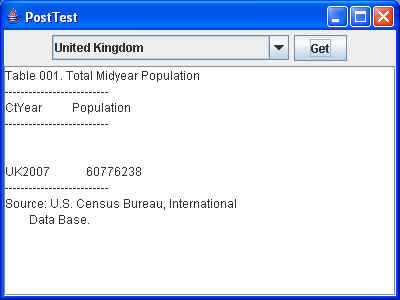
Unfortunately, it seems that this website has gone away, and I was unable to find a replacement for it. Thus, when I run this program now, it gives me:
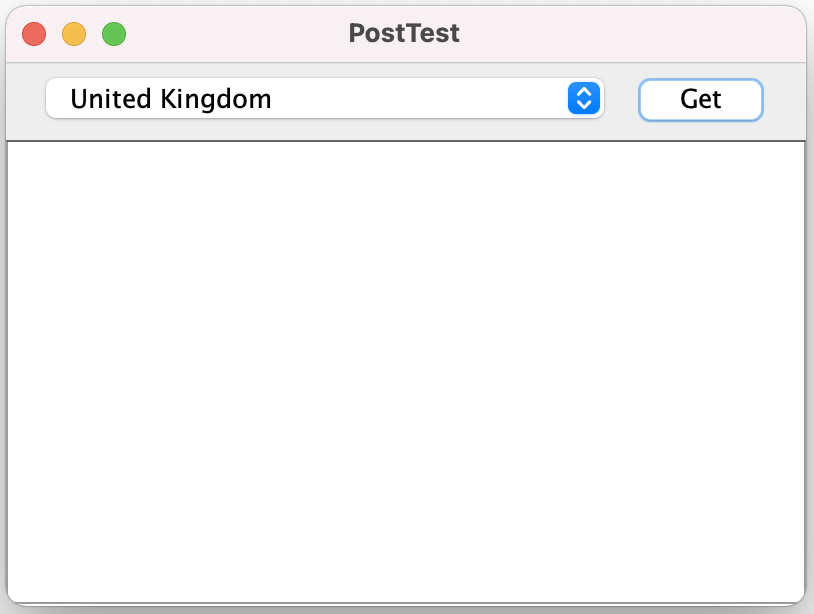
and shows no content. It also outputs the following to System.out:
Connecting to URL: http://www.census.gov/cgi-bin/ipc/idbsprd
Query String : cty=UK&optyr=latest+checked&tbl=001
Alternative Post Example
A later edition of the textbook has a different version of this PostTest program, which the author used to access the USPS website to look up the ZIP code for an address. It is rather more complex, showing more features of the HttpURLConnection class:
package post;

import java.io.IOException;
import java.io.InputStream;
import java.io.PrintWriter;
import java.net.CookieHandler;
import java.net.CookieManager;
import java.net.CookiePolicy;
import java.net.HttpURLConnection;
import java.net.URL;
import java.net.URLEncoder;
import java.nio.charset.StandardCharsets;
import java.nio.file.Files;
import java.nio.file.Paths;
import java.util.Map;
import java.util.Properties;
import java.util.Scanner;

/**
 * This program demonstrates how to use the URLConnection class for a POST request.
 *
 */
public class PostTest
{
   /**
    * Main entry point
    * @usage java properties-file
    * @param args
    * @throws IOException
    */
   public static void main(String[] args) throws IOException
   {
      // Properties file default is post.properties
      String propsFilename = args.length > 0 ? args[0] : "post.properties";
      Properties props = new Properties();
      try (InputStream in = Files.newInputStream(Paths.get(propsFilename)))
      {
         props.load(in);
      }
      String urlString = props.remove("url").toString();
      Object userAgent = props.remove("User-Agent");
      Object redirects = props.remove("redirects");
      CookieHandler.setDefault(new CookieManager(null, CookiePolicy.ACCEPT_ALL));
      String result = doPost(new URL(urlString), props,
         userAgent == null ? null : userAgent.toString(),
         redirects == null ? -1 : Integer.parseInt(redirects.toString()));
      System.out.println(result);
   }

   /**
    * Do an HTTP POST.
    * @param url the URL to post to
    * @param nameValuePairs the query parameters
    * @param userAgent the user agent to use, or null for the default user agent
    * @param redirects the number of redirects to follow manually, or -1 for automatic
    * redirects
    * @return the data returned from the server
    */
   public static String doPost(URL url, Map<Object, Object> nameValuePairs,
                               String userAgent, int redirects) throws IOException
   {
      System.out.println("Connecting to URL: " + url.toExternalForm());

      HttpURLConnection connection = (HttpURLConnection) url.openConnection();
      if (userAgent != null)
      {
         System.out.println("User-Agent : " + userAgent);
         connection.setRequestProperty("User-Agent", userAgent);
      }

      System.out.println("Redirects: " + redirects);

      if (redirects >= 0)
         connection.setInstanceFollowRedirects(false);

      connection.setDoOutput(true);

      try (var out = new PrintWriter(connection.getOutputStream()))
      {
         var first = true;
         System.out.print("Query String: ");
         for (Map.Entry<Object, Object> pair : nameValuePairs.entrySet())
         {
            if (first)
                first = false;
            else
            {
                out.print('&');
                System.out.print('&');
            }
            String name = pair.getKey().toString();
            String value = pair.getValue().toString();
            out.print(name);
            out.print('=');
            value = URLEncoder.encode(value, StandardCharsets.UTF_8);
            out.print(value);
            System.out.print(name + '=' + value);
         }
         System.out.println();
      }
      String encoding = connection.getContentEncoding();
      if (encoding == null)
          encoding = "UTF-8";

      if (redirects > 0)
      {
         int responseCode = connection.getResponseCode();
         if (responseCode == HttpURLConnection.HTTP_MOVED_PERM
               || responseCode == HttpURLConnection.HTTP_MOVED_TEMP
               || responseCode == HttpURLConnection.HTTP_SEE_OTHER)
         {
            String location = connection.getHeaderField("Location");
            if (location != null)
            {
               URL base = connection.getURL();
               connection.disconnect();
               return doPost(new URL(base, location), nameValuePairs, userAgent,
                     redirects - 1);
            }
         }
      }
      else if (redirects == 0)
      {
         throw new IOException("Too many redirects");
      }

      var response = new StringBuilder();
      try (var in = new Scanner(connection.getInputStream(), encoding))
      {
         while (in.hasNextLine())
         {
            response.append(in.nextLine());
            response.append("\n");
         }
      }
      catch (IOException e)
      {
         InputStream err = connection.getErrorStream();
         if (err == null)
             throw e;
         try (var in = new Scanner(err))
         {
            response.append(in.nextLine());
            response.append("\n");
         }
      }

      return response.toString();
   }
}
I supplied a Properties file for input to this program:
User-Agent=Mozilla/5.0 (Macintosh; Intel Mac OS X 11_2_0) AppleWebKit/537.36 (KHTML, like Gecko) Chrome/88.0.4324.146 Safari/537.36)
tAddress=100 Amherst Street
sState=NH
tCity=Nashua
url=https\://tools.usps.com/go/ZipLookupAction.action
When I ran the program, it output the following:
Connecting to URL: https://tools.usps.com/go/ZipLookupAction.action
User-Agent : Mozilla/5.0 (Macintosh; Intel Mac OS X 11_2_0) AppleWebKit/537.36 (KHTML, like Gecko) Chrome/88.0.4324.146 Safari/537.36)
Redirects: -1
Query String: tAddress=100+Amherst+Street&sState=NH&tCity=Nashua
<html lang="en">
<head>
	<meta charset="utf-8">
	<meta name="viewport" content="width=device-width, initial-scale=1">
	<meta name="" content="">
	<title>ZIP Code™ Lookup | USPS</title>
	<link rel="stylesheet" href="/styles/libs/bootstrap.min.css"/>
	<link rel="stylesheet" href="/styles/default-styles.css"/>
	<link rel="stylesheet" href="/styles/main-zip-code.css"/>
	<link rel="stylesheet" href="/styles/footer-sb.css"/>
	<link rel="stylesheet" href="/styles/main-sb.css"/>
	<link rel="stylesheet" href="/styles/style.css" />
	<style type="text/css">
	#shortcuts-menu-wrapper {
		height: auto !important;
	}
	</style>
</head>
<body style="display:none;">

[lots of content]. . .

</body>
</html>
It appears to ignore the query string parameters and simple provide the entire webpage. Sigh…
They say that once you put something on the Web, it never goes away. Unfortunately, in this case, it appears not to be true.
Alternatives for Coding for the Web
As you can see, programming for the Web/HTTP is not for the faint of heart. It is complex!
Instead of doing it yourself, it makes more sense to use an existing, well-written and easily available substitute library such as Apache HttpClient (http://hc.apache.org/httpcomponents-client-ga/)