
Table of Contents
ZIP files and JAR (Java Archive) files are very useful, and are heavily used in Java.
JAR files are archive files that include a Java-specific manifest file. A manifest file is a metadata file contained within a JAR. It defines extension and package-related data.
For example, in JDK 1.5, the code for the Java class library may be found in a ZIP file src.zip (in the top level directory for the JDK installation).
When loading a Java program (application or applet), it is more efficient to load from a ZIP or JAR file — only one file needs to be opened and read, rather than many different .class files. When downloading a set of files from the web, especially, using a ZIP or JAR file can have a considerable impact on performance.
So it stands to reason that Java contains a number of classes that are used to read and write ZIP and JAR files. Here’s how you can do this yourself…
ZIP File Streams
Here is the hierarchy of classes that are used to process Zip files:
(Package java.util.zip)
Object
    Adler32
    CRC32
    Deflater
    Inflater
    ZipEntry
    ZipFile
CheckSum (interface)
Object
    InputStream
        FilterInputStream
            CheckedInputStream
            InflaterInputStream
                GZIPInputStream
                ZipInputStream
    OutputStream
        FilterOutputStream
            CheckedOutputStream
            DeflaterOutputStream
                GZIPOutputStream
                ZipOutputStream
Object
    Throwable
        Exception
            DataFormatException
            IOException
                ZipException
Classes ZipInputStream & ZipEntry
Using the ZIP file streams is relatively simple. Each file within the ZIP file has a header with information including the name of the file and the compression method that was used.
Using the ZipInputStream Class
You use a ZipInputStream to read a ZIP file. Each file within the ZIP file is represented by a ZipEntry.
Here’s an example of how to read a ZIP file using ZipInputStream and ZipEntry:
package inputOutput;

import java.awt.BorderLayout;
import java.awt.Color;
import java.awt.event.ActionEvent;
import java.awt.event.ActionListener;

import java.io.BufferedReader;
import java.io.File;
import java.io.FileInputStream;
import java.io.InputStreamReader;
import java.io.IOException;

import java.util.zip.ZipInputStream;
import java.util.zip.ZipEntry;
import javax.swing.JComboBox;
import javax.swing.JFileChooser;
import javax.swing.JFrame;
import javax.swing.JMenu;
import javax.swing.JMenuBar;
import javax.swing.JMenuItem;
import javax.swing.JScrollPane;
import javax.swing.JTextArea;
import javax.swing.UIManager;

/**
 *   Class to open a ZIP file, and display a list of files
 *   stored within it.
 *   When the user selects a ZIP file, the contents of the
 *   file (assumed to be text) are displayed in the text
 *   area.
 *
 *   @author Bryan J. Higgs, 19 September, 1999
 */
public class ReadZipFile extends JFrame
{
  /**
   *   Main entry point.
   */
  public static void main(String[] args)
  {
    try
    {
      // Set the system look and feel
      UIManager.setLookAndFeel( UIManager.getSystemLookAndFeelClassName() );
    }
    catch (Exception ex)
    {
      // Ignore
    }

    ReadZipFile frame = new ReadZipFile();
    frame.setDefaultCloseOperation(JFrame.EXIT_ON_CLOSE);
    frame.setVisible(true);
  }

  /**
   *   Constructor.
   */
  public ReadZipFile()
  {
    setTitle("ZIP File Reader");

    // Set up frame menus
    JMenuBar menuBar = new JMenuBar();
    setJMenuBar(menuBar);

    JMenu fileMenu = new JMenu("File");
    menuBar.add(fileMenu);

    JMenuItem openItem = new JMenuItem("Open");
    fileMenu.add(openItem);
    openItem.addActionListener( new OpenAction() );

    JMenuItem exitItem = new JMenuItem("Exit");
    fileMenu.add(exitItem);
    exitItem.addActionListener( new ActionListener()
      {
        public void actionPerformed(ActionEvent event)
        {
          System.exit(0);
        }
      }
    );

    // Set the size of the combo box, and
    // hook it up to its actions
    m_fileList.setEditable(false);
    m_fileList.addItem("Use File->Open to select ZIP file");
    m_fileList.addActionListener( new ActionListener()
    {
      public void actionPerformed(ActionEvent event)
      {
        String item = (String) m_fileList.getSelectedItem();
        if (item != null)
          loadZipFile(item);
      }
    }
    );
    m_fileText.setEditable(false);
    m_fileText.setBackground(Color.WHITE);

    add(m_fileList, BorderLayout.SOUTH);
    add(new JScrollPane(m_fileText), BorderLayout.CENTER);
    pack();
  }

  /**
   *   Inner class to handle open file events.
   */
  private class OpenAction implements ActionListener
  {
    public void actionPerformed(ActionEvent event)
    {
      JFileChooser chooser = new JFileChooser();
      chooser.setCurrentDirectory( new File(".") );
      TypeFileFilter filter = new TypeFileFilter(".zip");
      filter.setDescription("ZIP files");
      chooser.setFileFilter(filter);
      int ret = chooser.showOpenDialog(ReadZipFile.this);
      if (ret == JFileChooser.APPROVE_OPTION)
      {
        m_zipFileName = chooser.getSelectedFile().getPath();
        scanZipFile(m_zipFileName);
      }
    }
  }

  /**
   * Scans the ZIP file and populates the combo box.
   */
  public void scanZipFile(String zipFileName)
  {
    // Clean out the list, in case it's already in use.
    m_fileList.removeAllItems();
    ZipInputStream zin = null;
    ZipEntry entry = null;
    try
    {
      zin = new ZipInputStream( new FileInputStream(zipFileName) );
      while ( (entry = zin.getNextEntry()) != null )
      {
        m_fileList.addItem(entry.getName());
        zin.closeEntry();
      }
      m_zipFileName = zipFileName;
    }
    catch (IOException ioe)
    {
      ioe.printStackTrace();
    }
    finally
    {
      try
      {
        zin.close();
      }
      catch (IOException ex)
      {
        // Ignore
      }
    }
  }

  /**
   *   Displays the files within the ZIP file,
   *   in the List component.
   */
  private void loadZipFile(String name)
  {
    ZipInputStream zin = null;
    ZipEntry entry = null;
    try
    {
      // Open the Zip file stream
      zin = new ZipInputStream( new FileInputStream(m_zipFileName) );
      // Scan through the entries until we find the one that matches
      while ( (entry = zin.getNextEntry()) != null)
      {
        // Does the name match?
        if (entry.getName().equals(name))
        {
          // Read the entry into the text area
          BufferedReader in = new BufferedReader( new InputStreamReader(zin) );
          String line;
          while ( (line = in.readLine()) != null)
          {
            m_fileText.append(line);
            m_fileText.append("\n");
          }
          // Be sure to show the start of the file, after loading.
          m_fileText.setCaretPosition(0);
        }
        zin.closeEntry();
      }
    }
    catch (IOException ioe)
    {
      ioe.printStackTrace();
    }
    finally
    {
      try
      {
        if (zin != null)
          zin.close();
      }
      catch (IOException ex)
      {
        // Ignore
      }
    }
  }

  /////// Private data /////////

  private JComboBox m_fileList = new JComboBox();
  private JTextArea m_fileText = new JTextArea(30, 80);
  private String    m_zipFileName;
}
The above class uses a FileFilter for the FileChooser dialog:
package inputOutput;

import java.io.File;
import java.util.ArrayList;
import javax.swing.filechooser.FileFilter;

/**
 * Class to provide a file filter based on one or more
 * extensions (file types)
 *
 */
public class TypeFileFilter extends FileFilter
{
  /**
   * Creates a new instance of TypeFileFilter
   * for a single file type
   */
  public TypeFileFilter(String type)
  {
    addType(type);
  }

  /**
   * Adds a new file type to the filter
   */
  public void addType(String type)
  {
    if (!type.startsWith("."))
      type = "." + type;
    m_types.add(type.toLowerCase());
  }

  /**
   * Returns true if the file passes muster,
   * false otherwise.
   */
  public boolean accept(File file)
  {
    if (file.isDirectory())
      return true;
    String name = file.getName().toLowerCase();
    for (String type: m_types)
    {
      if (name.endsWith(type))
        return true;
    }
    return false;
  }

  /**
   * Returns a description for the file set that
   * this file filter recognizes
   */
  public String getDescription()
  {
    return m_description;
  }

  /**
   * Sets a description for the file set that this
   * file filter recognizes.
   */
  public void setDescription(String description)
  {
    m_description = description;
  }

  ////// Private data //////

  // Holds the types that are to be matched.
  private ArrayList<String> m_types = new ArrayList<String>();
  private String m_description = "";
}
After you run this ReadZipFile class, and open a ZIP file, it produces something that looks like this (I opened the Java 5/1.5 src.zip file, and selected the java.lang.String class to display):
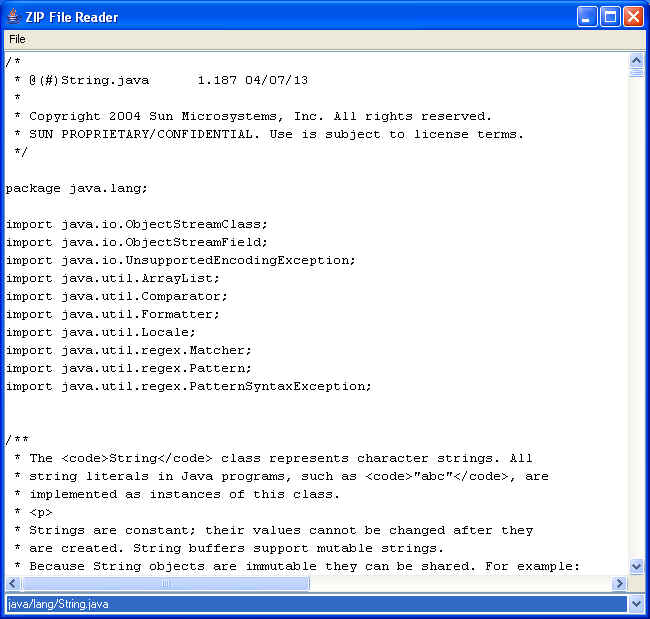
If you select a different entry in the combo box at the bottom of the frame, it will display the contents of that file (assuming it to be a text file).
Class ZipFile
Using the ZipFile Class
There is also a ZipFile class that allows you to access the ZIP file entries directly, rather than having to scan through the entire ZIP file sequentially.
It is likely that using the ZipFile class in place of the ZipInputStream class could provide better performance.
Here’s the same program as above, but with the ZipInputStream replaced by ZipFile. It simplifies the code, and appears to improve performance — at least, on my machine:
package inputOutput;

import java.awt.BorderLayout;
import java.awt.Color;
import java.awt.event.ActionEvent;
import java.awt.event.ActionListener;

import java.io.BufferedReader;
import java.io.File;
import java.io.FileInputStream;
import java.io.InputStream;
import java.io.InputStreamReader;
import java.io.IOException;
import java.util.Enumeration;

import java.util.zip.ZipFile;
import java.util.zip.ZipEntry;
import javax.swing.JComboBox;
import javax.swing.JFileChooser;
import javax.swing.JFrame;
import javax.swing.JMenu;
import javax.swing.JMenuBar;
import javax.swing.JMenuItem;
import javax.swing.JScrollPane;
import javax.swing.JTextArea;
import javax.swing.UIManager;

/**
 *   Class to open a ZIP file, and display a list of files
 *   stored within it.
 *   When the user selects a ZIP file, the contents of the
 *   file (assumed to be text) are displayed in the text
 *   area.
 *
 *   @author Bryan J. Higgs, 19 September, 1999
 */
public class ReadZipFile2 extends JFrame
{
  /**
   *   Main entry point.
   */
  public static void main(String[] args)
  {
    try
    {
      // Set the system look and feel
      UIManager.setLookAndFeel( UIManager.getSystemLookAndFeelClassName() );
    }
    catch (Exception ex)
    {
      // Ignore
    }

    ReadZipFile2 frame = new ReadZipFile2();
    frame.setDefaultCloseOperation(JFrame.EXIT_ON_CLOSE);
    frame.setVisible(true);
  }

  /**
   *   Constructor.
   */
  public ReadZipFile2()
  {
    setTitle("ZIP File Reader 2");

    // Set up frame menus
    JMenuBar menuBar = new JMenuBar();
    setJMenuBar(menuBar);

    JMenu fileMenu = new JMenu("File");
    menuBar.add(fileMenu);

    JMenuItem openItem = new JMenuItem("Open");
    fileMenu.add(openItem);
    openItem.addActionListener( new OpenAction() );

    JMenuItem exitItem = new JMenuItem("Exit");
    fileMenu.add(exitItem);
    exitItem.addActionListener( new ActionListener()
      {
        public void actionPerformed(ActionEvent event)
        {
          System.exit(0);
        }
      }
    );

    // Set the size of the combo box, and
    // hook it up to its actions
    m_fileList.setEditable(false);
    m_fileList.addItem("Use File->Open to select ZIP file");
    m_fileList.addActionListener( new ActionListener()
    {
      public void actionPerformed(ActionEvent event)
      {
        String item = (String) m_fileList.getSelectedItem();
        if (item != null)
          loadZipFile(item);
      }
    }
    );
    m_fileText.setEditable(false);
    m_fileText.setBackground(Color.WHITE);

    add(m_fileList, BorderLayout.SOUTH);
    add(new JScrollPane(m_fileText), BorderLayout.CENTER);
    pack();
  }

  /**
   *   Inner class to handle open file events.
   */
  private class OpenAction implements ActionListener
  {
    public void actionPerformed(ActionEvent event)
    {
      JFileChooser chooser = new JFileChooser();
      chooser.setCurrentDirectory( new File(".") );
      TypeFileFilter filter = new TypeFileFilter(".zip");
      filter.setDescription("ZIP files");
      chooser.setFileFilter(filter);
      int ret = chooser.showOpenDialog(ReadZipFile2.this);
      if (ret == JFileChooser.APPROVE_OPTION)
      {
        String zipFileName = chooser.getSelectedFile().getPath();
        scanZipFile(zipFileName);
      }
    }
  }

  /**
   * Scans the ZIP file and populates the combo box.
   */
  public void scanZipFile(String zipFileName)
  {
    // Clean out the list, in case it's already in use.
    m_fileList.removeAllItems();

    ZipEntry entry = null;
    try
    {
      // Close any previous zip file that
      // might have been open.
      if (m_zipFile != null)
      {
        m_zipFile.close();
        m_zipFile = null;
      }
      // Open the new Zip file
      m_zipFile = new ZipFile(zipFileName);
      // Go through all the entries and
      // populate the fileList combo box.
      Enumeration en = m_zipFile.entries();
      while (en.hasMoreElements())
      {
        entry = (ZipEntry)en.nextElement();
        m_fileList.addItem(entry.getName());
      }
    }
    catch (IOException ioe)
    {
      ioe.printStackTrace();
    }
  }

  /**
   *   Displays the files within the ZIP file,
   *   in the List component.
   */
  private void loadZipFile(String name)
  {
    InputStream in = null;
    try
    {
      // Get the Zip entry from the already open ZipFile
      ZipEntry entry = m_zipFile.getEntry(name);
      if (entry != null)
      {
        // Populate the text area with the contents of the entry.
        m_fileText.setText("");
        in = m_zipFile.getInputStream(entry);
        BufferedReader reader =
                    new BufferedReader(
                            new InputStreamReader(in));
        String line;
        while ( (line = reader.readLine()) != null )
        {
          m_fileText.append(line + "\n");
        }
      }
    }
    catch (IOException ioe)
    {
      ioe.printStackTrace();
    }
    finally
    {
      try
      {
        if (in != null)
          in.close();
      }
      catch (IOException ex)
      {
        // Ignore
      }
    }
  }

  /////// Private data /////////

  private JComboBox m_fileList = new JComboBox();
  private JTextArea m_fileText = new JTextArea(30, 80);
  private ZipFile   m_zipFile;
}
It produces the same results as the earlier ReadZipFile program, but with better performance when opening an entry in the file.
JAR File Streams
Here is the JAR File Stream class hiearchy:
(Package java.util.jar)
Object
    Attributes
    Attributes.Name
    Manifest
    JarEntry
    JarFile
Object
    InputStream
        FilterInputStreamCheckedInputStream
            InflaterInputStream
                GZIPInputStream
                ZipInputStream
                    JarInputStream
    OutputStream
        FilterOutputStreamCheckedOutputStream
            DeflaterOutputStream
                GZIPOutputStream
                ZipOutputStream
                    JarOutputStream
Object
    Throwable
        ExceptionDataFormatExceptionIOExceptionZipException
                   JarException
Classes JarFile & JarEntry
The JAR file support is quite similar to the ZIP file support.
To see just how similar, here is an example of the earlier ZIP program, changed to use the JarFile and JarEntry classes:
package inputOutput;

import java.awt.BorderLayout;
import java.awt.Color;
import java.awt.event.ActionEvent;
import java.awt.event.ActionListener;

import java.io.BufferedReader;
import java.io.File;
import java.io.FileInputStream;
import java.io.InputStream;
import java.io.InputStreamReader;
import java.io.IOException;
import java.util.Enumeration;
import java.util.jar.JarEntry;
import java.util.jar.JarFile;
import java.util.jar.Manifest;
import javax.swing.JButton;

import javax.swing.JComboBox;
import javax.swing.JFileChooser;
import javax.swing.JFrame;
import javax.swing.JMenu;
import javax.swing.JMenuBar;
import javax.swing.JMenuItem;
import javax.swing.JPanel;
import javax.swing.JScrollPane;
import javax.swing.JTextArea;
import javax.swing.UIManager;

/**
 *   Class to open a JAR file, and display a list of files
 *   stored within it.
 *   When the user selects a JAR file, the contents of the
 *   file (assumed to be text) are displayed in the text
 *   area.
 *
 *   @author Bryan J. Higgs, 19 September, 1999
 */
public class ReadJarFile extends JFrame
{
  /**
   *   Main entry point.
   */
  public static void main(String[] args)
  {
    try
    {
      // Set the system look and feel
      UIManager.setLookAndFeel( UIManager.getSystemLookAndFeelClassName() );
    }
    catch (Exception ex)
    {
      // Ignore
    }

    ReadJarFile frame = new ReadJarFile();
    frame.setDefaultCloseOperation(JFrame.EXIT_ON_CLOSE);
    frame.setVisible(true);
  }

  /**
   *   Constructor.
   */
  public ReadJarFile()
  {
    setTitle("JAR File Reader");

    // Set up frame menus
    JMenuBar menuBar = new JMenuBar();
    setJMenuBar(menuBar);

    JMenu fileMenu = new JMenu("File");
    menuBar.add(fileMenu);

    JMenuItem openItem = new JMenuItem("Open");
    fileMenu.add(openItem);
    openItem.addActionListener( new OpenAction() );

    JMenuItem exitItem = new JMenuItem("Exit");
    fileMenu.add(exitItem);
    exitItem.addActionListener( new ActionListener()
      {
        public void actionPerformed(ActionEvent event)
        {
          System.exit(0);
        }
      }
    );

    // Set the size of the combo box, and
    // hook it up to its actions
    m_fileList.setEditable(false);
    m_fileList.addItem("Use File->Open to select JAR file");
    m_fileList.addActionListener( new ActionListener()
    {
      public void actionPerformed(ActionEvent event)
      {
        String item = (String) m_fileList.getSelectedItem();
        if (item != null)
          loadJarFile(item);
      }
    }
    );
    m_fileText.setEditable(false);
    m_fileText.setBackground(Color.WHITE);

    // Add a button (inside a JPanel) to the North,
    // to allow quick access to the manifest
    JPanel panel = new JPanel();
    add(panel, BorderLayout.NORTH);
    panel.add(m_manifestButton);
    m_manifestButton.addActionListener( new ActionListener()
      {
        public void actionPerformed(ActionEvent event)
        {
          loadManifest();
        }
      }
    );
    // Disable manifest button until a Jar file is loaded
    m_manifestButton.setEnabled(false);

    add(m_fileList, BorderLayout.SOUTH);
    add(new JScrollPane(m_fileText), BorderLayout.CENTER);
    pack();
  }

  /**
   *   Inner class to handle open file events.
   */
  private class OpenAction implements ActionListener
  {
    public void actionPerformed(ActionEvent event)
    {
      JFileChooser chooser = new JFileChooser();
      chooser.setCurrentDirectory( new File(".") );
      TypeFileFilter filter = new TypeFileFilter(".jar");
      filter.setDescription("JAR files");
      chooser.setFileFilter(filter);
      int ret = chooser.showOpenDialog(ReadJarFile.this);
      if (ret == JFileChooser.APPROVE_OPTION)
      {
        String jarFileName = chooser.getSelectedFile().getPath();
        scanJarFile(jarFileName);
      }
    }
  }

  /**
   * Scans the JAR file and populates the combo box.
   */
  public void scanJarFile(String jarFileName)
  {
    // Clean out the list, in case it's already in use.
    m_fileList.removeAllItems();

    JarEntry entry = null;
    try
    {
      // Close any previous zip file that
      // might have been open.
      if (m_jarFile != null)
      {
        m_jarFile.close();
        m_jarFile = null;
      }
      // Open the new Zip file
      m_jarFile = new JarFile(jarFileName);
      // Go through all the entries and
      // populate the fileList combo box.
      Enumeration en = m_jarFile.entries();
      while (en.hasMoreElements())
      {
        entry = (JarEntry)en.nextElement();
        m_fileList.addItem(entry.getName());
      }
      // Enable the Get Manifest button
      m_manifestButton.setEnabled(true);
    }
    catch (IOException ioe)
    {
      ioe.printStackTrace();
    }
  }

  /**
   *   Displays the files within the ZIP file,
   *   in the text area component.
   */
  private void loadJarFile(String name)
  {
    InputStream in = null;
    try
    {
      // Get the Jar entry from the already open JarFile
      JarEntry entry = m_jarFile.getJarEntry(name);
      if (entry != null)
      {
        // Populate the text area with the contents of the entry.
        m_fileText.setText("");
        in = m_jarFile.getInputStream(entry);
        BufferedReader reader =
                    new BufferedReader(
                            new InputStreamReader(in));
        String line;
        while ( (line = reader.readLine()) != null )
        {
          m_fileText.append(line + "\n");
        }
      }
    }
    catch (IOException ioe)
    {
      ioe.printStackTrace();
    }
    finally
    {
      try
      {
        if (in != null)
          in.close();
      }
      catch (IOException ex)
      {
        // Ignore
      }
    }
  }

  /**
   * Loads the manifest into the text area
   */
  private void loadManifest()
  {
    m_fileText.setText("");
    Manifest manifest;
    try
    {
      manifest = m_jarFile.getManifest();
      manifest.write(m_fileOutputStream);
    }
    catch (IOException ex)
    {
      ex.printStackTrace();
    }
  }

  /////// Private data /////////

  private JButton   m_manifestButton = new JButton("Get Manifest");
  private JComboBox m_fileList = new JComboBox();
  private JTextArea m_fileText = new JTextArea(30, 80);
  private TextAreaOutputStream m_fileOutputStream =
                                 new TextAreaOutputStream(m_fileText);
  private JarFile   m_jarFile;
}
Note that I’m using a convenience class, TextAreaOutputStream, shown below:
/*
 * TextAreaOutputStream.java
 *
 * Created on January 24, 2008
 *
 */

package inputOutput;

import java.io.IOException;
import java.io.OutputStream;
import javax.swing.JTextArea;

/**
 * Class to act as an OutputStream for a text area
 *
 * @author Bryan Higgs
 * @version 1.0
 */
public class TextAreaOutputStream extends OutputStream
{
  /**
   * Creates a new instance of TextAreaOutputStream
   */
  public TextAreaOutputStream(JTextArea textArea)
  {
    m_textArea = textArea;
  }

  /**
   * Flush the output -- not useful in this case
   */
  @Override
  public void flush()
  { }

  /**
   * Close the output -- not useful in this case
   */
  @Override
  public void close()
  { }

  /**
   * Required override for OutputStream
   *
   * Writes the specified byte to this output stream.
   * The general contract for write is that one byte is written to the output stream.
   * The byte to be written is the eight low-order bits of the argument b.
   * The 24 high-order bits of b are ignored.
   *
   */
  @Override
  public void write(int b) throws IOException
  {
    if (b == '\r')
      return;

    if (b == '\n')
    {
      m_textArea.append(m_sb.toString());
      m_sb.setLength(0);
    }

    m_sb.append((char)b);
  }

  ///// Private data //////

  private final StringBuilder m_sb = new StringBuilder();
  private JTextArea m_textArea;
}
I’m using one potentially convenient additional feature of the JarFile class: the ability to obtain the Manifest file from the JAR. So, I’ve added a small GUI feature to the above class to allow you to click a button to view the JAR file’s manifest:
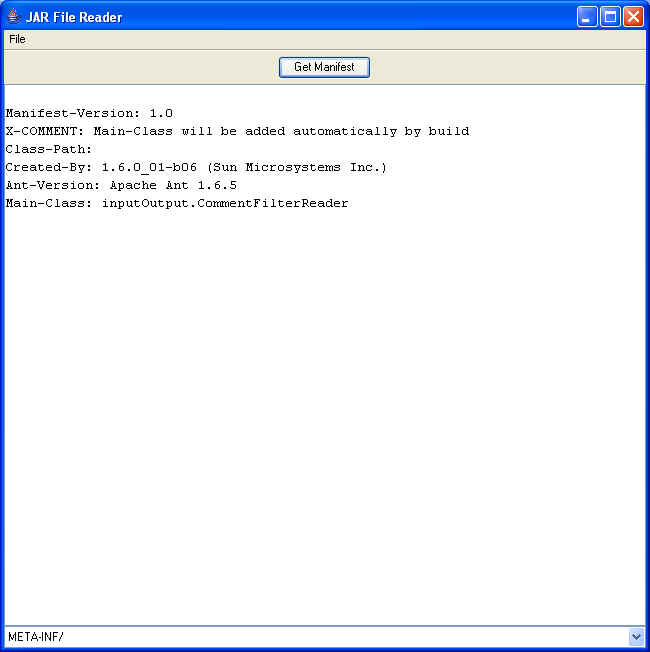
Here, I ran the program, opened one of my NetBeans’s project’s JAR files, and clicked on the GetManifest button to view the Manifest.