
Vector: A Dynamic Array Class
The standard Java class library contains a useful class called Vector. It is actually a kind of dynamic array.
This assignment involves writing a C++ class, called DynArray, that emulates a subset of the Java Vector class (see here). In addition, it involves writing other, related, classes, and is a useful exercise in the use of class inheritance and virtual functions.
Concepts
To implement such a dynamic class, it is necessary to use arrays of pointers, and to use new and delete to allocate and de-allocate memory for these arrays of pointers. Perhaps a picture would help:
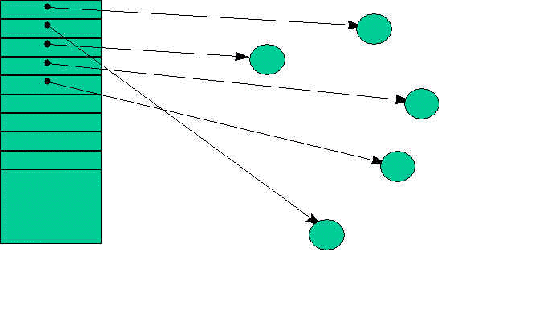
Here, the first five elements of the array (on the left) point to elements, while the remainder are empty (i.e., are NULL pointers). The topmost element is at index 0, the next at index 1, etc.
When an element is ‘added’ to the array, a pointer to that element is entered into the next available pointer slot. If there is no space left in the pointer array, then the array is automatically expanded by capacityIncrement elements to make space. This expansion is accomplished by:
- Determining how large the pointer array needs to become, and performing a new to allocate that amount of space for the array (not what the array elements point to),
- Copying the entries of the existing pointer array into the new pointer array, and zeroing out the remaining entries in the new pointer array,
- Deleting the old pointer array.
- Updating all the necessary internal data in the class to reflect the newly expanded array.
When an element is ‘removed’ from the array, the corresponding array pointer entry is zeroed, and then all the array pointer entries above it are moved down one, to fill in the gap (which means that their index values also change). All internal data in the class is updated to reflect the new state of the array.
Strategy
Our DynArray is an array of … what? On the one hand, we’d like to implement a dynamic array that would be generally useful — an array of Widgets, an array of Persons, an array of Vehicles, — whatever. On the other hand, how do we do this without writing a new kind of array for each type of element we might want to store into it?
We can solve this problem by using inheritance; we will implement a DynArray class that can store instances of any class derived from an abstract base class called DynArrayElement.
So far, so good. But think about the problem some more. Wouldn’t it be a good idea for an instance of each class derived from DynArrayElement to be informed when it is being added to a DynArray? and when it is being removed from a DynArray? For one thing, it would be nice if an element could determine whether it currently is in a DynArray, before it silently disappears as a result of being destroyed.
For example:
DynArray myArray(100, 10);    // initialCapacity 100,
	                            // capacityIncrement 10
MyElement *myElement = new MyElement;

myArray.AddElement(*myElement);

delete myElement;	// What happens to the array pointer?
Clearly, we would like to catch this error as early as possible. We can add code to the element’s destructor to make us aware of this situation, if the element is in a DynArray.
How can the element tell that it’s stored in a DynArray? Actually, the element may be in several DynArrays simultaneously, or even in the same DynArray more than once! So, it makes sense to keep a count of how many arrays each element is currently in; if the count is not zero at the time its destructor is called, it’s an ERROR!
How might we accomplish this? Well, let’s require that every class derived from DynArrayElement must implement a standard set of virtual functions. We can do that by writing our DynArrayElement class to include them as pure virtual functions:
class DynArrayElement
{
  public:
    virtual ~DynArrayElement();  // Why virtual?
    // Virtual functions to be implemented
    // by all derived classes
    virtual void OnInsertion(DynArray &array) = 0;
    virtual void OnRemoval(DynArray &array) = 0;
};
Function OnInsertion() is called by the DynArray code when it inserts an element into itself, and function OnRemoval() is called by the DynArray code when it removes it from itself. In each case, the function provides a reference to the DynArray instance to which the element is being added, in case the element needs to make use of that information. What each function does is totally dependent on the derived class. Indeed, different derived classes may do totally different things. These functions may keep a count of the number of arrays the instance is in, or they may perform more complex housekeeping. What they do, or should do, is the business of that class, and not of the DynArray class. So we delegate those functions to the element class, where it belongs.
Note: Since we always use the
DynArrayElementclass with theDynArrayclass, we will place its declarations in thedynarray.h
file. The implementation of theDynArrayclass will be in thedynarray.cppfile.
Use of Exceptions
Several of the member functions of the DynArray class have to deal with exceptional conditions. For example, an attempt to access an element via an index, when there is no element at that index, should be invalid. In this case, the function will throw an exception — specifically an ArrayOutOfBoundsException.
To make our exceptions simpler to deal with, we organize them into a class hierarchy:
class Exception
{
  public:
    virtual ~Exception() {}
};

class OutOfMemoryError : public Exception
{
};

class ArrayOutOfBoundsException : public Exception
{
};
Since we are using these exceptions only for the DynArray class, we will place their declarations in the dynarray.h file.
We do this so that we can catch a specific one of these exceptions by doing something like:
  try
  {
    // code that may throw an exception
  }
  catch (ArrayOutOfBoundsException &e)
  {
    // Do something...
  }
Alternatively, we can catch any of these exceptions by doing something like:
  try
  {
    // code that may throw an exception
  }
  catch (Exception &e)
  {
    // Do something...
  }
Requirements for the DynArray class
Here are the requirements for this DynArray class:
- A constructor that accepts two arguments:
int initialCapacity, the initial storage capacity of the array, andint capacityIncrement, how much to increase the element’s capacity on each expansion. The default value for each of these arguments will be 10: DynArray(int initialCapacity = 10, int capacityIncrement = 10); - The copy constructor and the assignment operator will be disabled (at least for the moment):
DynArray(const DynArray &array);
DynArray &operator=(const DynArray &array); - A destructor that performs the necessary cleanup for the array: ~DynArray(); What does ‘necessary cleanup’ mean here? [Hint: It means more than a simple delete!]
- An access method to return the number of elements currently stored in the array: int ElementCount() const ;
- An access method to return the current capacity of the array: int Capacity() const;
- An access method to return the array’s capacity increment: int CapacityIncrement() const;
- A method to ensure that the array has at least the specified capacity. If it doesn’t, then the array is expanded appropriately: void EnsureCapacity(int minCapacity); If the function fails to expand the array, it throws OutOfMemoryError.
- A method to trim the array’s capacity down to size (i.e. reduce its capacity to the actual number of elements currently stored): void TrimToSize(); If the function fails to contract the array, it throws OutOfMemoryError.
- A method to determine whether the array is empty or not: bool IsEmpty() const; Returns a Boolean value; true if the array has no elements, false otherwise.
- A method to determine whether the specified element is in the array: bool Contains(const DynArrayElement &element) const; Returns a Boolean value; true if element is in the array, false otherwise. Note that it is possible for an element to be in the array more than once.
Hint: This may be implemented by delegating most of its work to another member function in this class. - A method to add an element to the end of the array: void AddElement(const DynArrayElement &element);
Note that, if there is insufficient capacity for this element to be added, the array of pointers will be automatically extended. If the function fails to expand the array, it throws OutOfMemoryError. An element may be placed in the same array more than once. - A method to remove an element from an array: bool RemoveElement(const DynArrayElement &element); Returns a Boolean value; true if the element was found and removed, false otherwise. If an element occurs more than once in the array, only the first occurrence is removed.
- A method to remove an element from an array, using its index: void RemoveElementAt(int index); If there is no element with that index, the function throws ArrayOutOfBoundsException.
- A method to remove all elements from an array, from last to first: void RemoveAllElements();
(Think about how one might do this efficiently.) - A method to set an element into the array at a particular index, replacing the element that was previously there: void SetElementAt(const DynArrayElement &element, int index); The index must be within the range: (0 to ElementCount()-1), else the function throws an ArrayOutOfBoundsException. The previous element at that index is discarded (removed from the array).
- A method to insert an element into the array at a particular index: void InsertElementAt(const DynArrayElement &element, int index); The index must be within the range: (0 to ElementCount()-1), else the function throws an ArrayOutOfBoundsException. Elements with an index greater than or equal to the current index are shifted up to make room.
- A method to return the index of an element in the array: int IndexOf(const DynArrayElement &element, int indexStart = 0) const; Searches the array for the specified element, starting from indexStart. Returns the index of the element, if it is in the array; -1 if it is not in the array. If the element is in the array more than once, the index of the first occurrence encountered is returned.
- An overloaded
operator[]:DynArrayElement &operator[](int index); Allows the user to access DynArrayElements stored in a DynArray using subscript syntax (for exampleda[5]). - An overloaded
operator[]:const DynArrayElement &operator[](int index) const;Allows the user to access DynArrayElements stored in a const DynArray using subscript syntax.
Note that the overloaded
operator[]operators do not do the equivalent ofSetElementAt, orInsertElementAt, orRemoveElementAt. Do you understand why?
Requirements for testing
You will need to test your DynArray class, and so you’ll need to create a non-abstract class that can be used in such an array. In other words, it must be derived from DynArrayElement, and must implement the OnInsertion() and OnRemoval() virtual member functions. Let’s use something really simple: a Double class:
class Double : public DynArrayElement
{
  public:
    Double(double d);
    Double(const Double &d);
    Double &operator=(const Double &d);
    virtual ~Double();
    double DoubleValue() const;  // return m_value

    virtual void OnInsertion(DynArray &array);
    virtual void OnRemoval(DynArray &array);
  private:
    double m_value;     // The encapsulated value
    int m_inArrayCount; // Count of array memberships
                        // (initialized to 0)
};
Here’s what you’ll need to implement the Double class
- The constructors. These should be self-explanatory (but don’t forget to use initializer lists!)
- The assignment operator. Again, this should be simple (but don’t forget the assignment to self problem!)
- The DoubleValue() access method. Trivial!
- The OnInsertion() function. It should simply increment the
m_inArrayCount. - The OnRemoval() function. It should simply decrement the m_inArrayCount.
- The destructor. This is very slightly trickier — you will need to test whether m_inArrayCount is zero or not. Use the assert macro to assert that its value should be zero. (See assert.h)
Note that it is a good idea to ‘instrument’ your code with stuff like:
cout << "Double element inserted into DynArray" << endl;so you can trace what’s happening during execution.
Write yourself a test program to test that everything works. Be thorough!
Part 2: Enhancements
Change your DynArray class so that it is derived from DynArrayElement. Why might this be a good idea?
Does your class now compile? What do you have to do to make it compile?
Here is a function you can use to test this out:
void TestIt(void)
{
  DynArray parent;
  DynArray child1, child2, child3;

  parent.AddElement(child1);
  parent.AddElement(child2);
  parent.AddElement(child3);

  Double d1(1.0), d2(2.0), d3(3.0);

  child1.AddElement(d1);
  child1.AddElement(d2);
  child1.AddElement(d3);

  Double d4(4.0), d5(5.0), d6(6.0);

  child2.AddElement(d4);
  child2.AddElement(d5);
  child2.AddElement(d6);

  Double d7(7.0), d8(8.0), d9(9.0);

  child3.AddElement(d7);
  child3.AddElement(d8);
  child3.AddElement(d9);
  cout << " ";
  for (int k = 0; k < child1.ElementCount(); k++)
  {
    cout << "[" << k << "] ";
  }
  cout << endl;
  for (int i = 0; i < parent.ElementCount(); i++)
  {
    DynArray &child = (DynArray &)(parent[i]);
    cout << "[" << i << "]: ";
    for (int j = 0; j < child.ElementCount(); j++)
    {
      Double &d = (Double &)(child[j]);
      cout << d.DoubleValue() << " ";
  }
    cout << endl;
  }

  child3.RemoveAllElements();
  child2.RemoveAllElements();
  child1.RemoveAllElements();
  parent.RemoveAllElements();
}
Before you get too concerned about the amount of work you might have to do for this assignment, here’s some statistics from my implementation, including the enhancements:
dynarray.h:approximately 95 lines of code, including whitespace and commentsdynarray.cpp: approximately 240 lines of code, including whitespace and comments.- longest function: 38 lines of code, including whitespace and comments.
- most functions 10 lines or less, including whitespace and comments.
Happy coding!