
Linked Lists
What is a Linked List?
Linked lists are among the most useful data structures in Computer Science, and are therefore very heavily used in lots of different applications. For this assignment, we will concentrate on the doubly-linked list, which is perhaps the most useful of all linked lists. Here’s what a doubly-linked list looks like:
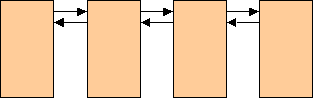
As you can see, the linked list consists of a number of list items linked together in both the forward direction and the reverse direction. The links are typically pointers, and that is what we will use to implement this kind of list.
Why are Linked Lists so Useful?
Linked lists are useful because they are very flexible. You can use a linked list as a collection mechanism; that is, the linked list can collect together items which have something in common with each other. For example, perhaps you wish to collect together all the people who work in your office. Or all the people who work for a particular boss.
Sometimes the order of items in a list is important, and sometimes it isn’t. It all depends on what your needs might be. Perhaps you don’t care about the order at all, in which case you could treat the items in a list as a set of items (in the Mathematical sense), or a multi-set of items (where the value of an item can be duplicated within the list).
Alternatively, you might wish to maintain the items in the list in a particular order — perhaps alphabetically, or by employee number, or by salary.
Linked List Operations
There are obviously a number of useful operations that a linked list should support. For example:
- Adding an item to a list
- Removing an item from a list
- Determining whether an item is currently in the list or not.
- Determining how many items are currently in the list
- Navigating through the list in order to access the items in a list
Depending on how you are using the list, you may need only the ability to add or remove an item at the end of a list, or at the front of a list, or to add or remove an item anywhere in the list. Similarly, you may need only to navigate the list from the start to the end, or you may need to move both in the forward direction or in the reverse direction. You may wish to start at the beginning of the list, at its end, or anywhere in between.
Doubly-Linked Lists
The doubly-linked list is very flexible in its ability to support the above features. Doubly-linked lists allow you to:
- Add an item anywhere in the list
- Remove an item from anywhere in the list
- Navigate in any direction, from any starting point in the list
The doubly-linked list supports these features by using two pointers in each list item:
- A next pointer
- A previous pointer
In addition, it is very useful to add one more pointer in each list item:
- A list pointer — a pointer to the list in which the list item currently resides
The next pointer, as its name suggests, points to the next list item in the list. The previous pointer similarly points to the previous list item in the list. If a list item is the first one in the list, then its previous pointer is NULL. If a list item is the last one in the list, then its next pointer is NULL. In this way, we can navigate through the list and have a way of ensuring that we don’t “fall off” at either end of the list.
The list pointer serves two purposes:
- A flag indicating whether the list item is currently in a list (we assume that a list item is either in a single list, or it is in no list). If the list item is not currently in a list, then its list pointer is NULL. If the list item is currently in a list, then the list pointer points to the owning list.
- If the list item is in a list, then the list pointer provides convenient access to the owning list’s context, which the list item code will need for its purposes.
Class Design
To implement such a doubly-linked list, we will be implementing three classes:
- A List class, each instance of which represents a doubly-linked list
- A ListItem class, each instance of which represents an item that can exist in a List
- A ListIterator class, which encapsulates the necessary context to allow multiple concurrent iterations (navigations) through a List
What must each class provide to support the necessary features?
Well, let’s cut to the chase, and give you some code to start with:
//
//  List.h
//  Assignment 4: Linked Lists
//
//  Created by Bryan Higgs on 10/31/24.
//

#ifndef List_h
#define List_h

#include <string>
using namespace std;

// Forward references

class ListItem;

// Class List

class List
{
  friend class ListItem;

public:
  List();   // Constructor
  ~List();  // Destructor

  // Access
  ListItem *GetFirst() const; // Returns ptr to first item in list
  ListItem *GetLast() const;  // Returns ptr to last item in list
  int GetCount() const;       // Returns count of items in list

  // Operations
  void Append(ListItem &item); // Appends an item to the end of the list
  void Purge();                // Removes all items from the list

  // Debugging member functions
  void Dump(const string prefix = "") const;
                              // Dump contents of list
                              // (prefix is a string that prefixes
                              //  each line of the dumped output)

private:
  // Disable copy constructor for List
  List(const List &);
  // Disable assignment for List
  List &operator=(const List &);

  // Data members
  ListItem *m_first;    // Pointer to the first list item
  ListItem *m_last;    // Pointer to the last list item
  int m_count;         // Count of list items currently in list
};

// Class ListItem

class ListItem
{
public:
  ListItem(void *data);    // Constructor (associates with data)
  ~ListItem();            // Destructor

  // Operations
  void Add(List &list, ListItem *prevItem);
                          // Add this ListItem to the specified list
                          // following the specified prevItem
                          // (if prevItem is NULL, place at front of list)

  void Remove();            // Remove this list item from the list it is in

  // Access member functions
  ListItem *GetNext() const;     // Return ptr to next item in list
  ListItem *GetPrevious() const; // Return ptr to previous item in list
  const List *GetList() const;   // Return ptr to the list item's list
  void *GetData();               // Returns ptr to data for item

  // Debugging member functions
  void Dump(const string prefix = "") const;
                              // Dump contents of list item
                              // (prefix is a string that prefixes
                              //  each line of the dumped output)
private:
  // Disable copy constructor for ListItem
  ListItem(const ListItem &);
  // Disable assignment for ListItem
  ListItem &operator=(const ListItem &);

  // Data members
  ListItem  *m_next;    // Pointer to next item in the list
  ListItem  *m_prev;    // Pointer to previous item in the list
  List      *m_list;    // Pointer to the list the item currently is in
  void      *m_data;    // Pointer to data
};

// Class ListIterator

class ListIterator
{
public:
  ListIterator(const List &list);  // Constructor
  ~ListIterator();           // Destructor

  // Access
  const List *GetList() const; // Return ptr to the iterator's list
  ListItem *GetCurrent() const;// Return ptr to current list item
  ListItem *GetNext();         // Move to next item and return ptr to it
  ListItem *GetPrevious();     // Move to previous item and return ptr to it
  bool  AtFirst() const;       // return true if current item is first item
  bool  AtLast() const;        // return true if current item is last item

private:
  // Disable copy constructor for ListIterator
  ListIterator(const ListIterator &);
  // Disable assignment for ListIterator
  ListIterator &operator=(const ListIterator &);

  // Data
  const List *m_list;       // The list we are iterating through
  ListItem   *m_current;    // Points to the current item in the list
};

#endif /* List_h */Note: The above classes are incomplete, and show no implementation details. That’s your job!
Warning: Do not change any of these class members, their signatures, or their access (public or private). Furthermore, do not add any other data members or member functions. These classes will be used and modified in specific ways in later assignments, and if you change them here, you will have difficulty following the instructions in the later assignments. BEWARE!
The List Class
As you might guess, a doubly-linked list is represented by an instance of class List. Its primary purpose is to provide the necessary state of the list — specifically, to point at the first item in the list, and the last item in the list, so that we can start navigation at the appropriate places. It also keeps track of the number of items currently in the list.
Aside from the obvious access methods, the List class supports two operations:
Append()— adds an item to the end of the ListPurge()— removes all items from the List.
Hint: Where, in particular, would you think the
Purge()operation would be useful within the List class?
In addition, there is a Dump() member function, which is a convenient debugging tool. It prints out the contents of the list in internal form — that is, the hexadecimal values of the List‘s private pointers, and also prints out the internal contents of each of the ListItems in the List.
The ListItem Class
Not surprisingly, an item in a doubly-linked list is represented by an instance of class ListItem. Its primary purpose is to hold the three pointers we talked about above, and to support the basic operations on a ListItem:
ListItem()— the constructor associates data with the list item. Since we don’t know what you might want to put in a list, this is avoid *pointer, which must be cast appropriately, once you retrieve the data from a list item.Add()— adds the item to a specified List, following the specified previous item. [Hint: What should this do if the item is already in aList?]Remove()— removes the item from theListit is in. [Hint: What should this do if the item is not in any List ?]Data()— this returns avoid *pointer to the data the list item represents. Typically, this must be typecast to the proper type before you can use the pointer to access the data structure. This implies that you must already know what is being held in the list item.
Hint: What should the
ListItemdestructor do?
As before, there is a Dump() member function, which is a convenient debugging tool. It prints out the contents of the list item in internal form — that is, the hexadecimal values of the ListItem‘s private pointers.
The ListIterator Class
Whenever you wish to navigate through a doubly-linked list, you need to maintain some context — where you are currently positioned within the list. We could have maintained that context within the List class itself, but that would mean that we could only have a single navigation active against a specific list at a time. That is often quite restrictive, so instead we invent a class, ListIterator, which serves to maintain the necessary context, and in general encapsulates the necessary support for iterating (navigating) through a specific list.
ListIterator supports the following operations:
ListIterator()— the constructor is responsible for associating theListIteratorwith the specifiedList, and for setting its starting position at the first item in thatList.GetList()— Returns a pointer to the associatedList.GetNext()— Moves the current position to the next item in theList. If there is no next item, does not change the current position, and returnsNULL.GetPrevious()— Moves the current position to the previous item in theList. If there is no previous item, does not change the current position, and returnsNULL.AtFirst()— returns a Boolean value indicating whether the current position is at the first item in theListAtLast()— returns a Boolean value indicating whether the current position is at the last item in theList.GetCurrent()— This is merely an access method, and returns a pointer to the current item for theListIterator. There should always be a current item for aListIterator(i.e. it should never becomeNULL, nor should it point at anything other than a list item that is in theListbeing navigated by theListIterator.). There is only one exception to this: When theListIteratoris associated with aListthat is currently empty; only in that case may theGetCurrent()member function return a null pointer. (Note, however, that theListIteratorclass should be able to handle the case where the association is made with an empty list, and subsequently the list has items added to it. See below.)
The Assignment
Your task is to implement the three classes, List, ListItem and ListIterator. Place the class declarations all in a single file, list.h (as shown in the above code), and their implementations in a single file, list.cpp.
Here are some hints you will need to pay attention to:
- Since these classes refer to each other, we need to use one or more forward references so that the classes will compile. Thus the need to specify the following line before the List class declaration:
class ListItem;This will forward declare the ListItem class so that the List class can refer to ListItem without the compiler complaining. Note that, since a forward declaration does not provide any information about a class other than its name, if you have code that refers to information about that class, such as its size or its members, your compiler will complain — sometimes with some very strange error messages!
- These three classes work together as a family of classes to support a single piece of functionality. It is necessary to declare appropriate friendship relationships among the classes. I have already included the necessary friendship declarations; try to keep these to a minimum — do not make every class a friend of every other class. In fact, you do not need to make any additions of this kind for this assignment.
- Since all of these classes contain data members which are pointers, we have disabled their copy constructors and assignment operators, by placing the declarations of those methods in the class’s private section. You do not need to implement these member functions.
Start by placing all your implementation code in the list.cpp file, and don’t worry about run-time efficiency. It’s much better to get the code working first, and then worry about how to make it fast — not the other way around. Later, if you have time, you can consider making the appropriate modifications to speed up the code — mostly making essential member functions inline.
To give you a starting point, here is a start at the list.cpp file, with the Dump() member functions coded for you:
//
//  List.cpp
//  Assignment 4: Linked Lists
//
//  Created by Bryan Higgs on 10/31/24.
//

#include <iostream>
#include <cassert>  // For assert() -- use encouraged!
using namespace std;

#include "list.h"

// List

void List::Dump(const string prefix) const
{
  // Print List information
  cout << prefix << "List at: " << this << endl
       << prefix << " Count:  " << GetCount() << endl
       << prefix << " First:  " << GetFirst() << endl
       << prefix << " Last:   " << GetLast() << endl;

  // Print all the ListItems
  for (ListItem *item = GetFirst();
       item != 0;
       item = item->GetNext()
      )
  {
      item->Dump(prefix + "  ");
  }
}

// ListItem

void ListItem::Dump(const string prefix) const
{
  cout << prefix << " ListItem: " << this << endl
       << prefix << "   Next:  " << GetNext() << endl
       << prefix << "   Prev:  " << GetPrevious() << endl;
}

// ListIterator
Of course, there’s lots else for you to fill in in this file!
Hints:
- Remember to use initializer lists whenever possible
- Try to avoid duplicating code as much as possible. For example, there should be one, and only one, place where you provide code to add an element to a list; there should be one, and only one, place where you provide code to remove an element from a list.
- Think about your List::Append member function: How should you implement it with the least amount of effort?
[Hint: My version of this function has a body consisting of a single statement.]- Think about how to code using as simple algorithms as possible (but not too simple!). For example, my code for the List::Purge member function contains of four lines of code within the body of the function — and two of those lines each consists of a single curly brace.
- Use the Dump member functions during your debugging — there’s a reason why I provided them for you to use!
- When you come to write the code for adding an item to a list, remember that there are basically three cases:
and remember that adding an item to an empty list is a special case of both of the first and second cases. Try to ensure that you have all the necessary cases covered, and that the various data members which are pointers to various items in the list are all properly updated in all of the cases. It’s easy to forget one or two! Try to develop consistent practices. It’s often helpful to draw yourself a diagram of all the links, before, during, and after an item is added to a list.
- When the item is to be inserted at the start of the list
- When the item is to be inserted at the end of the list
- When the item is to be inserted somewhere in the middle of the list.
- Similar thinking applies to when you come to write the code to remove an item from a list.
- It may appear at first glance that the ListIterator::GetCurrent() member function is trivial to implement. It would be, if it were not for the following situation that I wish this iterator to handle:
[Hint: What if the list was not empty when the iterator is created, but subsequently items are added to the beginning of the list before the iterator is used? What should the iterator do then?]
- The iterator is created to be associated with a list that is empty.
- Subsequently, items are added and removed from the list
- The iterator is then used to iterate over the items in the list, based on the items that are actually in the list at that time.
This means that the code for GetCurrent is not quite as simple as you might think. In particular, while GetCurrent is conceptually const, because it must handle the above case, you will have to code it in such a way that it is not const. See the slides on the web site for how to do this.- One more thing about GetCurrent: It should only return with a NULL pointer under one condition: if its associated list is currently empty. Under all other circumstances, it should return a valid pointer to the list item that is currently located at within its associated list. In particular, attempting to move from the last item in the list to the (non-existent) next item, or attempting to move from the first item in the list to the (non-existent) previous item, should not affect the value of the current pointer at all.
Testing Your Implementation
I’ve discovered that some of my students seem to struggle to create a thorough test for their implementation. So, to provide a (hopefully) good example of how to test, and to provide you with some guidance on what constitutes correct operation, here is a test program that tests just the basic List/ListItem/ListIterator class operations:
//
//  TestList.cpp
//  Assignment 4: Linked Lists
//
//  Created by Bryan Higgs on 10/31/24.
//

#include <iostream>
using namespace std;

#include "List.h"

/*
 * Tests a ListIterator, by iterating forward through the list,
 * then backward, then forward again.
 */
void testIterator(ListIterator &iter)
{
  cout << "The list contains " << iter.GetList()->GetCount()
                               << " items" << endl;
  cout << "The iterator is at the start of the list: "
                               << boolalpha << iter.AtFirst() << endl;

  ListItem *item = 0;
  cout << "Iterating forward..." << endl;
  for ( item = iter.GetCurrent(); item != 0; item = iter.GetNext() )
  {
    double *d = (double *) item->GetData();
    cout << *d << endl;
  }

  cout << "The iterator is at the end of the list: "
       << boolalpha << iter.AtLast() << endl;
  cout << "Iterating backward..." << endl;
  for ( item = iter.GetCurrent(); item != 0; item = iter.GetPrevious() )
  {
    double *d = (double *) item->GetData();
    cout << *d << endl;
  }

  cout << "The iterator is at the start of the list: "
       << boolalpha << iter.AtFirst() << endl;
  cout << "Iterating forward again..." << endl;
  for ( item = iter.GetCurrent(); item != 0; item = iter.GetNext() )
  {
    double *d = (double *) item->GetData();
    cout << *d << endl;
  }
}

/*
 * Main entry point to do a fairly complete test of the basic
 * List/ListItem/ListIterator classes.
 */
int main(int argc, const char * argv[])
{
  List list;
  ListIterator iter1(list);

  cout << "---Testing iteration through an empty list---" << endl;
  testIterator(iter1);

  cout << "---Initial list---" << endl;
  list.Dump();

  double d1 = 1.0, d2 = 2.0, d3 = 3.0, d4 = 4.0;

  ListItem item1(&d1);
  cout << "---Appending list item---" << endl;
  list.Append(item1);
  list.Dump();

  ListItem item2(&d2);
  cout << "---Adding list item to front of list---" << endl;
  item2.Add(list, 0);
  list.Dump();

  ListItem item3(&d3);
  cout << "---Inserting list item in the middle of list---" << endl;
  item3.Add(list, &item2);
  list.Dump();

  ListItem item4(&d4);
  cout << "---Adding list item to the end of list---" << endl;
  item4.Add(list, &item1);
  list.Dump();

  cout << "---Testing iterator initialized against full list---" << endl;

  ListIterator iter2(list);
  testIterator(iter2);

  cout << "---Testing iterator initialized against empty list---" << endl;
  testIterator(iter1);

  cout << "---Testing removal of item from end of list---" << endl;
  item4.Remove();
  list.Dump();

  cout << "---Testing removal of item from middle of list---" << endl;
  item3.Remove();
  list.Dump();

  cout << "---Testing removal of item from front of list---" << endl;
  item2.Remove();
  list.Dump();

  cout << "---Testing removal of item alone in list---" << endl;
  item1.Remove();
  list.Dump();

  cout << "---Adding items back to list---" << endl;
  list.Append(item1);
  list.Append(item2);
  list.Append(item3);
  list.Append(item4);
  list.Dump();

  cout << "---Testing purge---" << endl;
  list.Purge();
  list.Dump();

  cout << "---Ending main function---" << endl;
  cout << "***You should be testing the List destructor***" << endl;

  return 0;
}
Using Your Implementation
Wines
To give you an idea how you might use these classes in a real situation, here’s an example.
Naturally, when I thought of lists, the first thing that came into my mind was a wine list!
So here’s a very simple Wine class, some of which you will be filling in. Then there is a test program to give our list implementation a reasonable degree of testing in a wine list situation.column
//
//  Wine.h
//  Assignment 4: Linked Lists
//
//  Created by Bryan Higgs on 10/31/24.
//

#ifndef Wine_h
#define Wine_h

#include <string>
using namespace std;

class Wine
{
public:
  Wine(const string &name, int year);
  Wine(const Wine &wine);
  ~Wine();

  const string &Name() const
  {
    return m_name;
  }

  int Year() const
  {
    return m_year;
  }

  // Assignment operator
  Wine &operator=(const Wine &wine);

  void Print() const;

private:
  // Data members
  string m_name;
  int    m_year;
};

#endif /* Wine_h */
//
// Wine.cpp
// Assignment 4: Linked Lists
//
// Created by Bryan Higgs on 10/31/24.
//
#include <iostream>
using namespace std;
#include "Wine.h"
Wine::Wine(const string &name, int year)
: m_name(name), m_year(year)
{}
void Wine::Print() const
{
cout << "Wine: " << m_name << ", " << m_year << endl;
}
// You implement the remaining member functions of the Wine class
Here’s a test program for this…
//
//  TestWine.cpp
//  Assignment 4: Linked Lists
//
//  Created by Bryan Higgs on 10/31/24.
//

#include <iostream>
using namespace std;

#include "List.h"
#include "Wine.h"

static void display(List &list)
{
  cout << "Contents of list:" << endl;
  ListIterator iter(list);
  for (ListItem *item = iter.GetCurrent();
       item != 0;
       item = iter.GetNext()
      )
  {
    Wine *wine = (Wine *)(item->GetData());
    wine->Print();
  }

  cout << "-----Dump------" << endl;
  list.Dump();
  cout << "---End Dump----" << endl;
}

static void ListWines()
{
  Wine beaujolais("Beaujolais", 1970);
  Wine amontillado("Amontillado", 1964);
  Wine riesling("Riesling", 1980);
  Wine gewurztraminer("Gewurztraminer", 1993);
  Wine shiraz("Shiraz", 2003);
  Wine cabernet("Cabernet Sauvignon", 2001);

  // Each item in the following list is an instance
  // of ListItem, each pointing to its corresponding
  // Wine instance.
  ListItem items[] = { &beaujolais, &amontillado,
                       &riesling,   &gewurztraminer,
                       &shiraz,     &cabernet };

  ListItem *item; // Item pointer used in several places
  Wine *wine;     // Wine pointer used in many places

  List list;      // The list of wines

  // The following List iterator is positioned so that
  // the list it associates with is empty at the time
  // of the association.
  ListIterator iter(list);

  // Start testing

  cout << "Empty list..." << endl;
  display(list);

  cout << "Testing Append" << endl;
  cout << " Appending: ";
  wine = (Wine *)(items[0].GetData());
  wine->Print();
  list.Append(items[0]);
  display(list);

  cout << "Testing a second Append" << endl;
  cout << " Appending: ";
  wine = (Wine *)(items[4].GetData());
  wine->Print();
  list.Append(items[4]);
  display(list);

  cout << "Testing Add to front" << endl;
  cout << " Adding: ";
  wine = (Wine *)(items[1].GetData());
  wine->Print();
  items[1].Add(list, 0);
  display(list);

  cout << "Testing Add to end" << endl;
  cout << " Adding: ";
  wine = (Wine *)(items[2].GetData());
  wine->Print();
  items[2].Add(list, list.GetLast());
  display(list);

  cout << "Testing Add to middle" << endl;
  cout << " Adding: ";
  wine = (Wine *)(items[3].GetData());
  wine->Print();
  items[3].Add(list, &items[1]);
  display(list);

  cout << "------------Iterator testing------------" << endl;
  cout << "Testing iterator originally set on empty list..." << endl;
  for (item = iter.GetCurrent();
       item != 0;
       item = iter.GetNext()
      )
  {
    Wine *wine = (Wine *)(item->GetData());
    wine->Print();
  }

  cout << "Now reversing direction on iterator..." << endl;
  for (item = iter.GetCurrent();
       item != 0;
       item = iter.GetPrevious()
      )
  {
    Wine *wine = (Wine *)item->GetData();
    wine->Print();
  }

  cout << "Reversing direction again..." << endl;
  for (item = iter.GetCurrent();
       item != 0;
       item = iter.GetNext()
      )
  {
    Wine *wine = (Wine *)item->GetData();
    wine->Print();
  }
  cout << "--------End Iterator testing------------" << endl;

  cout << "Testing removal from middle" << endl;
  cout << " Removing: ";
  wine = (Wine *)(items[3].GetData());
  wine->Print();
  items[3].Remove();
  display(list);

  cout << "Testing removal from end" << endl;
  cout << " Removing: ";
  wine = (Wine *)(items[2].GetData());
  wine->Print();
  items[2].Remove();
  display(list);

  cout << "Testing removal from front" << endl;
  cout << " Removing: ";
  wine = (Wine *)(items[1].GetData());
  wine->Print();
  items[1].Remove();
  display(list);

  cout << "Testing removal from end" << endl;
  cout << " Removing: ";
  wine = (Wine *)(items[4].GetData());
  wine->Print();
  items[4].Remove();
  display(list);

  cout << "Testing removal of last item" << endl;
  cout << " Removing: ";
  wine = (Wine *)(items[0].GetData());
  wine->Print();
  items[0].Remove();
  display(list);

  // Finally, we test the actions of the List destructor

  // First, go through the items to check that they are not in
  // a list...
  cout << "Checking that removed items do not appear to be in a list" << endl;
  int len = sizeof(items)/sizeof(items[0]);
  int elem;
  int errors = 0;
  for (elem = 0; elem < len; elem++)
  {
    if (items[elem].GetList() != 0)
    {
      errors++;
      cerr << "Element " << elem << " still in a list" << endl;
  }
    if (items[elem].GetNext() != 0)
    {
      errors++;
      cerr << "Element " << elem << " still has a next ptr" << endl;
  }
    if (items[elem].GetPrevious() != 0)
    {
      errors++;
      cerr << "Element " << elem << " still has a previous ptr" << endl;
    }
  }

  // Now, create the list and populate it from the items
  cout << "Checking addition and removal to a dynamic list" << endl;
  List *dynList = new List();
  for (elem = len-1; elem >= 0; elem--)
  {
    dynList->Append(items[elem]);
  }

  // Display the list for validation
  display(*dynList);

  // Now destroy the list and examine the state of each
  // of the items that were in the list
  cout << "Destroying dynamic list" << endl;
  delete dynList;

  cout << "Checking that removed items do not appear to be in a list" << endl;
  for (elem = 0; elem < len; elem++)
  {
    if (items[elem].GetList() != 0)
    {
      errors++;
      cerr << "Element " << elem << " still in a list" << endl;
    }
    if (items[elem].GetNext() != 0)
    {
      errors++;
      cerr << "Element " << elem << " still has a next ptr" << endl;
    }
    if (items[elem].GetPrevious() != 0)
    {
      errors++;
      cerr << "Element " << elem << " still has a previous ptr" << endl;
    }
  }
  cout << errors << " errors detected" << endl;
}

int main(int argc, const char * argv[])
{
  ListWines();

  return 0;
}
Persons
Now, let’s look at an alternative approach to using such Lists, ListItems, etc.
You may notice that it’s a little clumsy to separate a ListItem from the data it represents. Here’s another, slightly different, approach that makes things a little easier:
//
//  Person.h
//  Assignment 4: Linked Lists
//
//  Created by Bryan Higgs on 10/31/24.
//

#ifndef Person_h
#define Person_h

#include <string>
using namespace std;

#include "List.h"

class Person
{
public:
  Person(const string &name);
  Person(const Person &person);
  ~Person();

  const string &Name() const
  {
      return m_name;
  }

  void Add(List &list, Person *prevPerson);
  void Remove();

  void Print() const;

  // Assignment operator
  Person &operator=(const Person &person);

  // Conversion function to ListItem &
  operator ListItem &()
  {
      return m_item;
  }

private:
  ListItem  m_item;
  string    m_name;
};

#endif /* Person_h */
//
// Person.cpp
// Assignment 4: Linked Lists
//
// Created by Bryan Higgs on 10/31/24.
//
#include <iostream>
using namespace std;
#include "Person.h"
Person::Person(const string &name)
: m_item(this), m_name(name)
{}
void Person::Print() const
{
cout << "Person: " << m_name << endl;
}
// You implement the remaining member functions of the Person class
… and here’s a test program for Persons:
//
//  TestPerson.cpp
//  Assignment 4: Linked Lists
//
//  Created by Bryan Higgs on 10/31/24.
//

#include <iostream>
using namespace std;

#include "List.h"
#include "Person.h"

static void display(List &list)
{
  cout << "Contents of list:" << endl;
  ListIterator iter(list);
  for (ListItem *item = iter.GetCurrent();
       item != 0;
       item = iter.GetNext()
      )
  {
    Person *person = (Person *)(item->GetData());
    person->Print();
  }

  cout << "-----Dump------" << endl;
  list.Dump();
  cout << "---End Dump----" << endl;
}

static void ListPersons()
{
  Person fred("Fred");
  Person mary("Mary");
  Person joe("Joe");
  Person clive("Clive");
  Person nigel("Nigel");
  Person nostradamus("Nostradamus");
  Person einstein("Einstein");

  Person *items[] = { &fred, &mary, &joe, &clive,
                      &nigel, &nostradamus, &einstein };

  ListItem *item;

  List list;      // The list of people

  // The following List iterator is positioned so that
  // the list it associates with is empty at the time
  // of the association.
  ListIterator iter(list);

  // Start testing

  cout << "Empty list..." << endl;
  display(list);

  cout << "Testing Append" << endl;
  cout << " Appending: ";
  fred.Print();
  list.Append(fred);
  display(list);

  cout << "Testing a second Append" << endl;
  cout << " Appending: ";
  nigel.Print();
  list.Append(nigel);
  display(list);

  cout << "Testing Add to front" << endl;
  cout << " Adding: ";
  mary.Print();
  mary.Add(list, 0);
  display(list);

  cout << "Testing Add to end" << endl;
  cout << " Adding: ";
  joe.Print();
  joe.Add(list, (Person *)(list.GetLast()));
  display(list);

  cout << "Testing Add to middle" << endl;
  cout << " Adding: ";
  clive.Print();
  clive.Add(list, &mary);
  display(list);

  cout << "------------Iterator testing------------" << endl;
  cout << "Testing iterator originally set on empty list..." << endl;
  for (item = iter.GetCurrent();
       item != 0;
       item = iter.GetNext())
  {
    Person *person = (Person *)(item->GetData());
    person->Print();
  }

  cout << "Now reversing direction on iterator..." << endl;
  for (item = iter.GetCurrent();
       item != 0;
       item = iter.GetPrevious()
      )
  {
    Person *person = (Person *)(item->GetData());
    person->Print();
  }

  cout << "Reversing direction again..." << endl;
  for (item = iter.GetCurrent();
       item != 0;
       item = iter.GetNext()
      )
  {
    Person *person = (Person *)(item->GetData());
    person->Print();
  }
  cout << "--------End Iterator testing------------" << endl;

  cout << "Testing removal from middle" << endl;
  cout << " Removing: ";
  clive.Print();
  clive.Remove();
  display(list);

  cout << "Testing removal from end" << endl;
  cout << " Removing: ";
  joe.Print();
  joe.Remove();
  display(list);

  cout << "Testing removal from front" << endl;
  cout << " Removing: ";
  mary.Print();
  mary.Remove();
  display(list);

  cout << "Testing removal from end" << endl;
  cout << " Removing: ";
  nigel.Print();
  nigel.Remove();
  display(list);

  cout << "Testing removal of last item" << endl;
  cout << " Removing: ";
  fred.Print();
  fred.Remove();
  display(list);

  // Finally, we test the actions of the List destructor

  // First, go through the items to check that they are not in
  // a list...
  cout << "Checking that removed items do not appear to be in a list" << endl;
  int len = sizeof(items)/sizeof(items[0]);
  int elem;
  int errors = 0;
  for (elem = 0; elem < len; elem++)
  {
    ListItem &item = *(items[elem]);
    if (item.GetList() != 0)
    {
      errors++;
      cerr << "Element " << elem << " still in a list" << endl;
    }
    if (item.GetNext() != 0)
    {
      errors++;
      cerr << "Element " << elem << " still has a next ptr" << endl;
  }
    if (item.GetPrevious() != 0)
    {
      errors++;
      cerr << "Element " << elem << " still has a previous ptr" << endl;
    }
  }

  // Now, create the list and populate it from the items
  cout << "Checking addition and removal to a dynamic list" << endl;
  List *dynList = new List();
  for (elem = len-1; elem >= 0; elem--)
  {
    dynList->Append(*(items[elem]));
  }

  // Display the list for validation
  display(*dynList);

  // Now destroy the list and examine the state of each
  // of the items that were in the list
  cout << "Destroying dynamic list" << endl;
  delete dynList;

  cout << "Checking that removed items do not appear to be in a list" << endl;
  for (elem = 0; elem < len; elem++)
  {
    ListItem &item = *(items[elem]);
    if (item.GetList() != 0)
    {
      errors++;
      cerr << "Element " << elem << " still in a list" << endl;
    }
    if (item.GetNext() != 0)
    {
      errors++;
      cerr << "Element " << elem << " still has a next ptr" << endl;
    }
    if (item.GetPrevious() != 0)
    {
        errors++;
        cerr << "Element " << elem << " still has a previous ptr" << endl;
    }
  }
  cout << errors << " errors detected" << endl;
}

int main()
{
  ListPersons();

  return 0;
}
Testing Your Implementation
You will need to do a reasonable amount of testing to ensure that your implementation of these classes actually works correctly. The above TestWine.cpp and TestPerson.cpp files do some reasonable amount of testing, but don’t feel restricted by them.
If you do add your own tests, please create your own test main program — it’s much easier for me to separate out your efforts from mine!
I strongly suggest that you freely instrument your code so that you can turn on tracing and debugging information when convenient and/or necessary. Adding a line like:
cout << "Adding item at " << this << " after item at " << prevItem
     << " and before item at " << nextItem << endl;
at the appropriate place in your code can really help you figure out what’s going on. However, I don’t need to see all these lines of code, so just use them for your debugging, and then clean them out so I can read your code.
Note that the calls to the Dump() member functions may give you as much information as you need, but then again, if you need to do your own tracing, you need to do it.
It is important that you have tested the program sufficiently. Since you will be using and enhancing these classes in later assignments, it’s to your advantage to make sure that they work, now!