
|
|
|
|
In Firefox, you can cause the Java Console to appear by selecting the appropriate menu item: 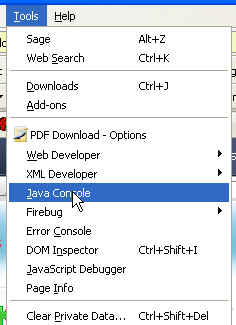
Note that there were problems in the Java Plug-in 1.6 with Firefox. Prior to Java Plugin 1.6.0_02, the Java Plug-in was incompletely recognized by Firefox, and so the menu item wasn't visible. The problem was a Sun Java Plug-in bug and has been fixed in 1.6.0_02. If you are using Java 1.6, I recommend that you ensure that you either have automatic updates enabled for Java (use the Java Control Panel to set this up), or explicitly update your Java 1.6 installation -- again, using the Java Control Panel. For details, and lots more about Java and Firefox, see http://kb.mozillazine.org/Java. |
|
This page was last modified on 02 October, 2007 |