|
| |
Not only does JList delegate
responsibility for data management to a list model, it also delegates
responsibility for tracking of selected items to a list selection model --
specifically, a class that implements the ListSelectionModel
interface.
List selection models provide support for three selection modes:
- Single selection mode -- allows only a single item in the list to
be selected at any given time.
- Single interval selection mode -- allows multiple selections, but
the selections must be contiguous.
- Multiple interval selection mode -- allows multiple contiguous
intervals of selected items.
The default selection mode for JList
is multiple interval selection.
Example of List Model and List Selection
Here is an example of the use of a List Model to add to and remove items
from a list model for a list. It uses an instance of DefaultListModel as
the model for a single JList.
In addition, it provides a simple example of how to use list selection.
Here's the code:
package swingExamples;

import java.awt.BorderLayout;
import java.awt.Container;
import java.awt.Font;
import java.awt.GridLayout;

import java.awt.event.ActionEvent;
import java.awt.event.ActionListener;

import javax.swing.DefaultListModel;
import javax.swing.JButton;
import javax.swing.JFrame;
import javax.swing.JList;
import javax.swing.JPanel;
import javax.swing.JScrollPane;

public class ModifiableListTest extends JFrame
{
  public ModifiableListTest()
  {
    setTitle("Modifiable List Test");
    setSize(300, 350);
    setDefaultCloseOperation(EXIT_ON_CLOSE);

    m_list.setFont(new Font("SansSerif", Font.BOLD, 14));

    Container contentPane = getContentPane();
    JPanel outerPane = new JPanel();
    outerPane.add(new ControlPanel());
    contentPane.add(outerPane, BorderLayout.WEST);
    contentPane.add(
        new JScrollPane(m_list), BorderLayout.CENTER);
  }

  private void addAnimals()
  {
    DefaultListModel model =
        (DefaultListModel) m_list.getModel();
    for (int i = 0; i < m_animals.length; i++)
    {
      model.addElement(m_animals[i]);
    }
  }

  private void addFishes()
  {
    DefaultListModel model =
        (DefaultListModel) m_list.getModel();
    for (int i = 0; i < m_fishes.length; i++)
    {
      model.addElement(m_fishes[i]);
    }
  }

  private int removeSelectedItems()
  {
    DefaultListModel model =
        (DefaultListModel) m_list.getModel();
    int[] selectedItems = m_list.getSelectedIndices();
    for (int i = 0; i < selectedItems.length; i++)
    {
      model.removeElementAt(selectedItems[i] - i);
    }
    // Return count of remaining elements
    return model.getSize();
  }

  private void removeAllItems()
  {
    DefaultListModel model =
        (DefaultListModel) m_list.getModel();
    model.removeAllElements();
  }

  // Private data for ModifiableListTest class
  private JList m_list = new JList( new DefaultListModel() );

  private static final String[] m_animals =
  {
    "Ardvaark", "Beaver", "Opossum",
    "Squirrel", "Moose", "Rabbit"
  };

  private static final String[] m_fishes =
  {
    "Skate", "Tuna", "Salmon", "Trout",
    "Shark", "Halibut", "Eel"
  };

  ////// Inner classes ///////

  private class ControlPanel extends JPanel
      implements ActionListener
  {
    public ControlPanel()
    {
      setLayout( new GridLayout(4, 1) );
                          // 4 rows, 1 column
      m_addAnimalsButton.addActionListener(this);
      add(m_addAnimalsButton);
      m_addFishesButton.addActionListener(this);
      add(m_addFishesButton);
      m_removeSelected.addActionListener(this);
      add(m_removeSelected);
      m_removeAll.addActionListener(this);
      add(m_removeAll);
    }

    public void actionPerformed(ActionEvent e)
    {
      JButton button = (JButton) e.getSource();
      if (button == m_addAnimalsButton)
      {
        m_addAnimalsButton.setEnabled(false);
                    // We can only add them once
        addAnimals();
      }
      else if (button == m_addFishesButton)
      {
        m_addFishesButton.setEnabled(false);
                    // We can only add them once
        addFishes();
      }
      else if (button == m_removeSelected)
      {
        int remaining = removeSelectedItems();
        if (remaining == 0)
        {
          m_addAnimalsButton.setEnabled(true);
                                  // Reenable
          m_addFishesButton.setEnabled(true);
                                  // Reenable
        }
      }
      else if (button == m_removeAll)
      {
        removeAllItems();
        m_addAnimalsButton.setEnabled(true);
                                  // Reenable
        m_addFishesButton.setEnabled(true);
                                  // Reenable
      }
    }

    // Private data for ControlPanel inner class
    private JButton m_addAnimalsButton =
                  new JButton("Add Animals");
    private JButton m_addFishesButton =
                  new JButton("Add Fishes");
    private JButton m_removeSelected =
                  new JButton("Remove Selected Items");
    private JButton m_removeAll =
                  new JButton("Remove All Items");
  }

  /**
   * Main entry point for program
   */
  public static void main(String[] args)
  {
    ModifiableListTest frame = new ModifiableListTest();
    frame.setVisible(true);
  }
}
|
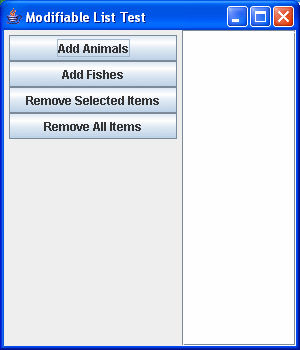
When run, this produces a frame that looks like this:
|
Initial view
 |
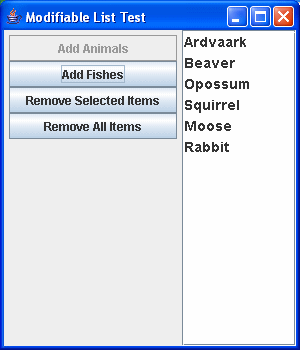
After clicking
on "Add Animals"
 |
|
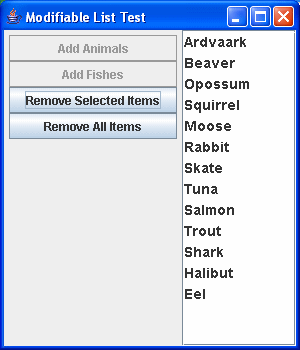
After clicking on "Add Fishes"
 |
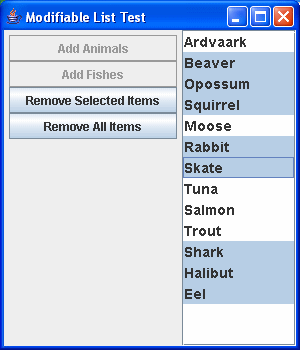
After selecting a number of items:
 |
|
After clicking "Remove Selected Items"
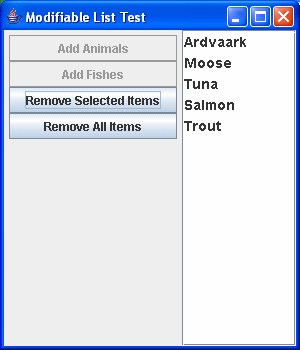 |
After clicking on "Remove All Items"
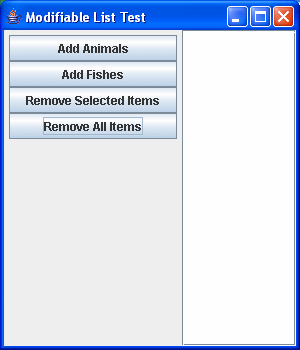 |
|
