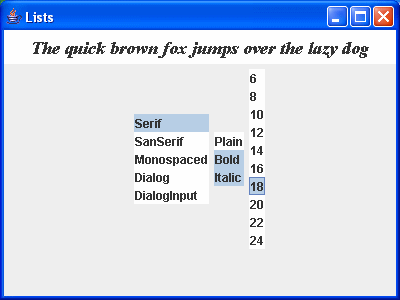
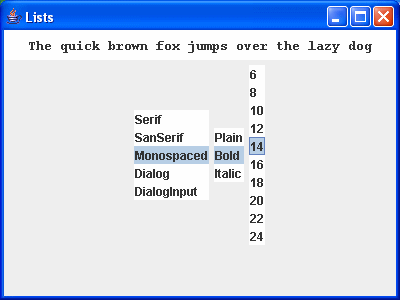
package swingExamples;

import java.awt.BorderLayout;
import java.awt.Color;
import java.awt.Container;
import java.awt.Font;

import javax.swing.JFrame;
import javax.swing.JList;
import javax.swing.JLabel;
import javax.swing.JPanel;
import javax.swing.ListSelectionModel;

import javax.swing.event.ListSelectionEvent;
import javax.swing.event.ListSelectionListener;

class ListsPanel extends JPanel
{
  public ListsPanel()
  {
    setLayout(new BorderLayout());
    add(new TextPanel(), BorderLayout.NORTH);
    add(new InputPanel(), BorderLayout.CENTER);
  }

  void setTextFont()
  {
    m_text.setFont(new Font(m_name, m_style, m_size));
  }

  /////// Private data /////
  private String m_name = "SanSerif"; // Current font name
  private int m_style = Font.PLAIN; // Current font style
  private int m_size = 14; // Current font point size

  private JLabel m_text =
      new JLabel(
      "The quick brown fox jumps over the lazy dog");

  /////// Inner classes /////
  class TextPanel extends JPanel
  {
    public TextPanel()
    {
      setBackground(Color.white);
      add(m_text);
      setTextFont();
    }
  }

  class InputPanel extends JPanel
      implements ListSelectionListener
  {
    public InputPanel()
    {
      m_fontNameList = new JList(m_fontNames);
      m_fontNameList.setSelectionMode(
          ListSelectionModel.SINGLE_SELECTION);
      m_fontNameList.addListSelectionListener(this);
      add(m_fontNameList);
      m_fontStyleList = new JList(m_fontStyles);
      m_fontStyleList.setSelectionMode(
          ListSelectionModel.MULTIPLE_INTERVAL_SELECTION);
      m_fontStyleList.addListSelectionListener(this);
      add(m_fontStyleList);
      m_fontSizeList = new JList(m_fontSizes);
      m_fontSizeList.setSelectionMode(
          ListSelectionModel.SINGLE_SELECTION);
      m_fontSizeList.addListSelectionListener(this);
      add(m_fontSizeList);
    }

    public void valueChanged(ListSelectionEvent ev)
    {
      JList source = (JList) ev.getSource();
      if (source == m_fontNameList)
      {
        setFontName();
      }
      else if (source == m_fontStyleList)
      {
        setFontStyle();
      }
      else if (source == m_fontSizeList)
      {
        setFontSize();
      }
      setTextFont();
    }

    private void setFontName()
    {
      String name =
          (String) m_fontNameList.getSelectedValue();
      m_name = name;
    }

    private void setFontStyle()
    {
      Object[] styles =
          m_fontStyleList.getSelectedValues();
      int stylesSet = 0;
      for (int i = 0; i < styles.length; i++)
      {
        String style = (String) styles[i];
        if (style.equals("Plain"))
        {
          stylesSet |= Font.PLAIN;
        }
        else if (style.equals("Bold"))
        {
          stylesSet |= Font.BOLD;
        }
        else if (style.equals("Italic"))
        {
          stylesSet |= Font.ITALIC;
        }
      }
      m_style = stylesSet;
    }

    private void setFontSize()
    {
      String size =
          (String) m_fontSizeList.getSelectedValue();
      m_size = Integer.parseInt(size);
    }

    ///// Private data /////
    private JList m_fontNameList;  // Font names
    private JList m_fontStyleList; // Font styles
    private JList m_fontSizeList;  // Font sizes
  }

  private static final String[] m_fontNames =
  {
    "Serif", "SanSerif", "Monospaced",
    "Dialog", "DialogInput"
  };
  private static final String[] m_fontStyles =
  {
    "Plain", "Bold", "Italic"
  };
  private static final String[] m_fontSizes =
  {
    "6", "8", "10", "12", "14",
    "16", "18", "20", "22", "24"
  };
}

class ListsFrame extends JFrame
{
  public ListsFrame()
  {
    setTitle("Lists");
    setSize(400, 300);
    setDefaultCloseOperation(EXIT_ON_CLOSE);
    Container contentPane = getContentPane();
    contentPane.add( new ListsPanel() );
  }
}

public class Lists
{
  public static void main(String[] args)
  {
    ListsFrame frame = new ListsFrame();
    frame.setVisible(true);
  }
}
|