|
| |
Combo boxes (JComboBox) are similar to list boxes (JList), except:
- Combo boxes take up less vertical space
- Combo boxes can be editable -- that is, they can present a set of
choices, and in addition allow the user to enter a choice not listed.
- List boxes support multiple selections, and delegate selection
responsibilities to an object that implements the interface
ListSelectionModel,
while combo boxes only support single selection, and selection is handled by
the combo box models.
- Combo boxes support key selection, while list boxes do not.
- List boxes do not provide any methods for directly adding, inserting, or removing
items directly to/from a list box. You must modify the list model to accomplish these actions.
- Items can be directly added to and removed from a combo box.
Here's what happens if we take the first List Box example above, and
replace two of its JLists with JComboBoxes:
package swingExamples;

import java.awt.BorderLayout;
import java.awt.Color;
import java.awt.Container;
import java.awt.Font;

import java.awt.event.ActionEvent;
import java.awt.event.ActionListener;

import javax.swing.JComboBox;
import javax.swing.JFrame;
import javax.swing.JLabel;
import javax.swing.JList;
import javax.swing.JPanel;
import javax.swing.ListSelectionModel;

import javax.swing.event.ListSelectionEvent;
import javax.swing.event.ListSelectionListener;

class ComboBoxesPanel extends JPanel
{
  public ComboBoxesPanel()
  {
    setLayout(new BorderLayout());
    add(new TextPanel(), BorderLayout.NORTH);
    add(new InputPanel(), BorderLayout.CENTER);
  }

  void setTextFont()
  {
    m_text.setFont(new Font(m_name, m_style, m_size));
    // Note: No repaint() necessary here, in this case.
  }

  /////// Private data /////
  private String m_name = "SanSerif"; // Current font name
  private int m_style = Font.PLAIN; // Current font style
  private int m_size = 14; // Current font point size

  private JLabel m_text =
      new JLabel(
      "The quick brown fox jumps over the lazy dog");

  /////// Inner classes /////
  class TextPanel extends JPanel
  {
    public TextPanel()
    {
      setBackground(Color.white);
      add(m_text);
      setTextFont();
    }
  }

  class InputPanel extends JPanel
      implements ActionListener, ListSelectionListener
  {
    public InputPanel()
    {
      m_fontNameList = new JComboBox(m_fontNames);
      m_fontNameList.addActionListener(this);
      add(m_fontNameList);
      m_fontStyleList = new JList(m_fontStyles);
      m_fontStyleList.setSelectionMode(
          ListSelectionModel.MULTIPLE_INTERVAL_SELECTION);
      m_fontStyleList.addListSelectionListener(this);
      add(m_fontStyleList);
      m_fontSizeList = new JComboBox(m_fontSizes);
      m_fontSizeList.setEditable(true);
      m_fontSizeList.addActionListener(this);
      add(m_fontSizeList);
    }

    public void actionPerformed(ActionEvent ev)
    {
      JComboBox source = (JComboBox) ev.getSource();
      if (source == m_fontNameList)
      {
        setFontName();
      }
      else if (source == m_fontSizeList)
      {
        setFontSize();
      }
      setTextFont();
    }

    public void valueChanged(ListSelectionEvent ev)
    {
      JList source = (JList) ev.getSource();
      if (source == m_fontStyleList)
      {
        setFontStyle();
      }
      setTextFont();
    }

    private void setFontName()
    {
      String name =
          (String) m_fontNameList.getSelectedItem();
      m_name = name;
    }

    private void setFontStyle()
    {
      Object[] styles =
          m_fontStyleList.getSelectedValues();
      int stylesSet = 0;
      for (int i = 0; i < styles.length; i++)
      {
        String style = (String) styles[i];
        if (style.equals("Plain"))
        {
          stylesSet |= Font.PLAIN;
        }
        else if (style.equals("Bold"))
        {
          stylesSet |= Font.BOLD;
        }
        else if (style.equals("Italic"))
        {
          stylesSet |= Font.ITALIC;
        }
      }
      m_style = stylesSet;
    }

    private void setFontSize()
    {
      String size =
          (String) m_fontSizeList.getSelectedItem();
      try
      {
        m_size = Integer.parseInt(size);
      }
      catch (NumberFormatException ex)
      {
        // Since the combo box is editable, we need to catch
        // any invalid numbers, and then do nothing
      }
    }

    ///// Private data /////
    private JComboBox m_fontNameList; // Font names
    private JList m_fontStyleList;    // Font styles
    private JComboBox m_fontSizeList; // Font sizes
  }

  private static final String[] m_fontNames =
  {
    "Serif", "SanSerif", "Monospaced",
    "Dialog", "DialogInput"
  };
  private static final String[] m_fontStyles =
  {
    "Plain", "Bold", "Italic"
  };
  private static final String[] m_fontSizes =
  {
    "6", "8", "10", "12", "14",
    "16", "18", "20", "22", "24"
  };
}

class ComboBoxesFrame extends JFrame
{
  public ComboBoxesFrame()
  {
    setTitle("ComboBoxes");
    setSize(400, 300);
    setDefaultCloseOperation(EXIT_ON_CLOSE);
    Container contentPane = getContentPane();
    contentPane.add( new ComboBoxesPanel() );
  }
}

public class ComboBoxes
{
  public static void main(String[] args)
  {
    ComboBoxesFrame frame = new ComboBoxesFrame();
    frame.setVisible(true);
  }
}
|
which produces the following:
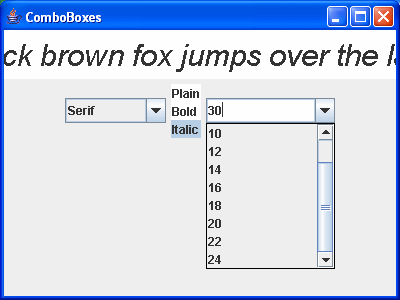
Note the following:
- We can't replace the style list box with a combo box, because we need
multiple selection support.
- The combo box for the font name is not editable; we only support
the set of names listed.
- The combo box for the font size is editable, because the user may
wish to choose a size other than the ones supplied.
|
