|
| |
We can change the layout further, by the use of rigid areas:
package swingExamples;

import java.awt.BorderLayout;
import java.awt.Container;
import java.awt.Dimension;
import javax.swing.Box;
import javax.swing.JButton;
import javax.swing.JFrame;
import javax.swing.JLabel;
import javax.swing.JPanel;
import javax.swing.JTextField;

class BoxLayoutExamplePanel extends JPanel
{
  public BoxLayoutExamplePanel()
  {
    setLayout( new BorderLayout() );

    // Create a horizontal box & populate it
    Box hbox1 = Box.createHorizontalBox();
    hbox1.add( new JLabel("Name:") );
    hbox1.add( Box.createHorizontalStrut(10) );
    JTextField nameTextField = new JTextField(10);
    nameTextField.setMaximumSize(
        nameTextField.getPreferredSize() );
    hbox1.add(nameTextField);

    // Create another horizontal box & populate it
    Box hbox2 = Box.createHorizontalBox();
    hbox2.add( new JLabel("Password:") );
    hbox2.add( Box.createHorizontalStrut(10) );
    JTextField passwordTextField = new JTextField(10);
    passwordTextField.setMaximumSize(
        passwordTextField.getPreferredSize() );
    hbox2.add(passwordTextField);

    // Create yet another horizontal box & populate it
    Box hbox3 = Box.createHorizontalBox();
    hbox3.add( new JButton("OK") );
    hbox3.add( Box.createHorizontalStrut(10) );
    hbox3.add( new JButton("Cancel") );

    // Now, create a vertical box, &
    // add the horizontal boxes to it.
    Box vbox = Box.createVerticalBox();
    vbox.add(hbox1);
    vbox.add(hbox2);
    vbox.add( Box.createRigidArea(
        new Dimension(10, 80) ) );
    vbox.add(hbox3);

    // Finally, add the vertical box to the
    // center of the panel's border layout.
    add(vbox, BorderLayout.CENTER);
  }
}

public class BoxLayoutExample5 extends JFrame
{
  public BoxLayoutExample5()
  {
    setDefaultCloseOperation(EXIT_ON_CLOSE);
    setTitle("BoxLayout");
    Container contentPane = getContentPane();
    contentPane.add( new BoxLayoutExamplePanel() );
  }

  public static void main(String[] args)
  {
    JFrame frame = new BoxLayoutExample5();
    frame.setSize(300, 200);
    frame.setVisible(true);
  }
}
|
which produces:
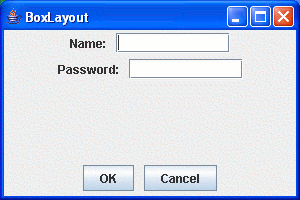
In other words, a rigid area is way of inserting both vertical and horizontal
space.
|
