|
| |
Before we go any further, we need to introduce the concept of combining
horizontal and vertical box layouts. This is further simplified by the use
of the Box container.
Let's modify our example so that we are actually producing more meaningful
content, and use both horizontal and vertical boxes:
package swingExamples;

import java.awt.BorderLayout;
import java.awt.Container;
import javax.swing.Box;
import javax.swing.JButton;
import javax.swing.JFrame;
import javax.swing.JLabel;
import javax.swing.JPanel;
import javax.swing.JTextField;

class BoxLayoutExamplePanel extends JPanel
{
  public BoxLayoutExamplePanel()
  {
    setLayout( new BorderLayout() );

    // Create a horizontal box & populate it
    Box hbox1 = Box.createHorizontalBox();
    hbox1.add( new JLabel("Name:") );
    hbox1.add( Box.createHorizontalStrut(10) );
    JTextField nameTextField = new JTextField(10);
    nameTextField.setMaximumSize(
        nameTextField.getPreferredSize() );
    hbox1.add(nameTextField);

    // Create another horizontal box & populate it
    Box hbox2 = Box.createHorizontalBox();
    hbox2.add( new JLabel("Password:") );
    hbox2.add( Box.createHorizontalStrut(10) );
    JTextField passwordTextField = new JTextField(10);
    passwordTextField.setMaximumSize(
        passwordTextField.getPreferredSize() );
    hbox2.add(passwordTextField);

    // Create yet another horizontal box & populate it
    Box hbox3 = Box.createHorizontalBox();
    hbox3.add( new JButton("OK") );
    hbox3.add( Box.createHorizontalStrut(10) );
    hbox3.add( new JButton("Cancel") );

    // Now, create a vertical box, & add the
    // horizontal boxes to it.
    Box vbox = Box.createVerticalBox();
    vbox.add(hbox1);
    vbox.add(hbox2);
    vbox.add(hbox3);

    // Finally, add the vertical box to the center
    // of the panel's border layout.
    add(vbox, BorderLayout.CENTER);
  }
}

public class BoxLayoutExample4 extends JFrame
{
  public static void main(String[] args)
  {
    JFrame frame = new BoxLayoutExample4();
    frame.setSize(300, 200);
    frame.setVisible(true);
  }
  public BoxLayoutExample4()
  {
    setDefaultCloseOperation(EXIT_ON_CLOSE);
    setTitle("BoxLayout");
    Container contentPane = getContentPane();
    contentPane.add(new BoxLayoutExamplePanel());
  }
}
|
which produces:
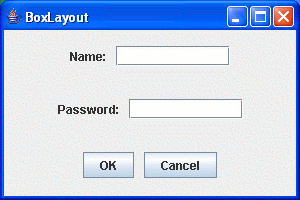
This is starting to produce more pleasing results.
|
