|
| |
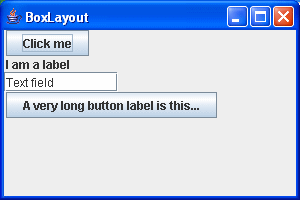
You'll note that the JTextField in the previous example expands unreasonably, filling
the remaining space. One solution to this is to set the maximum size
of the component, as follows:
package swingExamples;

import java.awt.Container;

import javax.swing.BoxLayout;
import javax.swing.JButton;
import javax.swing.JFrame;
import javax.swing.JLabel;
import javax.swing.JPanel;
import javax.swing.JTextField;

class BoxLayoutExamplePanel extends JPanel
{
  public BoxLayoutExamplePanel()
  {
    setLayout(new BoxLayout(this, BoxLayout.Y_AXIS));
    add(new JButton("Click me"));
    add(new JLabel("I am a label"));
    JTextField textField = new JTextField("Text field", 20);
    textField.setMaximumSize(textField.getPreferredSize());
    add(textField);
    add(new JButton("A very long button label is this..."));
  }
}

public class BoxLayoutExample2 extends JFrame
{
  public BoxLayoutExample2()
  {
    setDefaultCloseOperation(EXIT_ON_CLOSE);
    setTitle("BoxLayout");
    Container contentPane = getContentPane();
    contentPane.add(new BoxLayoutExamplePanel());
  }

  public static void main(String[] args)
  {
    JFrame frame = new BoxLayoutExample2();
    frame.setSize(300, 200);
    frame.setVisible(true);
  }
}
|
which produces:
|
