|
| | Here's an example of how you can create a message dialog:
package swingExamples;

import javax.swing.JOptionPane;

public class SimpleMessage1
{
  public static void main(String[] args)
  {
    JOptionPane.showMessageDialog(
        null, // The parent frame
        "You are hereby informed of an important fact."
              // A message
        );
  }
}
|
which produces the following:
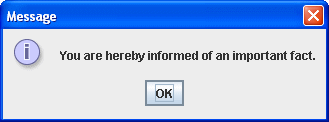
Note that there are three obvious components of this dialog:
- The message
- An icon to the left of the message, indicating what kind of message it
is (Informational, Warning, Error, etc.)
- The OK button.
If we modify this simple example a little:
package swingExamples;

import javax.swing.JOptionPane;

public class SimpleMessage2
{
  public static void main(String[] args)
  {
    JOptionPane.showMessageDialog(
        null,     // The parent frame
        "You are hereby informed of an error.",
                  // a message
        "Error",  // a title
        JOptionPane.ERROR_MESSAGE
                  // The message type
        );
  }
}
|
The result looks like this:
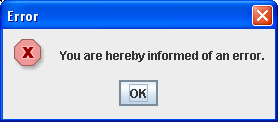
Note two things:
- The titlebar shows the specified title
- The icon has changed to indicate that an error is indicated.
If we wanted to show a warning:
package swingExamples;

import javax.swing.JOptionPane;

public class SimpleMessage3
{
  public static void main(String[] args)
  {
    JOptionPane.showMessageDialog(
        null, // The parent frame
        "You are hereby warned.",
              // a message
        "Warning", // a title
        JOptionPane.WARNING_MESSAGE
              // Warning type
        );
  }
}
|
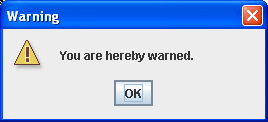
it would look like this:
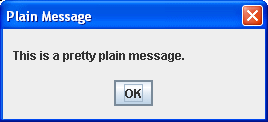
You also have the option of not showing an icon:
package swingExamples;

import javax.swing.JOptionPane;

public class SimpleMessage4
{
  public static void main(String[] args)
  {
    JOptionPane.showMessageDialog(
        null, // The parent frame
        "This is a pretty plain message.",
              // a message
        "Plain Message", // a title
        JOptionPane.PLAIN_MESSAGE
              // Plain type
        );
  }
}
|
which looks like:
You can also ask a question:
package swingExamples;

import javax.swing.JOptionPane;

public class SimpleMessage5
{
  public static void main(String[] args)
  {
    JOptionPane.showMessageDialog(
        null, // The parent frame
        "Are you sure you want to do this?",
              // a message
        "Just checking...", // a title
        JOptionPane.QUESTION_MESSAGE
              // Question type
        );
  }
}
|
which looks like this:
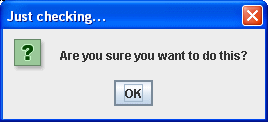
Of course, when the only option is OK, it's not terribly useful!
That's where Confirm Dialogs come in...
|
