|
| |
Sometimes, we want to ask a question that has an answer more complex than
Yes, No, or Cancel. So there's also an Input Dialog:
package swingExamples;

import javax.swing.JOptionPane;

public class SimpleInput1
{
  public static void main(String[] args)
  {
    JOptionPane.showInputDialog(
        null, // The parent frame
        "What is your mother's maiden name?"
              // a message
        );
  }
}
|
which produces:
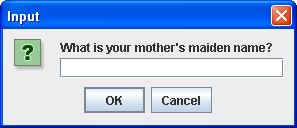
But then, we need to obtain the answer to this question:
package swingExamples;

import javax.swing.JOptionPane;

public class SimpleInput2
{
  public static void main(String[] args)
  {
    String name = JOptionPane.showInputDialog(
        null, // The parent frame
        "What is your mother's maiden name?"
              // a message
        );
    System.out.println("You responded with: " + name);
  }
}
|
If the user entered "Mary", and clicked on OK, the program prints
out:
You responded with: Mary
On the other hand, if the user clicked on Cancel, it prints out
You responded with: null
So you need to check the response for null!
More Complex Input
Maybe the answer isn't so open-ended. Perhaps there is a list of
items that you wish the user to choose from:
package swingExamples;

import javax.swing.JOptionPane;

public class SimpleInput3
{
  public static void main(String[] args)
  {
    String[] choices = new String[]
    { "Left", "Right", "Straight ahead" };
    String name = (String) JOptionPane.showInputDialog(
        null, // The parent frame
        "Select one of the following:", // the message
        "Select", // title
        JOptionPane.INFORMATION_MESSAGE, // message type
        null, // icon
        choices, // Choices to be presented
        choices[2] // Default choice
        );
    System.out.println("You responded with: " + name);
  }
}
|
which produces this:
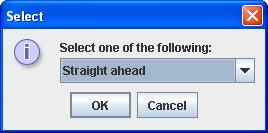
Note that the text field has automatically changed into a choice (combo
box).
Also, note that if the user clicks on the Cancel button, the value returned
will be null.
|
