|
| |
Confirm Dialogs
It's not very nice to ask a question, and then only give one option for
an answer. So there's also a Confirm Dialog, where we can specify more
buttons be made available:
package swingExamples;

import javax.swing.JOptionPane;

public class SimpleConfirm1
{
  public static void main(String[] args)
  {
    JOptionPane.showConfirmDialog(
        null, // The parent frame
        "Are you sure you want to do this?",
              // a message
        "Just checking...", // a title
        JOptionPane.YES_NO_OPTION,
                      // The option type
        JOptionPane.QUESTION_MESSAGE
                      // the message type
        );
  }
}
|
which produces:
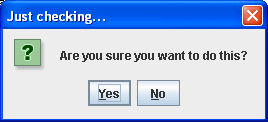
Now, we'd like to know how the user answered, so we can do the following:
package swingExamples;

import javax.swing.JOptionPane;

public class SimpleConfirm2
{
  public static void main(String[] args)
  {
    int status = JOptionPane.showConfirmDialog(
        null, // The parent frame
        "Are you sure you want to do this?",
              // a message
        "Just checking...", // a title
        JOptionPane.YES_NO_OPTION,
                      // The option type
        JOptionPane.QUESTION_MESSAGE
                      // the message type
        );
    if (status == JOptionPane.YES_OPTION)
    {
      System.out.println("You said Yes!");
    }
    else if (status == JOptionPane.NO_OPTION)
    {
      System.out.println("You said No!");
    }
  }
}
|
which produces the following, after the user responds by clicking on the No
button:
You said No!
Now, sometimes it's necessary to give the user a third choice: Yes,
No, or Cancel, so here's how you would do that:
package swingExamples;

import javax.swing.JOptionPane;

public class SimpleConfirm3
{
  public static void main(String[] args)
  {
    int status = JOptionPane.showConfirmDialog(
        null, // The parent frame
        "Are you sure you want to do this?",
              // a message
        "Just checking...", // a title
        JOptionPane.YES_NO_CANCEL_OPTION,
              // The option type
        JOptionPane.QUESTION_MESSAGE
              // the message type
        );
    if (status == JOptionPane.YES_OPTION)
       System.out.println("You said Yes!");
    else if (status == JOptionPane.NO_OPTION)
       System.out.println("You said No!");
    else if (status == JOptionPane.CANCEL_OPTION)
       System.out.println("You cancelled!");
  }
}
|
which produces:
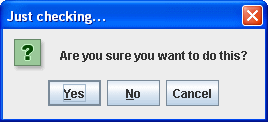
and in response to the user clicking on Cancel, the program prints out:
You cancelled!
|
