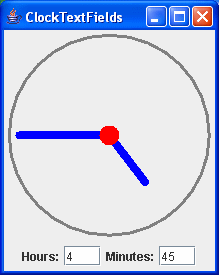
package swingExamples;

import java.awt.BasicStroke;
import java.awt.BorderLayout;
import java.awt.Color;
import java.awt.Container;
import java.awt.Dimension;
import java.awt.Graphics;
import java.awt.Graphics2D;

import java.awt.geom.Ellipse2D;
import java.awt.geom.Line2D;
import java.awt.geom.Point2D;

import javax.swing.JFrame;
import javax.swing.JLabel;
import javax.swing.JPanel;
import javax.swing.JTextField;

import javax.swing.event.DocumentEvent;
import javax.swing.event.DocumentListener;

class ClockTextFieldsFrame extends JFrame
{
  public ClockTextFieldsFrame()
  {
    setTitle("ClockTextFields");
    setDefaultCloseOperation(EXIT_ON_CLOSE);

    // Create main panel and add it to the content pane
    JPanel mainPanel = new JPanel(new BorderLayout());
    Container contentPane = getContentPane();
    contentPane.add(mainPanel);

    // Add the clock panel to the center of the main panel
    mainPanel.add(m_clockPanel, BorderLayout.CENTER);

    // Prepare a document listener
    DocumentListener listener = new ClockFieldListener();

    // Create the input panel containing text input fields,
    // and connect the text input fields up with the listener
    JPanel inputPanel = new JPanel();
    inputPanel.add(new JLabel("Hours:"));
    inputPanel.add(m_hourField);
    m_hourField.getDocument().addDocumentListener(listener);

    inputPanel.add(new JLabel("Minutes:"));
    inputPanel.add(m_minuteField);
    m_minuteField.getDocument().addDocumentListener(listener);

    // Add the input panel to the south of the main panel
    mainPanel.add(inputPanel, BorderLayout.SOUTH);

    // Set the clock's initial state
    setClock();

    // Self-size the frame.
    pack();
  }

  private void setClock()
  {
    try
    {
      int hours =
          Integer.parseInt(m_hourField.getText().trim());
      int minutes =
          Integer.parseInt(m_minuteField.getText().trim());
      m_clockPanel.setTime(hours, minutes);
    }
    catch (NumberFormatException nfe)
    {
      // Don't set the clock on formatting errors.
    }
  }

  /// Private data ///
  private ClockPanel m_clockPanel = new ClockPanel();
  private JTextField m_hourField = new JTextField("12", 3);
  private JTextField m_minuteField = new JTextField("00", 3);

  /// Inner class ///
  private class ClockFieldListener
      implements DocumentListener
  {
    public void insertUpdate(DocumentEvent event)
    {
      setClock();
    }

    public void removeUpdate(DocumentEvent event)
    {
      setClock();
    }

    public void changedUpdate(DocumentEvent event)
    {}
  }
}

class ClockPanel extends JPanel
{
  public ClockPanel()
  {
    // Set the preferred size of the panel
    // for layout purposes (pack)
    setPreferredSize(
        new Dimension(2 * RADIUS + 1 + 10, // Insets
                      2 * RADIUS + 1 + 10) // Insets
                    );
  }

  public void paintComponent(Graphics g)
  {
    super.paintComponent(g);

    Graphics2D g2 = (Graphics2D) g;

    // Create a BasicStroke for drawing outlines
    BasicStroke stroke = new BasicStroke(3.0F,
        BasicStroke.CAP_ROUND,
        BasicStroke.JOIN_ROUND);
    g2.setStroke(stroke);

    // Draw the outline of the clock
    Ellipse2D circle =
        new Ellipse2D.Double(INSET, INSET,
                             2 * RADIUS,
                             2 * RADIUS);
    g2.setPaint(Color.GRAY);
    g2.draw(circle);

    stroke = new BasicStroke(
                  8.0F,
                  BasicStroke.CAP_ROUND,
                  BasicStroke.JOIN_ROUND);
    g2.setStroke(stroke);

    // Draw the hour hand
    double hourDegrees =
        90 - 360 * m_minutes / (12 * 60);
    double hourAngle = Math.toRadians(hourDegrees);
    g2.setPaint(Color.BLUE);
    drawHand(g2, hourAngle, HOUR_HAND_LENGTH);

    // Draw the minute hand
    double minuteDegrees = 90 - 360 * m_minutes / 60;
    double minuteAngle = Math.toRadians(minuteDegrees);
    g2.setPaint(Color.BLUE);
    drawHand(g2, minuteAngle, MINUTE_HAND_LENGTH);

    // Draw the axle
    Ellipse2D axle =
        new Ellipse2D.Double(INSET + RADIUS - AXLE_RADIUS,
                             INSET + RADIUS - AXLE_RADIUS,
                             2 * AXLE_RADIUS,
                             2 * AXLE_RADIUS);
    g2.setPaint(Color.RED);
    g2.fill(axle);
  }

  private void drawHand(Graphics2D g2,
                        double angle, double handLength)
  {
    Point2D end =
        new Point2D.Double(INSET + RADIUS +
                              handLength * Math.cos(angle),
                           INSET + RADIUS -
                              handLength * Math.sin(angle));
    Point2D center =
        new Point2D.Double(INSET + RADIUS, INSET + RADIUS);
    g2.draw(new Line2D.Double(center, end));
  }

  public void setTime(int hours, int minutes)
  {
    m_minutes = hours * 60 + minutes;
    repaint();
  }

  ////// Private data //////
  private static final int INSET = 5;
  private static final int RADIUS = 100;
  private static final double HOUR_HAND_LENGTH =
                                   0.6 * RADIUS;
  private static final double MINUTE_HAND_LENGTH =
                                   0.9 * RADIUS;
  private static final double AXLE_RADIUS = 10;

  private double m_minutes = 0;
}


public class ClockTextFields
{
  public static void main(String[] args)
  {
    ClockTextFieldsFrame frame =
                new ClockTextFieldsFrame();
    frame.setVisible(true);
  }
}
|