|
| |
Until Java 1.4, the previous attempts at producing validated integer input in
a text field were pretty much what you had to do. Using Document models,
etc., was not for the faint of heart.
In Java 1.4, the Java developers produced a new text input component, called JFormattedTextField,
which allows you to do such checking of input -- not only for integers, but for
dates and more.
This area of Java is still not easy to deal with, but now at least there is a
well-defined (if not particularly well documented!) way of doing it.
Here's an example, which re-implements the ValidatedClock example using JFormattedTextFields:
package swingExamples;

import java.awt.BasicStroke;
import java.awt.BorderLayout;
import java.awt.Color;
import java.awt.Container;
import java.awt.Dimension;
import java.awt.Graphics;
import java.awt.Graphics2D;
import java.awt.Insets;

import java.awt.event.ActionEvent;
import java.awt.event.ActionListener;

import java.awt.geom.Ellipse2D;
import java.awt.geom.Line2D;
import java.awt.geom.Point2D;
import java.text.NumberFormat;

import javax.swing.JButton;
import javax.swing.JFormattedTextField;
import javax.swing.JFrame;
import javax.swing.JLabel;
import javax.swing.JPanel;
import javax.swing.event.DocumentEvent;
import javax.swing.event.DocumentListener;

class FormattedTextClockFrame extends JFrame
{
  public FormattedTextClockFrame()
  {
    setTitle("FormattedTextClock");
    setSize(300, 200);
    setDefaultCloseOperation(EXIT_ON_CLOSE);

    // Create main panel and add it to the content pane
    JPanel mainPanel = new JPanel(new BorderLayout());
    Container contentPane = getContentPane();
    contentPane.add(mainPanel);

    // Add the clock panel to the center of the main panel
    mainPanel.add(m_clockPanel, BorderLayout.CENTER);

    // Prepare a document listener
    DocumentListener listener = new ClockFieldListener();

    // Create the input panel containing text input fields,
    // and connect the text input fields up with the listener
    JPanel inputPanel = new JPanel();
    inputPanel.add(new JLabel("Hours:"));
    inputPanel.add(m_hourField);
    m_hourField.setColumns(3);
    m_hourField.setValue( new Long(12) );
    m_hourField.getDocument().addDocumentListener(listener);

    inputPanel.add(new JLabel("Minutes:"));
    inputPanel.add(m_minuteField);
    m_minuteField.setColumns(3);
    m_minuteField.setValue( new Long(0) );
    m_minuteField.getDocument().addDocumentListener(listener);

    // Add the Tick button and hook it up
    JButton tickButton = new JButton("Tick");
    tickButton.addActionListener(new ActionListener()
    {
      public void actionPerformed(ActionEvent ev)
      {
        m_clockPanel.tick();
      }
    }
    );
    inputPanel.add(tickButton);

    // Add the input panel to the south of the main panel
    mainPanel.add(inputPanel, BorderLayout.SOUTH);

    // Set the clock's initial state
    setClock();

    // Self-size the frame.
    pack();
  }

  private void setClock()
  {
    if (m_hourField.isValid() && m_minuteField.isValid())
    {
      long hours = (Long) m_hourField.getValue();
      long minutes = (Long) m_minuteField.getValue();
      m_clockPanel.setTime((int)hours, (int)minutes);
    }
  }

  /// Private data ///
  private ClockPanel m_clockPanel = new ClockPanel();
  private JFormattedTextField m_hourField =
      new JFormattedTextField( NumberFormat.getIntegerInstance() );
  private JFormattedTextField m_minuteField =
      new JFormattedTextField( NumberFormat.getIntegerInstance() );

  /// Inner class ///
  private class ClockFieldListener implements DocumentListener
  {
    public void insertUpdate(DocumentEvent event)
    {
      setClock();
    }

    public void removeUpdate(DocumentEvent event)
    {
      setClock();
    }

    public void changedUpdate(DocumentEvent event)
    {}
  }

  //// Inner class ////
  class ClockPanel extends JPanel
  {
    public ClockPanel()
    {
      // Set the preferred size of the panel
      // for layout purposes (pack)
      setPreferredSize(
          new Dimension(2 * RADIUS + 1 + 10, // Insets
          2 * RADIUS + 1 + 10) // Insets
          );
    }

    public void paintComponent(Graphics g)
    {
      super.paintComponent(g);

      Graphics2D g2 = (Graphics2D) g;

      // Create a BasicStroke for drawing outlines
      BasicStroke stroke =
          new BasicStroke(3.0F,
                          BasicStroke.CAP_ROUND,
                          BasicStroke.JOIN_ROUND);
      g2.setStroke(stroke);

      // Draw the outline of the clock
      Ellipse2D circle =
          new Ellipse2D.Double(INSET, INSET,
                               2 * RADIUS,
                               2 * RADIUS);
      g2.setPaint(Color.GRAY);
      g2.draw(circle);

      stroke = new BasicStroke(8.0F,
                               BasicStroke.CAP_ROUND,
                               BasicStroke.JOIN_ROUND);
      g2.setStroke(stroke);

      // Draw the hour hand
      double hourDegrees =
          90 - 360 * m_minutes / (12 * 60);
      double hourAngle = Math.toRadians(hourDegrees);
      g2.setPaint(Color.BLUE);
      drawHand(g2, hourAngle, HOUR_HAND_LENGTH);

      // Draw the minute hand
      double minuteDegrees =
          90 - 360 * m_minutes / 60;
      double minuteAngle = Math.toRadians(minuteDegrees);
      g2.setPaint(Color.BLUE);
      drawHand(g2, minuteAngle, MINUTE_HAND_LENGTH);

      // Draw the axle
      Ellipse2D axle =
          new Ellipse2D.Double(
                    INSET + RADIUS - AXLE_RADIUS,
                    INSET + RADIUS - AXLE_RADIUS,
                    2 * AXLE_RADIUS,
                    2 * AXLE_RADIUS);
      g2.setPaint(Color.RED);
      g2.fill(axle);
    }

    private void drawHand(Graphics2D g2,
                          double angle, double handLength)
    {
      Point2D end =
          new Point2D.Double(
                    INSET + RADIUS +
                    handLength * Math.cos(angle),
                    INSET + RADIUS -
                    handLength * Math.sin(angle));
      Point2D center =
          new Point2D.Double(INSET + RADIUS, INSET + RADIUS);
      g2.draw(new Line2D.Double(center, end));
    }

    public void setTime(int hours, int minutes)
    {
      m_minutes = hours * 60 + minutes;
      repaint();
    }

    public void tick()
    {
      m_minutes++;
      repaint();
    }

    ////// Private data //////
    private static final int INSET = 5;
    private static final int RADIUS = 100;
    private static final double HOUR_HAND_LENGTH =
        0.6 * RADIUS;
    private static final double MINUTE_HAND_LENGTH =
        0.9 * RADIUS;
    private static final double AXLE_RADIUS = 10;

    private long m_minutes = 0;
  }
}


public class FormattedTextClock
{
  public static void main(String[] args)
  {
    FormattedTextClockFrame frame =
        new FormattedTextClockFrame();
    frame.setVisible(true);
  }
}
|
which produces:
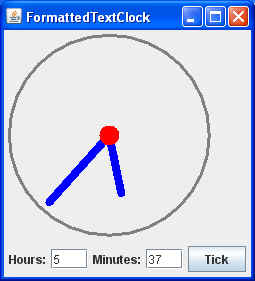
It's still not easy, but there's less code than before.
Text input fields and document models are not easy to deal with, so this is
as far as we'll go in this course.
|
