|
| |
A spinner is a component somewhat similar to a combo box, but
it shows only one item. It is represented by the JSpinner
class, and provides up and down arrows to move through its
set of values.
Spinners were introduced in Java 1.4.
A spinner is relatively flexible; you can set a spinner up to work with
a number of different choices, including bounded ranges such as days of the
week, months of the year, etc., and also unbounded ranges such as the set of
integers, etc.
As with other Swing components, you change the set of values a spinner is
associated with by setting up an appropriate spinner model.
Here's an example:
package swingExamples;

import java.awt.BorderLayout;
import java.awt.Container;
import java.awt.GridLayout;
import java.awt.event.ActionEvent;
import java.awt.event.ActionListener;

import javax.swing.BorderFactory;
import javax.swing.ButtonGroup;
import javax.swing.JFrame;
import javax.swing.JLabel;
import javax.swing.JPanel;
import javax.swing.JRadioButton;
import javax.swing.JSpinner;
import javax.swing.SpinnerDateModel;
import javax.swing.SpinnerListModel;
import javax.swing.SpinnerModel;
import javax.swing.SpinnerNumberModel;
import javax.swing.SwingUtilities;
import javax.swing.event.ChangeEvent;
import javax.swing.event.ChangeListener;

class SpinnersPanel extends JPanel
{
  public SpinnersPanel()
  {
    setLayout( new GridLayout(0, 3, 10, 10) );
    setBorder(
        BorderFactory.createCompoundBorder(
        BorderFactory.createEmptyBorder(5, 5, 5, 5),
        BorderFactory.createTitledBorder("Spinners:")
        ) );

    addSpinner( "Basic Spinner",
        new JSpinner() );
    addSpinner( "Date Spinner",
        new JSpinner( new SpinnerDateModel() ) );
    String[] weekdays =
    {
      "Sunday", "Monday", "Tuesday", "Wednesday",
      "Thursday", "Friday", "Saturday"
    };
    addSpinner( "List Spinner",
        new JSpinner( new SpinnerListModel(weekdays) ) );
    addSpinner( "Number Spinner",
        new JSpinner(
             new SpinnerNumberModel(0, 0, 100, 5) ) );
    addSpinner( "Rollover List Spinner (custom)",
        new JSpinner(
             new RolloverSpinnerListModel(weekdays) ) );
  }

  private void addSpinner(String description,
      JSpinner spinner)
  {
    add( new JLabel(description) );
    add(spinner);
    final JLabel valueLabel =
        new JLabel( spinner.getValue().toString() );
    add(valueLabel);
    spinner.addChangeListener(
        new ChangeListener()
        {
          public void stateChanged(ChangeEvent event)
          {
            JSpinner source = (JSpinner)event.getSource();
            SpinnerModel model = source.getModel();
            valueLabel.setText( model.getValue().toString() );
          }
        }
    );
  }

  /**
   * Finds the application's JFrame and [re]packs it.
   */
  private void repaintFrame()
  {
    SwingUtilities.getWindowAncestor(this).pack();
  }

  // Radio buttons for showing look and feel rendering of slider
  private ButtonGroup m_feelGroup = new ButtonGroup();
  private String[] m_feelCommands =
  {
    LookAndFeel.METAL, LookAndFeel.SYSTEM, LookAndFeel.MOTIF
  };
  private JRadioButton[] m_feelButtons =
  {
    new JRadioButton(LookAndFeel.METAL, true),
    new JRadioButton(LookAndFeel.SYSTEM),
    new JRadioButton(LookAndFeel.MOTIF)
  };
  // Add radio buttons to button group
  {
    int index = 0;
    for (JRadioButton button : m_feelButtons)
    {
      if (index == 0)
        button.setSelected(true);
      m_feelGroup.add(button);
      String command = m_feelCommands[index++];
      button.setActionCommand(command);
    }
  }
}

public class Spinners extends JFrame
{
  public Spinners()
  {
    super("Spinners");
    setDefaultCloseOperation(EXIT_ON_CLOSE);
    Container container = getContentPane();
    container.setLayout( new BorderLayout() );
    container.add(
        new SpinnersPanel(), BorderLayout.CENTER );
    container.add(
        new FeelPanel(), BorderLayout.SOUTH );
    setVisible(true);
    pack();
  }

  /**
   * Main entry point for application
   */
  public static void main(String[] args)
  {
    JFrame frame = new Spinners();
    frame.setVisible(true);
  }
}
|
package swingExamples;

import java.util.List;
import javax.swing.SpinnerListModel;

/**
 * A class to implement a "rollover" list model
 * for a JSpinner.  That is, it behaves like a
 * normal spinner list model, except that when
 * you move beyond the last item, or before the
 * first item, it "wraps around".
 */
public class RolloverSpinnerListModel
    extends SpinnerListModel
{
  public RolloverSpinnerListModel(Object[] items)
  {
    super(items);
  }

  public RolloverSpinnerListModel(List items)
  {
    super(items);
  }

  public Object getNextValue()
  {
    Object nextValue = super.getNextValue();
    if (nextValue == null)
      nextValue = getList().get(0);
    return nextValue;
  }

  public Object getPreviousValue()
  {
    Object prevValue = super.getPreviousValue();
    if (prevValue == null)
    {
      List list = getList();
      prevValue = list.get(list.size() - 1);
    }
    return prevValue;
  }
}
|
(The FeelPanel and LookAndFeel classes are the same
as in the Sliders example.)
Here's what this looks like on my Windows XP system:

and when I switch it to the System (in my case, Windows XP) L&F:

and to the Motif L&F:
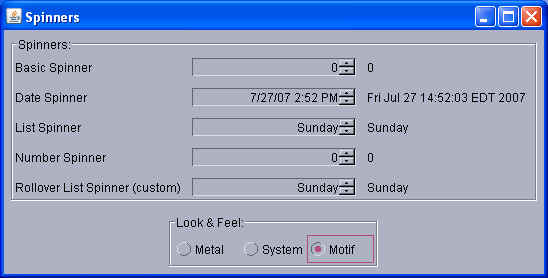
If you'd like to try this live, click on the launch button below:
 (You'll need Java
Web Start 1.5 or above to be working on your machine.)
(You'll need Java
Web Start 1.5 or above to be working on your machine.)
|
