|
| |
Now, to display the JList in the appropriate
font, we use a FontListCellRenderer:
package swingExamples;

import java.awt.BorderLayout;
import java.awt.Color;
import java.awt.Dimension;
import java.awt.Font;
import java.awt.GraphicsEnvironment;

import javax.swing.BorderFactory;
import javax.swing.JFrame;
import javax.swing.JLabel;
import javax.swing.JList;
import javax.swing.JPanel;
import javax.swing.JScrollPane;

import javax.swing.event.ListSelectionEvent;
import javax.swing.event.ListSelectionListener;

public class JListFontSelector2 extends JFrame
{
  public JListFontSelector2()
  {
    setTitle("JListFontSelector2");
    setDefaultCloseOperation(EXIT_ON_CLOSE);
    getContentPane().add( new JListFontPanel() );
    pack();
  }

  //// Inner classes ////
  class JListFontPanel extends JPanel
      implements ListSelectionListener
  {
    JListFontPanel()
    {
      setLayout( new BorderLayout() );

      JPanel listPanel = new JPanel();
      m_list.setSelectedIndex(0);
      m_list.setCellRenderer( new FontRenderer() );
      m_list.addListSelectionListener(this);
      listPanel.add( new JScrollPane(m_list) );
      add(listPanel, BorderLayout.SOUTH);

      JPanel fontPanel = new JPanel();
      fontPanel.setPreferredSize( new Dimension(500, 50) );
      fontPanel.setBackground(Color.WHITE);
      fontPanel.setBorder(
          BorderFactory.createCompoundBorder(
            BorderFactory.createEmptyBorder(5, 5, 5, 5),
            BorderFactory.createLineBorder(Color.BLUE)
            ) );
      String fontName =
          (String) m_list.getSelectedValue();
      m_fontLabel.setFont(
          new Font(fontName, Font.PLAIN, 16) );
      fontPanel.add(m_fontLabel);
      add(fontPanel, BorderLayout.NORTH);
    }

    public void valueChanged(ListSelectionEvent e)
    {
      JList source = (JList) e.getSource();
      String fontName = (String) source.getSelectedValue();
      m_fontLabel.setFont(
          new Font(fontName, Font.PLAIN, 16) );
    }

    private JList  m_list = new JList(FONT_NAMES);
    private JLabel m_fontLabel =
        new JLabel(
        "The quick brown fox jumps over the lazy dog");
  }

  private static final String[] FONT_NAMES =
      GraphicsEnvironment.getLocalGraphicsEnvironment()
                         .getAvailableFontFamilyNames();

  /**
   * Main entry point for program
   */
  public static void main(String[] args)
  {
    JListFontSelector2 frame = new JListFontSelector2();
    frame.setVisible(true);
  }
}
|
package swingExamples;

import java.awt.Color;
import java.awt.Component;
import java.awt.Dimension;
import java.awt.Font;
import java.awt.FontMetrics;
import java.awt.Graphics;

import javax.swing.JList;
import javax.swing.JPanel;
import javax.swing.ListCellRenderer;

public class FontRenderer extends JPanel
    implements ListCellRenderer
{
  public Component getListCellRendererComponent(
      JList list,
      Object value,
      int index,
      boolean isSelected,
      boolean cellHasFocus
      )
  {
    String fontName = (String) value;
    // Set a tooltip on this panel for the font name
    setToolTipText(fontName);

    m_font = new Font(fontName, Font.PLAIN, 14);
    m_background = isSelected ?
      list.getSelectionBackground() : list.getBackground();
    m_foreground = isSelected ?
      list.getSelectionForeground() : list.getForeground();
    return this;
  }

  public void paintComponent(Graphics g)
  {
    String text = m_font.getFamily();
    FontMetrics fm = g.getFontMetrics(m_font);
    g.setColor(m_background);
    g.fillRect(0, 0, getWidth(), getHeight());
    g.setColor(m_foreground);
    g.setFont(m_font);
    g.drawString(text, 0, fm.getAscent());
  }

  public Dimension getPreferredSize()
  {
    String text = m_font.getFamily();
    Graphics g = getGraphics();
    FontMetrics fm = g.getFontMetrics(m_font);
    return new Dimension(
        fm.stringWidth(text), fm.getHeight());
  }

  /// Private data ///
  private Font m_font;
  private Color m_background;
  private Color m_foreground;
}
|
which produces the following:
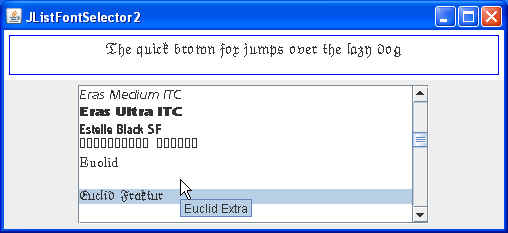
which is much improved.
Notice that it also shows those fonts which do not produce visible text (some
show no visible name; some show only boxes). So that you can tell which
font they represent, I added a "tool tip" which shows the font name if
you simply move the mouse over that entry in the list.
This shows that the FontListCellRenderer does not
have to extend from DefaultListCellRenderer, and
that it does not have to extend from JLabel.
|
