|
| |
All is not lost. We can control what is displayed in a JList
by the use of a ListCellRenderer. ListCellRenderer
is an interface which is declared as follows (stripped down to
its essentials):
package javax.swing;

import java.awt.Component;

public interface ListCellRenderer
{
    Component getListCellRendererComponent(
        JList list,
        Object value,
        int index,
        boolean isSelected,
        boolean cellHasFocus);
}
|
Once you've installed a cell renderer for a list, the renderer's getListCellRendererComponent()
method is called for each cell in the list. It returns a component that paints
the cell contents.
Here's how you can change the previous example to cause the JList
to display more appropriately:
package swingExamples;

import java.awt.BorderLayout;
import java.awt.Color;

import javax.swing.JFrame;
import javax.swing.JList;
import javax.swing.JPanel;
import javax.swing.JScrollPane;

import javax.swing.event.ListSelectionEvent;
import javax.swing.event.ListSelectionListener;

public class JListColorSelector2 extends JFrame
{
  public JListColorSelector2()
  {
    setTitle("JListColorSelector2");
    setDefaultCloseOperation(EXIT_ON_CLOSE);
    setSize(400, 300);
    getContentPane().add( new JListPanel() );
  }

  private static Color[] COLORS =
  {
    Color.BLACK, Color.BLUE,
    Color.CYAN, Color.DARK_GRAY,
    Color.GRAY, Color.GREEN,
    Color.LIGHT_GRAY, Color.MAGENTA,
    Color.ORANGE, Color.PINK,
    Color.RED, Color.WHITE,
    Color.YELLOW
  };

  //// Inner classes ////
  class JListPanel extends JPanel
      implements ListSelectionListener
  {
    JListPanel()
    {
      setLayout( new BorderLayout() );

      JPanel listPanel = new JPanel();
      m_list.setSelectedIndex(0);
      m_list.setCellRenderer( new ColorRenderer() );
      m_list.addListSelectionListener(this);
      listPanel.add( new JScrollPane(m_list) );
      add(listPanel, BorderLayout.WEST);

      add(m_colorPanel, BorderLayout.CENTER);
      Color color = (Color) m_list.getSelectedValue();
      m_colorPanel.setBackground(color);
    }

    public void valueChanged(ListSelectionEvent e)
    {
      JList source = (JList) e.getSource();
      Color color = (Color) source.getSelectedValue();
      m_colorPanel.setBackground(color);
      m_colorPanel.repaint();
    }

    private JList  m_list = new JList(COLORS);
    private JPanel m_colorPanel = new JPanel();
  }

  /**
   * Main entry point for program
   */
  public static void main(String[] args)
  {
    JListColorSelector2 frame =
        new JListColorSelector2();
    frame.setVisible(true);
  }
}
|
package swingExamples;

import java.awt.Color;
import java.awt.Component;

import java.util.HashMap;

import javax.swing.DefaultListCellRenderer;
import javax.swing.ListCellRenderer;
import javax.swing.JList;

public class ColorRenderer
    extends DefaultListCellRenderer
{
  public Component getListCellRendererComponent(
      JList list,
      Object value,
      int index,
      boolean isSelected,
      boolean cellHasFocus
      )
  {
    // Call the superclass's version first
    super.getListCellRendererComponent(
        list, value, index, isSelected, cellHasFocus);

    // For this list cell, we expect a value of type Color
    if (value instanceof Color)
    {
      Color color = (Color) value;
      String colorName = (String) m_colorMap.get(color);
      if (colorName != null)
      {
        // Make the text be the color name text
        setText(colorName);
        // Make the text stand out against the background color
        Color foreground = new Color(255 - color.getRed(),
                                     255 - color.getGreen(),
                                     255 - color.getBlue()
                                    );
        // Avoid gray foreground on a gray background!
        if (color == Color.GRAY)
          foreground = Color.WHITE;
        setForeground(foreground);
      }
      // Set the background color of the list cell
      // to match its color.
      setBackground(color);
    }

    return this;
  }

  /// Private data ///
  // This is a mapping of Color to color name text.
  private static final Object[][] COLOR_NAMES =
  {
    { Color.BLACK, "Black" },
    { Color.BLUE, "Blue" },
    { Color.CYAN, "Cyan" },
    { Color.DARK_GRAY, "Dark Gray" },
    { Color.GRAY, "Gray" },
    { Color.GREEN, "Green"},
    { Color.LIGHT_GRAY, "Light Gray" },
    { Color.MAGENTA, "Magenta" },
    { Color.ORANGE, "Orange" },
    { Color.PINK, "Pink" },
    { Color.RED, "Red" },
    { Color.WHITE, "White" },
    { Color.YELLOW, "Yellow" }
  };

  private static HashMap m_colorMap = new HashMap();

  static
  {
    for (int color =0; color < COLOR_NAMES.length; color++)
    {
      m_colorMap.put(COLOR_NAMES[color][0],
                     COLOR_NAMES[color][1]);
    }
  }
}
|
This produces the following:
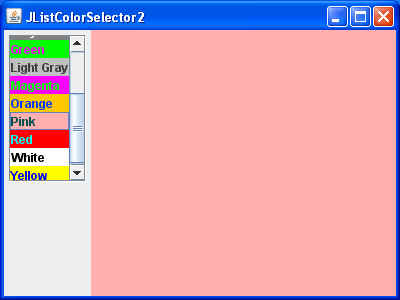
which is much more reasonable, in terms of a JList display (albeit a little
garish!).
Note that the definition of DefaultListCellRenderer
is:
public class DefaultListCellRenderer extends JLabel
    implements ListCellRenderer, Serializable
|
which indicates that it is is a JLabel -- a
Component that can be used directly, and which can handle foreground and
background colors, text displays, etc.
|
