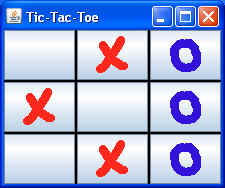
package swingExamples;

import java.awt.Color;
import java.awt.Container;
import java.awt.GridLayout;

import javax.swing.ImageIcon;
import javax.swing.JButton;
import javax.swing.JFrame;
import javax.swing.JPanel;

class GridButtons2Panel extends JPanel
{
  public GridButtons2Panel()
  {
    setBackground(Color.BLACK); // To show through the gap
    setLayout(  // rows, cols, hgap, vgap
        new GridLayout(3, 3, 2, 2) );
    loadImages();
    int[] contents = { 0, 1, 2, 1, 0, 2, 0, 1, 2 };
    for (int i = 0; i < contents.length; i++)
      addButton( contents[i] );
  }

  private void loadImages()
  {
    // Find the images relative to the current class
    Class baseClass = GridButtons2Panel.class;
    m_cross = new ImageIcon(
        baseClass.getResource("../images/cross.gif") );
    m_nought = new ImageIcon(
        baseClass.getResource("../images/nought.gif") );
  }

  private void addButton( int content )
  {
    ImageIcon icon = null;
    if (content == 1)
      icon = m_cross;
    else if (content == 2)
      icon = m_nought;
    if (icon != null)
      add( new JButton(icon) );
    else
      add( new JButton() );
  }

  // Private data //
  private ImageIcon m_cross;
  private ImageIcon m_nought;
}

class GridButtons2Frame extends JFrame
{
  public GridButtons2Frame()
  {
    setTitle("Tic-Tac-Toe");
    setDefaultCloseOperation(EXIT_ON_CLOSE);
    Container contentPane = getContentPane();
    contentPane.add( new GridButtons2Panel() );
    pack();
  }
}

public class GridButtons2
{
  public static void main(String[] args)
  {
    GridButtons2Frame frame = new GridButtons2Frame();
    frame.setVisible(true);
  }
}
|