|
|
|
|
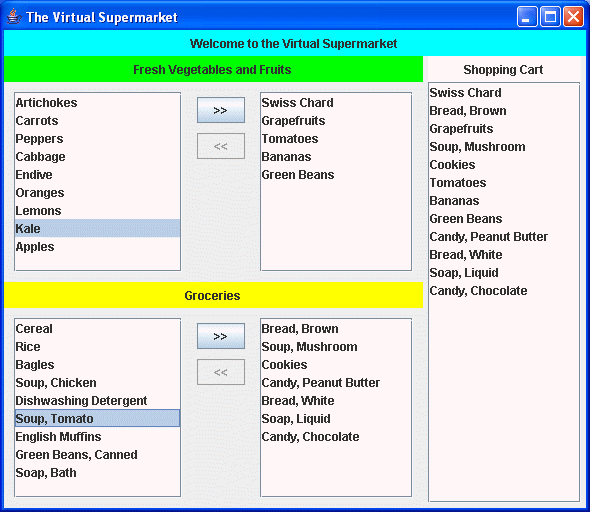
A Virtual SupermarketNow write a Java program that uses several of these Shuttle components -- a "Virtual Supermarket". Here is how it should look:
As you can see, it contains two shuttle controls, labeled "Fresh Vegetables and Fruits" and "Groceries", plus a "Shopping Cart" list on the right. Hint: In order to get the alignment right, you will most likely have to use various components nested within panels, within panels, each using an appropriate choice of layout manager. Experiment! I expect this learning process to take some time, but I think you'll find it worth the time. As you move items in each shuttle control to the right, the item should be replicated in the shopping cart list, so you get a "roll-up" of all the items selected from each shuttle. Similarly, if you move items back to the left in each shuttle control, the corresponding entry should be removed from the shopping cart list.
Once you have the layout done, you've done most of the work! All you have to do, then, is supply the appropriate list of items to be added to the left hand side of each shuttle control, and then connect the shuttle control behavior up to the main class, so that you can "intercept" when items are added to, or removed from, the right list of each shuttle control. That, given the functionality you've added to the shuttle class as specified above, I think you'll find it pretty easy to hook things up! The virtual supermarket should use the shuttle events that are emitted by the shuttles as a result of user actions on those shuttles, in order to populate or to depopulate the Shopping Cart. Here's what to do for the main class for this application,
Once you've implemented the basic stuff, like the layout of the above window, the work of connecting things together should be quite simple. Note: If you implemented Part B correctly, you should need to make zero changes to your Shuttle classes. You should only be writing the necessary class(es) to use those Shuttle classes. I don't want to see any new versions of the Shuttle classes supplied with Part C. If you can't get your Part B classes to work in part C, go back to Part B and fix them, and only then return to working on Part C. |
|
This page was last modified on 02 October, 2007 |