|
| |
Drawing Shapes: Preparing the
Infrastructure
What might we need to accomplish this?
First, we'll need a convenient place to draw our shapes. What
can we draw shapes on? A Swing JPanel seems
appropriate. So what if we derive our class from class JPanel
-- how about a ShapesPanel?
Second, we should have some way of translating between the
coordinate system of our ShapesPanel
and the coordinate system required to display the data -- a kind
of adapter class. Remember our CoordinateSystem
class? That's its job.
Finally, we'll need some shapes to draw. Unfortunately, if we
use the standard Java classes Point, Rectangle, etc.,
they're not really shapes, and they don't know how to draw
themselves.
Note:
I find it curious that the same folks who gave us this
incredible Object-Oriented programming language didn't, in its original
version, provide even a basic set of object-oriented shape
classes!
In the JSDK version 1.2 and beyond, they provide a set of classes
for doing two dimensional drawing -- the 2D API -- but
that's a topic for another course.
Since shapes have a set of common attributes and behavior,
let's first create a class that captures that common stuff --
class Shape.
Then we'll at least have to create a class that represents a
point -- class Point,
derived from class Shape.
Note that our class Point
is not the same as java.awt.Point.
Under some circumstances, you may need to explicitly qualify one
or the other of these classes to ensure they don't conflict with
each other.
Note:
Do not
change the name of your Point class!
Hint:
Do not use wildcard importation, such as the following:
import java.awt.*;
or:
import javax.swing.*;
Here's What To Do:
-
Write a set of classes that satisfies the Shapes
Specification.
Note that this specification is for the entire assignment, but in this part,
we'll just focus on the following classes:
screen.ScreenCoordinateshapes.Shapeshapes.Pointshapes.ShapesPanelshapes.ShapesTestworld.Boundsworld.Coordinateworld.CoordinateSystem
Note: This
assignment uses a CoordinateSystem
class that has been changed and enhanced from the version in the
previous assignment.
In this part, you should ignore the following classes:
shapes.FilledRectangleshapes.Lineshapes.Rectangle
Here's the order in which you probably should
implement the classes you need for this part of the assignment:
Coordinate
and ScreenCoordinateBoundsCoordinateSystemShapePointShapesPanelShapesTest
(You can implement them in any order you like, but since the classes have
interdependencies, you'll probably have trouble if you deviate from the above
order too much.)
I encourage you to implement small pieces of each
class, get something that compiles and (to some extent) runs, and
then iterate a number of times over them to produce the final
result. It's always a good idea to implement a small piece, get
it working, and then add to it progressively. Don't try to add
everything at once, or you'll likely get stuck and become quite
frustrated!
Note:
I have intentionally organized
these classes into three packages: shapes,
world, and screen. It is important to keep these
classes in these specified packages.
As before, you may
not change the specification, except to add main() methods for testing purposes.
Use These Classes to Produce Equivalent
Results to
the Previous Assignment
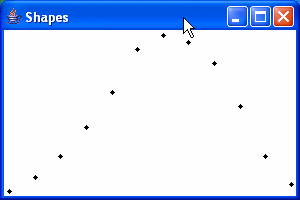
My solution produced the following results for the set of points specified in
assignment 4:
-
Finally, To Ensure That You Did Things
Correctly:
Change the set of points to be displayed by the ShapesTest
class to:
To obtain this source code, you can copy and paste the above into your Java
IDE, or do a 'Save Link/Target as...' on this link.
After you've made the changes, see what your program displays!
You shouldn't have to make any other changes to the classes you wrote for this part of
the assignment other than changing the m_shapes array,
above. If you do have to make additional changes to make this last part
work correctly, you need to go back and ensure that the earlier parts of
this assignment still work.
If your program doesn't show anything reasonable, or if it doesn't
display all the points in the ShapesPanel, or if it doesn't scale properly, then go back and fix
the problems, and make sure that the program still works with the original set
of points.
|
