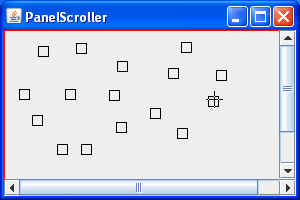
package swingExamples;

import java.awt.Adjustable;
import java.awt.BorderLayout;
import java.awt.Color;
import java.awt.Container;
import java.awt.Cursor;
import java.awt.Dimension;
import java.awt.Graphics;
import java.awt.Point;

import java.awt.event.AdjustmentEvent;
import java.awt.event.AdjustmentListener;
import java.awt.event.ComponentAdapter;
import java.awt.event.ComponentEvent;
import java.awt.event.MouseAdapter;
import java.awt.event.MouseEvent;
import java.awt.event.MouseListener;
import java.awt.event.MouseMotionListener;
import java.util.ArrayList;

import javax.swing.JFrame;
import javax.swing.JPanel;
import javax.swing.JScrollBar;

class PanelScrollerPanel extends JPanel
{
  public PanelScrollerPanel()
  {
    // Set up the mouse event handling
    MouseHandler handler = new MouseHandler();
    addMouseListener(handler);
    addMouseMotionListener(handler);
  }

  /**
   *   Adds a new square at x, y
   */
  public void add(int x, int y)
  {
    m_squares.add( new Point(x, y) );
    repaint();
  }

  /**
   * Finds the square that corresponds to the
   * coordinates x,y.  If there is no square at
   * these coordinates, returns null;
   */
  public Point find(int x, int y)
  {
    for (Point point : m_squares)
    {
      // Do these coordinates match somewhere
      // within this square?
      int xlo = point.x - SQUARE_LENGTH / 2;
      int xhi = point.x + SQUARE_LENGTH / 2;
      int ylo = point.y - SQUARE_LENGTH / 2;
      int yhi = point.y + SQUARE_LENGTH / 2;
      if ( (xlo <= x) && (x <= xhi)
        && (ylo <= y) && (y <= yhi)
      )
        return point; // Yes
    }
    return null; // No match
  }

  /**
   *   Removes the specified square.
   */
  public void remove(Point point)
  {
    if (point != null)
    {
      m_squares.remove(point);
      repaint();
    }
  }

  /**
   *   Stores scroll offsets, and then repaints.
   */
  public void translate(int x, int y)
  {
    m_dx = x;
    m_dy = y;
    repaint();
  }

  /**
   * Paints the panel, drawing the current
   * set of squares.
   */
  public void paintComponent(Graphics g)
  {
    super.paintComponent(g);
    // Translate to appropriate coordinates
    g.translate(-m_dx, -m_dy);
    // Draw the outer rectangle in red.
    g.setColor(Color.RED);
    g.drawRect(0, 0, MAX_WIDTH - 1, MAX_HEIGHT - 1);
    // Draw each square
    g.setColor(Color.BLACK);
    for (Point square : m_squares)
    {
      draw(g, square);
    }
  }

  /**
   *   Draws the ith square in the Graphics context.
   */
  private void draw(Graphics g, Point square)
  {
    g.drawRect(square.x - SQUARE_LENGTH / 2,
               square.y - SQUARE_LENGTH / 2,
               SQUARE_LENGTH, SQUARE_LENGTH);
  }

  ////// Private data //////

  // The maximum size of the area
  // (mouse clicks outside this area have no effect)
  static final int MAX_WIDTH = 300;
  static final int MAX_HEIGHT = 200;

  private static final int SQUARE_LENGTH = 10;
                            // Size of a square

  // The set of squares
  private ArrayList<Point> m_squares =
                          new ArrayList<Point>();
  // Scroll offsets.
  private int m_dx = 0;
  private int m_dy = 0;

  //////// Inner classes //////

  /**
   * Hamdler for mouse events and mouse motion.
   */
  class MouseHandler extends MouseAdapter
  {
    ///// MouseListener required methods

    /**
     * If the mouse was pressed outside an
     * existing square, adds a new square at
     * these coordinates.
     */
    public void mousePressed(MouseEvent evt)
    {
      int x = evt.getX() + m_dx;
      int y = evt.getY() + m_dy;
      Point point = find(x, y);
      if (point == null)
      {
        // Not inside an existing square,
        // so add a square to the panel
        if ( (x < MAX_WIDTH) && (y < MAX_HEIGHT))
        {
          add(x, y);
        }
      }
    }

    /**
     * If the mouse double-clicks on a aquare,
     * removes the square.
     */
    public void mouseClicked(MouseEvent evt)
    {
      if (evt.getClickCount() >= 2)
      {
        int x = evt.getX();
        int y = evt.getY();
        remove( find(x, y) );
      }
    }

    ///// MouseMotionListener required methods

    /**
     * Causes the mouse cursor to change to a
     * crosshairs when over a square, and to a
     * normal cursor when not.
     */
    public void mouseMoved(MouseEvent evt)
    {
      int x = evt.getX();
      int y = evt.getY();
      Cursor cursor = null;
      if (find(x, y) != null)
      {
        cursor = Cursor.getPredefinedCursor(
                          Cursor.CROSSHAIR_CURSOR);
      }
      else
      {
        cursor = Cursor.getDefaultCursor();
      }
      setCursor(cursor);
    }

    /**
     * When the mouse is over a square,
     * and is dragged, moves the square with it.
     */
    public void mouseDragged(MouseEvent evt)
    {
      int x = evt.getX();
      int y = evt.getY();
      // Find the corresponding square
      Point square = find(x, y);
      if (square != null)
      {
        Graphics g = getGraphics();
        g.setXORMode(getBackground());
        draw(g, square);
        square.x = x;
        square.y = y;
        draw(g, square);
        g.dispose();
      }
    }
  }
}

class PanelScrollerFrame extends JFrame
    implements AdjustmentListener
{
  public PanelScrollerFrame()
  {
    setTitle("PanelScroller");
    setSize(300, 200);
    setDefaultCloseOperation(EXIT_ON_CLOSE);
    Container contentPane = getContentPane();
    contentPane.add(m_panel, BorderLayout.CENTER);

    // Add the vertical scrollbar to the east
    contentPane.add(
        m_verticalScroller, BorderLayout.EAST);
    m_verticalScroller.addAdjustmentListener(this);
    m_verticalScroller.setValues(
        m_verticalScroller.getValue(),
        0, 0, PanelScrollerPanel.MAX_HEIGHT);

    // Add the horizontal scrollbar to the south
    contentPane.add(
        m_horizontalScroller, BorderLayout.SOUTH);
    m_horizontalScroller.addAdjustmentListener(this);
    m_horizontalScroller.setValues(
        m_horizontalScroller.getValue(),
        0, 0, PanelScrollerPanel.MAX_WIDTH);

    // Add a component listener to the frame,
    // to cause the scrollbars to display correctly
    // on show and resize.
    addComponentListener( new ComponentAdapter()
      {
        public void componentShown(ComponentEvent evt)
        {
          setVisibleAmounts();
        }

        public void componentResized(ComponentEvent evt)
        {
          setVisibleAmounts();
        }
      }
    );
  }

  public void adjustmentValueChanged(AdjustmentEvent evt)
  {
    m_panel.translate(
        m_horizontalScroller.getValue(),
        m_verticalScroller.getValue());
  }

  private void setVisibleAmounts()
  {
    Dimension dim = m_panel.getSize();
    m_horizontalScroller.setVisibleAmount(dim.width);
    m_verticalScroller.setVisibleAmount(dim.height);
  }

  ///// Private data /////
  private PanelScrollerPanel m_panel =
      new PanelScrollerPanel();
  private JScrollBar m_horizontalScroller =
      new JScrollBar(Adjustable.HORIZONTAL);
  private JScrollBar m_verticalScroller =
      new JScrollBar(Adjustable.VERTICAL);
}

public class PanelScroller
{
  public static void main(String[] args)
  {
    PanelScrollerFrame frame = new PanelScrollerFrame();
    frame.setVisible(true);
  }
}
|