|
| |
So what to do?
Here's a better approach: You can create a separate panel, with a FlowLayout
(the default layout manager for a JPanel), and add it to the south of the
main panel, which uses a
BorderLayout:
package swingExamples;

import java.awt.BorderLayout;
import java.awt.Color;
import java.awt.Container;

import javax.swing.JButton;
import javax.swing.JFrame;
import javax.swing.JPanel;

class NestedLayouts2Panel extends JPanel
{
  public NestedLayouts2Panel()
  {
    setLayout(new BorderLayout());
    add(new ButtonsPanel(), BorderLayout.SOUTH);
  }
}

class ButtonsPanel extends JPanel
{
  public ButtonsPanel()
  {
    setBackground(Color.pink);
    add(m_yellow);
    add(m_blue);
    add(m_red);
  }

  ////////////// Data //////////////////
  private JButton m_yellow = new JButton("Yellow");
  private JButton m_blue = new JButton("Blue");
  private JButton m_red = new JButton("Red");
}

class NestedLayouts2Frame extends JFrame
{
  public NestedLayouts2Frame()
  {
    setTitle("NestedLayouts");
    setSize(300, 200);
    setDefaultCloseOperation(EXIT_ON_CLOSE);
    Container contentPane = getContentPane();
    contentPane.add( new NestedLayouts2Panel() );
  }
}

public class NestedLayouts2
{
  public static void main(String[] args)
  {
    NestedLayouts2Frame frame = new NestedLayouts2Frame();
    frame.setVisible(true);
  }
}
|
which produces:
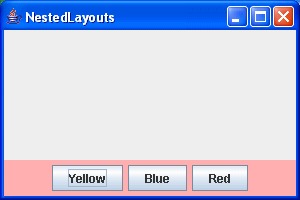
I colored the additional panel pink, to indicate its
presence. If I hadn't, you would have no visual indication that it was
there.
This approach of nesting layout managers of the appropriate types is very
useful, and as a result is used heavily in Java GUIs. Nested layouts can be used to construct some surprisingly complex layouts.
|
