|
| |
Now, let's see what happens if we add some more buttons:
package swingExamples;

import java.awt.Color;
import java.awt.Container;

import javax.swing.JButton;
import javax.swing.JFrame;
import javax.swing.JPanel;

class FlowButtons2Panel extends JPanel
{
  public FlowButtons2Panel()
  {
    setBackground(Color.lightGray);
    add(m_yellow);
    add(m_blue);
    add(m_red);
    add(m_orange);
    add(m_cyan);
    add(m_pink);
    add(m_white);
  }

  ////////////// Data //////////////////
  private JButton m_yellow = new JButton("Yellow");
  private JButton m_blue = new JButton("Blue");
  private JButton m_red = new JButton("Red");
  private JButton m_orange = new JButton("Orange");
  private JButton m_cyan = new JButton("Cyan");
  private JButton m_pink = new JButton("Pink");
  private JButton m_white = new JButton("White");
}

class FlowButtons2Frame extends JFrame
{
  public FlowButtons2Frame()
  {
    setTitle("FlowButtons");
    setSize(300, 200);
    setDefaultCloseOperation(EXIT_ON_CLOSE);
    Container contentPane = getContentPane();
    contentPane.add( new FlowButtons2Panel() );
  }
}

public class FlowButtons2
{
  public static void main(String[] args)
  {
    FlowButtons2Frame frame = new FlowButtons2Frame();
    frame.setVisible(true);
  }
}
|
Here's what we get:
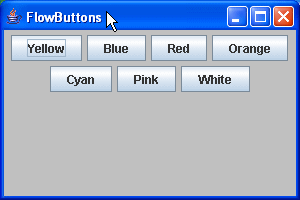
Again, notice that the buttons are still nicely centered, horizontally, and
when there's no more room left on the first row, the additional buttons are
automatically placed in a second row.
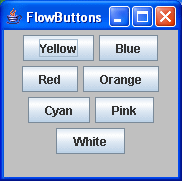
Furthermore, if the user resizes
the frame, the buttons stay centered:
|
