|
BorderLayout Gaps
| |
The BorderLayout layout manager is one of the most useful layout managers
provided in the JDK. It lays out components according to the points of
the compass: NORTH, SOUTH, EAST, WEST, and
CENTER.
Here's an example that shows its use:
package swingExamples;

import java.awt.BorderLayout;
import java.awt.Color;
import java.awt.Container;

import javax.swing.JButton;
import javax.swing.JFrame;
import javax.swing.JPanel;

class BorderButtons1Panel extends JPanel
{
  public BorderButtons1Panel()
  {
    setBackground(Color.lightGray);
    setLayout( new BorderLayout() );
    add(m_north,  BorderLayout.NORTH);
    add(m_south,  BorderLayout.SOUTH);
    add(m_east,   BorderLayout.EAST);
    add(m_west,   BorderLayout.WEST);
    add(m_center, BorderLayout.CENTER);
  }

  ////////////// Data //////////////////
  private JButton m_north = new JButton("North");
  private JButton m_south = new JButton("South");
  private JButton m_east = new JButton("East");
  private JButton m_west = new JButton("West");
  private JButton m_center = new JButton("Center");
}

class BorderButtons1Frame extends JFrame
{
  public BorderButtons1Frame()
  {
    setTitle("BorderButtons");
    setSize(300, 200);
    setDefaultCloseOperation(EXIT_ON_CLOSE);
    Container contentPane = getContentPane();
    contentPane.add( new BorderButtons1Panel() );
  }
}

public class BorderButtons1
{
  public static void main(String[] args)
  {
    BorderButtons1Frame frame = new BorderButtons1Frame();
    frame.setVisible(true);
  }
}
|
which produces:
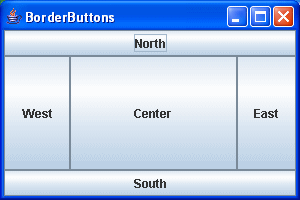
Note that the buttons' preferred sizes appear to be completely ignored by the
BorderLayout layout manager. Actually, what happens is that:
- The North and South regions
pay attention to the component's preferred height, and stretch out the
component to fill the region horizontally
- The East and West regions pay
attention to the component's preferred width, and stretch out the component to
fill the region vertically.
- The Center region gets what's left
over, regardless of the component's preferred size, and the component gets
stretched both horizontally and vertically.
|
