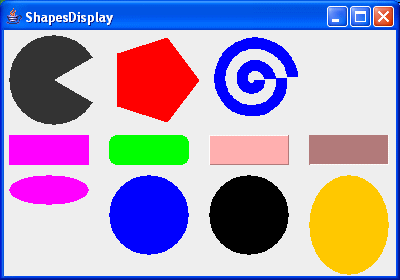
package swingExamples;

import java.awt.Color;
import java.awt.Container;
import java.awt.Dimension;
import java.awt.Graphics;
import java.awt.Polygon;

import javax.swing.JFrame;
import javax.swing.JPanel;

class FilledShapesDisplayPanel extends JPanel
{
    public void paintComponent(Graphics g)
    {
        super.paintComponent(g);
        int cx = 5;
        int cy = 5;
        cy = drawPolys(g, cx, cy);
        cy = drawRects(g, cx, cy);
        cy = drawOvals(g, cx, cy);
    }

    private int drawPolys(Graphics g, int cx, int cy)
    {
        int r = 45;     // radius of circle
        cx += r;
        cy += r;
        int angle = 30;

        int dx = (int)(r * Math.cos(angle * Math.PI/180));
        int dy = (int)(r * Math.sin(angle * Math.PI/180));

        g.fillArc(cx - r, cy - r, 2*r, 2*r, angle, 360 - 2*angle);

        Polygon poly = new Polygon();
        cx += 100;
        for (int i = 0; i < 5; i++)
        {
            poly.addPoint((int)(cx + r * Math.cos(i * 2 * Math.PI/5)),
                          (int)(cy + r * Math.sin(i * 2 * Math.PI/5)));
        }
        g.setColor(Color.RED);
        g.fillPolygon(poly);

        poly = new Polygon();
        cx += 100;
        for (int i = 0; i < 360; i++)
        {
            double t = i/360.0;
            poly.addPoint((int)(cx + r * t * Math.cos(8 * t * Math.PI)),
                          (int)(cy + r * t * Math.sin(8 * t * Math.PI)));
        }
        g.setColor(Color.BLUE);
        g.fillPolygon(poly);

        return cy + r + 10;
    }

    private int drawRects(Graphics g, int cx, int cy)
    {
        int width = 80;
        int height = 30;

        g.setColor(Color.MAGENTA);
        g.fillRect(cx, cy, width, height);

        cx += 100;
        g.setColor(Color.GREEN);
        g.fillRoundRect(cx, cy, width, height, 15, 15);

        cx += 100;
        g.setColor(Color.PINK);
        g.fill3DRect(cx, cy, width, height, true);

        cx += 100;
        g.fill3DRect(cx, cy, width, height, false);

        return cy + height + 10;
    }

    private int drawOvals(Graphics g, int cx, int cy)
    {
        int width = 80;
        int height = 30;

        g.setColor(Color.MAGENTA);
        g.fillOval(cx, cy, width, height);

        cx += 100;
        height = 80;
        g.setColor(Color.BLUE);
        g.fillArc(cx, cy, width, height, 0, 360);

        cx += 100;
        g.setColor(Color.BLACK);
        g.fillOval(cx, cy, width, height);

        cx += 100;
        height = 100;
        g.setColor(Color.ORANGE);
        g.fillOval(cx, cy, width, height);

        return cy + height + 10;
    }
}

class FilledShapesDisplayFrame extends JFrame
{
    public FilledShapesDisplayFrame()
    {
        setTitle("FilledShapesDisplay");
        setSize(400, 280);
        setDefaultCloseOperation(EXIT_ON_CLOSE);
        Container contentPane = getContentPane();
        contentPane.add( new FilledShapesDisplayPanel() );
    }
}

public class FilledShapesDisplay
{
  public static void main(String[] args)
  {
    FilledShapesDisplayFrame frame = new FilledShapesDisplayFrame();
    frame.setVisible(true);
  }
}
|