
|
|
|
|
If you wish to move something other than characters or strings through a stream, then this is the set of classes you will need to use. The (Package
|
| Method | Description |
|---|---|
public int
available() |
Returns the number of bytes that can
be read from this input stream without blocking. The
available method of InputStream returns 0. This
method should be overridden
by subclasses. |
public
void close() throws IOException |
Closes this input stream and
releases any system resources associated with the
stream. The close method of InputStream
does nothing. |
public
synchronized void mark(int readLimit) |
Marks the current position in this
input stream. A subsequent call to the reset method
repositions this stream at the last marked position
so that subsequent reads re-read the same bytes. The readlimit argument tells this input stream to
allow that many bytes to be read before the mark
position gets invalidated. The mark method of InputStream
does nothing. |
public
boolean markSupported() |
Tests if this input stream supports
the mark and reset methods. The markSupported method of InputStream returns false. |
public
int read(byte[] b) |
Reads up to b.length
bytes of data from this input stream into an array of
bytes. The read method of InputStream calls the read method of three
arguments with the arguments b,
0, and b.length. |
public
abstract int read() |
Reads the next byte of data from
this input stream. The value byte is returned as an
int in the range 0 to 255. If no byte is available
because the end of the stream has been reached, the
value -1 is returned. This method blocks until input
data is available, the end of the stream is detected,
or an exception is thrown. A subclass must provide an implementation of this method. |
public
int read(byte[] b, int off, int len) |
Reads up to len bytes of data from
this input stream into an array of bytes. This method
blocks until some input is available. If the argument
b is null, a NullPointerException is
thrown. The read method of InputStream reads a single
byte at a time using the read
method of zero arguments to fill in the array.
Subclasses are encouraged to provide a more efficient
implementation of this method. |
public
synchronized void reset() |
Repositions this stream to the
position at the time the mark
method was last called on this input stream. The reset method of InputStream throws an
IOException, because input
streams, by default, do not support mark and reset. Stream marks are intended to be used in situations where you need to read ahead a little to see what's in the stream. Often this is most easily done by invoking some general parser. If the stream is of the type handled by the parser, it just chugs along happily. If the stream is not of that type, the parser should toss an exception when it fails, which, if it happens within readlimit
bytes, allows the outer code to reset the stream and
try another parser. |
public
long skip(long n) throws IOException |
Skips over and discards n bytes of data from this
input stream. The skip
method may, for a variety of reasons, end up skipping
over some smaller number of bytes, possibly 0. The
actual number of bytes skipped is returned. The skip method of InputStream creates a byte
array of length n and
then reads into it until n
bytes have been read or the end of the stream has
been reached. Subclasses are encouraged to provide a
more efficient implementation of this method. |
public InputStream() |
Creates an instance of InputStream. |
Note: System.in
is an instance of InputStream.
OutputStream ClassOutputStream is the base
class (superclass) of all output byte streams. It provides
the following methods:
| Method | Description |
|---|---|
public
void close() |
Closes this output stream and
releases any system resources associated with this
stream. The close method of OutputStream does nothing. |
public
void flush() |
Flushes this output stream and
forces any buffered output bytes to be written out. The flush method of OutputStream does nothing. |
public
void write(byte[] b) |
Writes b.length
bytes from the specified byte array to this output
stream. The write method of OutputStream calls the write method of three
arguments with the three arguments b, 0,
and b.length. |
public
abstract void write(byte[] b, int off, int len) |
Writes len
bytes from the specified byte array starting at
offset off to this
output stream. The write method of OutputStream calls the
write method of one
argument on each of the bytes to be written out.
Subclasses are encouraged to override this method and
provide a more efficient implementation. |
public
abstract void write(int b) |
Writes the specified byte to this
output stream. Subclasses of OutputStream
must provide an implementation for this method. |
public OutputStream() |
Creates an instance of OutputStream. |
We can classify Data Source/Sink byte streams as follows:
| Data Source/Sink | Readers | Writers |
|---|---|---|
| Memory | ByteArrayInputStream |
ByteArrayOutputStream |
| Pipe | PipedInputStream |
PipedOutputStream |
| File | FileInputStream |
FileOutputStream |
Here's an example of writing bytes to a file, and reading them back:
package inputOutput;

import java.io.FileInputStream;
import java.io.FileOutputStream;
import java.io.IOException;

public class FileBytesReadWrite
{
    public static void main(String[] args)
    {
        try
        {
            // Write the file out
            FileOutputStream out = new FileOutputStream("rawdata.lst");
            for (int count = 0; count < m_counts.length; count++)
            {
                out.write(m_counts[count]);
            }
            out.close();

            // Read the file back in. and print its contents out
            FileInputStream in = new FileInputStream("rawdata.lst");
            while (true)
            {
                int b = in.read();
                if (b == -1)
                    break;		// End of stream
                System.out.println("Byte value = " + b);
            }
        }
        catch (IOException e)
        {
            e.printStackTrace();
        }
    }

    //// Private data ////
    private static final byte[] m_counts =
    {
        23, 57, 45, 30,
    };
} |
Notice how easy it is to change this to write to, and read
back from, a byte array stream, by changing FileInputStream and
FileOutputStream to ByteArrayInputStream and ByteArrayOutputStream, as in the
following example:
package inputOutput;

import java.io.ByteArrayInputStream;
import java.io.ByteArrayOutputStream;
import java.io.IOException;

public class ArrayBytesReadWrite
{
    public static void main(String[] args)
    {
        try
        {
            // Copy the byte array to a ByteArrayOutputStream
            ByteArrayOutputStream out = new ByteArrayOutputStream();
            for (int count = 0; count < m_counts.length; count++)
            {
                out.write(m_counts[count]);
            }
            out.close();

            // Get the byte array from the above output stream,
            // and print its contents out
            ByteArrayInputStream in = new ByteArrayInputStream(
					out.toByteArray());
            while (true)
            {
                int b = in.read();
                if (b == -1)
                    break;		// End of stream
                System.out.println("Byte value = " + b);
            }
        }
        catch (IOException e)
        {
            e.printStackTrace();
        }
    }

    //// Private data ////
    private static final byte[] m_counts =
    {
        23, 57, 45, 30,
    };
} |
There's a set of processing byte streams that add a lot of value to the family of streams.
Here's a table of Processing Byte streams:
| Process | Readers | Writers |
|---|---|---|
| Buffering | BufferedInputStream |
BufferedOutputStream |
| Filtering | FilterInputStream |
FilterOutputStream |
| Concatenation | SequenceInputStream |
|
| Object Serialization | ObjectInputStream |
ObjectOutputStream |
| Counting | LineNumberInputStream (deprecated) |
|
| Data Conversion | DataInputStream |
DataOutputStream |
| Peeking Ahead | PushbackInputStream |
|
| Printing | PrintStream |
BufferedInputStream and BufferedOutputStreamThese streams buffer data while reading or writing, which reduces the number of accesses required on the original data source/sink. Buffered streams are in general more efficient -- often much more efficient -- than non-buffered streams, especially when reading from, or writing to, files.
FilterInputStream and FilterOutputStreamThese are abstract classes that form a hierarchy of classes which perform a variety of filtering operations on data that is sent through them.
SequenceInputStreamThis is a class that allows you to concatenate multiple input streams together to form a single input stream.
ObjectInputStream and ObjectOutputStreamThese classes are used to serialize Java objects. See Object Streams and Serialization.
LineNumberInputStreamThis class is useful for keeping track of line numbers while reading.
Note: LineNumberInputStream is deprecated. This class
incorrectly assumes that bytes adequately represent
characters. As of JDK 1.1, the preferred way to
operate on character streams is via the new
character-stream classes, which include a class for
counting line numbers.
DataInputStream and DataOutputStreamThese classes can read or write primitive Java datatypes in a machine-independent format. See Data Conversion Streams.
PushbackInputStreamThis class (a subclass of FilterReader) allows you to
"unread" character(s) that have been read from a
stream. This is very useful in some applications (such as
language parsers and similar tools) which find it useful to
"peek ahead" in order to determine what to do next.
PrintStreamThis class contains a number of convenient printing
methods, such as print and println.
Note: System.out and System.err are instances of
PrintStream.
The unlikely named SequenceInputStream
is used to concatenate multiple input streams into a single
input stream:
package inputOutput;

import java.io.FileInputStream;
import java.io.FileNotFoundException;
import java.io.InputStream;
import java.io.SequenceInputStream;
import java.io.IOException;
import java.util.Enumeration;
import java.util.NoSuchElementException;

/**
 *  This class is an example of how to concatenate
 *  input streams together.
 */
public class ConcatenateFiles
{
    /**
     *  Main entry point supplies a set of filenames to use
     *  for concatenation.
     */
    public static void main(String[] args)
    {
        MyFiles files = new MyFiles(args);
        SequenceInputStream stream =
                    new SequenceInputStream(files);
        try
        {
            while (true)
            {
                // NOTE: Restricted to ISO Latin-1 characters!!!
                int c = stream.read();
                if (c == -1)
                    break;
                System.out.write(c);
            }
            stream.close();
        }
        catch (IOException e)
        {
            e.printStackTrace();
        }
    }
}

/**
 *  This class provides a convenient Enumeration interface
 *  which the SequenceInputStream can use.
 */
class MyFiles implements Enumeration<InputStream>
{
    MyFiles(String[] fileNames)
    {
        m_fileNames = fileNames;
    }

    //// Methods required to implement Enumeration

    public boolean hasMoreElements()
    {
        return (m_currentFile < m_fileNames.length);
    }

    public InputStream nextElement()
    {
        if (!hasMoreElements())
            throw new NoSuchElementException("No more files");

        InputStream fileStream = null;
        String fileName = m_fileNames[m_currentFile++];
        try
        {
            fileStream = new FileInputStream(fileName);
        }
        catch (FileNotFoundException e)
        {
            throw new NoSuchElementException("Can't open file " +
                                                fileName);
        }

        return fileStream;
    }

    /// Private data ///
    private String[] m_fileNames = null;
    private int      m_currentFile = 0;
}
|
In order to use any one of the the above set of processing streams, you must wrap streams within other streams.
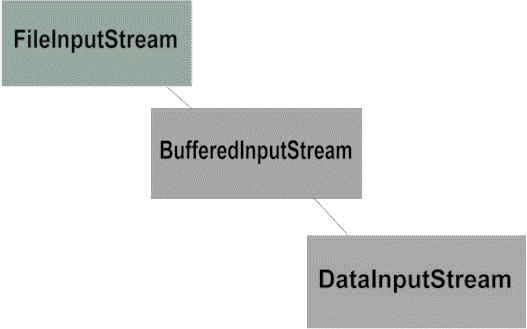
You can wrap as many streams within streams as you wish, to accomplish your task. Here is an example:
package inputOutput;

import java.io.BufferedInputStream;
import java.io.FileInputStream;
import java.io.FileOutputStream;
import java.io.IOException;

public class BufferedBytesFileRead
{
    /**
     *  This main method expects a single argument: a filename.
     *  It will attempt to read the file, and print its contents.
     */
    public static void main(String[] args)
    {
        try
        {
            // Read a file in. and print its contents out
            BufferedInputStream in = new BufferedInputStream(
                                            new FileInputStream(
						args[0]));
            while (true)
            {
                // NOTE: Restricted to ISO-Latin-1 characters!!!
                int c = in.read();
                if (c == -1)
                    break;
                System.out.print((char)c);  // Cast required
            }
        }
        catch (IOException e)
        {
            e.printStackTrace();
        }
    }
} |
| The page was last updated February 19, 2008 |