|
| | Labels are simple text components. They simply display textual
information; they do not accept input -- in fact, they do not accept input
focus. However, they can contain an image, which can be very useful at times.
Here's a simple example:
package swingExamples;

import java.awt.Color;
import java.awt.Container;
import java.awt.Font;

import javax.swing.ImageIcon;
import javax.swing.JLabel;
import javax.swing.JFrame;
import javax.swing.JPanel;
import javax.swing.SwingConstants;

class SimpleLabelsPanel extends JPanel
{
  public SimpleLabelsPanel()
  {
    JLabel look = new JLabel("Look at me!  I'm a label!");
    add(look);
    JLabel whoopee = new JLabel("Whoopee!");
    whoopee.setForeground(Color.red);
    whoopee.setFont(
        new Font("monospaced",
                 Font.BOLD | Font.ITALIC, 18));
    add(whoopee);
    JLabel conservative = new JLabel(
        "Please quiet down up there; I'm trying to sleep...");
    conservative.setForeground(Color.blue);
    conservative.setFont(new Font("serif", Font.PLAIN, 10));
    add(conservative);

    ImageIcon[] images = loadImages();
    JLabel crossLabel =
        new JLabel("I am a cross image plus text", images[0],
        SwingConstants.RIGHT);
    add(crossLabel);
    JLabel noughtLabel =
        new JLabel("I am a nought image plus text", images[1],
        SwingConstants.CENTER);
    add(noughtLabel);
  }

  private ImageIcon[] loadImages()
  {
    ImageIcon[] icons = new ImageIcon[2];
    // Find the images relative to the current class
    Class baseClass = SimpleLabelsPanel.class;
    icons[0] = new ImageIcon(
        baseClass.getResource("../images/cross.gif") );
    icons[1] = new ImageIcon(
        baseClass.getResource("../images/nought.gif") );
    return icons;
  }
}

class SimpleLabelsFrame extends JFrame
{
  public SimpleLabelsFrame()
  {
    setTitle("SimpleLabel");
    setSize(300, 200);
    setDefaultCloseOperation(EXIT_ON_CLOSE);
    Container contentPane = getContentPane();
    contentPane.add( new SimpleLabelsPanel() );
  }
}

public class SimpleLabels
{
  public static void main(String[] args)
  {
    SimpleLabelsFrame frame = new SimpleLabelsFrame();
    frame.setVisible(true);
  }
}
|
which produces the following:
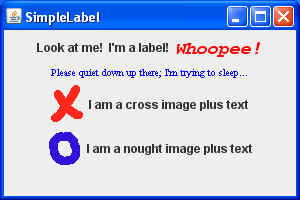
Notice that you have control over the foreground color and the font.
In this case, we're using a FlowLayout, so it lays the labels out according to
their sizes.
The last two labels each contains an image and some text.
|
