|
| |
Determining which Radio Button is Set within a
Group
In the original Java AWT, radio buttons were handled differently from the
Swing approach.
In the AWT approach:
- There is no separate class for radio buttons; the class
java.awt.Checkbox
is used for both checkboxes and radio buttons.
- To turn checkboxes into radio buttons, all you have to do is add them to
a
java.awt.CheckboxGroup, and their visual representation changes
automatically.
In particular, the CheckboxGroup class has a method:
public Checkbox getSelectedCheckbox()
which allows you to find out which of the checkboxes in the CheckboxGroup
is selected.
Unfortunately, there is no equivalent mechanism for JRadioButtons and
ButtonGroups in Swing. When they moved to a Model-View-Controller
separation of state versus presentation approach, they sacrificed some of the
simplicity of the original approach.
It is much harder to figure out how to do the same
thing in Swing. You have to resort to Actions to do it, and it's more
awkward that it ought to be.
Here's an
example:
package swingExamples;

import java.awt.BorderLayout;
import java.awt.Color;
import java.awt.Container;

import java.awt.event.ActionEvent;
import java.awt.event.ActionListener;

import javax.swing.ButtonGroup;
import javax.swing.JFrame;
import javax.swing.JPanel;
import javax.swing.JRadioButton;

class ColorRadioButtonsPanel extends JPanel
{
  public ColorRadioButtonsPanel()
  {
    setLayout(new BorderLayout());
    add(m_colorPanel, BorderLayout.CENTER);
    add(new InputPanel(), BorderLayout.SOUTH);
  }

  private void setPanelColor()
  {
    Color back = null;
    if (m_colorCommand.equals(YELLOW))
    {
      back = Color.YELLOW;
    }
    else if (m_colorCommand.equals(BLUE))
    {
      back = Color.BLUE;
    }
    else if (m_colorCommand.equals(RED))
    {
      back = Color.RED;
    }
    m_colorPanel.setBackground(back);
  }

  /////// Private data ///////

  // Action commands
  private static final String YELLOW = "Yellow";
  private static final String BLUE = "Blue";
  private static final String RED = "Red";
  private String m_colorCommand = YELLOW;
                                  // Current color "command"

  private ColorPanel m_colorPanel = new ColorPanel();

  /////// Inner classes /////

  class ColorPanel extends JPanel
  {
  }

  class InputPanel extends JPanel
      implements ActionListener
  {
    public InputPanel()
    {
      addRadioButton(m_yellow, YELLOW);
      m_yellow.setSelected(true); // Make yellow the default
      addRadioButton(m_blue, BLUE);
      addRadioButton(m_red, RED);
      setPanelColor();
    }

    // ActionListener required methods
    public void actionPerformed(ActionEvent evt)
    {
      m_colorCommand =
          m_group.getSelection().getActionCommand();
      setPanelColor();
    }

    private JRadioButton addRadioButton(
                            JRadioButton button,
                            String command)
    {
      add(button);
      m_group.add(button);
      button.setActionCommand(command);
      button.addActionListener(this);
      return button;
    }

    ///// Private data /////
    private ButtonGroup m_group = new ButtonGroup();
    private JRadioButton m_yellow = new JRadioButton("Yellow");
    private JRadioButton m_blue = new JRadioButton("Blue");
    private JRadioButton m_red = new JRadioButton("Red");
  }
}

class ColorRadioButtonsFrame extends JFrame
{
  public ColorRadioButtonsFrame()
  {
    setTitle("ColorRadioButtons");
    setSize(300, 200);
    setDefaultCloseOperation(EXIT_ON_CLOSE);
    Container contentPane = getContentPane();
    contentPane.add( new ColorRadioButtonsPanel() );
  }
}

public class ColorRadioButtons
{
  public static void main(String[] args)
  {
    ColorRadioButtonsFrame frame =
                new ColorRadioButtonsFrame();
    frame.setVisible(true);
  }
}
|
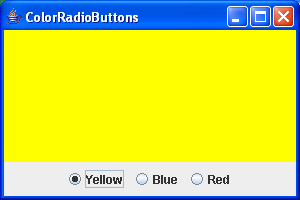
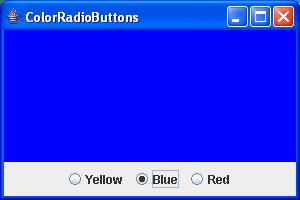
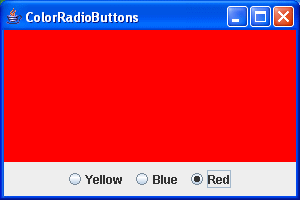
which produces:
|