|
| |
A convenient way of accomplishing this separation is provided by the Swing
Action interface, and related classes.
Here's an example, which brings up a window that looks like this:
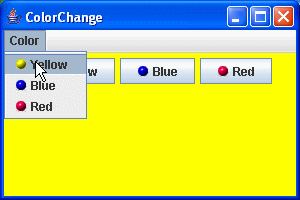
We allow the user to change the background color of the application:
- By clicking on one of the buttons inside the frame
- By selecting one of the menu items
- By depressing the Y, B, and R keys on the keyboard (we could have chosen
CTRL/Y, CTRL/B, and CTRL/R, or any other reasonable combination).
package swingExamples;

import java.awt.Color;
import java.awt.Container;

import java.awt.event.KeyEvent;
import java.awt.event.ActionEvent;
import java.net.MalformedURLException;
import java.net.URL;

import javax.swing.AbstractAction;
import javax.swing.Action;
import javax.swing.Icon;
import javax.swing.ImageIcon;
import javax.swing.JComponent;
import javax.swing.JFrame;
import javax.swing.JMenu;
import javax.swing.JMenuBar;
import javax.swing.JPanel;
import javax.swing.KeyStroke;
import javax.swing.JButton;

class ColorChangePanel extends JPanel
{
  public ColorChangePanel(ColorChangeFrame frame)
  {
    setBackground(Color.lightGray);

    // Set up the color actions for yellow, blue and red
    setupActions();

    // Add the buttons to the panel
    add( new ActionButton(m_yellowAction) );
    add( new ActionButton(m_blueAction) );
    add( new ActionButton(m_redAction) );

    // Register keyboard actions for each color
    registerKeyboardAction(m_yellowAction,
        KeyStroke.getKeyStroke(KeyEvent.VK_Y, 0),
        JComponent.WHEN_IN_FOCUSED_WINDOW);
    registerKeyboardAction(m_blueAction,
        KeyStroke.getKeyStroke(KeyEvent.VK_B, 0),
        JComponent.WHEN_IN_FOCUSED_WINDOW);
    registerKeyboardAction(m_redAction,
        KeyStroke.getKeyStroke(KeyEvent.VK_R, 0),
        JComponent.WHEN_IN_FOCUSED_WINDOW);

    // Create menu bar with menu of color actions
    JMenu menu = new JMenu("Color");
    menu.add(m_yellowAction);
    menu.add(m_blueAction);
    menu.add(m_redAction);
    JMenuBar menuBar = new JMenuBar();
    menuBar.add(menu);
    // Add the menu bar to the panel's frame.
    frame.setJMenuBar(menuBar);
  }

  /**
   * Set up the three color actions
   */
  private void setupActions()
  {
    // Find the images relative to the current class
    Class baseClass = ColorChangePanel.class;
    URL url = baseClass.getResource("../images/yellow-ball.gif");
    m_yellowAction =
        new ColorAction(
            "Yellow",
            new ImageIcon(url),
            Color.YELLOW
            );
    url = baseClass.getResource("../images/blue-ball.gif");
    m_blueAction =
        new ColorAction(
            "Blue",
            new ImageIcon(url),
            Color.BLUE
            );
    url = baseClass.getResource("../images/red-ball.gif");
    m_redAction =
        new ColorAction(
            "Red",
            new ImageIcon(url),
            Color.RED
            );
  }

  //////// Private data ///////
  private Action m_yellowAction;
  private Action m_blueAction;
  private Action m_redAction;

  //////// Inner class ////////
  class ColorAction extends AbstractAction
  {
    public ColorAction(String name, Icon icon, Color color)
    {
      putValue(Action.NAME, name);
      putValue(Action.SMALL_ICON, icon);
      putValue(Action.SHORT_DESCRIPTION,
          "Set panel color to " + name.toLowerCase());
      putValue("color", color);
    }

    public void actionPerformed(ActionEvent ev)
    {
      Color color = (Color) getValue("color");
      setBackground(color);
    }
  }

  //////// Inner class ///////
  class ActionButton extends JButton
  {
    public ActionButton(Action action)
    {
      setText( (String) action.getValue(Action.NAME));
      Icon icon = (Icon) action.getValue(Action.SMALL_ICON);
      if (icon != null)
      {
        setIcon(icon);
      }
      addActionListener(action);
    }
  }
}

class ColorChangeFrame extends JFrame
{
  public ColorChangeFrame()
  {
    setTitle("ColorChange");
    setSize(300, 200);
    setDefaultCloseOperation(EXIT_ON_CLOSE);

    // Add panel to frame
    JPanel panel = new ColorChangePanel(this);
    Container contentPane = getContentPane();
    contentPane.add(panel);
  }
}

public class ColorChangeActions
{
  public static void main(String[] args)
  {
    ColorChangeFrame frame = new ColorChangeFrame();
    frame.setVisible(true);
  }
}
|
Note that we centralized the implementation of the change background color in
the ColorAction class, and then set things up so that this class's
actionPerformed method would be called as a result of any of the three different
ways of causing that action to happen. This basically decouples the form
from the desired function.
The advantages would become much more evident in a larger, more realistic
program.
|
