Keyboard Events in JDK 1.0.x
Event Modifiers and Keyboard Events
ALT_MASK ALT key is down CTRL_MASK CTRL key is down META_MASK META key is down SHIFT_MASK SHIFT key is down
Event Modifiers and Function Keys
DOWN DOWN key pressed END END key pressed F1 - F12 FUNCTION key 1 - 12 pressed HOME HOME key pressed LEFT LEFT key pressed PGDOWN PAGE DOWN key pressed PGUP PAGE UP key pressed RIGHT RIGHT key pressed UP UP key pressed
Example
import java.awt.*;

public class EventsOld extends Frame
{
    public boolean keyDown(Event e, int key)
    {
        if ((char)key == Event.RIGHT)
        {
            current_color++;
            if (current_color >= colors.length)
                current_color = 0;
            showCurrentColor();
            return true;       // We handled the event
        }
        if ((char)key == Event.LEFT)
        {
            current_color--;
            if (current_color < 0)
                current_color = colors.length-1;
            showCurrentColor();
            return true;       // We handled the event
        }
        return super.keyDown(e, key);
    }

    public boolean mouseDown(Event e, int x, int y)
    {
        start = new Point(x, y);
        end   = new Point(x, y);
        if (e.clickCount == 2)
        {
            Graphics g = getGraphics();
            g.setColor(colors[current_color]);
            g.drawOval(start.x, start.y, 70, 30);
        }
        return true;      // We handled the event
    }

    public boolean mouseDrag(Event e, int x, int y)
    {
        end   = new Point(x, y);
        Graphics g = getGraphics();
        g.setColor(colors[current_color]);
        g.drawLine(start.x, start.y, end.x, end.y);
        start = new Point(x, y);
        return true;      // We handled the event
    }

    public void paint(Graphics g)
    {
        showCurrentColor();
        super.paint(g);
    }

    public EventsOld()
    {
        super("EventsOld");
        setBackground(Color.red);
        resize(300, 200);
        show();
    }

    public static void main(String[] arga)
    {
        Frame f = new EventsOld();
    }

    private void showCurrentColor()
    {
        Graphics g = getGraphics();
        g.setColor(colors[current_color]);
        g.drawString("Current color", 20, 180);
    }

    ///////////// Data //////////////////
    private Point start, end;
    private final Color[] colors =
     {Color.white, Color.cyan, Color.blue, Color.yellow};
    private int current_color = 0;
}
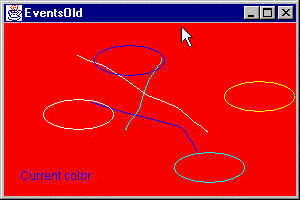
which produces: