How to do Graphical Scaling
Here's the problem:
You have a set of points, (x, y) with a range (xmin, ymin) to (xmax, ymax), where xmin, xmax, ymin and ymax are the minimum and maximum values of x and y, respectively. This range defines an area that looks like this:
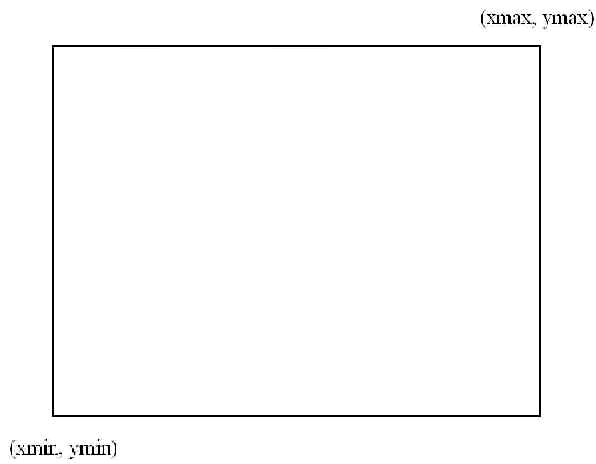
We call this the world coordinate system.
Note that:
- The origin (where x = 0 and y = 0) of this coordinate system depends on the values of xmin, xmax, ymin and ymax
- x values increase from left to right
- y values increase from bottom to top
- The x and y values are represented by either real numbers or integers, depending on what is being plotted.
You wish to draw this set of points onto the 'client area' of the window, which looks like this:
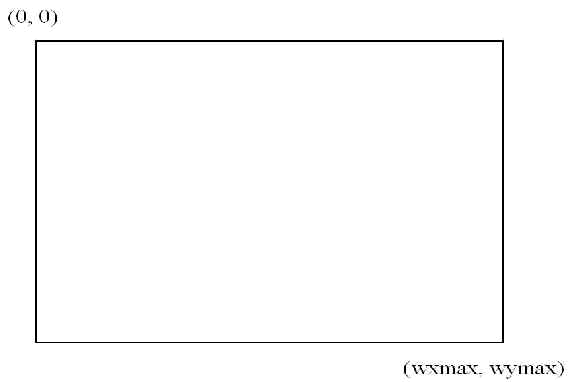
We'll call this the window coordinate system. (It's also called a viewport)
Note that:
- The client area has, as its coordinate system origin, the upper left corner
- The lower right corner has coordinates wxmax, and wymax, which are the width and height of the window (remember the insets, however!)
- x values increase from left to right
- y values increase from top to bottom
- The x and y values are in pixel positions (which are represented by integer values for x and y)
The goal is to transform the data from the world coordinate system, within the range of the points specified, to the window coordinate system, within the window.
There are actually three transformations that the data must undergo:
- Scaling of the values so that they can all fit within the bounds of the window
- Translation of the values so that (xmin, ymin) in the world coordinate system maps to (0,0) in the window coordinate system, and all the point x and y values are changed appropriately.
- Reversal of one of the axes (reverse the sign of each y value)
Scaling
Here, we have to scale the x coordinates and the y coordinates separately. We have to change the x values so that they will fit within the window coordinate system x range, and change the y values so that they will fit within the window coordinate system y range. Here are the algorithms:
x_rangeworld = (xmax - xmin)
y_rangeworld = (ymax - ymin)
x_rangewindow = wxmax = width of window in pixels
y_rangewindow = wymax = height of window in pixelsx_scale_factor = x_rangewindow/x_rangeworld
y_scale_factor = y_rangewindow/y_rangeworldxscaled = xorig * x_scale_factor
yscaled = yorig * y_scale_factorNote that, in scaling, you may have to concern yourself with rounding the numbers, rather than truncating them.
Translation
Finally, we have to translate the x and y values so that they fall within the window. So:
xtranslated = xscaled - xmin * x_scale_factor
= (xorig - xmin) * x_scale_factor
ytranslated = yscaled - ymin * y_scale_factor
= (yorig - ymin) * y_scale_factor
Reversal
This one is simple: reverse the sign of every y value:
yrev = -ytranslated
Combining the Three Transformations
Using algebra, here are the two equations to use:
xfinal = (width of window in pixels) * (xorig - xmin)/(xmax - xmin)
yfinal = - (height of window in pixels) * (yorig - ymin)/(ymax - ymin)where the final values are in pixels, and the original, min and max values are the original coordinates.